
An agent quotes a homeowners policy in one screen. Then the same household goes into the agency management system, and the renewal date goes into a spreadsheet. The Ivans 2026 Carrier-Agency Connection Report surveyed 702 independent agents. It found 98% re-key data that already exists in their AMS.
That re-keying is why agencies decide to build custom CRM for insurance agents. A custom insurance CRM is a sales and service system shaped around policies, carriers, producers and renewals.
It can be configured on Salesforce or HubSpot, coded from scratch, or assembled with a no-code builder. This guide shows how to build custom CRM for insurance agents, step by step.
Key Takeaways
- Most agencies should build custom CRM for insurance agents by configuring a platform, not by coding from scratch.
- The data model of households, policies, carriers and renewals decides whether the CRM helps producers or slows them.
- Plan the AMS connection and the security controls first, because both shape the budget and the timeline.
What Are the Ways to Build an Insurance CRM?
There are three ways to build an insurance CRM. Configure a CRM platform, write custom code, or use a no-code builder. Each one changes who owns the system, what it costs and how fast it ships.
Platform configuration starts from Salesforce, Microsoft Dynamics 365, HubSpot or Odoo. The team adds custom objects for policies and renewals. Tools such as Salesforce Flow or Power Automate then run the repeat steps.
Custom code means a development team writes the application itself. A typical stack uses React for screens, a Python or Node.js service layer and a PostgreSQL database. The agency owns every line, and also every bug, upgrade and security patch.
A no-code CRM builder such as Bubble or Softr lets an operations lead drag tables and forms into place. It suits a one-office agency testing an idea. It struggles with complex permissions, carrier data feeds and audit trails.
A hybrid build sits between the first two. It keeps a CRM platform for contacts and pipelines. A small custom app then handles one hard job, such as commission splits. Unboxx describes these routes on its custom CRM development page.
When Should You Build Custom CRM for Insurance Agents?
Build custom CRM for insurance agents when packaged insurance agency software blocks a workflow that earns money. A packaged insurance agency CRM handles contacts, quotes and reminders well. It breaks down with mixed sales cycles across lines, or with layered commission rules.
Use this decision rule. List the five workflows that drive written premium. Score each one 1 to 3 for how well the packaged tool supports it today. If two or more score 1, the case to build custom CRM for insurance agents is strong.
| Factor | Off-the-shelf CRM | Configured platform | Custom code |
|---|---|---|---|
| Time to first use | Days to weeks | 2 to 12 weeks | 3 months or longer |
| Fit to agency workflows | Fixed by the vendor | High, inside platform limits | Full |
| Ongoing upkeep | Vendor | Shared with the platform | Agency or its developer |
| AMS connection | Prebuilt or none | API or middleware | Built to order |
| Best for | Small, single-line agencies | Growing multi-line agencies | Brokerages with unique products |
The custom CRM vs off the shelf CRM choice also depends on headcount. A five-person agency rarely recovers the cost of custom code. A 60-producer brokerage with its own programs often does. Every saved minute repeats across the whole team.
Agencies that already run a CRM should review the existing tool first. The guide to CRM for insurance agents compares packaged options. A gap list from that review becomes the brief to build custom CRM for insurance agents later.
Watch for side spreadsheets on producer desktops and renewals that slip without warning. Another sign is an owner who has to ask for pipeline numbers. Those are the signs that it is time to build custom CRM for insurance agents.
Which Build Path Fits Your Agency Best?
A configured platform fits most agencies, because it gives custom objects and automation without a code base to own. Teams that build custom CRM for insurance agents on Salesforce inherit security, mobile apps and an integration layer. The same holds for Dynamics 365.
HubSpot is the lighter option. Its help center states that HubSpot custom objects need an Enterprise subscription. That detail matters, because a policy object is the heart of any insurance CRM platform. On lower tiers, policies end up as deal records or contact properties, which limits reporting.
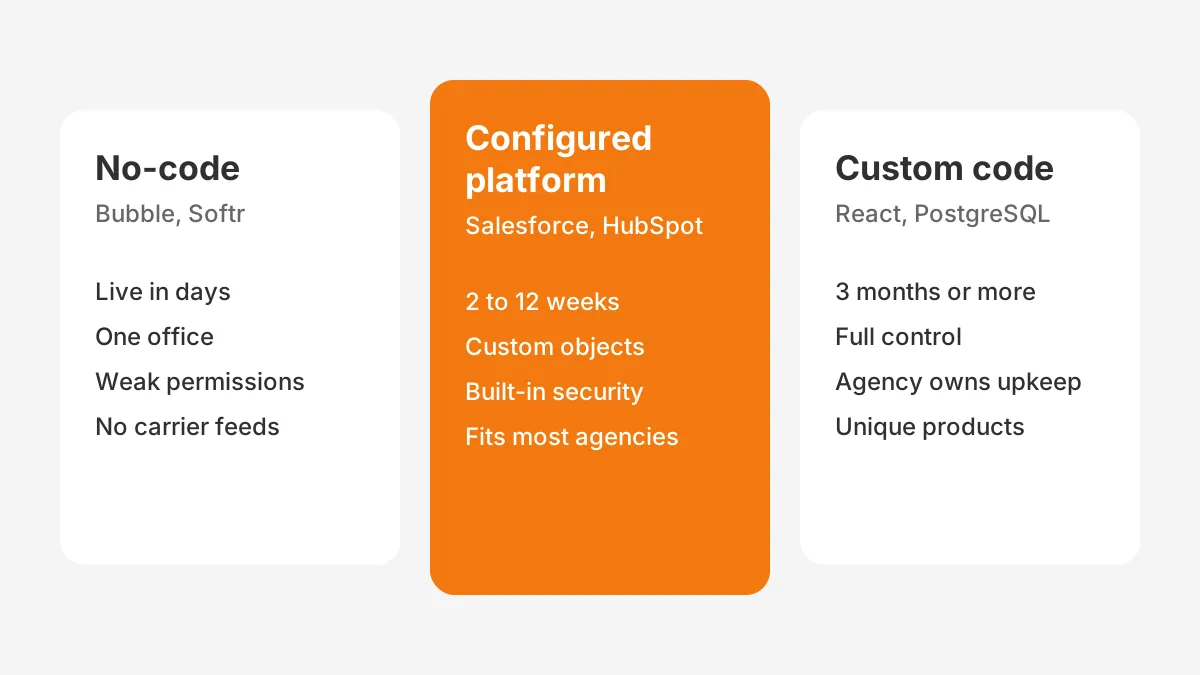
Custom insurance software makes sense for a narrower group. An MGA with its own rating rules may need logic no platform models well. So may a brokerage that sells a niche program. In those cases, insurance CRM development from scratch can pay back with a long-term maintenance budget.
HubSpot can handle insurance policies on Enterprise, where custom objects hold policy records. Salesforce is good for insurance agents in multi-line agencies with deep automation needs. It does need an admin. Under ten users, a custom CRM for insurance brokers usually fits HubSpot or Odoo.
The five revenue workflows from the decision rule settle the path. If they fit standard objects plus three or four custom ones, configure a platform. A workflow may need its own pricing engine or rules language. Then build custom CRM for insurance agents with code for that part only.
What Data Belongs in an Insurance CRM?
An insurance CRM needs eight core records: household, contact, policy, coverage line, carrier, producer, renewal and claim. Get these relationships right and every report and reminder follows. Get them wrong and producers keep a spreadsheet next to the CRM.
- Household or business account: the client that owns policies, showing the full book of business per client.
- Contact: each person in the household or company, with roles such as named insured or driver.
- Policy: number, line, carrier, effective date, expiration date, premium and status.
- Coverage line: the limits and deductibles inside each policy, used to spot cross-selling gaps.
- Carrier: the insurer, its appetite notes and its commission schedule.
- Producer: the licensed agent credited with the sale and the split rules.
- Renewal: a record created before expiration that drives the renewal pipeline.
- Claim: date, status and adjuster, so claims tracking is visible before a renewal call.
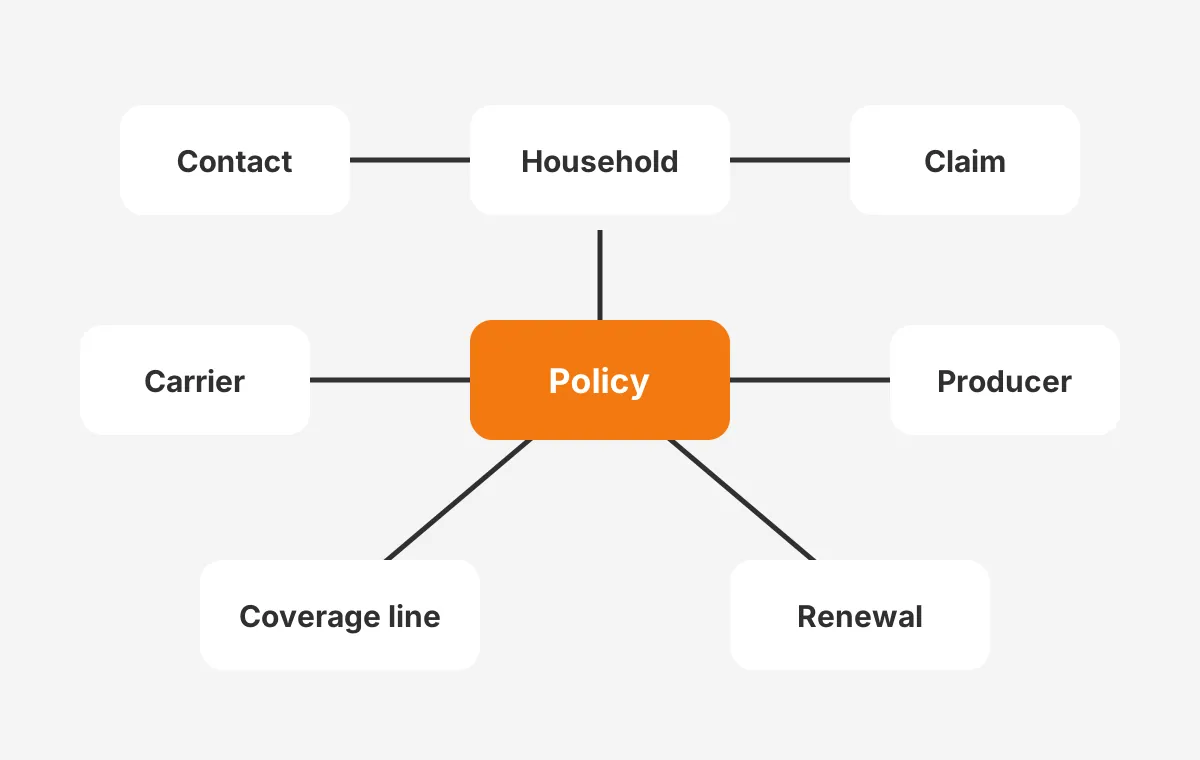
A household view separates an insurance agent CRM from a generic sales tool. When a client calls, the agent sees auto, home and umbrella on one screen. So what data belongs in an insurance CRM? Anything an agent needs during a renewal or claim conversation.
Keep the AMS as the policy system of record. The CRM holds a copy of key policy fields for selling and service. Duplicating every endorsement and billing line creates the same re-keying problem the build was meant to remove.
Name fields the way producers talk. If the team says "X-date" for an expiration date, put that label on the screen. Familiar labels cut training time when you build custom CRM for insurance agents.
What Features Does an Insurance CRM Need First?
An insurance CRM needs lead management, quote tracking, renewal automation and producer dashboards first. These four features touch revenue every week. Client portals, AI scoring and marketing journeys can follow in a second release.
- Lead management: capture leads from the website, referrals and phone calls, then assign them by line and territory.
- Quote tracking: a pipeline for each quote with carrier, premium and next step.
- Policy renewal reminders: tasks created 90, 60 and 30 days before expiration.
- Commission tracking: expected commission by carrier and producer, reconciled against statements.
- Producer dashboards: written premium, close rate and retention per person.
- E-signature: send applications through a tool such as DocuSign from the record.
- Workflow automation: texts through Twilio, emails and task handoffs between sales and service.
What features does an insurance CRM need beyond that list? It depends on the lines sold. A CRM for life insurance agents needs beneficiary fields and underwriting status. A CRM for health insurance agents needs enrollment periods, plan details and stricter access rules for health data.
Write each feature as a requirement with an owner and a measure before development starts. The guide to gathering CRM requirements shows how to rank them. A ranked list keeps the first release small enough to ship.
The scope for a first release should fit on one page when you build custom CRM for insurance agents. Anything longer moves to release two. Producers decide in the first month whether the system is worth their time.
How Do You Build Custom CRM for Insurance Agents?
You build custom CRM for insurance agents in eight steps, from workflow mapping to a phased launch. The order matters more than the platform. Most failed builds skipped steps 1 and 4.
- Map the workflows. Shadow two producers and one service rep for a day, and record every hand-off.
- Write ranked requirements. Give each pain point a measure, such as renewal tasks created automatically.
- Design the data model. Define the eight records above and the fields each one needs.
- Plan the AMS and carrier connections. Decide which system owns each field before anything is built.
- Choose the build path. Configure a platform, write custom code, or combine both.
- Build in two-week sprints. Show working screens to producers at the end of each sprint.
- Migrate and test the data. Clean records, load a sample, then load the full book.
- Launch in phases. Start with one team or one line, then widen after two weeks of fixes.
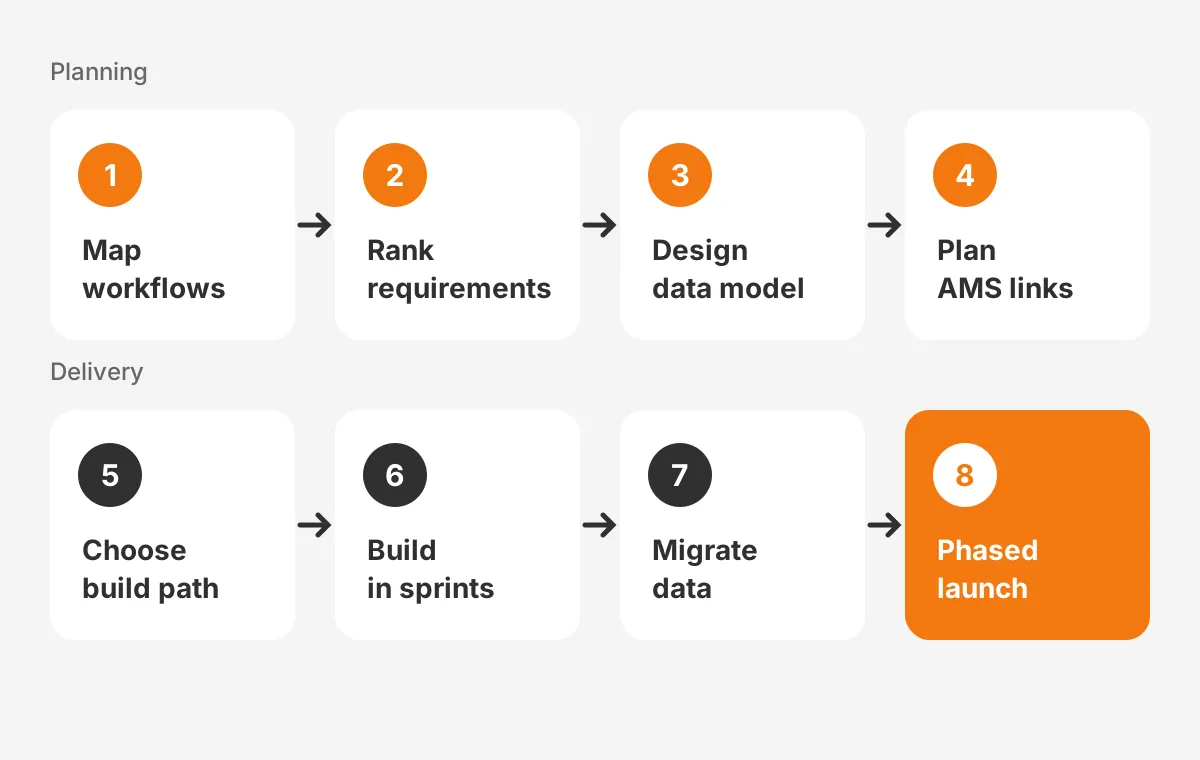
Step 7 gets rushed most often by those who build custom CRM for insurance agents. How to migrate insurance client data into a CRM has a plain answer: clean it first. Merge duplicate households and fix carrier names. The CRM data cleansing runbook lists the checks.
The same eight steps answer how to create custom CRM for insurance agents on any platform. They also cover how to create custom insurance brokerage software. There, commission splits and carrier appointments add records to step 3.
Assign one owner per step. The agency principal signs off steps 1 and 2. An operations lead owns steps 3 and 4. The build partner owns steps 5 to 7, and the sales manager owns the launch.
How Should the CRM Connect to the AMS?
The CRM should exchange data with the agency management system through an API, middleware or a scheduled file sync. The goal is that nobody types a policy twice. Pick the method by what the AMS vendor supports.
How does CRM differ from AMS? The AMS is the accounting and policy system, with names such as Applied Epic, AMS360, EZLynx and HawkSoft. The CRM is the selling and service system. When agencies build custom CRM for insurance agents, the AMS normally keeps policies, billing and documents.
Carrier data lands in the AMS first. Ivans Download moves policy and claims information from carriers into the management system. The CRM then reads that data, so renewals and claims appear without anyone keying them. This carrier download path beats manual policy updates.
Can a CRM integrate with an AMS in both directions? Sometimes, but one-way sync is safer for a first release. Read policies into the CRM, and send only new clients and won quotes back. Two-way sync on every field causes overwrite conflicts that are hard to trace.
Test the sync with real policies before go-live. Agencies that build custom CRM for insurance agents should load 50 recent policies and compare every field. Any mismatch points to a mapping error that is cheap to fix now.
Write a field ownership sheet before the integration build. It lists every shared field, the system that owns it and how often it syncs. An insurance broker CRM with a clear sheet draws fewer support tickets. Unboxx scopes these links within its CRM for insurance service.
What Security Rules Apply to an Insurance CRM?
An insurance CRM must protect nonpublic client information with access controls, encryption, logging and a breach plan. Client records hold license numbers, health details and bank data. That makes data security a design input, not a final check.
The NAIC Insurance Data Security Model Law (2017) sets a model that states can adopt. It requires licensees to notify the commissioner within 72 hours of determining a cybersecurity event occurred. It also names multi-factor authentication as a control for nonpublic information.
The FTC Safeguards Rule under the Gramm-Leach-Bliley Act covers financial institutions that no other regulator oversees. Since May 2024, it requires a report within 30 days of a breach involving 500 or more consumers. Confirm with counsel which rule applies to the agency.
Translate these rules into build requirements:
- Role-based access: producers see their book, service staff see assigned clients, owners see everything.
- Multi-factor authentication for every login, including integration users.
- An audit log of who viewed, exported or changed each record.
- Encryption at rest and in transit, plus field masking for license and bank numbers.
- A tested export and deletion process for client data requests.
Platforms such as Salesforce and Dynamics 365 provide most of these controls out of the box. With custom code, the agency builds and tests each one itself. That adds weeks to the plan.
Security also shapes vendor choice. Hire a partner to build custom CRM for insurance agents only after reviewing its security. Ask for its access policy, breach process and data location. Get the answers in writing before signing.
How Much Does a Custom Insurance CRM Cost?
A custom insurance CRM costs from about $8,000 for platform customization to $300,000 or more for an enterprise build. The build path drives the price more than the feature list does.
The figures below are Unboxx's indicative 2026 ranges from its custom CRM development page. They are planning ranges, not quotes.
- Platform customization: $8,000 to $60,000, delivered in 2 to 12 weeks.
- MVP custom build: $25,000 to $60,000, delivered in 8 to 12 weeks.
- Mid-size custom build: $60,000 to $150,000, delivered in 3 to 6 months.
- Enterprise custom build: $150,000 to $300,000 or more, delivered in 6 to 12 months.
How long does it take to build a custom CRM, then? Platform work takes weeks, while a coded system takes months. Add hosting, support and licences to get a three-year total. The breakdown of CRM implementation cost lists each budget line.
Here is a worked example with assumed figures. A 20-user agency chooses to configure Salesforce for $40,000. Licences at an assumed $100 per user per month add $24,000 a year. The three-year total is $112,000 before support.
A coded build at an assumed $120,000, plus $1,500 a month in hosting, reaches $174,000 over the same period. The gap funds a part-time admin for the platform option.
How much does a custom CRM cost to run after launch? Budget for an admin or a support retainer. Every new carrier, product or state rule needs a change. An unmaintained CRM drifts back to spreadsheets.
Phasing also spreads the cost. Agencies that build custom CRM for insurance agents in two releases fund the second from savings in the first. Release one covers leads, quotes and renewals. Release two adds portals and reporting.
What Mistakes Derail an Insurance CRM Build?
Five mistakes derail most insurance CRM builds. They are copying the AMS, skipping producers, over-building, bad data and a big-bang launch. Each one is avoidable with a rule set before the build starts.
- Copying the AMS: rebuilding billing and endorsements inside the CRM doubles the work. Keep the CRM focused on selling and service.
- Skipping producers: a CRM designed only by managers gets ignored. Put two producers on every sprint review.
- Over-building: forty custom fields on day one slow every screen. Start with the fields in the data model above.
- Ignoring data quality: duplicate households break renewal reports. Clean before loading.
- Launching everywhere at once: one team first exposes problems while they are still cheap to fix.
Teams that set these rules first build custom CRM for insurance agents once, then spend year two adding features. Teams that skip them often have to build custom CRM for insurance agents twice.
Frequently Asked Questions
Should an agency build or buy a CRM?
Buy a packaged CRM if it supports your top five revenue workflows well. Build when two or more of those workflows break in it. Most agencies configure Salesforce, HubSpot or Dynamics 365 rather than coding a new system. Few need to build custom CRM for insurance agents from scratch.
Can a no-code tool build an insurance CRM?
Yes, a no-code tool such as Bubble or Softr can build a simple insurance CRM for one office. It suits contact lists, quote tracking and reminders. It struggles with role-based access, carrier feeds, audit logs and AMS sync, which growing agencies need within a year.
Who should own the CRM after launch?
An operations manager should own the CRM, with a certified admin or partner handling changes. The owner sets priorities, approves new fields and reviews adoption each month. Without a named owner, producers create workarounds, data quality drops and trust fades within two quarters.
How do you get producers to use a CRM?
To get producers to use a new CRM, make it save them time on day one. Build their daily call list, renewal tasks and quote pipeline first. Train in short sessions by role. Retire the old spreadsheets on a set date and review usage weekly.
Can one CRM serve personal and commercial lines?
Yes, one CRM can serve personal and commercial lines with separate pipelines and page layouts. Personal lines need fast household quoting and renewal volume. Commercial lines need longer sales stages, submission tracking and certificate requests. A shared client record keeps cross-selling visible across both teams.
Should You Build Custom CRM for Insurance Agents Now?
Build custom CRM for insurance agents now if re-keying, missed renewals or hidden pipelines cost revenue each month. Start with a workflow map and a field ownership sheet. A clear plan to build custom CRM for insurance agents keeps the first release on time.
Unboxx is a Salesforce Crest Partner that configures Salesforce, HubSpot, Dynamics 365 and Odoo for insurance agencies, brokerages and MGAs. To plan how to build custom CRM for insurance agents at your firm, schedule a consultation with the Unboxx team.
Let's create something out of this world together.
Have a project in mind? Contact us for expert design and development solutions. Let's discuss how we can help grow your business.
Ready to Unboxx Your Potential?
Build smarter systems. Automate faster. Scale confidently.