
Loan officers lose deals in the gaps between systems. A lead waits in an inbox. A past client refinances with a competitor. A buyer's agent hears about a delay last.
Those gaps are expensive. Independent mortgage banks spent $11,094 to produce each loan in 2025, according to the Mortgage Bankers Association (2026). They kept $785 per loan in net production profit.
A mortgage CRM closes those gaps by holding borrowers, referral partners and loan milestones in one place. This guide covers features, platforms, the Encompass link, compliance rules, rollout steps and cost.
This article is general information, not legal advice. Confirm regulatory requirements with your compliance counsel.
Key Takeaways
- A mortgage CRM manages relationships before and after the loan, while the loan origination system manages the loan file.
- The link to the LOS, usually Encompass, decides whether loan officers trust the CRM or work around it.
- RESPA, the FTC Safeguards Rule and the 2026 trigger lead ban should shape fields and lead sources early.
What Is a Mortgage CRM and Who Uses It?
A mortgage CRM is customer relationship management software built around the mortgage sales cycle. It covers the path from first inquiry to the years after closing. It stores borrowers, prospects and referral partners, and it automates the follow-up each contact needs.
Mortgage customer relationship management differs from general sales CRM in one main way. The product is a loan with a fixed sequence of milestones. The borrower expects an update at each one. A good mortgage CRM system is built around that sequence instead of a generic deal pipeline.
Who uses it, and how, depends on the business model:
- Retail lenders and independent mortgage banks run one system across branches, with lead routing by territory and licence.
- Brokers use a CRM for mortgage brokers to manage borrowers and wholesale lender relationships together.
- Banks and credit unions often run mortgage as one line of business inside a wider banking CRM.
- Commercial lending teams track fewer, larger deals, so a commercial mortgage CRM needs property data more than drip email.
A residential mortgage CRM carries the opposite load. It handles high lead volume, short follow-up windows and heavy post-close marketing.
Some lenders also sell deposit, card or wealth products. They usually need a CRM built for banking and finance businesses rather than a stand-alone mortgage tool. That keeps every product a household holds on one record.
How Does a Lender's CRM Differ From an LOS?
The CRM manages people and relationships, while a loan origination system manages the loan application and its documents. The LOS is where processing, disclosures, underwriting and closing happen. Encompass from ICE Mortgage Technology, Calyx Point, LendingPad and Byte are common examples of loan origination software.
The two systems meet at the handoff. A lead becomes an application in the LOS, and loan milestones flow back to the CRM. Without that link, loan officers retype data and borrowers miss status updates.
A simple rule settles the mortgage CRM vs LOS question for each task:
- Work before an application, such as lead capture, nurturing and pre-approval follow-up, sits in the CRM.
- Work on the loan file, such as disclosures, conditions and underwriting, sits in the LOS.
- Work after closing, such as anniversary emails, refinance opportunities and review requests, returns to the CRM.
Here is how the split looks for one purchase loan. The borrower fills in a website form, and the CRM routes the lead to a loan officer.
After pre-approval, the loan officer starts the application in the LOS. The LOS tracks conditions until clear to close. The CRM then sends the closing message and schedules the first anniversary email.
Do mortgage brokers need a CRM when the LOS already holds contact fields? A useful test is follow-up quality. Past clients may refinance elsewhere without a call. Partner updates may depend on memory. Either sign means the LOS alone is no longer enough.
Which Features Should a Mortgage CRM Include?
A mortgage CRM should include lead management, milestone pipelines, marketing automation, partner tools, LOS integration and consent records. The list below covers the mortgage CRM features worth testing in every demo.
- Mortgage lead management: capture leads from the website, partners and paid sources in one queue.
- Lead routing: assign each lead by territory, licence state or rotation, with an instant task for speed to lead.
- Mortgage pipeline management: pipeline stages that mirror loan milestones, from pre-approval to clear to close and funded.
- Milestone updates: automatic emails or texts to the borrower and both agents when the loan changes stage.
- Marketing automation: drip campaigns for prospects, rate alerts for past clients and post-close marketing on loan anniversaries.
- Referral partner tools: a record for each real estate agent or builder, with the loans they sent.
- Consent tracking and audit trail: the source, date and wording of each permission to call, text or email.
- Reporting: production by loan officer, conversion by lead source and funded volume by referral partner.
The features work as one loop, not as separate tools. A lead enters, becomes a loan, closes, and then feeds borrower retention and the next referral.

Mortgage marketing CRM tools deserve a hard look in the demo. Ask each vendor to run one real campaign from start to finish. Check who receives it and what triggers it. Then confirm that one unsubscribe stops every channel.
Check mobile access as well. Loan officers spend much of the day at open houses, agent offices and in their cars. A feature that only works on a desktop will see little use in the field.
Which Mortgage CRM Platforms Fit Which Lenders?
The right platform depends on company size, the LOS in use and the customization the team can support. Mortgage CRM software falls into two groups: general CRMs configured for lending, and products built only for mortgage.
General platforms include Salesforce with Financial Services Cloud, HubSpot and Microsoft Dynamics 365. Mortgage-specific products include Jungo, Surefire, BNTouch, Total Expert and Shape. The table lists the LOS links each vendor names on its own site (2026). The fit column reflects the trade-offs in this guide, not a ranking.
| Platform | Type | LOS links listed by vendor | Typical fit |
|---|---|---|---|
| Salesforce with Financial Services Cloud | General CRM, configured for lending | Encompass, through ICE's Encompass Connector | Banks, credit unions and larger lenders with an admin team |
| Jungo | Mortgage CRM built on Salesforce | Encompass, Calyx Point, LendingPad, Byte | Loan officers who want Salesforce without building it |
| Surefire | Mortgage CRM from ICE Mortgage Technology | Part of the ICE product line with Encompass | Encompass lenders focused on marketing content |
| BNTouch | Mortgage CRM | Encompass, LendingPad, Byte, MeridianLink, Calyx | Brokers and small lenders |
| HubSpot | General CRM | Built through APIs or middleware such as Zapier | Teams that value marketing ease over loan data depth |
Salesforce for mortgage lending suits firms that sell more than loans. One client record can hold the mortgage, the deposit account and the wealth relationship. That supports cross-selling. The cost is admin effort, because someone has to own the configuration.
A loan officer CRM such as Jungo or BNTouch ships with ready milestone emails, rate alerts and partner reports. Jungo, for example, sends referral partners automated pipeline reports through its Reffinity feature. The trade-off is less freedom to model anything outside mortgage.
HubSpot for mortgage brokers works best when marketing is the main need and loan volume is modest. Expect to build the LOS connection yourself. Dynamics 365 fits lenders already standardized on Microsoft tools.
There is no single best mortgage CRM for every lender. The right choice matches the lender's LOS first, then its team size, then its admin capacity.
Five questions sort the shortlist quickly in vendor demos:
- Which LOS versions does the connector support, and who maintains it?
- Which fields sync, in which direction, and how often?
- Where are consent records stored, and can they be exported for an audit?
- Can partners receive milestone updates without a login?
- What does the second year cost, including add-ons and texting fees?
Ask for written answers. Vendors that cannot name supported LOS versions or sync timing should drop down the list.
How Do You Connect the CRM to Encompass?
Use a vendor connector where one exists, and a custom integration where it does not. Anyone working out how to connect a mortgage CRM to Encompass should check the vendor's connector list first.
Salesforce users have a ready option. The Encompass Connector for Salesforce from ICE Mortgage Technology (2026) syncs both ways. Users can create loans, receive updates and check loan status inside Salesforce.
Mortgage CRM integration succeeds or fails on one decision: which system owns each field. The LOS owns loan data, such as loan amount, rate lock and closing date. The CRM owns marketing preferences, consent and partner relationships. Each field gets one owner and one direction of sync.
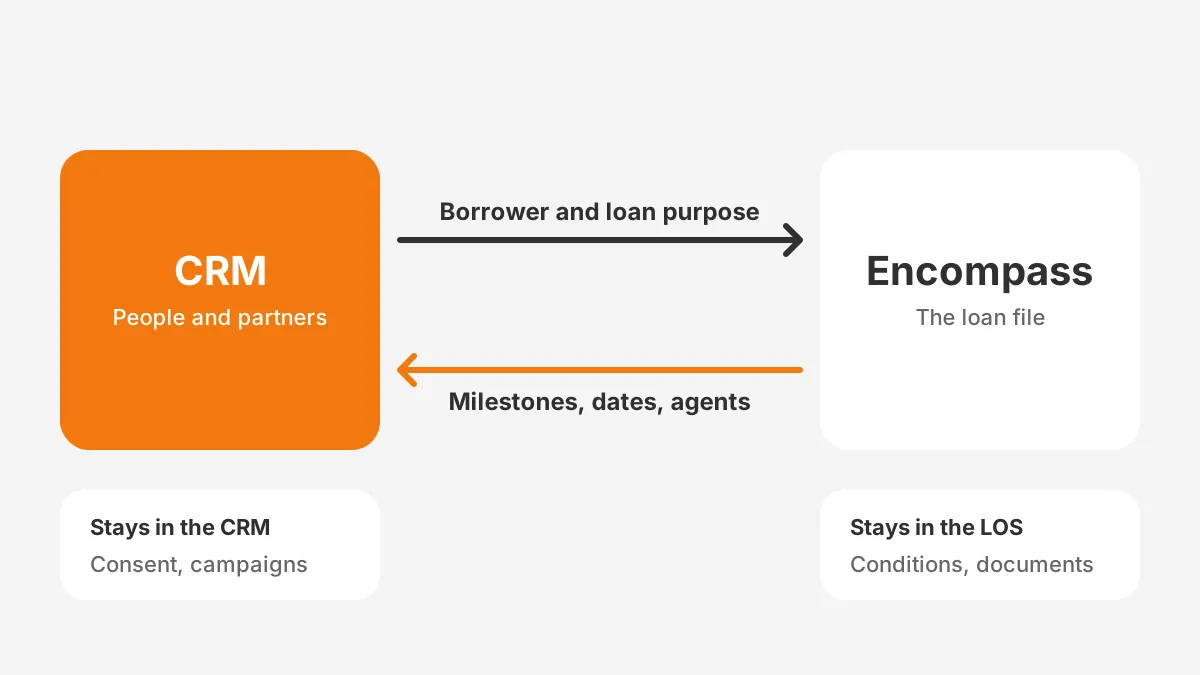
A typical field map for a mortgage CRM with Encompass integration looks like this:
- CRM to LOS: borrower name, email, phone, loan purpose and assigned loan officer.
- LOS to CRM: loan number, milestone and date, loan amount, closing date, and the buyer's and seller's agents.
- Stays in the CRM: consent records, campaign history, partner tier and notes.
Plan for the edge cases too. A borrower may apply twice, or a co-borrower may join late. Decide in advance which record wins when the LOS and the CRM disagree.
Test the sync on 20 recent loans before go-live. Check that each milestone arrives once, on the right record, and triggers the right message. Teams without integration staff often bring in CRM integration services for this step. A broken sync erodes trust fast.
What Compliance Rules Shape a Lender's CRM?
Four rules shape the build: RESPA Section 8, the FTC Safeguards Rule, the Homebuyers Privacy Protection Act and the TCPA. Each one maps to fields, permissions or lead sources the system must hold. Planning mortgage CRM compliance at design time costs far less than retrofitting it.
RESPA Section 8 and referral partners
RESPA Section 8 bars giving or receiving a thing of value for referring settlement service business. That is the summary in the National Association of Realtors RESPA guide (2026). Joint advertising is allowed when each party pays a share that matches the value it receives.
That makes the CRM the right place to log who paid what for each co-marketing campaign. Record the campaign, the total cost, each party's share and the basis for the split.
The FTC Safeguards Rule
The FTC Safeguards Rule guidance (2026) lists mortgage lenders and mortgage brokers among the institutions it can cover. The rule, issued under the Gramm-Leach-Bliley Act, requires encryption, multi-factor authentication, access controls and activity logging. A Qualified Individual must oversee the program.
It also requires a report to the FTC within 30 days of discovering certain breaches. The trigger is unencrypted data on 500 or more consumers. In the CRM, that means role-based access, MFA for every user and field encryption for income data. It also means an audit log someone reviews.
The trigger lead ban
The Homebuyers Privacy Protection Act amends the Fair Credit Reporting Act. It was signed on September 5, 2025 and took effect on March 5, 2026, according to NAMB (2026). Credit bureaus may now sell trigger leads only where the lender has an existing relationship or the consumer opted in.
Clean up lead sources to match. Tag every lead with its source, retire purchased trigger lead lists, and store opt-in proof on the contact record.
TCPA consent
Calls and texts need consent records that survive an audit. Store the consent source, date, wording and channel on each contact. Block automated texts to any contact without it.
How Should Lenders Track Referral Partners?
Track referral partners as their own records, linked to every loan they send. Give each partner an update schedule they can rely on. Lenders asking how to track referral partners in a mortgage business should start with that structure.
- Partner record: company, licence number, preferred channel, assigned loan officer and partner tier.
- Loan links: every referred loan, its milestone and its funded amount.
- Automatic updates: a short message to the agent at application, approval, clear to close and funding.
- Scorecard: loans referred, pull-through rate and funded volume per partner each quarter.
- Co-marketing ledger: each joint campaign, its cost and each party's share, for RESPA review.
Mortgage CRM referral partner tracking pays off in the scorecard. It shows which real estate agents send loans that close, not only loans that apply. Loan officers can then spend partner time where funded volume comes from.
Partner tiers turn the scorecard into action. Top partners might get a weekly pipeline call. Newer partners might get a monthly market update and milestone texts only.
How Do You Implement a Mortgage CRM?
Implement it in eight steps, from process mapping to a 90-day review. The order matters, because each step depends on the one before it.
- Map the current process: how leads arrive, who follows up, and where loan officers keep notes today.
- Write ranked requirements, using a method such as this guide to gathering and scoring CRM requirements.
- Choose the platform and the Encompass or other LOS integration method together.
- Clean past client data, following a step-by-step CRM data cleansing runbook, then migrate it.
- Configure pipeline stages, consent fields, partner records and role-based permissions.
- Build the LOS sync and test it on 20 recent loans.
- Train by role and launch in one branch before the rest.
- Review adoption, lead response time and partner updates after 90 days.
Mortgage CRM data migration deserves its own plan. Past clients often sit in spreadsheets, an old CRM and LOS exports at once. Deduplicate on email and phone before import. Teams moving onto Salesforce can follow a Salesforce data migration guide for the load itself.

The rollout also needs owners and dates. A CRM implementation plan with phases, owners and budget keeps the project on schedule. Name one executive sponsor and one system admin before configuration starts.
Plan training by role. Loan officers need lead queues, tasks and mobile use. Processors need the milestone view. Managers need the pipeline and partner reports.
What Mistakes Derail a Lender's CRM Rollout?
The mistakes that derail a rollout sit in adoption, data and integration choices made before launch. These five are worth designing out from the start:
- Launching without the LOS sync, so loan officers update milestones twice and stop.
- Importing past clients without cleanup, so campaigns hit duplicates and closed accounts.
- Copying every old field, so screens fill with data nobody uses.
- Skipping consent fields, so marketing cannot prove permission later.
- Training everyone the same way, so each role misses the screens it needs.
Every one of them is cheap to fix at design time and expensive to fix after launch. A short pilot in one branch exposes most of them before the full rollout.
How Much Does a Mortgage CRM Cost?
The cost is a per-user licence plus one-time setup, integration and data migration. Licence prices vary by vendor and tier, so request written quotes. Setup costs depend on the LOS link and the state of the data.
The worked example below uses assumed figures, not vendor quotes. Picture a lender with 15 loan officers and 3 support staff:
- Licences: 18 users at an assumed $100 per user per month, or $21,600 a year.
- Configuration: an assumed 80 hours of work.
- Encompass integration: an assumed 60 hours of work.
- Data migration: an assumed 40 hours of work.
- Services rate: an assumed $150 per hour, so 180 hours cost $27,000.
First-year mortgage CRM pricing in this example totals $48,600. The 2025 MBA average production expense was $11,094 per loan. So the example equals the cost of producing about 4.4 loans.
Set the business case against loans won back from past clients and partners. Track that number from the first quarter, using lead source and partner fields.
Four choices push the first-year cost up:
- A second LOS or a point-of-sale system to integrate.
- A custom partner portal instead of emailed updates.
- Data spread across old CRMs, spreadsheets and personal phones.
- Branch-by-branch process differences that need separate configuration.
A mortgage CRM for small brokers looks different. A mortgage-specific product with ready templates cuts configuration hours. A two-person team may need little integration work.
Frequently Asked Questions
What is the best CRM for mortgage loan officers?
The best CRM for mortgage loan officers is the one that syncs with their LOS and sends milestone updates automatically. Mortgage-specific tools such as Jungo and BNTouch suit individual loan officers. Salesforce with Financial Services Cloud suits larger lenders with admin support and broader banking products.
Is Encompass a CRM?
No. Encompass is a loan origination system from ICE Mortgage Technology, used to process, underwrite and close loans. ICE offers Surefire as its separate CRM product. Other CRMs connect to Encompass through a vendor connector or a custom integration built on its APIs.
Can HubSpot work as a mortgage CRM?
Yes, HubSpot can work as a mortgage CRM for teams focused on marketing and nurturing. It needs custom pipeline stages for loan milestones and a connection to the LOS. Without that connection, loan officers update milestones by hand, which defeats the purpose of the system.
How long does a mortgage CRM implementation take?
It takes as long as its integration and data work. The example rollout above assumes 12 weeks for one LOS and one main data source. Each extra branch, data source or custom integration adds time. A one-branch pilot first keeps the risk contained.
How does a CRM help with borrower retention?
A mortgage CRM helps with borrower retention by keeping past clients in automated, permission-based campaigns. Loan anniversaries, rate alerts and home value updates prompt contact at the right time. When rates drop, the system can flag refinance opportunities before a competitor reaches the borrower.
Is Your Team Ready for a Mortgage CRM?
Your team is ready for a mortgage CRM when follow-ups slip and partner updates depend on memory. Past clients refinancing elsewhere is another sign. The right system ties leads, loan milestones and partners together, with compliance built into the fields.
Unboxx implements and integrates CRMs for lenders and financial firms on Salesforce, HubSpot and Odoo. To plan a mortgage CRM rollout around your LOS and your team, schedule a CRM consultation with Unboxx.
Let's create something out of this world together.
Have a project in mind? Contact us for expert design and development solutions. Let's discuss how we can help grow your business.
Ready to Unboxx Your Potential?
Build smarter systems. Automate faster. Scale confidently.