
A 10-person sales team can pay four times more for one CRM than the other. That gap appears before anyone logs a deal. HubSpot lists Sales Hub Professional at $90 per seat per month on its Sales Hub pricing page. A required $1,500 onboarding fee comes on top.
Odoo vs HubSpot is a choice between a business suite and a front-office platform. Odoo bundles CRM with inventory, manufacturing and accounting. HubSpot focuses on marketing, sales and service, and connects to an ERP from outside. The better pick depends on which half of the business has the bigger gap.
Key Takeaways
- Odoo vs HubSpot comes down to scope: Odoo runs the whole business, HubSpot runs the customer-facing teams.
- On license cost alone, Odoo Standard costs less per user than every paid HubSpot Sales Hub tier except discounted Starter.
- Manufacturers and distributors that need quotes, stock and invoices in one database usually fit Odoo better.
What Is the Core Difference in Odoo vs HubSpot?
The core difference in Odoo vs HubSpot is scope. Odoo is an ERP suite with a CRM app inside it. HubSpot is a customer platform built around marketing, sales and service, with no inventory or accounting module.
Odoo ships as a set of apps that share one PostgreSQL database. Odoo CRM sits beside Odoo Inventory, Odoo Manufacturing and Odoo Accounting.
A won opportunity can become a sales quotation, then a delivery and an invoice, without a connector. That is the main reason teams search for a CRM with built in ERP. In Odoo vs HubSpot terms, Odoo removes the handoff between sales and operations.
HubSpot works the other way round. The HubSpot CRM is the shared record layer, and the hubs sit on top of it. HubSpot Sales Hub handles pipelines and sequences. HubSpot Marketing Hub runs email marketing, landing pages and forms. HubSpot Service Hub runs tickets and a help desk.
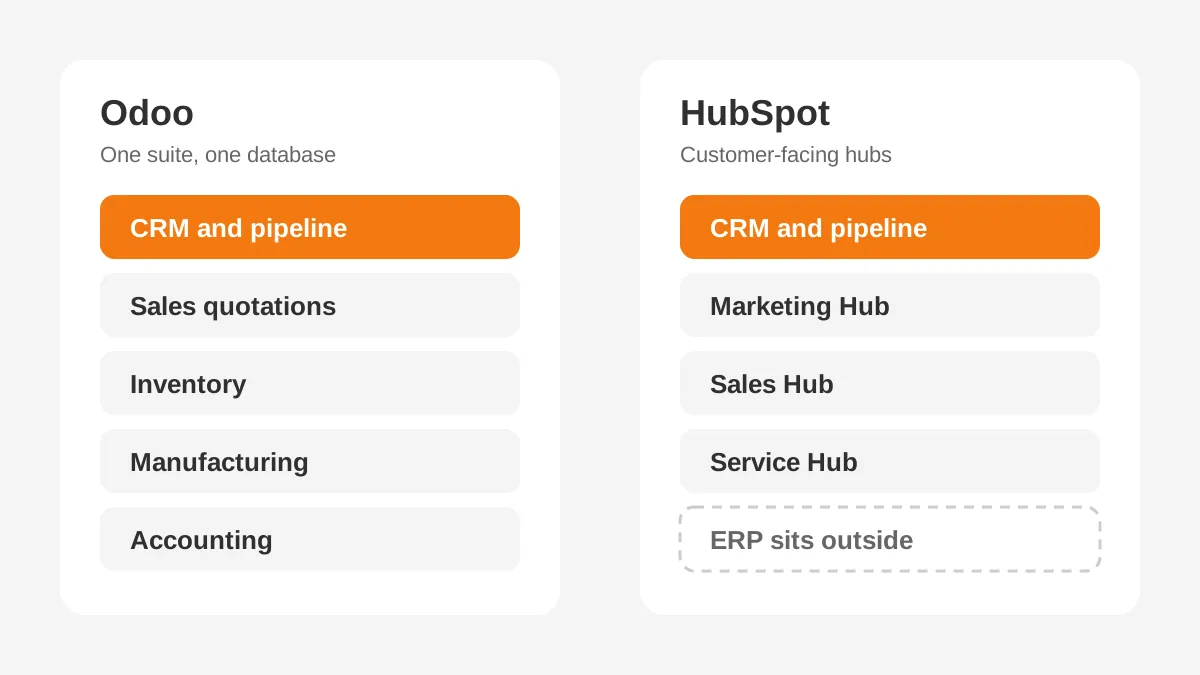
That makes Odoo vs HubSpot partly a CRM vs ERP question, and buyers should frame it that way early.
A business that needs one system for orders, stock and finance gets more from Odoo. A business that already runs an ERP and wants stronger marketing automation gets more from HubSpot.
Editions add a second layer. Odoo Community is a free, open source CRM and ERP that a company hosts itself. Odoo Enterprise is the paid edition, sold as the Odoo Standard plan or the Custom plan. It runs on Odoo Online, on Odoo.sh or on a company's own servers.
Edition choice changes the Odoo vs HubSpot comparison. Odoo Community lacks some Enterprise apps, and support comes from partners rather than Odoo. HubSpot has no self-hosted edition, so every HubSpot customer runs on HubSpot's cloud. Teams with strict data residency rules should check both vendors' hosting options early.
How Do Odoo and HubSpot CRM Features Compare?
For core selling, both products cover the basics: contacts, companies, a sales pipeline, activities and reports. The differences in Odoo CRM vs HubSpot show up in marketing depth and in what happens after the deal closes.
| Area | Odoo CRM | HubSpot CRM |
|---|---|---|
| Pipeline and deals | Kanban pipeline with stages and activities | Deal pipelines with stages, tasks and sequences |
| Lead scoring | Scoring rules inside the CRM app | Lead scoring in paid Sales Hub and Marketing Hub tiers |
| Marketing | Separate Email Marketing and Marketing Automation apps | HubSpot Marketing Hub with email, landing pages and workflows |
| After the sale | Quotations, inventory, manufacturing and invoices in one database | Quotes in Sales Hub; orders and invoices sit in an outside ERP |
| Customization | Odoo Studio and custom modules in Python | Custom objects and properties in paid tiers |
| Integrations | Odoo App Store modules | HubSpot App Marketplace apps |
Read across the Odoo vs HubSpot feature table and a pattern appears. HubSpot leads on inbound marketing and campaign reporting. Odoo leads on quote to cash, because quotations, stock checks and invoices live next to the opportunity.
Workflow automation also works differently. In HubSpot, workflows trigger on contact, company and deal properties. In Odoo, automated actions can touch any model, including stock moves and invoices. That reach is useful for operations teams, and it needs careful testing.
Customization is the other gap. Odoo Studio lets an admin add fields and screens without code. Larger changes become custom modules, which need a developer and must be updated at each Odoo upgrade. HubSpot keeps customization inside its own data model, so upgrades are the vendor's job.
A sales manager will find HubSpot faster to learn. The interface is narrower, and HubSpot's free tools let a team try the CRM before paying. Odoo asks users to learn more screens, because more of the business runs in it.
Reporting follows the same split. HubSpot reports join marketing source, deal stage and revenue, which suits attribution questions. Odoo reports join deals with margins, stock and invoices, which suits operations questions.
In an Odoo vs HubSpot evaluation, list the five reports leaders read each month. Then check where the data for each one lives.
How Does Odoo vs HubSpot Pricing Compare in 2026?
Odoo vs HubSpot pricing follows two models. Odoo charges one price per user for all apps. HubSpot charges per seat for each hub and tier, and adds onboarding fees on the upper tiers.
| Plan | Listed price | Notes |
|---|---|---|
| HubSpot free CRM | $0 | Free for up to 2 users |
| HubSpot Starter (Sales Hub) | From $7 per seat per month; $20 also shown | Discount for new customers only; 500 HubSpot credits |
| HubSpot Professional (Sales Hub) | From $90 per seat per month | Required $1,500 onboarding; 3,000 HubSpot credits |
| HubSpot Enterprise (Sales Hub) | From $150 per seat per month | Required $3,500 onboarding; 5,000 HubSpot credits |
| Odoo Community | $0 license | Self-hosted, open source |
| Odoo Standard plan | About $24.90 per user per month, billed annually | All Odoo apps included |
The HubSpot figures come from its Sales Hub pricing page, read on 7 November 2026. The Odoo Standard figure comes from Sybill's 2026 Odoo comparison. That source also confirms that Odoo Community is free and open source.
Odoo cost per user also varies by country and billing term. Cloudpepper's May 2026 comparison notes that Odoo prices differ by region. A US buyer should confirm the quote before budgeting. The Custom plan adds Odoo Studio, multi company support and external API access, at a higher price.
HubSpot cost per user grows with each hub a company adds. A marketing team on HubSpot Marketing Hub pays by marketing contacts as well as by seat. The HubSpot onboarding fee is a one-time charge, but it lands in the first-year budget.
Odoo CRM pricing has its own extras. Odoo.sh hosting is billed on top of user licenses. Partner support is a separate contract. Self-hosting Odoo Community removes license fees, but it adds server, backup and upgrade work.
The pricing models reward different growth paths. Odoo vs HubSpot pricing favors Odoo when headcount grows across departments, because warehouse and finance users pay the same rate. HubSpot pricing favors teams where only sales and marketing need seats. Count every future user, not only today's sales reps.
What Does a 10-User Team Pay in Year One?
A 10-user team pays about $2,988 in year one on Odoo Standard, against $12,300 on HubSpot Sales Hub Professional. The example below uses the list prices above and assumes 12 months of annual billing.
- Odoo Standard: 10 users × $24.90 × 12 months = $2,988, which matches Sybill's own 10-user figure.
- HubSpot Starter at the $20 rate: 10 seats × $20 × 12 months = $2,400.
- HubSpot Professional: 10 seats × $90 × 12 months = $10,800, plus $1,500 onboarding, totals $12,300.
- HubSpot Enterprise: 10 seats × $150 × 12 months = $18,000, plus $3,500 onboarding, totals $21,500.

These Odoo vs HubSpot figures are an example, not a quote. They leave out taxes, discounts, hosting and implementation. They also compare Odoo's full suite with one HubSpot hub, so the gap widens when a team adds Marketing Hub.
Odoo is cheaper than HubSpot on licenses at every paid tier except discounted Starter. Total cost of ownership is closer, because Odoo projects often carry more implementation work. The next sections cover that work.
What Does Odoo vs HubSpot Cost Over Three Years?
Over three years, the Odoo vs HubSpot license gap grows with every user. The worked example below keeps list prices flat, which is an assumption. Real renewals may rise, and discounts may apply.
| Team size | Odoo Standard, 36 months | HubSpot Professional, 36 months plus onboarding |
|---|---|---|
| 10 users | $8,964 | $33,900 |
| 25 users | $22,410 | $82,500 |
| 50 users | $44,820 | $163,500 |
The Odoo column multiplies $24.90 by users and 36 months. The HubSpot column multiplies $90 by seats and 36 months, then adds the $1,500 onboarding once. Neither column includes hosting, taxes or partner fees.
Implementation narrows the gap. Add the Sybill range of $5,000 to $50,000 for an Odoo partner project. A 25-user Odoo rollout at the top of that range totals $72,410. That still sits below the HubSpot Professional license total for the same team.
The comparison changes when HubSpot replaces fewer tools. A company that keeps its ERP pays for that ERP as well. Total cost of ownership should count every system the choice keeps or retires, not only the CRM line.
Which Fits Manufacturers and Distributors Better?
Odoo vs HubSpot for manufacturing usually favors Odoo, because the sales and production data sit in one system. HubSpot has no production module. A quote can check stock, reserve parts and trigger a manufacturing order from its bill of materials.
Take a distributor that sells to 400 dealers. Each dealer has its own price list, and orders ship from two warehouses. In Odoo, the sales rep builds the quotation from those price lists and sees available stock. Accounting invoices from the same order.
The same distributor on HubSpot would keep price lists, stock and invoices in an ERP. A CRM ERP integration would pass products, prices and order status into HubSpot.
That works, and Unboxx builds such links. Each sync is still a field map to own and monitor. The Unboxx guide to CRM ERP integration covers that planning.
HubSpot fits a manufacturer better when marketing drives growth. A firm that runs trade-show campaigns, gated content and nurture emails will get more from HubSpot Marketing Hub. Its ERP can stay as the system of record for orders.
The best CRM for manufacturers depends on where the gap sits. If inventory management and production planning are the problem, look at Odoo first. If lead flow is the problem, look at HubSpot first. The Unboxx page on CRM for manufacturers lists the questions to ask.
What Do Implementation and Migration Involve?
Implementation effort depends on scope more than platform, but Odoo projects tend to be larger. An Odoo rollout often replaces the ERP too, while a HubSpot rollout usually covers sales and marketing only.
A typical project in either direction moves through five steps:
- Map current processes and name an owner for each one.
- Clean and deduplicate data before any export.
- Configure pipelines, products, users and permissions.
- Load data in order: companies, contacts, deals, then activities.
- Train users by role and track adoption for 60 days.
Odoo implementation cost runs from $5,000 to $50,000 through a partner, per the Sybill comparison. ZoomInfo's 2026 comparison lists Odoo implementation packs from EUR 280 for 4 hours to EUR 9,180 for 200 hours. Partner implementation rates vary by country, so get two quotes.
HubSpot implementation cost starts with the required onboarding: $1,500 for Professional and $3,500 for Enterprise on Sales Hub. ZoomInfo puts Marketing Hub Professional at $800 per month for 2,000 marketing contacts, with a $3,000 onboarding fee. Partner work for data migration and workflows is extra.
Data migration follows the same pattern in both directions. A HubSpot to Odoo migration exports contacts, companies and deals to CSV files. The team maps them to Odoo models and loads them in order. An Odoo to HubSpot migration does the reverse and needs a key for each record.
HubSpot's import documentation lists the keys: Record ID for any object, email for contacts and company domain for companies. It also states that existing emails, meetings, notes and tasks cannot be updated through import. Plan activity history as a one-time load.
Migration risk is part of the Odoo vs HubSpot decision, because switching later costs a second project. Leaving HubSpot also has a deadline. Cloudpepper reports a 90-day window to export data after an account closes. The HubSpot CRM migration guide covers the steps before and after a move.
Can You Run Odoo and HubSpot Together?
Yes. An Odoo HubSpot integration lets marketing work in HubSpot while sales orders, stock and invoices stay in Odoo. This setup suits companies that want HubSpot's marketing tools without giving up Odoo as the ERP.
Can HubSpot integrate with Odoo without custom code? Cloudpepper notes connectors in the Odoo App Store priced from $200 to $600, sold as annual or one-time licenses. Larger teams often build on the APIs of both systems for tighter control.
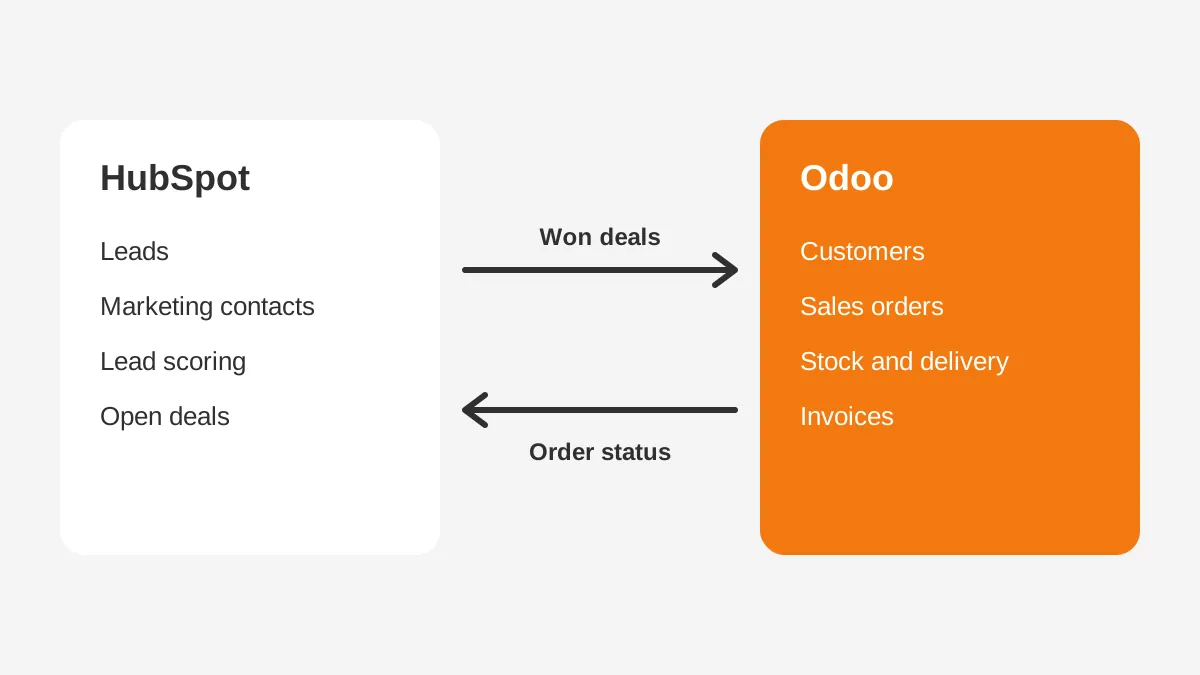
A working split looks like this:
- HubSpot owns leads, marketing contacts, lead scoring and the early sales pipeline.
- A won deal creates a customer and a sales order in Odoo.
- Odoo owns products, prices, stock, delivery and invoices.
- Order status and invoice totals sync back to HubSpot for reporting.
The rule is one owner per field. If both systems can edit a customer address, the sync will overwrite good data. Decide the owner of each object before turning on the connector.
Running both also means paying for both. The Odoo vs HubSpot cost comparison then becomes Odoo plus HubSpot, plus the connector. That stack makes sense when marketing revenue justifies HubSpot Marketing Hub on top of an Odoo ERP.
Which Teams Should Choose Odoo or HubSpot?
The Odoo vs HubSpot answer depends on team shape. Choose Odoo when the business needs one system for sales and operations. Choose HubSpot when the business needs stronger marketing and a CRM that sales reps adopt fast.
Odoo fits teams that:
- sell physical products and need stock, delivery and invoices tied to each deal;
- want to replace spreadsheets or an aging ERP in the same project;
- have budget for an Odoo partner and an internal admin.
HubSpot fits teams that:
- grow through inbound marketing, content and email nurture;
- already run an ERP such as NetSuite or Microsoft Dynamics 365;
- want a short rollout and a vendor-hosted product.
For Odoo vs HubSpot for small business, the answer depends on headcount and growth path. A 5-person team can start on HubSpot free CRM or Odoo Community at no license cost. The HubSpot vs Odoo for small business choice then turns on whether marketing or operations is the bottleneck.
There is no single best CRM for B2B companies. The best fit is the platform that removes the most manual work from your sales and order process. That is why the Odoo vs HubSpot decision should start with process maps, not with feature lists.
Some teams compare a third option. Salesforce sits between the two for large sales teams, and the Odoo vs Salesforce comparison covers that matchup. Teams weighing Salesforce marketing tools can read Pardot vs HubSpot.
What to Test in an Odoo vs HubSpot Demo?
Run one real process end to end in each Odoo vs HubSpot demo. A scripted tour hides the work your team will do every day.
- Create a lead from a web form and score it.
- Convert it to a deal and build a quote from your price list.
- Win the deal and check what happens to stock and invoicing.
- Run the pipeline report your sales manager reads each Monday.
- Import 500 of your own records and check duplicates.
Score each step on time taken and clicks needed. Ask each vendor or partner to price the steps that needed custom work. That list becomes the real scope for a CRM implementation partner.
Bring two users to each Odoo vs HubSpot demo: a sales rep and someone from operations or finance. Their scores often differ. Reps tend to favor HubSpot, while operations staff lean toward Odoo. That split shows where the real trade-off sits.
Frequently Asked Questions
Is Odoo better than HubSpot?
Odoo is better for companies that want CRM, inventory, manufacturing and accounting in one system. HubSpot is better for marketing-led teams that want fast adoption and stronger campaign tools. Neither wins for every business, so match the platform to the process that slows your team most today.
Can Odoo replace HubSpot?
Odoo can replace HubSpot for pipeline management, quotations and basic email marketing. It is weaker for advanced marketing automation, landing pages and attribution reporting. Teams that rely on HubSpot Marketing Hub often keep it for marketing. They connect it to Odoo for orders and invoicing instead.
How much does Odoo cost per user?
Odoo Standard runs about $24.90 per user per month billed annually, with every app included. HubSpot Sales Hub Professional starts at $90 per seat per month, plus a required $1,500 onboarding fee. HubSpot Starter is cheaper, but it covers fewer sales features than Professional.
Is Odoo CRM free?
Odoo Community is free and open source, but the company hosts and maintains it. Odoo also offers paid plans with hosting and support. HubSpot free CRM is also $0 for up to 2 users. Both free options limit features, so growing teams usually move to paid plans.
How long does an Odoo vs HubSpot rollout take?
A HubSpot rollout for sales and marketing often takes weeks, because the scope stops at customer-facing teams. An Odoo rollout that adds inventory, manufacturing and accounting often takes months. The timeline depends on data volume, integrations and how much custom work the processes need in practice.
How Do You Decide Between Odoo vs HubSpot?
Decide Odoo vs HubSpot by naming the bottleneck first. If orders, stock and invoices break between systems, Odoo removes that gap. If lead flow and campaign reporting are weak, HubSpot fixes more of the problem. An existing ERP can stay in place.
Unboxx implements HubSpot and Odoo for B2B teams through its CRM consulting services and Odoo consulting services. To test your processes against both platforms, schedule a consultation with the Unboxx team.
Let's create something out of this world together.
Have a project in mind? Contact us for expert design and development solutions. Let's discuss how we can help grow your business.
Ready to Unboxx Your Potential?
Build smarter systems. Automate faster. Scale confidently.