
Picture a new CRM admin on day one: a live Salesforce org, 40 sales users and a backlog of requests. Trailhead holds hundreds of free modules, and nobody hands over a reading order.
Salesforce also ships three major releases each year (Salesforce Admins blog, 2026). The platform changes while the admin is still learning it. That is why the right sales cloud tutorials for the first two weeks protect data and users before anything else.
Platform basics, user management and data security come first. Leads, opportunities, reports and Flow follow. Below is a day-by-day plan built from current Trailhead modules and their published time estimates.
Key Takeaways
- The first week of sales cloud tutorials should cover setup, users, data modeling and data security before any sales features.
- Ten working days of focused Trailhead modules add up to about 16 hours of tutorial time.
- Practice every module in a Trailhead Playground or sandbox, never in production.
Which Sales Cloud Tutorials Should New Admins Take First?
A new admin should take sales cloud tutorials in a fixed order: platform, users, data, security, then sales objects. The order follows risk. A wrong permission exposes records to the wrong people, while a wrong opportunity stage only confuses a report.
Trailhead is the free Salesforce learning site, and it groups lessons into modules and trails.
A module is one topic with short units. A trail is a set of modules in order, so it works as a salesforce administrator learning path. Each salesforce admin tutorial shows a time estimate, which makes a two-week schedule easy to plan.
Open these five modules first:
- Agentforce 360 Platform Basics, about 45 minutes, which explains the architecture, Setup and AppExchange.
- Core Responsibilities for Salesforce Admins, about 1 hour 45 minutes, which covers the five core admin duties.
- User Management, about 45 minutes, which shows how to add users and control access.
- Data Modeling, about 45 minutes, which explains objects, fields and relationships.
- Data Security, about 1 hour 50 minutes, which covers org, object, field and record access.
Together, these sales cloud tutorials answer the first question any crm platform admin faces, which is who can see what. Sales features sit on top of that access model, so they come second.
Salesforce has moved some Sales Cloud content under the Agentforce Sales name, including the admin trail for core sales features. The Leads and Opportunities module on Trailhead still sits on admin trails under both names. Leads, opportunities, Path and Kanban views behave the same under either label.
Why Does a Two-Week Learning Plan Matter?
A two-week plan gives a new admin a deadline and a fixed sequence. Without one, sales cloud tutorials get picked by curiosity. The result is an admin who knows Dynamic Forms but cannot explain why a rep sees a hidden field.
Ten working days is long enough for the foundational Trailhead content and short enough to fit a probation period. The window also gives the sales leader a clear date when the admin will take requests alone.
Production benefits too. Page layout changes on day two can break the view a rep uses all day. A schedule keeps experiments in a practice org until the basics are clear.
Three rules keep the plan on track. Limit sales cloud tutorials to one or two hours a day. Repeat every module in a practice org. End each day with one small change made in a sandbox and written down.
A search for a salesforce admin two week plan tends to return course lists sorted by topic. Crm admin training libraries are built the same way, by subject rather than by risk.
The best trailhead modules for new admins depend on what could go wrong in that org. A salesforce admin learning plan should follow those risks, not a popularity ranking.
The guide to CRM administration tasks and cadence explains the wider job. The plan here covers the learning that makes that job safe.
Which Sales Cloud Tutorials Fit Days One to Five?
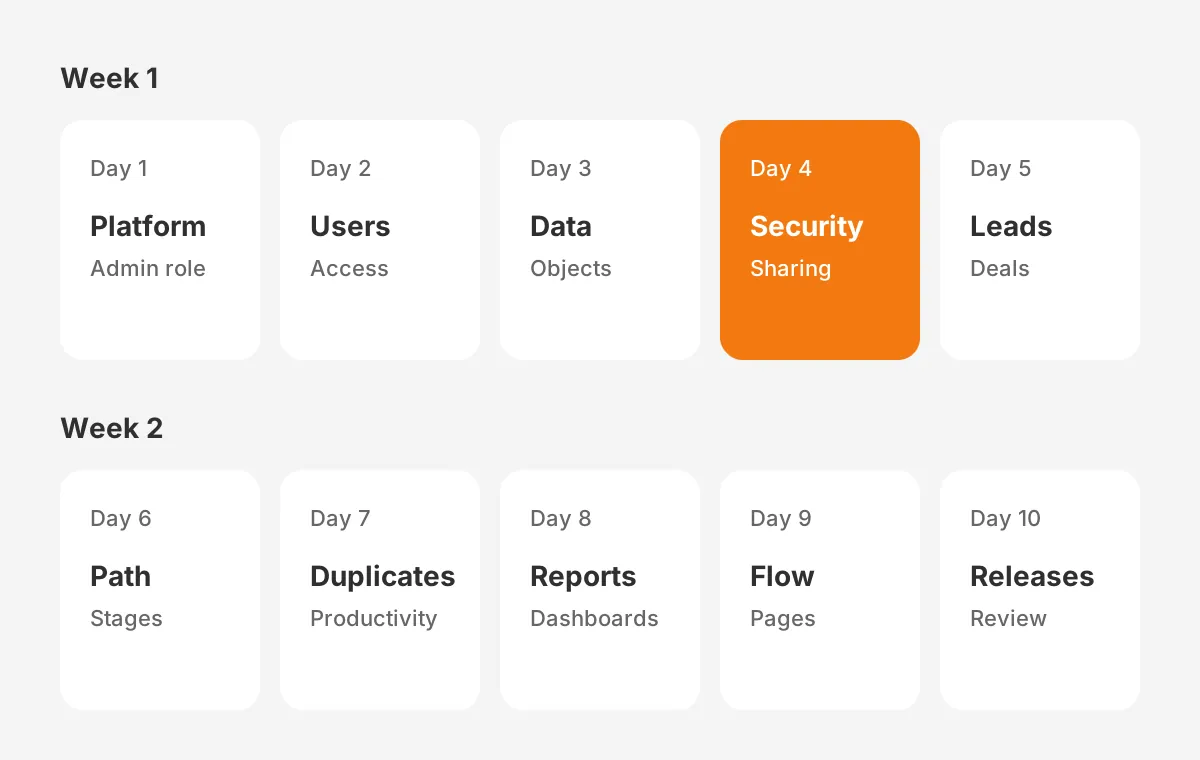
Week one holds the sales cloud tutorials on platform, users, data and the first sales objects. By Friday the admin should be able to add a user, explain the role hierarchy and convert a lead.
Day 1: Platform and the admin role
Start with Agentforce 360 Platform Basics (about 45 minutes) and Core Responsibilities for Salesforce Admins (about 1 hour 45 minutes). The second module names five core responsibilities: user management, data management, product management, security and actionable analytics.
Day 2: Users and access
User Management takes about 45 minutes across two units, "Add New Users" and "Control What Your Users Can Access". Profiles set the baseline, and permission sets add access on top without cloning profiles.
In the playground, create one rep user and one manager user. Log in as each and compare what they see.
Day 3: Objects and data
Data Modeling (about 45 minutes) and Data Management (about 35 minutes) share the day. Between them they cover objects, fields, relationships, imports and exports. After each unit, open Object Manager and Schema Builder in Setup and find the same objects in the company's org.
Day 4: Data security
Data Security runs about 1 hour 50 minutes over seven units. Org access, object access, field access, record access, the role hierarchy and sharing rules each get a unit. It is the longest day of the plan and the one that prevents the costliest mistakes.
Afterwards, sketch the company's role hierarchy on paper and check it against Setup. Gaps between the drawing and the real hierarchy show where sharing rules do extra work.
Day 5: Accounts, contacts, leads and opportunities
Accounts and Contacts (about 30 minutes) comes before Leads and Opportunities (about 1 hour 10 minutes). The longer module has four units: lead conversion, working opportunities, team selling with split credit, and Path with Kanban.
Which Tutorials Fill Days Six to Ten?
Week two moves to the sales cloud tutorials on productivity, reporting, automation and releases. By day ten the admin can build a report, adjust a sales path and read release notes with a purpose.
Day 6: Sales path and page layouts
The Customize a Sales Path for Your Team project (about 30 minutes) pairs with Path and Workspaces (about 30 minutes). Path shows reps the key fields and guidance for each opportunity stage. The sales team notices that change quickly.
Day 7: Productivity and duplicates
Sales Productivity (about 30 minutes) covers the activity timeline and integrated email. Duplicate Management (about 50 minutes) covers the matching rules and duplicate rules that stop reps creating the same account twice. Then check the sandbox for existing duplicate accounts to size the cleanup the org needs.
Day 8: Reports and dashboards
Reports and Dashboards for Lightning Experience fills about 1 hour 50 minutes. Its five units cover the Report Builder, filters, formatting and the Lightning Dashboard Builder. A pipeline dashboard is the first output most sales managers will see from a new admin.
Rebuild one existing sales report from scratch after the module. Pick a report the sales manager opens every week, so the exercise teaches the real data model. If the totals differ from the original, look for a hidden filter or a stale report type.
Day 9: Flow and page building
Flow Builder Basics takes about 40 minutes. Lightning App Builder runs about 2 hours 50 minutes. Finish its Dynamic Forms and visibility rules units today. The custom component unit can wait for week three. For the flow, write down the trigger, the condition and the action before opening Flow Builder.
Day 10: Releases and review
Salesforce Release Readiness Strategies and Sales Dialer take about 20 minutes each. Spend the rest of the day reviewing notes and listing open questions for the sales leader. Those questions shape the sales cloud tutorials for week three.
Added up, these sales cloud tutorials total about 985 minutes, or roughly 16 hours 25 minutes. Spread over ten days, that is about 1 hour 40 minutes of tutorial time per day.
How Do Sales Cloud Tutorials Compare by Time?
Sales cloud tutorials range from 20 minutes to almost 3 hours, so time is the first planning constraint. Every module in the plan appears below with its Trailhead estimate and the skill it builds.
| Module | Trailhead estimate | Day | Skill it builds |
|---|---|---|---|
| Agentforce 360 Platform Basics | ~45 mins | 1 | Architecture, Setup, AppExchange |
| Core Responsibilities for Salesforce Admins | ~1 hr 45 mins | 1 | The five admin duties |
| User Management | ~45 mins | 2 | Users, profiles, permission sets |
| Data Modeling | ~45 mins | 3 | Objects, fields, relationships |
| Data Management | ~35 mins | 3 | Imports and exports |
| Data Security | ~1 hr 50 mins | 4 | Role hierarchy, sharing rules |
| Accounts and Contacts | ~30 mins | 5 | Core customer records |
| Leads and Opportunities | ~1 hr 10 mins | 5 | Lead conversion, pipeline |
| Customize a Sales Path for Your Team | ~30 mins | 6 | Stage guidance for reps |
| Path and Workspaces | ~30 mins | 6 | Opportunity page layout |
| Sales Productivity | ~30 mins | 7 | Activity timeline, email |
| Duplicate Management | ~50 mins | 7 | Matching and duplicate rules |
| Reports and Dashboards for Lightning Experience | ~1 hr 50 mins | 8 | Pipeline reporting |
| Flow Builder Basics | ~40 mins | 9 | No-code automation |
| Lightning App Builder | ~2 hrs 50 mins | 9 and week 3 | Record pages, Dynamic Forms |
| Salesforce Release Readiness Strategies | ~20 mins | 10 | Sandbox preview, release notes |
| Sales Dialer | ~20 mins | 10 | Calling from Salesforce |
The Trailhead Admin Beginner trail overlaps with this plan. It holds five modules and about 7 hours 20 minutes of content. Two of its modules fit well in week three. Lightning Experience Customization takes about 3 hours, and User Engagement takes about 1 hour 10 minutes.
How Should Admins Practice Without Touching Production?
Admins should practice every tutorial in a Trailhead Playground or a sandbox, never in the production org. A Trailhead Playground is a free practice org linked to the learner's Trailhead account. Hands-on challenges check the work there.
A salesforce sandbox is a copy of the company's own org. It holds the real objects, fields and automation, and in some sandbox types real data. Practicing there shows how a change behaves against the company's actual setup.
Each module then goes through the same three-step loop:
- Complete the unit and its challenge in a Trailhead Playground.
- Repeat the same change in a sandbox that mirrors production.
- Write down what changed, who it affects and how to undo it.
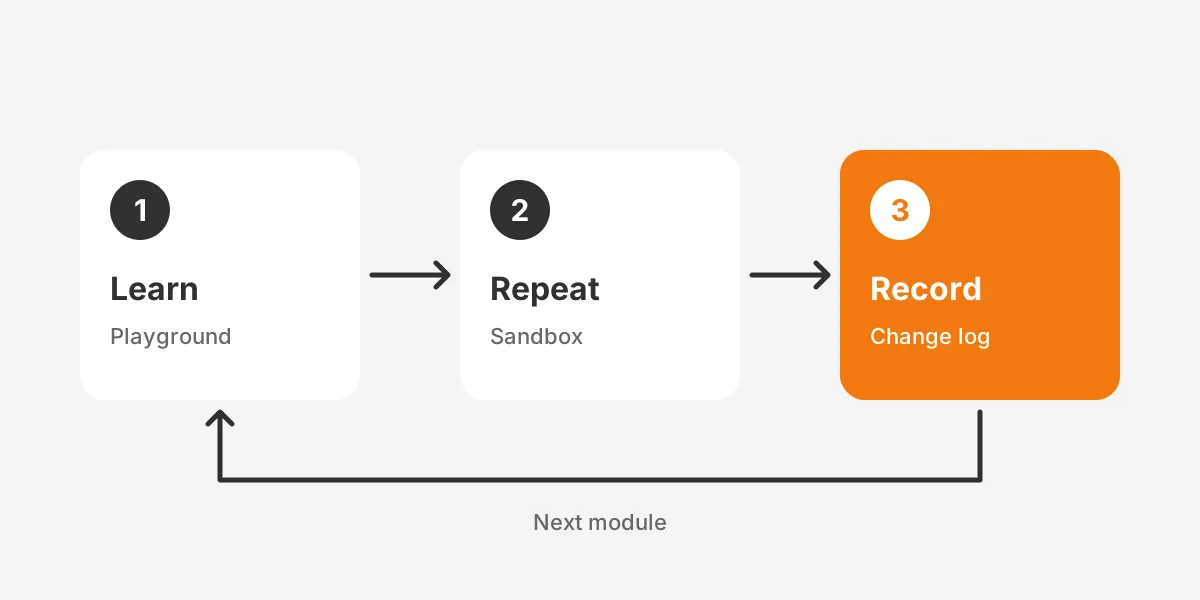
The written record pays off later. After two weeks it becomes the first page of the admin's change log. It also shows the sales leader what the new admin can now do.
Here is an assumed example. Suppose a 40-user sales team asks for a new "Competitor" field on opportunities. The admin creates it in a Trailhead Playground on day three, then in the sandbox. Field-level security from day four decides which profiles can see it.
What Should a New Admin Learn in Month One?
In month one a new admin should learn six feature areas. The Salesforce Admins blog names them in this order:
- User management tools, including profiles and permission sets.
- Object Manager and Schema Builder.
- Lightning App Builder with Dynamic Forms.
- Reports and dashboards.
- Flow Builder.
- Release Updates and Security Health Check.
The two-week sales cloud tutorials cover the first five of those areas. Weeks three and four should close the gaps:
- Finish Lightning App Builder, including custom Lightning components.
- Run Security Health Check and fix the high-risk settings it flags.
- Review pending Release Updates and test each one in a sandbox first.
- Build one record-triggered flow that replaces a manual step the sales team dislikes.
- Take Lightning Experience Customization from the Admin Beginner trail.
Time with users belongs in month one as well. An hour each with two reps and one manager produces a list of real fixes that no tutorial supplies.
The salesforce admin first 30 days should end with a short review. The admin walks through the change log, the open requests and the next sales cloud tutorials planned. Real requests then decide what a new salesforce admin should learn first in month two.
Certification can start in month two for admins who want a credential.
The Salesforce Certified Platform Administrator credential is the usual first exam. Salesforce admin certification prep goes faster after real org work. The sales cloud tutorials in this plan cover much of the platform administrator certification foundation. The exam guide sets the full scope.
Which Salesforce Admin Skills Do Sales Teams Need Most?
Sales teams need four salesforce admin skills most: clean access control, a reliable pipeline, accurate reports and safe automation. Each module in the plan maps to one of the four. That turns a list of sales cloud tutorials into a job description the sales leader can read.
Access control comes from User Management and Data Security. A rep who cannot see a shared account can lose a deal. A rep who sees a colleague's commission data creates an HR problem. Both cases trace back to profiles, permission sets and sharing rules.
Pipeline reliability rests on Leads and Opportunities, Path and Duplicate Management. Reps trust the pipeline when each opportunity stage has clear exit criteria. Duplicate rules keep the same account from appearing twice in a forecast.
Reporting skill comes from the Reports and Dashboards module. Three views make a sensible first set: pipeline by stage, deals closing this month and activity by rep. Building those in a sandbox gives the admin early credibility with sales managers.
Flow Builder Basics covers the fourth skill, safe automation. A first flow should be small and reversible, such as a task created when an opportunity reaches a set stage. Larger automation waits until the admin understands the org's existing flows.
The same skill map doubles as a salesforce admin onboarding checklist. A sales leader ticks off each skill once the admin ships a tested change in that area. That keeps salesforce admin training tied to visible results rather than badge counts.
How Do Admins Keep Sales Cloud Tutorials Current?
Admins keep sales cloud tutorials current by tying learning to the release calendar. Salesforce ships three major releases a year, and each one changes features the sales team uses. A learning plan written once goes stale within months.
The Salesforce Release Readiness Strategies module takes about 20 minutes. Its three units cover the release process, early access through the sandbox preview, and finding, enabling and communicating new features.
A repeatable release routine takes four steps:
- Read the release notes for Sales Cloud and the platform features in use.
- Test the changes in a preview sandbox before production upgrades.
- Pick the new sales cloud tutorials or release modules that match the changes.
- Brief reps on what changed in a short note or a ten-minute call.
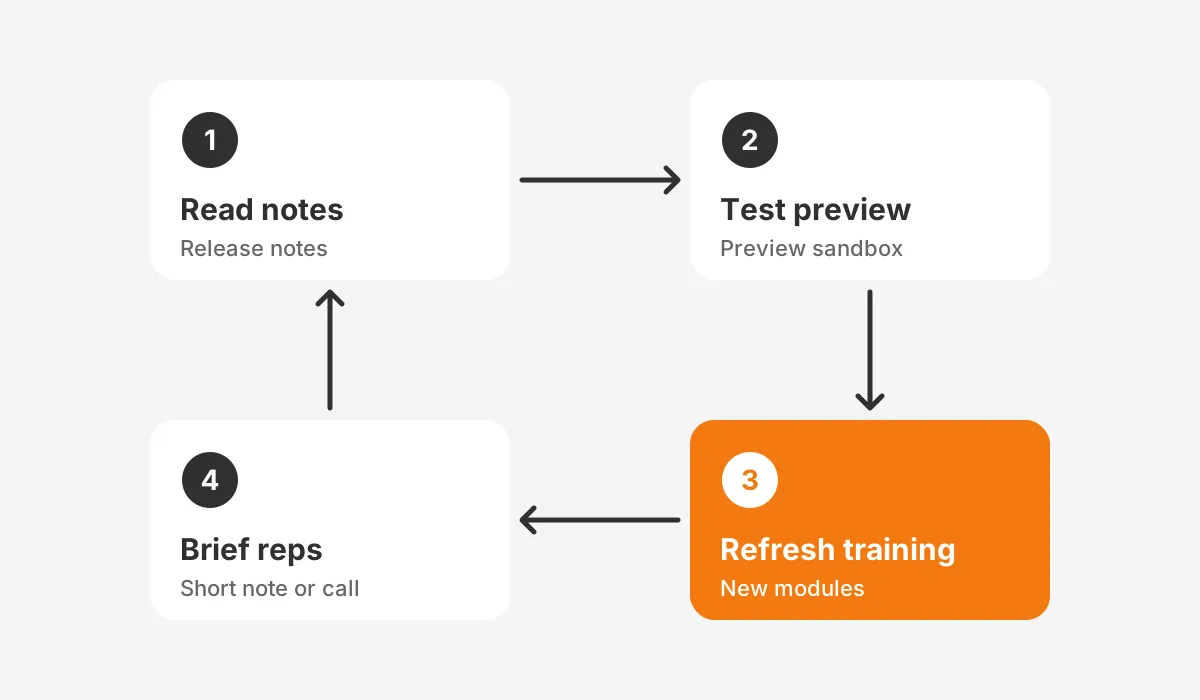
Sales leaders often ask how to keep sales cloud training current. The answer is to refresh it on the release cycle instead of a fixed annual date. The same rule applies to salesforce sales cloud training for reps.
Adoption needs the same rhythm. The guide to measuring and raising CRM adoption shows how to track feature use. It tells the admin whether reps use what the training covered.
When Should a New Admin Get Outside Help?
A new admin should get outside help when a change touches security, integrations or data migration before week two ends. Those areas carry risks that sales cloud tutorials alone do not cover well. Watch for these signals:
- The org has hundreds of custom fields and no documentation.
- Sharing rules and the role hierarchy produce visibility nobody can explain.
- An integration with an ERP or marketing tool fails without clear errors.
- The sales leader needs a redesign of stages, products or forecasting.
Unboxx works with Salesforce, HubSpot, Dynamics 365 and Odoo teams on these problems. Its CRM consulting and implementation services cover selection, implementation, data migration, integration and administration support. For a Salesforce org, the Salesforce Sales Cloud consulting services page explains the scope.
Some companies keep a junior admin and add senior cover. An outsourced Salesforce administration arrangement gives the new admin a reviewer for risky changes. The dedicated Salesforce administration success story shows that model in practice.
Implementation history matters too, because a recent setup leaves design choices behind. The Salesforce Sales Cloud implementation guide explains the choices a new admin inherits.
Frequently Asked Questions
How long does the Trailhead Admin Beginner trail take?
The Admin Beginner trail takes about 7 hours 20 minutes, according to Trailhead's own estimate. It holds five modules: Data Modeling, Data Management, Lightning Experience Customization, User Engagement, and Reports and Dashboards. At one hour per working day, it fits inside two weeks.
Do sales cloud tutorials cost anything?
No, the Trailhead modules in this plan are free. A learner signs up for a Trailhead account and gets a free Trailhead Playground for hands-on challenges. Paid options exist, such as instructor-led classes and certification exam fees, but the foundational sales cloud tutorials need no payment.
Should a new admin take the certification exam first?
No, a new admin should learn the org first and sit the exam later. The Salesforce Certified Platform Administrator exam tests broad platform knowledge. Two weeks of hands-on tutorials and a month in a real org make exam prep faster.
Who should approve changes a new admin makes?
A named owner, usually the sales operations lead or a senior admin, should approve changes during the first month. Approval covers anything that changes access, required fields or automation. A short written request and a sandbox test before production keep the review quick.
Can new admins learn Sales Cloud without a sandbox?
Yes, a Trailhead Playground covers every tutorial in this plan. A sandbox still adds value because it copies the company's real setup. Without one, the admin should test risky changes with a small group of users and record each change for rollback.
Where Should Your Sales Cloud Tutorials Lead Next?
Sales cloud tutorials should lead to a working admin routine. That means a change log, a release calendar and a short list of user requests. Two weeks of structured modules builds the base, and month one turns it into daily practice.
Unboxx helps teams plan admin onboarding, clean up inherited orgs and review risky changes. To map the right sales cloud tutorials and next steps for your org, schedule a consultation with Unboxx.
Let's create something out of this world together.
Have a project in mind? Contact us for expert design and development solutions. Let's discuss how we can help grow your business.
Ready to Unboxx Your Potential?
Build smarter systems. Automate faster. Scale confidently.