
A company can pay for every CRM seat and still run its pipeline from spreadsheets. Forrester (2023) found that 64% of surveyed organizations had adopted CRM for sales force automation. Its headline still read low satisfaction. Buying the system is the easy half.
CRM adoption is the degree to which your users work in the CRM daily and trust its data for decisions. This guide covers how to measure CRM adoption in Salesforce, HubSpot and Dynamics 365. It also explains why usage drops and how to raise it in 90 days.
Key Takeaways
- CRM adoption is measured by logins, activity, data quality and business outcomes, not by the number of licences sold.
- Salesforce, HubSpot and Dynamics 365 each ship built-in usage reports that an admin can read in under an hour.
- A 90-day plan with named owners, weekly metrics and workflow fixes raises adoption faster than extra training alone.
What Is CRM Adoption?
CRM adoption is the share of intended users who treat the CRM as their main system. Their records are complete and current. A rep who logs in weekly to update a stage has access. A rep who logs calls, plans next steps and forecasts from the CRM has adopted it.
Two levels are worth separating. Organizational adoption means the company has bought and deployed a CRM. User adoption means the people inside it use the CRM every working day. Forrester's survey describes the first level. Most revenue problems sit in the second.
A useful working definition has four parts. Users sign in on a regular cadence. They create and update the records their role owns. The data they enter is complete enough to report on. Managers and leaders make decisions from CRM reports instead of side spreadsheets.
That definition turns CRM user adoption into something an admin can count. It also explains why a high login rate alone can mislead. Logins show presence, while record updates and data quality show real work.
Why Does CRM Adoption Matter for Revenue?
CRM adoption matters because every report, forecast and automation depends on reps entering data. When a third of the team keeps deals in email or notebooks, the pipeline report undercounts revenue. Forecast accuracy drops, and managers coach from guesses.
The cost shows up in three places. Leadership loses a single view of pipeline and customers. Marketing cannot attribute revenue to campaigns without closed-won data. Service teams answer customers without the sales history that should sit on the account record.
Automation suffers too. Lead routing, renewal reminders and AI features all read CRM fields. When those fields are empty or stale, the automation fires at the wrong time or not at all. Poor usage quietly breaks tools the company already paid for.
Adoption is also the main return lever after go-live. Licence fees, integration work and CRM customization are sunk costs. The return arrives only when users work in the system, which is why CRM ROI calculations depend on usage data.
Change management research supports this. Prosci's Best Practices in Change Management study surveyed more than 2,600 practitioners. Projects with excellent change management met or exceeded objectives 88% of the time, against 13% for poor change management.
A CRM rollout is a change project, so the same pattern applies. The software can be configured perfectly and still fail if the people side is skipped.
What Causes Low CRM Adoption?
Low CRM adoption usually starts with design choices made before go-live, not with lazy users. Six causes sit behind most underused systems.
- The CRM does not match how the team sells, so reps run a second process outside it.
- Data entry takes too long because page layouts hold dozens of fields nobody reads.
- Reps see no personal benefit, only a reporting tool for their managers.
- Training covered clicks, not daily workflows, and ended on launch day.
- Email, calendar and phone tools are not connected, so activity logging is manual.
- Leaders still ask for spreadsheet updates, which tells reps the CRM is optional.
Signs of low CRM adoption are easy to spot once you look. Opportunities sit in one stage for months. Close dates are in the past on open deals. Contacts have no activity in 90 days. The forecast call starts with a rep reading from private notes.
Of the six, the last carries the most weight. If the sales manager reviews pipeline from the CRM in every one-to-one, usage rises. If the manager accepts a spreadsheet, every other fix loses force. Executive and manager behaviour sets the rule users follow.
Resistance from reps has a logic worth respecting. Sales reps resist CRM work because they are paid on closed deals. Every minute of data entry is a minute not selling. Any adoption plan has to give time back.
Duplicate entry is a related cause. When orders live in an ERP and deals live in the CRM, reps may type the same customer details twice. Each extra copy raises the chance that one system falls behind. Integration removes that double work and the excuse that comes with it.
How Do You Measure CRM Adoption?
You measure CRM adoption with four layers of metrics, from simple presence to business outcomes. Track all four, because each one can look healthy while the next one is failing.
- Login rate: the share of licensed users who signed in during the last 7 days.
- Activity: records created or updated per user, such as calls, meetings and opportunities.
- Data quality: the share of required fields filled and records with a valid next step.
- Outcomes: forecast accuracy, pipeline coverage and win rate reported from the CRM.
Salesforce's own Trailhead module on user adoption metrics suggests the same starting questions. Count the opportunities users created in the last 30 days. Then check the login rate over the last 7 days. It also recommends reviewing these metrics at least once a month.

Combine the layers into one CRM adoption score per team. Weight logins at 20%, activity at 30%, data quality at 30% and outcomes at 20%. The weights are a judgment call, so agree them with sales leadership and keep them stable for a quarter.
Data quality deserves its own report. Trailhead lists two warning signs worth tracking. The first is opportunities stuck in one stage too long. The second is open deals with a close date in the past. A CRM data cleansing runbook covers how to fix the backlog those reports reveal.
How Often Should You Review Each Metric?
Review cadence should match how fast each metric can change. Logins move daily, while outcomes move over a quarter. A sensible rhythm looks like this.
- Weekly: login rate and activity counts by team, shared in the sales meeting.
- Monthly: data quality scores by user, reviewed by sales operations and the admin.
- Quarterly: forecast accuracy, pipeline coverage and win rate against the baseline.
Keep the weekly view short. Three numbers per team are enough to start a coaching conversation. Longer reports belong in the monthly review, where there is time to find causes.
Where Do You Find CRM Adoption Data by Platform?
Salesforce, HubSpot and Dynamics 365 all record logins and record changes, but the reports live in different places. The table below shows where an admin starts in each one.
| Platform | Where to look | What it shows | Limits to know |
|---|---|---|---|
| Salesforce | Setup, Login History, plus the free Adoption Dashboards pack on AgentExchange | Logins, records created and updated, data quality by user | Dashboards need installing and tuning to your objects |
| HubSpot | Settings, Account Management, Audit Logs, Login History | Every login, including the mobile app, with login type | Shows the last 30 days; Super Admin access required |
| Dynamics 365 | Power Platform admin center, Manage, Dataverse analytics | Total active users, most used tables, users by security role and business unit | Charts refresh every 24 hours; downloads cover 30 days |
In Salesforce, start with Login History for presence and the Adoption Dashboards pack for record activity. Trailhead describes the pack as providing "metrics around usage and data creation". Add a report of opportunities with past close dates for data quality.
In HubSpot, the HubSpot audit log shows all logins within the last 30 days. Enterprise accounts also get a user analytics tab with total daily logins, deletions, exports and reports. Export the login view each month to keep a longer trend line.
In Dynamics 365, Microsoft's Dataverse analytics sit in the Power Platform admin center. The Active users dashboard shows total active users, most used tables and active users by security role. An Environment Admin can view reports for environments they can access.
Salesforce adoption and HubSpot adoption reports answer the presence question well. None of them judges data quality for you, so build that report yourself in each platform.
Teams that run two platforms, such as Salesforce for sales and HubSpot for marketing, need one shared scorecard. Export each platform's login and activity data monthly into a single sheet or BI tool. Use the same definitions in both, or the comparison means nothing.
What Is a Good CRM Adoption Rate?
A good CRM adoption rate is one your team sustains while the CRM data stays reliable enough to forecast from. No public standard defines a single target. Vendor and analyst figures use different definitions, so set an internal target and track the trend.
A practical starting point is a weekly login rate target for each sales role. Pair it with a data quality target. For example, every open opportunity has a next step and a future close date. Raise both targets each quarter.
Here is a worked example with assumed figures, not survey data. A 40-person sales team has 34 users who logged in during the last 7 days, an 85% login rate. Only 22 of 60 open opportunities have a future close date and a next step.
That team's data quality score is 37%. The login rate looks healthy, but the forecast is unreliable. Reps open the CRM, then keep the real deal notes elsewhere.
The CRM adoption rate you report should therefore combine presence and quality. In the example, a weighted CRM adoption score would sit far below the 85% headline. That lower number is the honest one to bring to the leadership meeting.
Set targets by role rather than one figure for the company. An SDR team should log activity on nearly every working day. A field sales team may update records after each customer visit instead. Comparing the two against one login target punishes the wrong people.
Who Owns CRM Adoption After Go-Live?
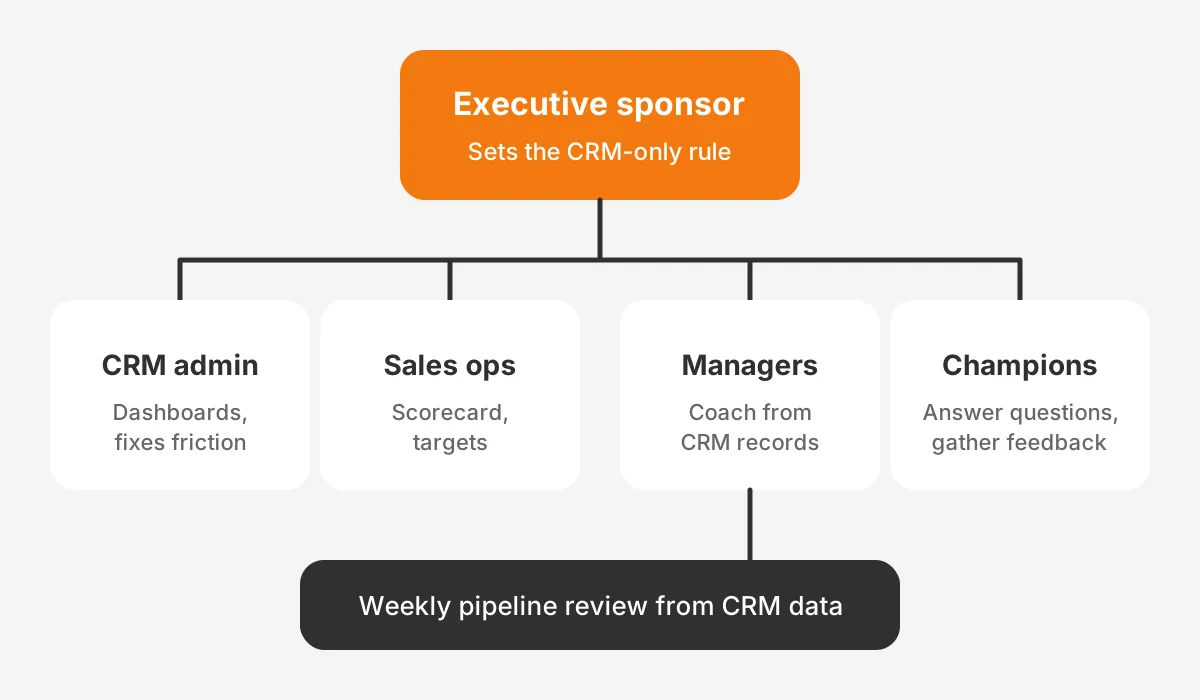
CRM adoption is owned by sales leadership, with the CRM administrator and front-line managers carrying the daily work. When nobody owns the number, it tends to slide after launch.
Five roles share the work, and each needs a named person.
- Executive sponsor: sets the rule that pipeline reviews use CRM data only.
- CRM administrator: builds the adoption dashboards and fixes reported friction.
- Sales operations: owns the scorecard, targets and monthly reporting.
- Front-line managers: coach from CRM records in every one-to-one.
- CRM champions: one experienced user per team who answers questions and gathers feedback.
The administrator role is easy to under-resource after launch. A small team may need a part-time admin or a managed service. The guide to CRM administration tasks and cadence shows what that role covers each week.
Managers carry the most weight in this model. The manager who runs the pipeline meeting is responsible for CRM adoption day to day. That meeting decides which system the team trusts.
Champions need time set aside for the role, about one hour a week. Without that time, the role becomes a title with no effect. Rotate champions each year so knowledge spreads across the team.
How Do You Build a 90-Day CRM Adoption Plan?
You build a 90-day CRM adoption plan by measuring a baseline, removing friction, then reinforcing the new habit with managers. Each phase lasts about 30 days and ends with a scorecard review.
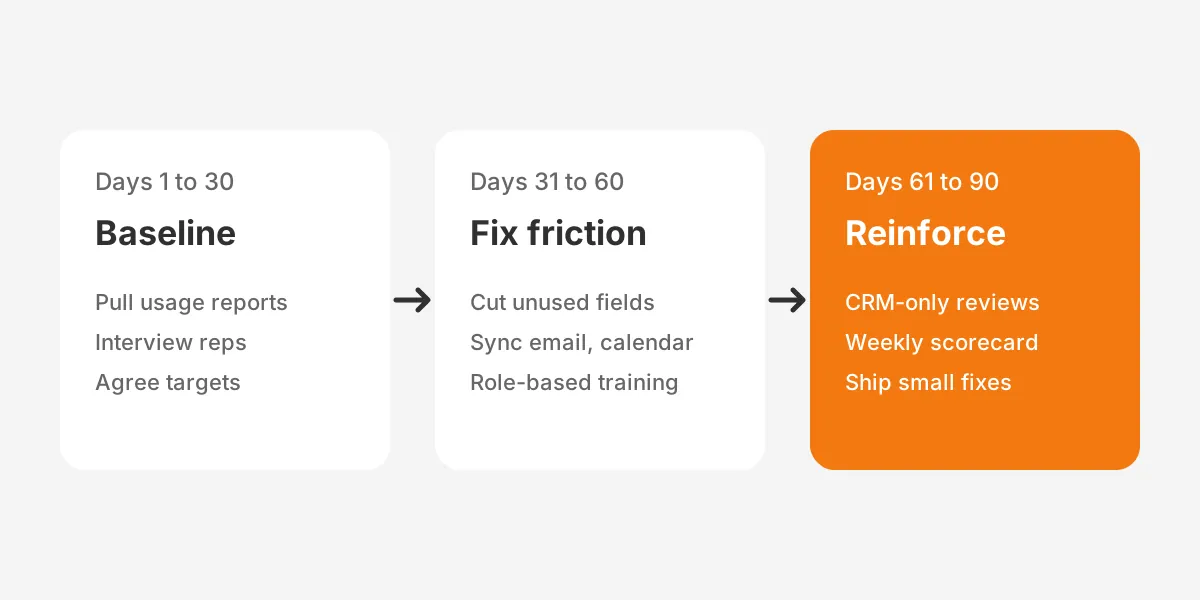
Days 1 to 30 set the baseline and find the friction.
- Pull login, activity and data quality reports for every user.
- Interview five reps and two managers about what slows them down.
- List every field on the opportunity and contact layouts, and mark the unused ones.
- Agree the CRM adoption score and its targets with the executive sponsor.
The interviews matter more than the reports in this phase. Ask each rep which task takes longest in the CRM and what they track elsewhere. Ask managers which report they distrust. The answers show which fixes to make first.
Days 31 to 60 fix the workflow. Remove or hide fields nobody reports on. Turn on email and calendar sync, such as Einstein Activity Capture in Salesforce or the HubSpot inbox connection. Add workflow automation for follow-up tasks and stage reminders.
Run role-based CRM training in this phase, built around daily tasks. A 30-minute session on updating the pipeline before Monday's meeting beats a two-hour feature tour. Add in-app guidance or short videos for the three most common tasks.
Days 61 to 90 reinforce the habit. Managers run every pipeline review from CRM dashboards. Sales ops publishes the adoption scorecard each week. Champions collect feedback, and the admin ships one improvement every two weeks.
Close the plan with a review against the baseline. If the data quality score has not moved, return to the friction list. A scored CRM audit helps find the configuration problems that training cannot fix.
Which CRM Adoption Strategy Fits Each Role?
The CRM adoption strategy that works is the one that gives each role a reason to open the CRM. A single company-wide message rarely changes behaviour. SDRs, account executives and managers use the system for different jobs.
| Role | What they need from the CRM | Adoption lever |
|---|---|---|
| SDR | Call lists, sequences and lead status | Dialer and email logging that needs no manual entry |
| Account executive | Deal notes, next steps and forecast | Mobile updates and a pipeline view that replaces their spreadsheet |
| Sales manager | Pipeline coverage and coaching data | Dashboards that run the weekly one-to-one |
| Marketing | Lead source and campaign revenue | Closed-won data tied to campaigns |
| Service | Account history and open cases | Sales notes visible on the account record |
For account executives, mobile CRM access matters most. Deals move after meetings. A rep who can update a stage from a phone in two minutes will do it. A rep who must wait for a laptop often will not.
For managers, the strategy is simple: stop accepting data from anywhere else. Once the forecast comes only from the CRM, reps keep their records current because the meeting depends on it.
If the CRM itself is the obstacle, the fix may be a redesign rather than more training. Unboxx's CRM consulting and implementation services cover that work, from requirements to configuration. A clear CRM implementation plan with adoption targets prevents the problem on the next rollout.
How Do You Keep Adoption High After 90 Days?
You keep adoption high by treating the CRM as a product that changes with the business. Usage falls again when the sales process changes and the system does not follow. New products, territories and team structures all create fresh friction.
Four habits protect the gains from the first 90 days.
- Onboard every new hire with role-based CRM tasks in their first week.
- Run a short quarterly survey asking users what slows them down.
- Review the field list and automation rules every six months.
- Keep the scorecard in the leadership meeting, not only in sales operations.
Release changes in small batches with a two-line note to users. A surprise layout change can undo months of habit building. Champions can test each change with their team before it reaches everyone.
Finally, connect the CRM to the tools reps already use. Email, calendar, video calls and e-signature should write back to the record without manual steps. Every manual step removed is one less reason to drift back to spreadsheets.
Frequently Asked Questions
How long does CRM adoption take?
Plan for about 90 days of focused effort after go-live, split into baseline, workflow fixes and reinforcement. Complex rollouts across sales, marketing and service can take two quarters. Track the adoption score weekly, and treat a flat trend after 60 days as a signal to fix workflows.
How do you get sales reps to use CRM?
Give reps time back and remove every reason to keep a second system. Automate activity logging through email and calendar sync, and cut unused fields. Give them a pipeline view better than their spreadsheet. Then have managers run every one-to-one from CRM records so updates matter weekly.
What are the signs of low CRM adoption?
Low CRM adoption shows up as stale data rather than missing logins. Watch for open deals with past close dates and opportunities stuck in one stage. Contacts with no activity for 90 days and forecast calls built on notes are others. Reps exporting data into spreadsheets is another warning.
Does CRM training improve user adoption?
Training improves user adoption only when it teaches daily workflows for each role, not every feature. Short sessions tied to real tasks, followed by in-app guidance and manager coaching, work better than one launch-day course. Repeat training after every major change to fields, stages or automation rules.
Can a CRM consultant help with low adoption?
A CRM consultant helps when the cause is design. Typical examples are cluttered layouts, missing integrations, or a sales process the system does not reflect. The consultant audits usage data, interviews users and reconfigures the CRM. Internal managers still own the habit change, so the best results combine both efforts.
How Can Unboxx Help Improve CRM Adoption?
CRM adoption improves fastest when measurement, workflow fixes and manager habits move together. Unboxx is a Salesforce Crest Partner that also works across HubSpot, Dynamics 365 and Odoo. The team audits usage, simplifies layouts, connects email and calendar tools, and sets up adoption dashboards your leaders will use.
See how a dedicated admin model kept one Salesforce CRM running smoothly. If your team's CRM adoption has stalled, schedule a consultation to review your usage data and agree a 90-day plan.
Let's create something out of this world together.
Have a project in mind? Contact us for expert design and development solutions. Let's discuss how we can help grow your business.
Ready to Unboxx Your Potential?
Build smarter systems. Automate faster. Scale confidently.