
A B2B sales team buys Salesforce in January. By June, reps still update a spreadsheet each Friday because the pipeline shows the wrong stages. Reps spend 70% of their week on non-selling tasks, per the Salesforce State of Sales report (2024).
In that example, the stages were never agreed, so nobody could build them correctly. A planned Salesforce Sales Cloud implementation settles questions like that first.
This sales cloud implementation guide covers edition choice, six phases and pipeline design. It then covers Flow automation, data loading, a 14-week sample timeline and the cost lines to price.
Key Takeaways
- A Salesforce Sales Cloud implementation succeeds when the sales process is written down before any field is built.
- The worked example, a 40-user distributor with one ERP link, runs 14 weeks from kickoff to stable use.
- Licences, partner services, data work, integration and training are the five cost lines to price first.
What Is a Salesforce Sales Cloud Implementation?
A Salesforce Sales Cloud implementation is the project that configures Sales Cloud to match how a company sells. It covers objects, pipeline stages, automation, security, data loading, integrations and training. The output is a working org that reps use every day.
What is Sales Cloud in Salesforce? It is the product for lead management, opportunity management, forecasting and quoting. It runs on the same core platform as Service Cloud, so both share accounts and contacts.
A sales cloud setup differs from a general Salesforce implementation in scope. A full Salesforce CRM implementation may add service, marketing and custom apps. A Sales Cloud project stays focused on the path from first contact to signed deal.
Partners and vendors also call this work a Sales Cloud rollout, a Sales Cloud deployment or Sales Cloud configuration. The deliverable does not change with the label. Every Salesforce Sales Cloud implementation does need a named owner on the client side, usually the head of sales operations.
Three inputs set the scope of a Salesforce Sales Cloud implementation. The first is the number of sales processes, such as renewals and channel deals. The second is the systems that must connect, such as email, ERP and billing. The third is the volume and quality of existing data.
Which Sales Cloud Edition Should You License?
The edition decides which features a Salesforce Sales Cloud implementation can use, so choose it before design starts. Salesforce lists five paid editions on its Sales Cloud pricing page, viewed in October 2026.
| Edition | List price per user per month | Billing | Notable inclusions |
|---|---|---|---|
| Starter Suite | $25 | Monthly or annually | Built-in sales flows and lead routing |
| Pro Suite | $100 | Annually | Sales quoting and forecasting |
| Core | $195 | Annually | Professional features plus Premier Success and Slack Business+ |
| Advanced | $395 | Annually | Sales Programs, Backup and Recover, Security Center |
| Max | $550 | Annually | Agentforce for Sales and 2.75M Flex Credits per org per year |
This sales cloud editions comparison shows the widest price gaps between Pro Suite, Core and Advanced. Three answers usually settle the choice. How much custom automation does the team need? Does testing need a Full sandbox? Will AI agents work leads in year one?
Sandbox access is easy to overlook at purchase. Salesforce Help lists no Partial Copy or Full sandbox on Professional Edition, according to its sandbox licenses and storage guide. A team that tests only in a Developer sandbox tests without real data.
For a Salesforce implementation for small business, Starter Suite or Pro Suite often covers the first year. Teams with an ERP link, territory rules or approval chains should price Core and Advanced against that scope. Agentforce for Sales comes bundled in Max.
Licence choice also shapes the Salesforce Sales Cloud implementation budget for years. Upgrading later is possible, though features the team worked around on the lower edition may then need rebuilding. Price the second and third year before signing the first.
What Are the Salesforce Sales Cloud Implementation Phases?
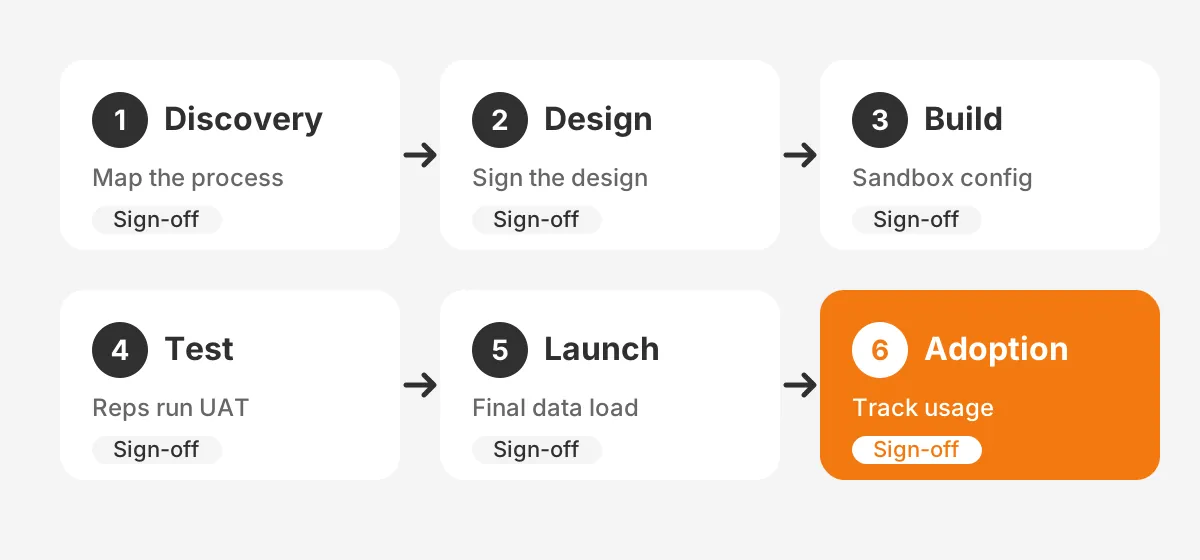
The Salesforce Sales Cloud implementation phases are discovery, design, build, test, launch and adoption. Each of these sales cloud implementation phases ends with a written sign-off. That makes any later scope change visible, and it gets priced rather than absorbed.
- Discovery: map the current sales process, systems, users and reports, and agree on success metrics.
- Design: define objects, fields, stages, security, automation and integrations in a design document.
- Build: configure the org in a sandbox, with every change tracked in a release log.
- Test: run user acceptance testing with real reps on a copy of production data.
- Launch: load final data, switch integrations on and complete the Salesforce go-live.
- Adoption: support users for 30 to 60 days and measure usage against the agreed metrics.
Copied into a project plan, the list above becomes the Salesforce Sales Cloud implementation steps for the team. Each step gets one owner and one date. A Salesforce implementation plan with blank owner fields has nobody to chase late work.
Discovery gets the most care because every later phase builds on it. Interview two reps, one manager and one finance user before writing any requirement. A ranked list keeps the build focused on deals rather than wish lists. The guide to gathering CRM requirements shows how to score each item.
For a wider view of phases, owners and budgets across platforms, see the CRM implementation plan guide. A Salesforce Sales Cloud implementation follows that logic, with Salesforce tools at each step.
How Should You Design Leads, Opportunities and Stages?
Design the sales process first, then map it to leads, accounts, contacts and opportunities. In a Salesforce Sales Cloud implementation, the opportunity object carries the pipeline. Its stages drive forecasts, reports and most automation.
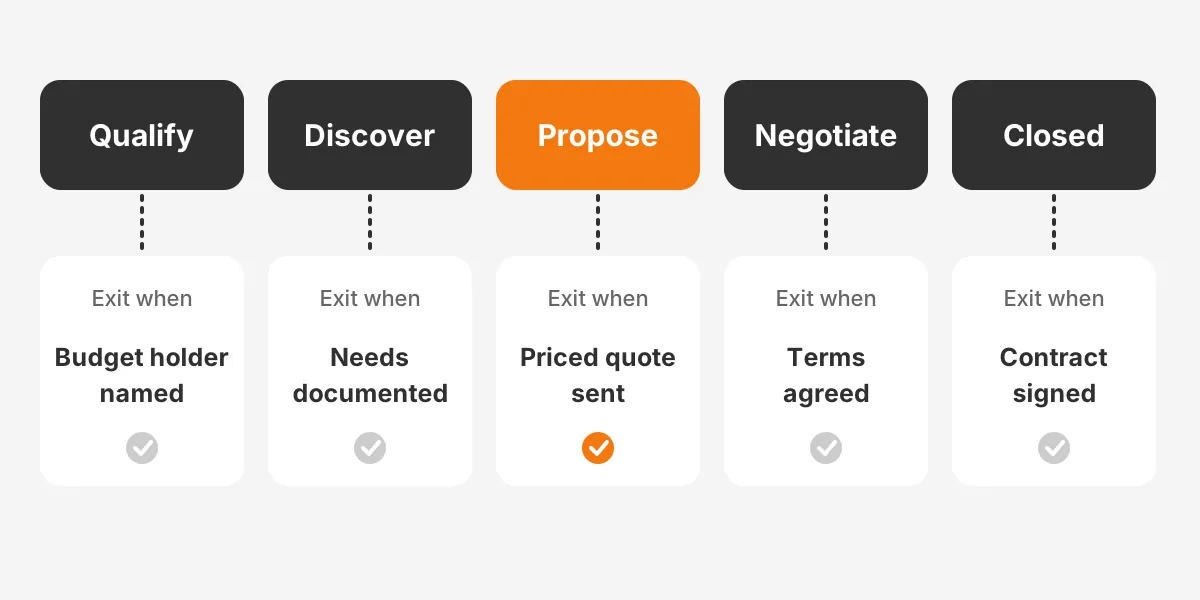
Write an exit criterion for each of the pipeline stages. An exit criterion is a fact a manager can check, such as "budget holder named" or "pricing sent". Without exit criteria, two reps can put the same deal in different stages, and the forecast stops meaning anything.
Use these Sales Cloud features to hold the design in place:
- Salesforce Path shows the stages across the top of each record, with guidance and key fields per stage.
- Record types separate sales processes, such as new business and renewals, on one object.
- Validation rules block a stage change until the required fields are filled in.
- Lead assignment rules route each new lead to the right rep or queue by region or product.
- Duplicate rules and matching rules stop reps from creating a second record for the same company.
Keep the first design small. A first release with five to seven stages and under 20 required fields is easier to test and teach. Price books and quotes can follow in a second release once reps trust the pipeline.
Here is how that looks for a distributor using five stages: Qualify, Discover, Propose, Negotiate and Closed. Qualify exits when a budget holder is named, and Discover when needs are documented. Propose exits when a priced quote is sent.
Negotiate exits when terms are agreed, and Closed when the contract is signed. Each exit fact becomes a required field enforced by a validation rule.
Security belongs in the design document too. Set org-wide defaults first, then build the role hierarchy, then grant extra access with permission sets. The Unboxx first Salesforce build for a professional services firm started with roles, profiles and permission sets for that reason.
Which Sales Processes Should Flow Automate First?
Flow Builder should first take over the tasks reps repeat on every deal. Lead routing, stage-based tasks and approval requests are good starting points. Each removes a manual step without changing how reps sell.
Flow is now the only supported automation builder for new work. Workflow Rules and Process Builder lost support after 31 December 2025, according to Salesforce Ben. Older orgs can convert them with the Migrate to Flow tool.
Start with five record-triggered flows in this order:
- New lead: assign an owner, set a follow-up task due in one business day and notify the rep in Slack.
- Lead conversion: copy campaign and source fields to the new opportunity.
- Stage change: create the next-step tasks for that stage and update the close date if it has passed.
- Discount over a set threshold: send the opportunity to the sales manager for approval.
- Closed won: create an onboarding record and alert finance or the ERP team.
One flow per object and trigger keeps the logic easy to debug. Name each flow by object, trigger and purpose. Document it in the release log with its owner and test case.
Einstein Activity Capture can log email and calendar events from Outlook or Gmail without manual entry. Turn it on after launch, once reps trust the core data. Agentforce for Sales comes later still, when the pipeline data is clean enough to act on.
The Unboxx team builds these flows as part of its Salesforce CRM implementation and customization services. In-house teams can follow the same rule: automate a process that is written down, never a guess about one.
How Do You Migrate Data Into Sales Cloud?
Migrate data in four passes: clean, map, test-load and final load. A Salesforce data migration plan names each source system and the objects it feeds. It also names the person who signs off the counts.
Pick the tool by volume and object. The Data Import Wizard handles up to 50,000 records at a time for common objects, according to Salesforce Trailhead. Data Loader handles larger volumes and any object type.
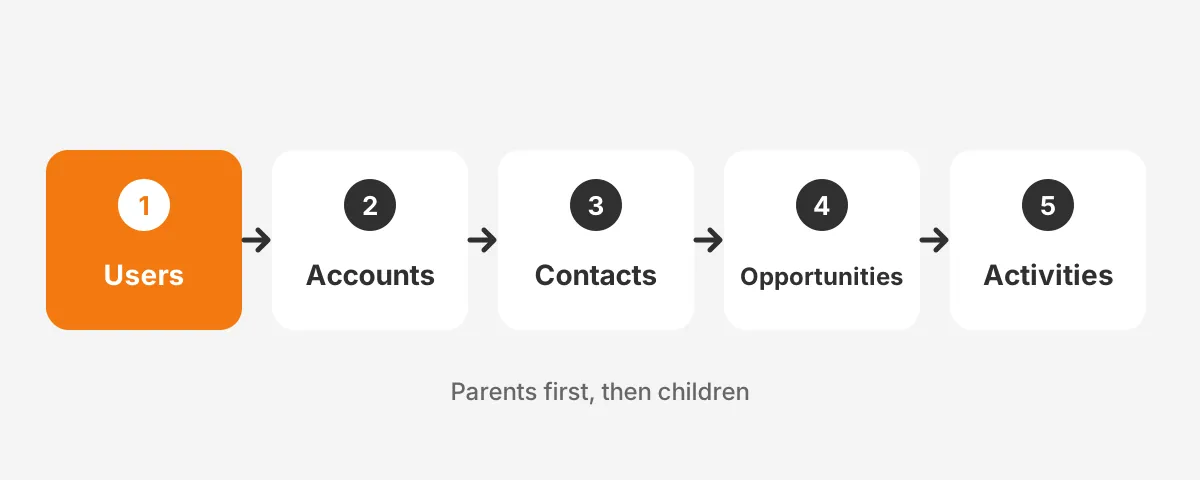
Load objects in dependency order. Users come first, then accounts, contacts, opportunities and activities. Each child record needs its parent's Salesforce ID. Keep the old system ID in an external ID field for matching.
Clean before loading, not after. Merge duplicate companies, fix email formats and drop closed deals older than the agreed cut-off. The CRM data cleansing runbook sets out that sequence by platform.
Run the test load into a Partial Copy or Full sandbox. Compare record counts and five sample records per object with the source. The Salesforce data migration guide covers the before, during and after checks in more detail.
Which integrations should go live on day one?
Connect only the integrations reps need in their first week. Email and calendar sync come first, through Outlook or Gmail. Slack alerts for new leads and won deals come second. Everything else can join in a later release.
When an ERP link is in scope, it is often the largest integration in a Salesforce Sales Cloud implementation. Decide which system owns each record before building it. Accounts and opportunities usually live in Salesforce, while orders, invoices and stock levels stay in the ERP.
Teams moving from HubSpot or another CRM should freeze changes in the old system two weeks before go-live. A freeze keeps the final data load small and the record counts easy to reconcile.
How Long Does a Salesforce Sales Cloud Implementation Take?
A Salesforce Sales Cloud implementation for 20 to 60 users often runs 10 to 16 weeks. Small teams on Starter Suite can launch faster. Projects with ERP links or territory rules take longer.
How long does a Salesforce implementation take for one specific company? The sample below is a worked example with assumed figures, not a benchmark. It describes a 40-user distributor with one ERP integration and two sales processes.
| Weeks | Phase | Main output |
|---|---|---|
| 1-2 | Discovery | Process maps and ranked requirements |
| 3-4 | Design | Signed design document |
| 5-9 | Build | Configured sandbox and ERP connector |
| 10-11 | Test | Signed user acceptance testing log |
| 12 | Launch | Final data load and go-live |
| 13-14 | Hypercare | Daily support and first usage report |
This sales cloud implementation timeline assumes a sales operations lead gives two days a week to the project. Less client time means slower decisions, so the Salesforce implementation timeline grows with every week a sign-off waits.
Sandbox refresh intervals also shape the plan. A Full sandbox can be refreshed every 29 days and a Partial Copy every 5 days, per Salesforce Help. Book the final test refresh before week 10, so the Salesforce Sales Cloud implementation is tested on current data.
Phases can overlap to save time. Design for the second sales process can run while the first one is in build. Testing cannot overlap with the final data load, though. A Salesforce Sales Cloud implementation that rushes testing usually pays for it in hypercare.
How Much Does a Salesforce Sales Cloud Implementation Cost?
A Salesforce Sales Cloud implementation cost has five lines: licences, partner services, data work, integration and training. Licences recur every year. The other four are mostly one-time costs.
How much does Salesforce implementation cost in practice? The figures below use Salesforce list prices and assumed service figures for the same 40-user distributor. Treat the service lines as example assumptions, not quotes.
| Cost line | Example basis | Example figure |
|---|---|---|
| Licences | 40 users on Core at $195 list per month | $93,600 per year |
| Partner services | Assumed 400 hours of design and build | Priced by partner rate |
| Data work | Assumed 80 hours of cleanup and loading | Priced by partner rate |
| Integration | One ERP connector, licence plus setup | Vendor quote needed |
| Training | Assumed four role-based sessions | Internal time plus trainer |
The licence line is the only figure set by a public price list. Every other line depends on scope, so a fixed scope is the best way to control the Salesforce implementation cost. Ask any Salesforce implementation partner to price each line separately.
Change requests after design sign-off add cost that the original quote did not include. Each new field or flow after week 4 adds build, test and training work. Keep a change log with the cost and owner of every request.
Budget for year two as well. Admin time, new releases from Salesforce three times a year and small change requests continue after launch. A Salesforce Sales Cloud implementation is a first release, not a finished product, so plan the support model before go-live.
How Do You Drive Adoption After Go-Live?
Drive adoption by making Sales Cloud the only place where pipeline numbers count. Managers run weekly pipeline reviews from Salesforce reports and dashboards, not from spreadsheets. Once the forecast meeting uses Salesforce, reps keep it current.
Sales cloud user adoption also depends on trust in the data. Only 35% of sales professionals completely trust their organization's data, according to the same Salesforce State of Sales research. Clean data at launch protects that trust.
Build Salesforce onboarding around roles, not features. Reps learn lead and opportunity screens. Managers learn collaborative forecasts and coaching dashboards. Admins learn Flow Builder and Trailhead modules on security and data.
Track three numbers for the first 60 days. Measure weekly logins per rep, opportunities updated per rep and the share of deals with a next step. Review them every Monday. Fix the screens where reps stall before adding new features.
Common Salesforce implementation challenges show up here: reps keeping side spreadsheets, managers skipping the dashboards, and fields left blank. Each one points back to a design or training gap, not a software fault.
Fix the cause in a short release every two to four weeks. Each release adds one change reps asked for, such as a simpler layout or a new dashboard. A steady release rhythm shows reps their feedback changes the system, which keeps a Salesforce Sales Cloud implementation in use.
How Do You Choose a Salesforce Implementation Partner?
Choose a Salesforce implementation partner by testing how it handles discovery, not by its slide deck. Ask each candidate to describe the first two weeks of your Salesforce Sales Cloud implementation in detail. Strong partners name the workshops, the attendees and the documents they will produce.
Use these five questions in every partner interview:
- Which Sales Cloud projects of a similar size and industry has the team delivered?
- Who on the team holds current Salesforce certifications, and will they work on this project?
- How does the partner price change requests after design sign-off?
- What does the test plan include, and who writes the test scripts?
- What support is included after go-live, and for how long?
A Sales Cloud implementation partner should also say what it will not do. Clear exclusions protect both sides of a Salesforce Sales Cloud implementation contract. A proposal that promises every feature in the first release usually hides the cost in change requests.
Check the partner's own case studies for proof of similar work. Read the problem, the build and the measured result, then ask to speak with that client. A partner confident in its Salesforce Sales Cloud implementation work will arrange the call.
Frequently Asked Questions
How to implement Salesforce Sales Cloud on a budget?
To implement Sales Cloud on a small budget, start on Starter Suite or Pro Suite with standard objects only. Limit the first release to leads, accounts, contacts and opportunities. Add quotes, territories and AI features after reps use the core screens every day.
What belongs on a sales cloud implementation checklist?
A sales cloud implementation checklist covers edition choice, process maps, stage exit criteria and the security model. It also lists automation, data mapping, testing, training and the go-live date. Each item needs one owner and a sign-off date. An item with no owner has nobody to chase it.
Do you need a sales cloud consultant?
Hire a sales cloud consultant when the project has an ERP link, three sales processes or a data migration. Small teams with one process can often self-configure. Paying for Salesforce implementation services costs less than rebuilding a poor first design later.
How to set up Sales Cloud stages correctly?
To set up Sales Cloud stages, list the real steps a deal passes through. Then write one checkable exit fact per step. Keep five to seven stages. Add Salesforce Path guidance and validation rules so reps record the exit fact before moving forward.
What are sales cloud implementation best practices for testing?
Sales cloud implementation best practices for testing start with a sandbox holding real sample data. Write test scripts per role, run user acceptance testing with working reps, and log every defect with an owner. Retest fixes before the final data load, never after.
Is Your Team Ready for Sales Cloud Implementation?
A team is ready for a Salesforce Sales Cloud implementation with three things in place. It needs a written sales process, a named owner and clean source data. If any of the three is missing, fix it first. That work costs less than a second build.
Unboxx is a Salesforce Crest Partner. It runs each Salesforce implementation project from discovery to adoption through its CRM consulting and implementation services. To review the edition, scope and timeline of your Salesforce Sales Cloud implementation, schedule a consultation with Unboxx.
Let's create something out of this world together.
Have a project in mind? Contact us for expert design and development solutions. Let's discuss how we can help grow your business.
Ready to Unboxx Your Potential?
Build smarter systems. Automate faster. Scale confidently.