
Salesforce Implementation Checklist: Owners, Timing, Gates
A new Salesforce org can pass every demo and still stall in its second week. Sales reps already spend only 28% of their week selling, according to Salesforce's State of Sales research (2023). A clumsy rollout takes even more of that time away.
A Salesforce implementation checklist prevents that outcome. It lists every task from discovery to the first 90 days after launch. Each item gets an owner, a timing window and a pass criterion. This salesforce implementation checklist groups the work into six phases a B2B team can run and check.
Key Takeaways
- Every checklist item needs a named owner, a due week and a test that proves it is done.
- Sandboxes, data loads and user acceptance testing decide most go-live dates, so plan them first.
- The launch is a gate decision with written go/no-go criteria, not a date on a calendar.
What Is a Salesforce Implementation Checklist?
A Salesforce implementation checklist is a phase-by-phase list of tasks, owners and sign-off tests for launching Salesforce. Every item on it is either done and proven, or still open. That binary status is what makes a Salesforce implementation checklist more useful than a status meeting.
A Salesforce implementation plan says what the project delivers and when. The Salesforce implementation checklist says how the team proves each piece works. The two documents work together, and the checklist is the one the steering committee reviews each week.
The salesforce implementation process usually runs in six phases. Discovery sets the requirements. Environment setup prepares sandboxes and security. Build covers configuration and automation. Data migration loads clean records. Testing and training prepare users. Go-live and hypercare protect the first 90 days.
Each phase on the Salesforce implementation checklist ends with a gate. The gate is a short review where owners show proof, such as a signed list or a passed test. The project moves on only when the sponsor approves the gate.
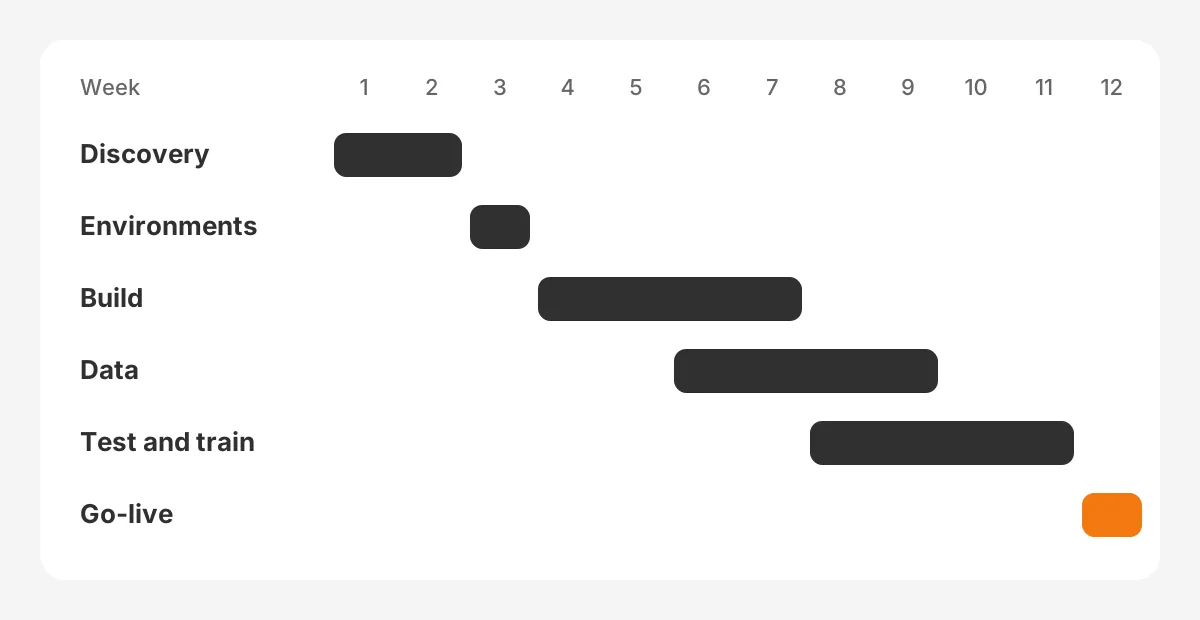
The timeline above is an example for a 40-user Sales Cloud rollout with one integration. These are assumed figures for illustration, not a benchmark. A larger org with Service Cloud or two or more integrations needs more weeks in build and testing.
Scope sets the length. A single-team Sales Cloud setup with clean data can finish in weeks. A multi-cloud project with ERP integration takes far longer. The salesforce implementation timeline should come from the Salesforce implementation checklist, not the other way round.
Who Owns Each Item on the Checklist?
Every item on a salesforce implementation checklist needs exactly one owner. Shared ownership means no ownership, and open items then sit unresolved until launch week. Assign owners in the first workshop and write the names into the Salesforce implementation checklist itself.
The executive sponsor owns scope and budget decisions. A Salesforce admin owns configuration and security. A data owner from each department signs off on field mapping and record counts. Team leads own user acceptance testing for their own process.
The table below shows a typical ownership split. Smaller teams combine roles, which is fine as long as every row still has a name.
| Checklist area | Owner | Sign-off test |
|---|---|---|
| Scope and budget | Executive sponsor | Signed requirements list |
| Configuration and security | Salesforce admin | Access review passed in a sandbox |
| Field mapping and data quality | Data owner per department | Record counts reconcile with the source |
| Automation and integrations | Admin or partner developer | Test scripts pass in a Full sandbox |
| User acceptance testing | Team lead per process | Every test script marked pass |
| Training and adoption | Project manager | All users trained before launch |
A steering committee meets weekly to review open items. It includes the sponsor, the project manager and one lead from each team. Its only job is to clear blockers and approve phase gates.
Put the owner list at the top of the Salesforce implementation checklist. Add a due week and a status column to every row. The project manager updates the status before each steering committee meeting, so the meeting reviews facts instead of opinions.
After launch, the Salesforce admin and a small change board decide who owns each implementation change. Teams without an in-house admin often hand this role to a partner. One option is CRM consulting and implementation services that cover administration as well as the build.
What Belongs in the Discovery and Planning Phase?
Discovery fixes the business requirements before anyone opens Setup. Changes made here cost a workshop. Changes made after build cost rework, retesting and often a later go-live date.
Discovery adds seven items to the Salesforce implementation checklist:
- Write three to five measurable goals, such as forecast accuracy or lead response time.
- Map the current sales process stage by stage, including who does each step.
- List the salesforce implementation requirements as user stories with acceptance criteria.
- Rank requirements as launch, phase two or later.
- Inventory every system that must connect, such as ERP, email and marketing automation.
- Count records in each source system and name the data owner for each.
- Agree the salesforce implementation project plan, budget and steering committee dates.
Each item has a pass test. Goals pass when each one has a baseline number. Requirements pass when the sponsor signs the ranked list. The inventory passes when every integration has a named owner on both sides.
A good Salesforce implementation checklist records the baseline for each goal during discovery. Without a baseline, the team cannot show after launch that forecast accuracy or response time improved. Pull the baseline from the old CRM, spreadsheets or the ERP before anything changes.
This is also the point to decide who builds. Some teams run the salesforce crm implementation in-house. Others bring in a salesforce implementation partner for the build and keep an internal admin for the run phase. Either way, record the decision and the reason in the Salesforce implementation checklist.
Smaller companies can compress this phase into two or three workshops. The guide to Salesforce implementation for small business shows a shorter version of the same steps.
How Should You Set Up Sandboxes and Environments?
Set up sandboxes before the first configuration change, and never build directly in production. A sandbox is a copy of the org where admins build and test safely. The salesforce sandbox strategy decides where each kind of work happens.
Salesforce offers four sandbox types, and each one suits a different task. The figures below come from Salesforce Help on sandbox licenses and storage limits.
| Sandbox type | What it copies | Data storage | Refresh interval | Best use |
|---|---|---|---|---|
| Developer | Metadata only | 200 MB | 1 day | Building one feature |
| Developer Pro | Metadata only | 1 GB | 1 day | Larger builds and unit tests |
| Partial Copy | Metadata and sample data | 5 GB | 5 days | Integration and data tests |
| Full | Metadata and all data | Same as production | 29 days | UAT and load rehearsal |
The sandbox refresh interval matters for planning. A Full sandbox refreshes at most every 29 days. Schedule that refresh for the start of user acceptance testing, so testers work on current data. Put the refresh date on the Salesforce implementation checklist as its own item, with the admin as owner.
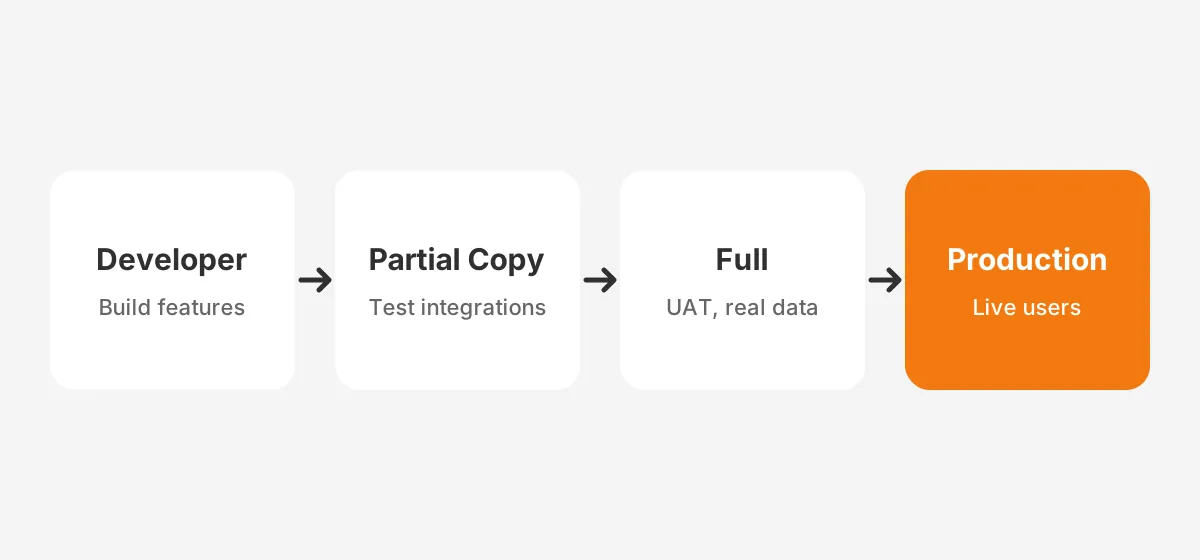
The environment items on a Salesforce implementation checklist include these tasks. Create the sandboxes and name an owner for each. Turn on multi-factor authentication for every user. Set the org's fiscal year, currency and business hours. Agree a Salesforce release management method, such as change sets or a source-control tool.
Security belongs here too. Salesforce Help describes permission sets as the recommended way to manage users' permissions. A Salesforce security review at this stage checks profiles, permission sets and role hierarchy before any user logs in.
Which Build and Configuration Items Come Next?
Build covers objects, fields, page layouts, record types, automation and integrations. Each item traces back to a ranked requirement. Anything without a requirement waits for phase two.
The salesforce configuration checklist for build looks like this:
- Create custom fields and objects from the signed requirements list.
- Build page layouts and record types per team, showing only the fields that team uses.
- Add validation rules for required data, such as a close date on every opportunity.
- Set duplicate rules and matching rules for leads, contacts and accounts.
- Build automation in Flow Builder, with one owner and a description per flow.
- Assign access through permission sets grouped by job role.
- Connect integrations in a Partial Copy sandbox before testing them with full data.
- Build the reports and dashboards each team lead asked for in discovery.
Automation choice is a Salesforce implementation checklist item in its own right. Salesforce ended support for Workflow Rules and Process Builder after December 31, 2025, as Salesforce Ben reported. New automation goes in Flow Builder. Orgs that still run old rules can use the Migrate to Flow tool.
Each build item passes when it works in a sandbox and matches its acceptance criteria. The admin marks it done, and the requirement owner confirms it. That two-name rule catches fields built to the wrong definition.
Document each build item as it is finished. A one-line description on every field, validation rule and flow saves hours for the next admin. The Salesforce implementation checklist can hold a link to that documentation for each item.
The Sales Cloud details differ by edition and team size. The Salesforce Sales Cloud implementation guide covers the six build phases for that product in more depth.
How Do You Check Data Migration Before Go-Live?
Check data migration with record counts, field-level spot checks and a full rehearsal load in a sandbox. Data problems found after launch erode trust faster than any missing feature. Poor data is also common.
Validity's State of CRM Data Management in 2025 surveyed 602 CRM users. Of those, 76% said less than half of their CRM data is accurate and complete. In the same survey, 37% reported losing revenue because of poor data quality.
A salesforce data migration checklist needs seven checks:
- Clean the source data first: remove duplicates, fix formats and archive dead records.
- Map every source field to a Salesforce field, and record the transformation rule.
- Add an external ID field on each object, so reloads update records instead of duplicating them.
- Load in dependency order: users, accounts, contacts, opportunities, then activities.
- Run a rehearsal load in the Full sandbox and time it.
- Reconcile record counts per object against the source system.
- Have each data owner spot-check 20 records by hand.
The choice of Data Loader vs Data Import Wizard depends on volume. Salesforce Help's guide to choosing a data import method lists these limits.
| Tool | Record volume | Runs | Fits |
|---|---|---|---|
| Data Import Wizard | Up to 50,000 | Inside Salesforce | Small loads of accounts, contacts, leads and custom objects |
| Data Loader | 5,000 to 5 million | Outside Salesforce | Large loads and repeatable jobs |
The salesforce data migration plan should also include a cutover plan and a rollback plan. The Salesforce cutover plan freezes edits in the old system and sets the final load window. The Salesforce rollback plan says what happens if counts do not reconcile.
What Testing Does a Salesforce Implementation Checklist Need?
A Salesforce implementation checklist needs three layers of testing: build tests, integration tests and user acceptance testing. Each layer has its own owner and its own pass rule. Skipping a layer moves defects into production.
Build tests confirm each field, rule and flow works alone. The admin runs them in a Developer or Developer Pro sandbox. Integration tests confirm data moves correctly between Salesforce and connected systems, in a Partial Copy sandbox.
Salesforce user acceptance testing comes last, in a Full sandbox with real data. Team leads write test scripts from the user stories. A test script lists the steps, the expected result and a pass or fail mark.
A salesforce uat checklist covers five items:
- One test script per user story, written by the team that owns the process.
- Testers from each role, including at least one manager who reviews reports.
- A defect log with severity, owner and fix date for every failed script.
- A retest of every fixed defect before sign-off.
- Written sign-off from each team lead when all critical scripts pass.
Training runs alongside testing. The salesforce training plan should match each role. Reps learn their daily screens. Managers learn reports, forecasts and dashboards. Admins learn change requests and release management.
Keep training short and task-based. A 60-minute session per role on that team's own records works better than a generic tour. Trailhead modules can cover the basics before the session.
Track testing progress on the Salesforce implementation checklist with three numbers: scripts written, scripts passed and defects open. These numbers show the sponsor the testing status without a long report. When the passed count matches the written count, UAT is ready for sign-off.
Which Go/No-Go Gates Decide the Launch Date?
Launch only when every written go/no-go criterion passes, whatever the calendar says. The steering committee checks the criteria in a short meeting held two to three working days before cutover. A failed gate moves the date. The Salesforce implementation checklist records each gate result with the date and the approver.
The salesforce go-live checklist uses these gates:
- All critical UAT scripts pass, and no severity-one defect is open.
- The rehearsal load reconciled within the agreed tolerance on every object.
- Every user is trained and has a working login with the right permission sets.
- Integrations ran without errors for a full test cycle.
- The cutover plan and rollback plan are approved and have named owners.
- Support is staffed for the first two weeks, with a clear channel for issues.
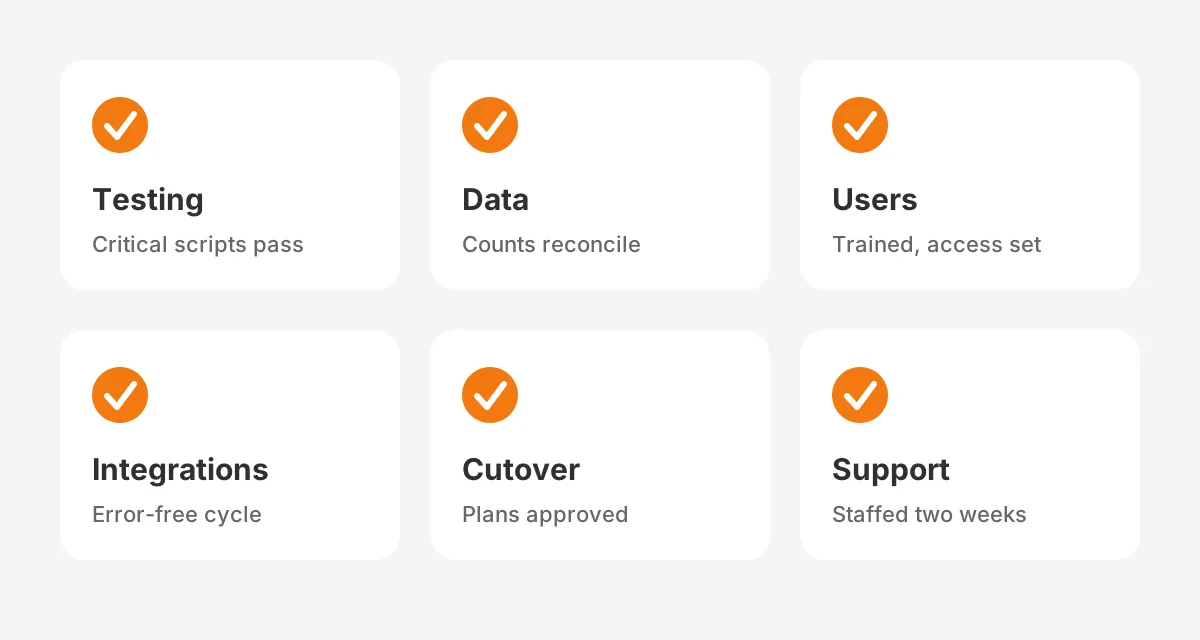
A salesforce go live readiness review also checks the business calendar. Avoid launching in the last week of a quarter, when reps focus on closing deals. A Monday launch after a weekend cutover gives the team a full week of support.
This gate model is the main difference between a Salesforce implementation checklist and a project plan. The CRM implementation plan guide covers the phases, owners and budget lines that feed these gates.
What Should You Check in the First 90 Days?
Check adoption, data quality and open defects every week for the first 90 days. This period is called hypercare. The salesforce post go live checklist keeps the project team engaged until usage is stable.
Post-launch checks follow the calendar:
- Week 1: daily stand-up, defect triage and a login report for every user.
- Weeks 2 to 4: weekly user adoption review by team, with follow-up for low usage.
- Month 2: data quality check on required fields and duplicates.
- Month 3: review phase-two requirements and plan the next release.
User adoption is measurable. Track logins per user, opportunities updated per rep and the share of deals with a next step. Agree target numbers in discovery, then compare against them here.
Salesforce ships three major releases a year. Add a release review to the checklist, so each update is tested in a sandbox before it reaches users. Change management continues after launch, with every new request logged, ranked and scheduled.
Close the Salesforce implementation checklist at day 90 with a short review. Compare the adoption numbers against the discovery baseline. List what moved to phase two, then hand the open items to the admin.
What Mistakes Break a Salesforce Rollout Checklist?
The most common salesforce implementation mistakes come from items without owners, tests or dates. A salesforce rollout checklist only works when the team treats it as a gate list. Watch for these six patterns.
- Building in production instead of a sandbox, which leaves no safe place to test.
- Migrating dirty data and planning to clean it later.
- Copying every old field into Salesforce without a requirement behind it.
- Writing UAT scripts in IT instead of the business teams.
- Training everyone in one generic session a month before launch.
- Ending support on launch day instead of running hypercare.
Each mistake maps to an item on the Salesforce implementation checklist above. That is the purpose of salesforce implementation best practices: each one becomes an item with an owner and a test. Teams that need a ready format can copy this list into a salesforce implementation template.
Unboxx has run this pattern on live projects. The success story on building a Salesforce CRM right from day one shows the same phases on a real rollout.
Frequently Asked Questions
How long does a Salesforce implementation take?
The answer depends on scope, data quality and the number of integrations. The example in this guide, a 40-user Sales Cloud rollout with one integration, runs for 12 weeks. Multi-cloud projects with ERP links and large data migrations need far longer, so plan from the checklist.
What are the main Salesforce implementation steps?
The main salesforce implementation steps are discovery, environment setup, build, data migration, testing and training, then go-live with hypercare. Each step ends with a sign-off. The salesforce implementation phases overlap a little, but no phase should start before the previous gate passes.
Do you need a partner to implement Salesforce?
No, but a partner reduces risk when the team has no experienced admin. Learning how to implement Salesforce well takes time. Companies often use a partner for the build and data migration. They then keep an internal admin for daily support, change requests and release reviews.
How does a checklist differ from a roadmap?
A salesforce implementation roadmap shows phases and releases over time, often across a year or more. A checklist lists the tasks, owners and pass tests inside each phase. Teams use the roadmap to plan releases and the checklist to prove each release is ready.
What should a Salesforce admin checklist include?
A salesforce admin checklist should include weekly login and adoption reports, a data quality review and permission set audits. It should also cover sandbox refreshes, release testing three times a year and a log of change requests. The admin owns these tasks after hypercare ends.
How Can Unboxx Help With Your Salesforce Implementation Checklist?
Unboxx is a Salesforce partner that runs implementations with this gate model, from discovery to hypercare. The team can build your salesforce implementation checklist, assign owners and run the data migration and testing phases with you.
To review your plan before build starts, schedule a consultation with the Unboxx team. You can also read how Unboxx delivers Salesforce CRM services across Sales Cloud and integrations.
Let's create something out of this world together.
Have a project in mind? Contact us for expert design and development solutions. Let's discuss how we can help grow your business.
Ready to Unboxx Your Potential?
Build smarter systems. Automate faster. Scale confidently.