
Salesforce Implementation for Small Business: 7 Steps
A five-person sales team buys Salesforce on a Friday and opens it on Monday to an empty screen. Nobody owns the setup, and the old spreadsheet still runs the pipeline. The SBA Office of Advocacy (2026) counts 36,207,130 small businesses in the United States, so this story repeats often.
Salesforce implementation for small business is the work of turning a new account into a system your team uses daily. It covers goals, edition choice, data, configuration, testing, training and go-live.
This guide gives seven steps, a 12-week example plan and the budget lines for a Salesforce implementation for small business.
Key Takeaways
- A Salesforce implementation for small business works best when one named owner runs it in short, dated phases.
- Starter Suite suits simple sales processes, while Pro Suite adds quoting, forecasting and a sandbox for testing.
- Clean data and daily-task training decide user adoption more than any feature you configure.
What Does Salesforce Implementation for Small Business Involve?
A Salesforce implementation for small business involves seven pieces of work: goals, edition, data, configuration, testing, training and go-live. Each piece has an owner and an end date. Skipping one rarely saves time, because the gap returns after launch as rework.
Put plainly, Salesforce implementation is the project that turns a blank Salesforce org into your sales pipeline. Your leads, contacts, accounts and opportunities move in. Your sales stages, page layouts and permission sets are set to match how your team sells.
Can a small business use Salesforce without a large IT team? Yes. Salesforce built Starter Suite and Pro Suite for smaller teams, and the setup is guided. A Salesforce implementation for small business still needs one person with protected time, usually two to six hours a week.
The scope is smaller than an enterprise program. There are fewer users, fewer integrations and fewer custom objects. That makes a Salesforce implementation for small business faster. It also means each decision lands on fewer people. A wrong field is felt by the whole team at once.
The usual starting point is the sales pipeline, which Salesforce sells as Sales Cloud. Service Cloud for support cases and Agentforce for AI agents come later, once the pipeline runs. That order keeps the first release small enough to finish.
The same order applies to any small business CRM implementation, whatever the platform. A Salesforce implementation for small business has more options to switch on. Leaving some off takes discipline. One visible win, such as a pipeline report, should come before the next phase begins.
Which Salesforce Edition Should a Small Business Choose?
Most small teams should start with Starter Suite. Move to Pro Suite when you need quoting, forecasting or deeper customization. The choice sets your budget and your build options, so make it before any configuration starts.
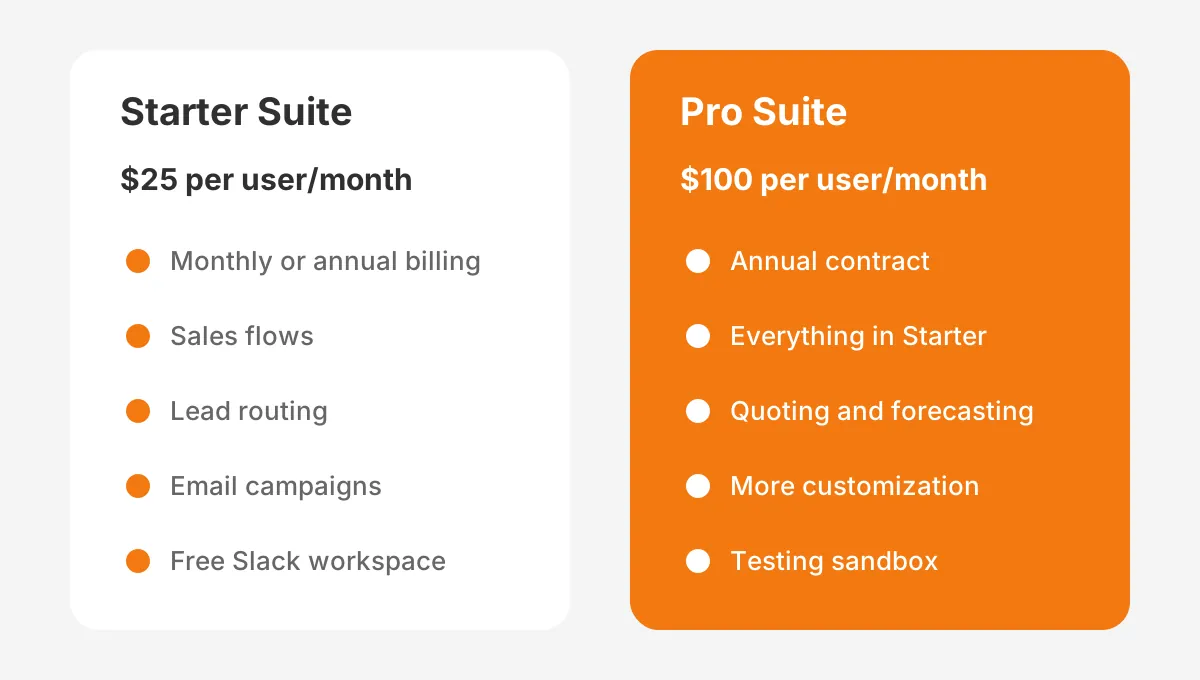
The Salesforce small business pricing page (2026) lists Starter Suite at $25 per user per month, billed monthly or annually. Pro Suite costs $100 per user per month, billed annually with a contract. Transaction fees apply to both, and Starter has no user maximum.
The Salesforce Starter page (2026) lists guided setup, built-in sales flows, lead routing and email nurture campaigns. It also includes a free Slack workspace connected to the CRM and 2,000 emails per month. That covers a simple sales pipeline for most teams under 20 users.
The Salesforce Pro Suite page (2026) adds sales quoting and forecasting, greater customization and automation, and access to AppExchange. It also provides a sandbox for safe testing and training. That sandbox matters once more than one person changes the setup.
| Factor | Salesforce Starter Suite | Salesforce Pro Suite |
|---|---|---|
| List price (2026) | $25 per user per month | $100 per user per month |
| Billing | Monthly or annually | Annually, contract required |
| Sales tools | Sales flows, lead routing | Adds quoting and forecasting |
| Customization | Guided setup | Greater customization and automation |
| Testing | No sandbox listed | Sandbox for testing and training |
| Best fit | Simple pipeline, small team | Quotes, forecasts, custom process |
Settle Starter Suite vs Pro Suite early in your Salesforce implementation for small business, with one rule. Choose Starter if one sales process, standard fields and email are enough. Choose Pro if you send quotes from the CRM, forecast revenue or need custom fields on three or more objects.
Start a Salesforce free trial before you sign. Load 20 real records, build one report and walk one deal through the stages. A one-hour test shows more about fit than a feature list.
Is Salesforce good for small business teams already on HubSpot or Microsoft Dynamics 365? It can be, but compare the full cost of switching first. Unboxx covers that comparison on its Salesforce CRM services page, alongside the build itself.
Edition is the first real fork in a Salesforce implementation for small business. A team that picks Pro Suite for one feature pays four times the license fee for every user. A team that picks Starter and outgrows it can upgrade later, once the need is real.
How Long Does Salesforce Implementation for Small Business Take?
A Salesforce implementation for small business with one sales process often fits in 8 to 12 weeks. That assumes one owner gives it steady time. The calendar depends less on Salesforce and more on decision speed and data quality.
How long a Salesforce implementation will take for your team depends on three counts. They are data sources, integrations and the hours your owner can commit. Each extra source or integration usually adds one to two weeks.
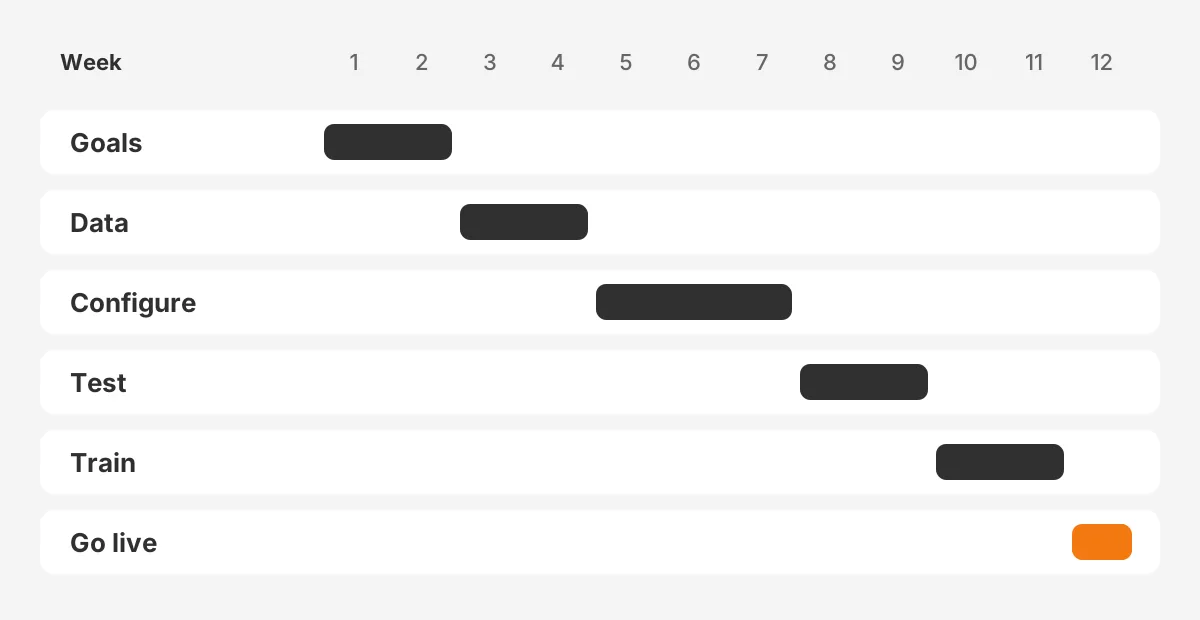
The Salesforce implementation timeline below is an example, not a benchmark. It assumes 12 users, one spreadsheet and one email system, Starter Suite, and an owner with five hours a week.
- Weeks 1 to 2: goals, CRM requirements and edition choice.
- Weeks 3 to 4: data cleanup, field mapping and a test import.
- Weeks 5 to 7: configuration of stages, page layouts and permission sets.
- Weeks 8 to 9: email integration, reports and dashboards, and user acceptance testing.
- Weeks 10 to 11: training and the final import.
- Week 12: Salesforce go-live and the first weekly review.
A Salesforce implementation for startups can move faster, because there is less history to migrate. A team with ten years of records in an old CRM moves slower. The data step is where most schedules slip.
Fixed decision dates protect the schedule. If a field or a stage is still open on its date, the owner decides alone. A Salesforce implementation for small business loses more weeks to open questions than to technical work.
What Are the 7 Salesforce Implementation Steps?
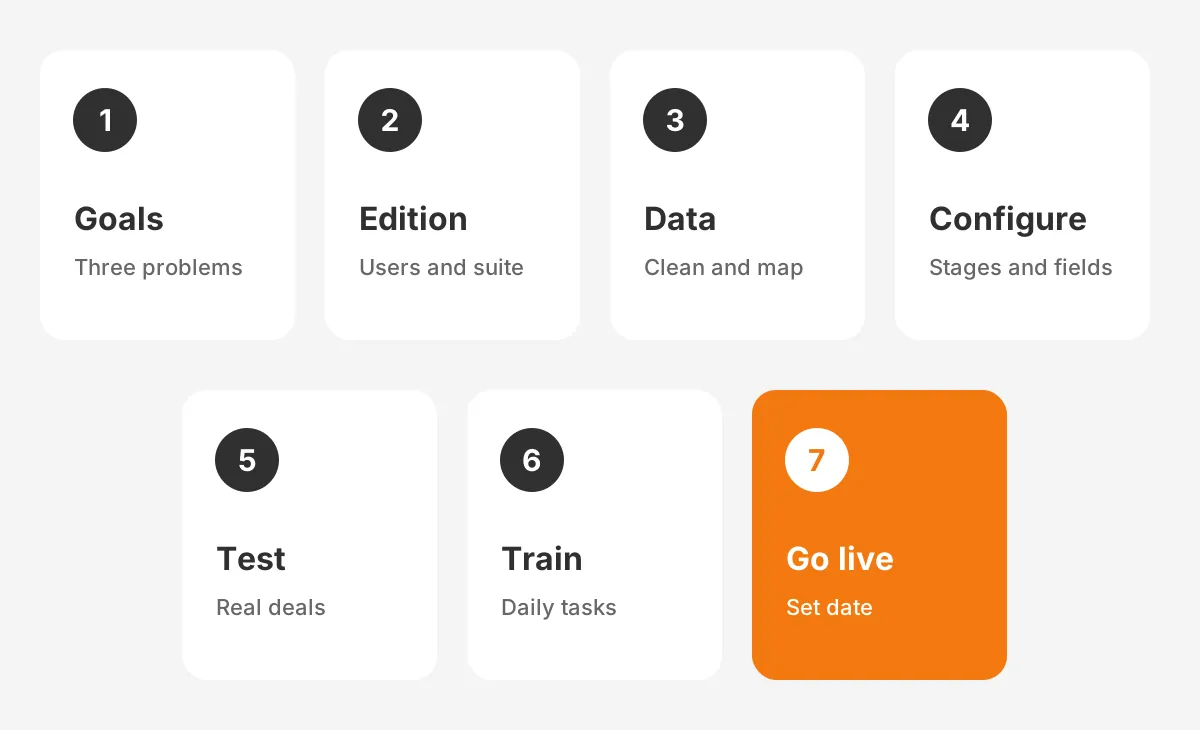
The seven Salesforce implementation steps are goals, edition, data, configuration, testing, training and go-live, in that order. Each step ends with a sign-off from the owner. The sequence works as a Salesforce implementation plan and a Salesforce implementation checklist at once.
Here is how to implement Salesforce in a small company, step by step.
- Write down three problems the CRM must solve, such as lost follow-ups or no pipeline view.
- Pick the edition and the number of users from those problems.
- Clean and map your data, then run a test import of 50 records.
- Configure stages, custom fields, page layouts, lead routing and automation flows.
- Run user acceptance testing with two sales reps on real deals.
- Train every user on their daily tasks, not the full menu.
- Go live on a set date and switch off the old spreadsheet that day.
In a Salesforce implementation for small business, step 1 shapes everything that follows. A goal such as "every lead gets a reply within one working day" sets the fields, rules and reports. A goal such as "be more organized" tells you nothing.
Step 4 is where Salesforce configuration happens. Keep it close to standard Salesforce. Every custom field and every flow is something the team must maintain later. Add a field only when a report or a rule needs it.
Step 5 needs a safe place to test. On Pro Suite, sandbox testing lets you try changes away from live data. On Starter, test with a small set of marked test records and delete them before go-live.
Step 7 needs a hard switch. If the old spreadsheet stays open, the team keeps two pipelines and trusts neither. Set the date, export the old file to an archive and remove edit access.
These steps hold for every Salesforce implementation for small business, whatever the industry. For a larger multi-team rollout, the phases in this Salesforce Sales Cloud implementation guide apply as well.
How Should You Prepare and Migrate Your Data?
Prepare your data before you migrate it: remove duplicates, fill required fields and agree on one format for every value. Salesforce data migration goes faster when the cleanup happens in the source file, not after the import.
Start with an export of every source into CSV files. Common sources are spreadsheets, Gmail or Outlook contacts, an accounting tool such as QuickBooks, and an older CRM. Put each source in its own tab so you can see where each record came from.
Data cleanup is where a Salesforce implementation for small business usually loses time, so start it early. Merge duplicate records, fix company names spelled three ways, and delete contacts nobody has touched in years. Deduplication before import is far easier than merging inside Salesforce afterwards.
Then map each column to a Salesforce field. Leads hold people who have not bought yet. Accounts hold companies, contacts hold the people at those companies, and opportunities hold open deals. A clear map stops a contact from landing in the lead object by mistake.
Salesforce offers the Data Import Wizard inside setup for smaller loads, and Data Loader for larger or repeated loads. Check which tool your edition supports before you plan the import. Run a test import of 50 records first and check every field on screen.
In a Salesforce implementation for small business, data is the step owners most often underestimate. Budget at least two weeks for it, even with one spreadsheet. The Salesforce data migration checklist on the Unboxx blog covers the before, during and after steps.
Who Should Own the Salesforce Project Internally?
Every Salesforce implementation for small business needs one named owner inside the company. That person needs authority to decide and protected time every week. In a small company this is often a sales manager or an operations lead, not the founder.
That owner usually becomes the Salesforce admin after go-live. A system administrator controls users, profiles, permission sets, page layouts and reports. In a team of 5 to 30 users, the role often takes two to four hours a week once stable.
The owner needs a small group around them. Two sales reps test every change, and one person from finance or service checks the fields they rely on. The founder signs off on goals and budget, then steps back.
Salesforce training for new users starts with the owner. Trailhead, Salesforce's free training site, offers short Trailhead modules on setup, reports and security. The owner should finish the basics before configuration starts, not during it.
Security belongs to the owner as well. Salesforce Security states that Salesforce requires multi-factor authentication when accessing its products. That rule has been in effect since February 1, 2022. Plan how each user will verify logins before training day.
A clear owner keeps a Salesforce implementation for small business on schedule. Without one, every open question waits for the founder, and the schedule stretches.
How Much Does a Small Business Salesforce Setup Cost?
A small business Salesforce setup costs the license fees plus the time to configure, migrate and train. Licenses are the predictable part. Services and internal hours change the most from one company to the next.
How much does Salesforce cost for a small business on licenses alone? At the 2026 list prices, 10 users on Starter Suite cost $250 a month, or $3,000 a year. The same 10 users on Pro Suite cost $1,000 a month, or $12,000 a year.
The Salesforce implementation cost on top of licenses has four lines:
- Partner or consultant hours for design and configuration.
- Data cleanup and migration work.
- Training time for every user.
- Paid AppExchange apps, if any.
Internal time is the hidden line. An owner spending five hours a week for 12 weeks gives 60 hours to the project. Price those hours at their real rate when you compare doing it yourself with hiring help.
Unboxx explains each budget line in its guide to CRM implementation cost. For a Salesforce implementation for small business, the cheapest plan goes live once. The lowest quote is not always that plan.
As a worked example, take the 12-user team from the timeline section on Starter Suite. Licenses cost $300 a month at list price. Add 60 owner hours, partner hours if needed, and one training session per user. That total is the real price of the Salesforce implementation for small business.
What Mistakes Derail Small Business Salesforce Projects?
The most common Salesforce implementation mistakes are unclear goals, dirty data, over-building and feature-based training. Each one is avoidable with a rule set at the start.
- No goals: the build follows opinions, and nobody can say when it is done.
- Dirty data: users meet duplicates on day one and stop trusting the system.
- Over-building: custom fields and flows pile up faster than anyone can maintain them.
- Feature tours: users learn every menu but not how to log a call.
- No owner: changes stall because nobody has authority to decide.
Salesforce implementation best practices reverse each of these. Write goals first, clean data before import, stay close to standard features and train on daily tasks. Review usage every week for the first month.
User adoption needs its own plan. Change management in a small team starts with a clear go-live date and one channel for questions. A weekly pipeline meeting run from Salesforce completes it. The guide to CRM adoption lists the measures to track after launch.
Reports and dashboards drive adoption too. If the weekly sales meeting uses a Salesforce dashboard, reps keep their deals current. If the meeting uses a spreadsheet, the CRM goes stale within weeks.
A rushed CRM setup causes the last common mistake. Teams import data before stages and fields are final, then fix records by hand for months. In a Salesforce implementation for small business, configuration comes before the final import, never after.
Should You Do It Yourself or Hire a Partner?
Do it yourself when you have one sales process, under 15 users and an owner with five spare hours weekly. Hire a partner for integrations, data from three or more sources, or Pro Suite customization.
Do you need a Salesforce consultant for a simple setup? Often not. For a basic Salesforce implementation for small business, guided setup in Starter Suite handles a standard pipeline. A consultant earns their fee on decisions that are hard to undo, such as data models, automation and integrations.
A Salesforce implementation partner also shortens the calendar. A certified team has run the same steps before and knows where small projects stall. You still need an internal owner, because a partner cannot decide how your team sells.
A hybrid model works for most small teams. The partner designs, configures and migrates, then hands over to your Salesforce admin with documentation. The guide on how to hire a Salesforce consultant covers the models and the red flags.
One Unboxx client story shows the hybrid model in practice: building a Salesforce CRM right from day one. The same split of work suits a Salesforce CRM for small business teams with no in-house admin yet.
What Should Happen in the First 90 Days?
The first 90 days after go-live should focus on usage, data quality and small fixes. This is where a Salesforce implementation for small business either becomes a habit or fades.
In weeks 1 to 4, the owner checks daily that every new lead and deal is logged. Fix broken page layouts and missing picklist values within a day. Collect feature requests in one list and hold them.
In weeks 5 to 8, review the reports the team uses in its weekly meeting. Remove fields nobody fills in. Add one automation only if the team asks for it twice.
In weeks 9 to 12, compare the results with the three goals from step 1. Leads answered within one working day would mean the Salesforce implementation for small business has met its first goal. Then plan the next phase.
Frequently Asked Questions
Is Salesforce good for small business teams?
Yes, Salesforce suits small business teams when the sales process is clear. Starter Suite costs $25 per user per month and can be billed monthly. Salesforce for small business pays off when reps log every deal. Plan training and a weekly pipeline review from the first week of use.
Can a small team set up Salesforce without code?
Yes, you can set up Salesforce for a small team without code. Guided setup handles users, stages, fields and email. Automation flows are built with point-and-click tools. Coding only enters the picture for unusual integrations, which a Salesforce implementation partner can scope before you commit.
What does Salesforce onboarding include for new users?
Salesforce onboarding for new users covers login and multi-factor authentication first. It then covers the daily tasks in each role and the reports each person is measured on. Keep each session under an hour. Short sessions on real records beat long product tours, and Trailhead adds free practice.
How do you measure a Salesforce deployment after launch?
Measure a Salesforce deployment by usage and data quality, not logins alone. Track open opportunities updated each week, leads routed within one working day and duplicate records created. Review these numbers in a short weekly meeting for the first 90 days, then monthly after that.
When should you move from Starter to Pro Suite?
Move from Starter Suite to Pro Suite when you need quoting and forecasting inside the CRM. More customization or a sandbox for testing are the other triggers. A growing team with two or more sales processes usually reaches that point first. Compare yearly license costs before upgrading.
How Can Unboxx Help With Your Salesforce Rollout?
A Salesforce implementation for small business succeeds with written goals, clean data and one owner driving a short, dated plan. Unboxx, a Salesforce Crest Partner, runs that plan with small and mid-sized B2B teams. The work runs from edition choice to the first weekly review.
Planning a Salesforce rollout, or fixing one that stalled? Schedule a consultation with Unboxx to scope the steps, the timeline and the budget for your team.
Let's create something out of this world together.
Have a project in mind? Contact us for expert design and development solutions. Let's discuss how we can help grow your business.
Ready to Unboxx Your Potential?
Build smarter systems. Automate faster. Scale confidently.