
A support team switches on Salesforce in March. By May, agents still forward emails to each other, and nobody can say which cases broke their response promise. The licences are not cheap. Service Cloud Core lists at $195 per user per month on the Salesforce Service Cloud pricing page (2026).
A Salesforce Service Cloud implementation prevents that outcome by setting up channels, routing and service levels in the right order. Order matters more than features. Editions, phases and setup sequence come first, then routing, SLAs, migration, testing, metrics and a 12-week example.
Key Takeaways
- A Salesforce Service Cloud implementation works when queues, routing and service levels are designed before any channel goes live.
- Entitlements and milestones turn a written support agreement into timers that agents and managers can see on every case.
- The worked example, a 30-agent team with email and web channels, runs 12 weeks from kickoff to stable use.
What Is a Salesforce Service Cloud Implementation?
A Salesforce Service Cloud implementation is the project that configures Service Cloud to match how a company supports its customers. It covers channels, case management, routing, service levels, knowledge, security, data loading and training. The output is a working console that agents use for every request.
What is Salesforce Service Cloud? It is the Salesforce customer service software for cases, agents, knowledge articles and support channels. It runs on the same platform as Sales Cloud, so both clouds share accounts and contacts.
Partners also call this work a Service Cloud rollout, a Service Cloud deployment or Service Cloud configuration. The label does not change the deliverable. Every Service Cloud project still needs a named client-side owner, usually the head of support operations.
Three inputs set the scope of a Salesforce Service Cloud implementation. Channels come first: email, web forms, phone and chat each need their own setup. Service tiers in customer contracts come next, since every tier needs its own timers. Historical cases, and how clean they are, decide the migration effort.
Teams that run Salesforce as a help desk for internal IT follow the same steps. Only the customer records differ, because the requesters are employees. An internal Salesforce Service Cloud implementation often skips entitlements, since staff have no paid service tiers.
Which Service Cloud Edition Should You License?
The edition decides which features a Salesforce Service Cloud implementation can use, so choose it before design starts. Salesforce lists five editions on the same Service Cloud pricing page, read in November 2026.
| Edition | List price per user per month | Billing | Notable inclusions listed |
|---|---|---|---|
| Starter Suite | $25 | Monthly or annually | Starting price, transaction fees apply |
| Pro Suite | $100 | Annually, contract required | Starting price, transaction fees apply |
| Core | $195 | Annually | Case management, self-service help center, Slack |
| Advanced | $395 | Annually | AI agent for customer service, full sandbox |
| Max | $550 | Annually | Full AI suite with Agentforce for Service |
The same page says Core replaces Enterprise Edition, Advanced replaces Unlimited Edition and Max replaces Agentforce 1 Edition. Older quotes and partner guides still use the retired names, so map them before comparing prices.
How much does Service Cloud cost for a real team? Multiply seats by the list price and by 12. A 30-agent team on Core pays $70,200 a year at list price, before any discount.
Pick the edition for a Salesforce Service Cloud implementation from the features support needs, not seat price. Teams that need a full sandbox or an AI agent should price Advanced. Salesforce marks the page as subject to change, so confirm current inclusions with an account executive.
What Are the Salesforce Service Cloud Implementation Phases?
A Salesforce Service Cloud implementation moves through six phases, each closed by a sign-off. These are the service cloud implementation steps most partners follow, with names that vary by firm.
- Discover: map current channels, case types, service tiers and reports, then write the requirements.
- Design: agree the case model, queues, routing rules, service levels and security.
- Build: configure the org in a sandbox, including channels, automation and the console.
- Migrate: clean, map and load accounts, contacts, open cases and selected closed cases.
- Test: run system tests, routing tests and service cloud user acceptance testing with real agents.
- Launch: go live by channel, then hold a hypercare period of two to four weeks.
The same structure appears in the general CRM implementation plan Unboxx uses across platforms. Service work adds two items that sales projects lack: routing rules and service level timers.
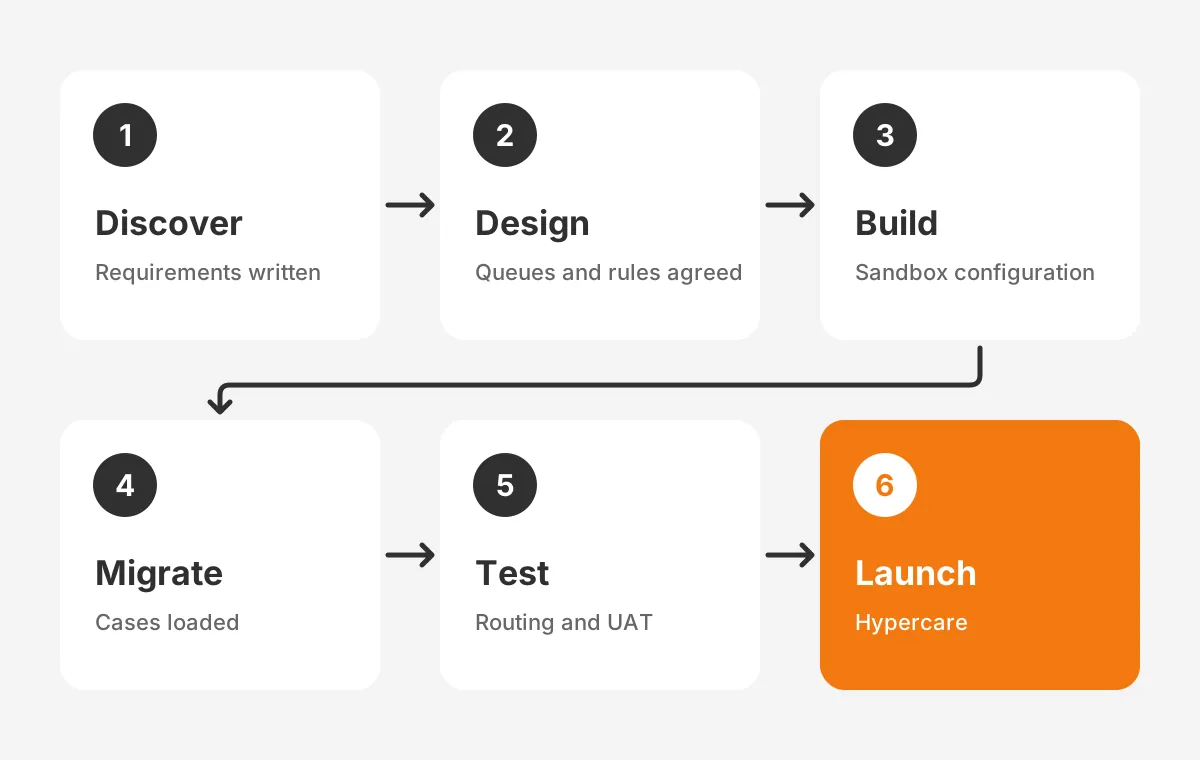
The list doubles as a service cloud implementation checklist. In a Salesforce Service Cloud implementation, each phase ends with a named approver, a date and open risks.
Teams that also run sales on Salesforce can reuse decisions from a Salesforce Sales Cloud implementation. Account structure, contact rules and security roles should match across both clouds.
Who Should Own Each Phase?
Every Salesforce Service Cloud implementation needs five named roles before discovery starts. Small teams can combine roles, but each still needs one name.
- Executive sponsor: approves scope, budget and the go-live date.
- Support operations lead: owns requirements, service tiers and sign-offs.
- Salesforce admin: builds and documents the configuration.
- Team leads: test routing and approve macros for their queues.
- Data owner: approves mapping and reconciles the migrated records.
A partner can supply the solution architect and developers. The client roles cannot be outsourced, because only the support team knows its own exceptions.
In What Order Should You Configure Service Cloud?
Configure Service Cloud in dependency order: security first, then the case model, then queues, routing, service levels and channels. A channel that goes live before its queue exists sends cases nowhere.
How to enable Service Cloud in Salesforce starts with licences. An admin assigns Service Cloud user licences in Setup, then works through Service Setup in this order.
- Security: profiles, permission sets and roles for agents, team leads and managers.
- Case model: record types, status values, required fields and page layouts.
- Queues: one queue per team or skill group that will own work.
- Routing: case assignment rules and Omni-Channel routing settings.
- Service levels: entitlements, entitlement processes and milestones.
- Channels: Email-to-Case and Web-to-Case, then phone or chat.
- Agent tools: the Salesforce Service Console, macros, quick text and knowledge articles.
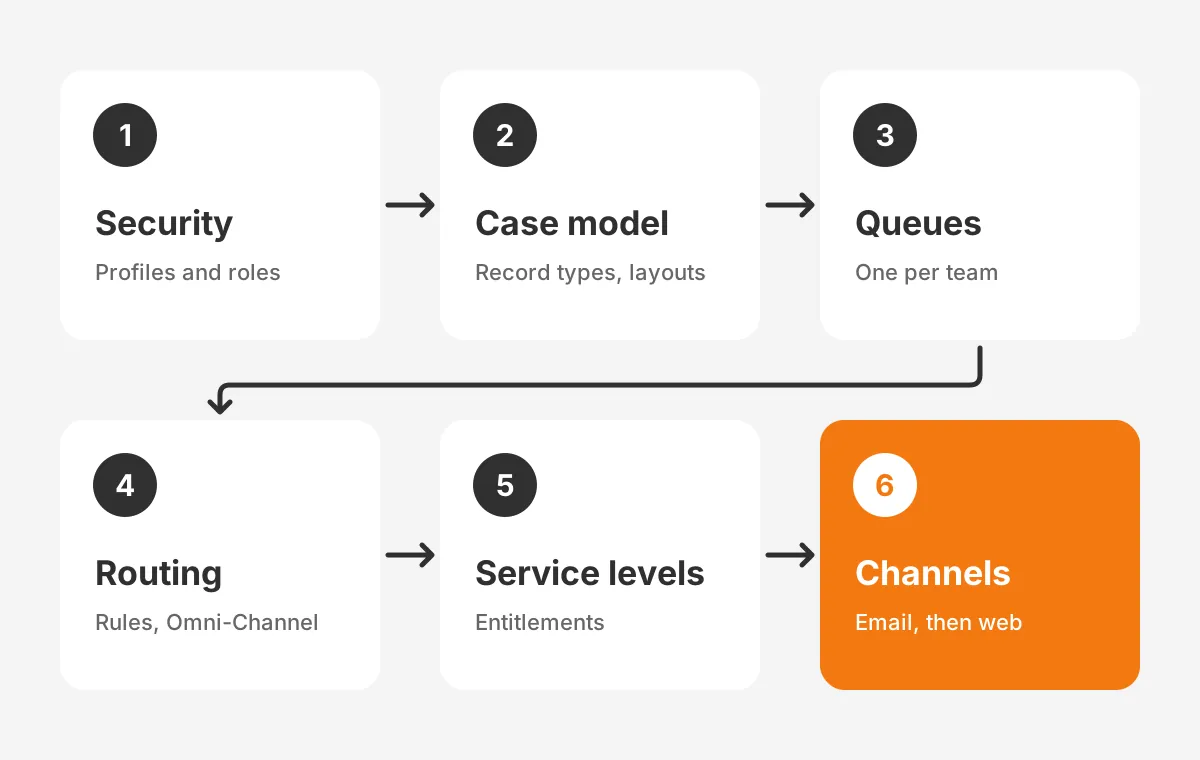
This salesforce service cloud setup order keeps every build step testable. A Salesforce Service Cloud implementation built this way tests routing with internal emails first. No customer sees the new channel until those tests pass.
The service cloud admin should record each setting in a design document. Unboxx keeps that document current in its Salesforce CRM services projects. Future changes depend on knowing why each rule exists.
Which Integrations Belong in the First Release?
The first release of a Salesforce Service Cloud implementation should include only the integrations agents need on day one. Each extra connection adds design, testing and failure points.
- Email: the support mailboxes behind Email-to-Case.
- Sales Cloud: shared accounts and contacts, so agents see deal history.
- ERP: order, shipment and invoice status, read-only at first.
- Slack: case alerts for team leads, included in the Core edition per the pricing page.
Phone systems, billing write-backs and product telemetry can follow in a later release. The CRM integration services page describes how Unboxx scopes each connection.
How Should Cases Reach the Right Agent?
Cases reach the right agent when each channel creates a case and each case lands in a queue. Routing then assigns it by capacity or skill. Salesforce case management depends on that chain working without manual forwarding.
Email-to-Case setup converts each support email address into cases. Web-to-Case setup does the same for a form on the company website. Both should set the case origin, so reports can compare channels.
Case assignment rules then send each case to a queue by product, region, customer tier or language. Escalation rules reassign or alert when a case stays untouched past a set time.
Omni-Channel routing pushes queued work to available agents. The Salesforce Help guide to Omni-Channel describes two models: routing to a queue and routing to a skill.
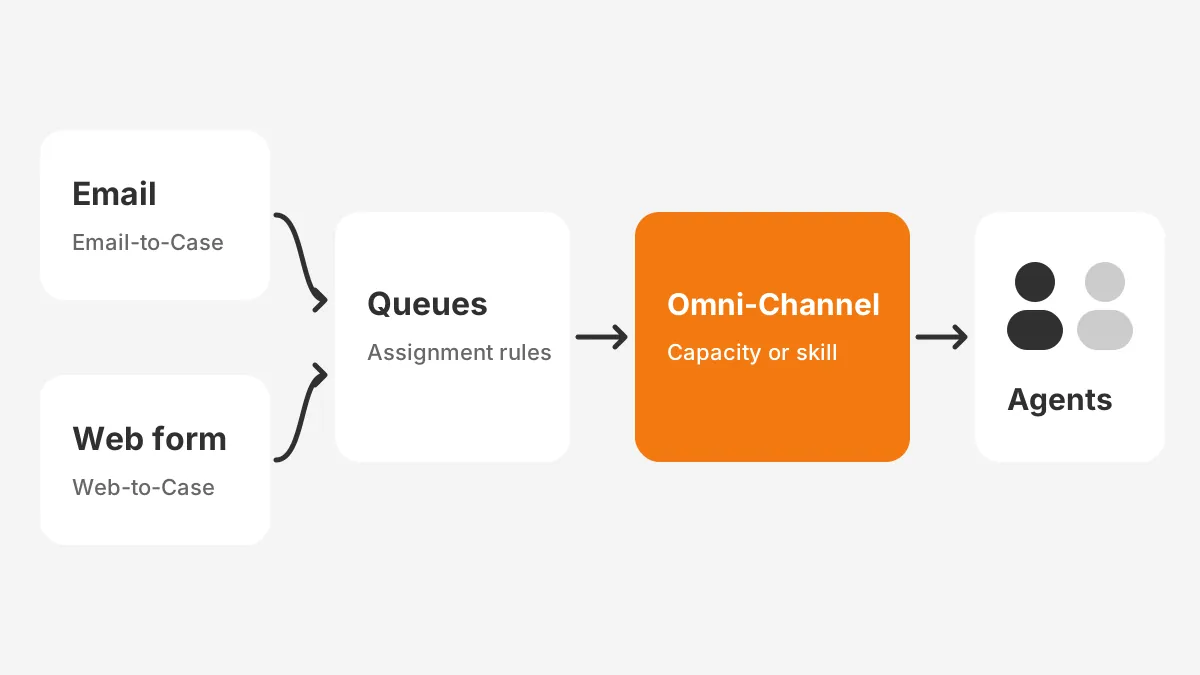
Queue-based routing suits teams where any agent in a group can solve any case in that queue. Skills-based routing suits teams where language, product knowledge or certification decides who can help.
How to set up Omni-Channel routing in practice: define presence statuses and set agent capacity. Then link queues or skills to routing configurations. Start with queue-based routing in a first Salesforce Service Cloud implementation, and add skills once volumes justify it.
Macros and quick text cut repeat typing for common replies. Salesforce Knowledge gives agents approved answers, and the same articles support case deflection through the self-service help center.
When Should Phone and Chat Join?
Phone and chat should join after email and web routing run cleanly for two to four weeks. Live channels need presence, capacity and staffing rules that email does not test.
Phone needs a telephony integration, often called CTI, that logs calls as cases or activities. Chat needs agents who can handle two or more conversations at once. Add each channel to a Salesforce Service Cloud implementation as its own mini-project with routing tests.
How Do Entitlements and Milestones Enforce SLAs?
Entitlements and milestones turn each service level agreement into timers on the case. Salesforce defines entitlements as "units of customer support", such as phone support or web support, in its Entitlements help article.
The same article says entitlements can attach to accounts, assets, contacts and service contracts. An entitlement process is a timeline with every step agents must complete to resolve a record. Milestones are the timed steps inside that process.
How to set up entitlements in Salesforce: enable Entitlement Management, then create the entitlement process and add milestones. Finally, attach entitlements to customer accounts. Add milestone fields to the case page layout so agents see the clock.
The table below is an example design for three tiers. The targets are assumed figures for illustration, not benchmarks.
| Tier | First response milestone | Resolution milestone | Action when missed |
|---|---|---|---|
| Standard | 8 business hours | 5 business days | Alert the team lead |
| Priority | 2 business hours | 2 business days | Alert lead and move to priority queue |
| Premium | 1 hour, 24x7 | 1 day | Alert support manager and account owner |
Service contracts suit customers with two or more entitlements under one agreement. Keep the first version small, because each extra tier adds test cases and reporting work.
How Do You Migrate Historical Cases?
Migrate historical cases after accounts and contacts load, because each case needs a parent record. Service cloud data migration usually moves open cases in full and closed cases selectively. Plan historical case migration as its own workstream inside the Salesforce Service Cloud implementation.
- Clean the source data first, using a CRM data cleansing pass on accounts and contacts.
- Map source statuses and categories to the new status values and record types.
- Load accounts, then contacts, then cases, keeping the legacy ID in an external ID field.
- Load case comments, emails and attachments against the new case IDs.
- Reconcile record counts by status and by year against the source system.
Decide how much history agents need before mapping starts. The answer sets the load volume, the test effort and the archive plan. One workable rule is to load two years of closed cases and archive the rest. Data Loader handles volumes in the hundreds of thousands.
Switch off assignment rules, escalation rules and email alerts during the load. If they stay on during a Salesforce Service Cloud implementation, every imported case triggers routing and customer emails. A service cloud migration from another help desk follows the same order.
How Should You Test Routing Before Go-Live?
Test routing with scripted cases that cover every channel, queue, tier and failure path. Run the scripts in a full sandbox where the configuration matches production.
| Test case | Input | Expected result |
|---|---|---|
| Email to support address | Email from a known contact | Case created, linked to contact, origin Email |
| Web form, unknown sender | Form with new email address | Case created, flagged for contact match |
| Premium customer case | Case on a premium account | Premium entitlement and milestones applied |
| Missed first response | Case left untouched past target | Milestone violation and lead alert |
| Agent at capacity | New case while agent is full | Case waits in queue, no assignment |
Service cloud user acceptance testing then puts real agents in front of the console for a week of sample work. Their feedback catches layout and macro problems that scripts miss. Fix those items before training starts, so agents learn the final screens.
Agree exit criteria before testing starts. A workable rule is zero open critical defects and every routing script passed twice in a row. Record the results, because the test log becomes the baseline for later changes to the Salesforce Service Cloud implementation.
How Do You Train Agents for Go-Live?
Train agents by role, in the sandbox, with their own case types. Separate sessions of about two hours per role keep each group on the screens it will use.
- Agents: console navigation, case updates, macros, knowledge search and milestone timers.
- Team leads: queue monitoring, reassignment, escalation alerts and the support dashboard.
- Managers: service level reports, backlog trends and change requests.
Name one super user per team for the first month. That person answers routine questions and logs defects, which keeps the Salesforce Service Cloud implementation team focused on fixes.
Which Service Metrics Prove the Project Worked?
First response time, first contact resolution, average handle time, backlog age and customer satisfaction score prove whether the project worked. Capture a baseline for each before go-live, or no comparison is possible.
- First response time tests routing and milestones.
- First contact resolution reveals gaps in the knowledge articles.
- Average handle time measures whether the console, macros and layouts save effort.
- Backlog age signals when queue sizes no longer match staffing.
- Customer satisfaction score tells you whether customers notice any change.
Build these reports and a support dashboard during the build phase, not after launch. Review them weekly during hypercare and monthly after that. Set targets after four weeks of live data. The first weeks of a Salesforce Service Cloud implementation include training effects.
How Long Does a Salesforce Service Cloud Implementation Take?
Partner guides that rank for this topic quote 6 weeks to 6 months for a Salesforce Service Cloud implementation. Scope drives the range: channels, service tiers, integrations and data volume add time.
The worked example below uses assumed figures. It describes a 30-agent B2B support team with email and web channels, three tiers and one ERP link.
- Weeks 1 to 2: discovery and requirements.
- Weeks 3 to 4: design and sign-off.
- Weeks 5 to 8: build in a sandbox.
- Weeks 8 to 9: data migration rehearsal and final load.
- Weeks 10 to 11: system testing and user acceptance testing.
- Week 12: service cloud go-live, followed by hypercare.
This service cloud implementation timeline grows when phone, chat or field service join the first release. Teams can phase those channels into a second release instead. A phased Salesforce Service Cloud implementation also spreads training load across two smaller launches.
What Drives Service Cloud Implementation Cost?
Five lines drive service cloud implementation cost: licences, partner services, data work, integration and training. Licence cost follows the list prices above. Partner fees depend on scope and the rate card.
In the worked example, licences for 30 Core seats total $70,200 a year at list price. The other four lines depend on the partner, the data quality and the number of integrations. Ask each partner to price them separately, so quotes can be compared line by line.
What Mistakes Delay a Salesforce Service Cloud Implementation?
Four planning mistakes delay a Salesforce Service Cloud implementation, and none of them is technical.
- Building channels before queues and routing rules are agreed.
- Copying every legacy status and category into the new case model.
- Designing five service tiers when contracts only need two.
- Skipping the routing test scripts because email works in a demo.
Each one creates rework after go-live, when changes are slower and riskier. A firm design sign-off in week 4 guards against all four.
After launch, a Salesforce managed services plan can cover admin changes, new queues and release updates.
Frequently Asked Questions
How to implement Salesforce Service Cloud for small teams?
Start a small Salesforce Service Cloud implementation with one channel, one queue per team and one tier. Service Cloud for small business works best with queue-based routing and Email-to-Case first. Add web forms, skills-based routing and extra tiers once agents use the console. A small first release cuts testing time.
Do you need a Service Cloud consultant?
A Service Cloud consultant helps when the project includes entitlements, multi-team routing, data migration or ERP integration. A capable in-house admin can handle a single-queue setup. A service cloud implementation partner adds tested templates, migration tools and experience with common routing and service level mistakes.
Where does Agentforce for Service fit in?
Agentforce for Service fits after the Salesforce Service Cloud implementation has stable cases, queues and knowledge articles. AI agents answer from the knowledge base and hand cases to human queues. Salesforce lists the full Agentforce for Service suite in the Max edition. Pilot it on one simple case type.
What are Service Cloud best practices for knowledge?
Write knowledge articles from the top 20 case reasons first, and assign an owner to each article. Link articles to cases so usage shows which answers work. Review low-rated articles monthly. The Salesforce Knowledge help guide covers the setup options.
Can Service Cloud handle customer support automation?
Yes. Salesforce Flow automates case updates, notifications and follow-up tasks, while escalation rules and milestones handle time-based actions. Start with automation that removes manual forwarding and status changes. Keep each flow small and documented, so the service team can change rules without breaking routing.
Is Your Team Ready for Salesforce Service Cloud Implementation?
A team is ready for Salesforce Service Cloud implementation when it can name its channels, queues, tiers and metrics. If those answers are unclear, discovery is the first job. A Salesforce customer communication success story shows the kind of outcome a planned project targets.
Unboxx plans, builds and supports Service Cloud projects for B2B companies. To review your scope, schedule a consultation with the Unboxx team.
Let's create something out of this world together.
Have a project in mind? Contact us for expert design and development solutions. Let's discuss how we can help grow your business.
Ready to Unboxx Your Potential?
Build smarter systems. Automate faster. Scale confidently.