

A customer types "where is my order" into your Salesforce chat. The case lives in the CRM, but the sales order, shipment and invoice sit in the ERP.
An agent that sees only Salesforce data will guess. In MuleSoft's 2026 Connectivity Benchmark Report, 82% of IT leaders named integration among their biggest AI challenges.
AI agents Salesforce ERP integration gives an agent such as Agentforce governed, read-only access to ERP order data. Done well, the agent answers customer order status questions with facts and hands off the rest. What follows is the checklist, a data map, five connection patterns and a four-stage test plan.
Key Takeaways
- An order status agent needs read-only ERP data, verified customer identity and a clear handoff rule before launch.
- Most teams expose one governed order status API instead of letting the agent call raw ERP tables.
- Testing in a full-copy sandbox with masked data catches wrong answers before customers see them.
What Does AI Agents Salesforce ERP Integration Mean?
AI agents Salesforce ERP integration connects a Salesforce AI agent to the ERP holding order, shipment and billing records. The agent reads those records through approved actions and writes an answer in plain language. It does not copy the ERP into the CRM by default.
The classic first use case is WISMO, short for "where is my order." It is a frequent question in B2B and retail service queues. The answer depends on three facts: the order line status, the shipment tracking number and the promised date. All three usually live outside Salesforce.
A typical AI agents Salesforce ERP integration has four parts. Agentforce holds the topics and instructions. Salesforce Flow, Apex or MuleSoft actions fetch data. An ERP such as NetSuite, SAP, Microsoft Dynamics 365 or Odoo returns the facts. Service Cloud logs the conversation as a case.
Salesforce publishes a related pattern. Its 2025 Admins blog example uses two autolaunched flows. One starts an ERP job and returns an execution ID. The other checks that ID and reports "in progress", "success" or "failed" back to the agent.
That split between starting work and checking status is the core of most designs. The agent never touches ERP screens or tables.
It calls a narrow action, receives structured fields and turns them into a sentence. Every AI agents Salesforce ERP integration should follow that shape. For wider context, see the Salesforce ERP integration guide and the guide to integrations within Salesforce.
This differs from an older order tracking chatbot. A scripted bot follows fixed menus and fails on unusual wording. An Agentforce service agent reads the question, picks the right action and explains the result. The AI agents Salesforce ERP integration is what gives that agent real order facts to explain.
Why Do Order Status Questions Need ERP Data?
Order status questions need ERP data because the ERP is the system of record for fulfilment. Salesforce knows the account, the contact and the opportunity. The ERP knows whether the warehouse picked the order, which carrier took it and whether the invoice posted.
Copied data goes stale fast. A nightly sync can show "pending" for an order that shipped at 9 a.m. An AI customer service agent that repeats that stale value creates a second contact and a frustrated buyer. Real-time order status, or a sync measured in minutes, avoids that failure.
The business case is growing. Gartner predicted in March 2025 that agentic AI will resolve 80% of common customer service issues by 2029. Gartner tied that shift to a 30% cut in operational costs.
The gap is connection. A 2025 Salesforce survey found 80% of businesses cite data integration as a major blocker to AI adoption. The same report says only 29% of apps are connected inside the average organisation. AI agents Salesforce ERP integration closes that gap for one high-volume question first.
Order status makes a sensible first scope for AI agents Salesforce ERP integration. Customers ask it often, the answer is factual, and the ERP already stores it in fields. Each AI agent order status reply can be checked against the ERP record, which makes accuracy measurable from day one.
What Data Does an AI Agent Need?
An AI agent needs the customer's identity, the order header, the line status, the shipment details and the billing state. Anything beyond that list raises risk without improving the answer. Start narrow, then add fields when a real question needs them.
The table below maps each field to its usual home. Field names differ by ERP, so treat it as a starting map for your own systems.
| Data the agent needs | Usual system | Why the agent needs it |
|---|---|---|
| Account and contact | Salesforce | Confirms who is asking |
| Open case and channel | Service Cloud | Logs the conversation |
| Sales order header and lines | ERP | Gives order and line status |
| Shipment tracking number and carrier | ERP or carrier system | Shows where the parcel is |
| Inventory availability | ERP | Explains backorders and dates |
| Invoice and payment status | ERP | Answers billing follow-ups |
Each field has one owner system. The AI agents Salesforce ERP integration reads it from that owner and never mixes two versions of one value. That rule prevents the agent from quoting a CRM date that disagrees with the ERP.
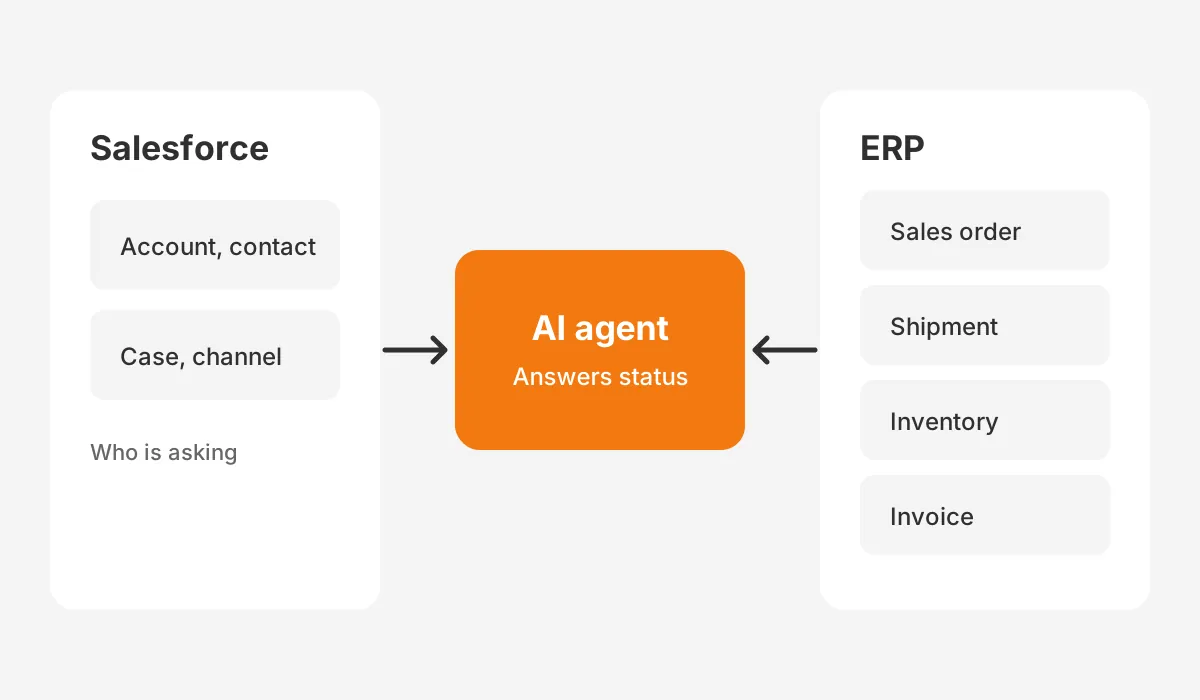
ERP data quality for AI matters as much as access. Duplicate orders, blank tracking fields and old status codes all produce wrong answers. Run a short profile on 200 recent orders before launch, and fix the fields the agent will read first.
What Belongs on the Prerequisites Checklist?
The prerequisites checklist covers data, access, identity, behaviour and ownership. Teams that skip it usually stall in testing. Use this order status integration checklist before any build work starts:
- Name the questions in scope, such as order status, delivery date and invoice copy.
- Confirm the ERP order API, or plan MuleSoft RPA if the ERP has no API.
- List the exact fields each answer needs and their owner system.
- Create a service identity with OAuth 2.0 and read-only ERP access.
- Define how the agent verifies the customer before sharing order details.
- Set the human handoff rules, including disputes, refunds and missing data.
- Agree latency targets, for example a reply within five seconds.
- Name an owner for prompts, actions and the audit log.
Skipping any item has a cost. Without identity rules, order data leaks to the wrong person. Without handoff rules, customers loop. An action with no owner can stay broken for weeks.
These ERP integration prerequisites also set the AI agent tool requirements. If the ERP has an order status API, the build is mostly configuration. If it has none, the Admins blog example shows MuleSoft RPA entering data through the ERP screen instead.
A 2026 CData deployment guide adds a readiness test. It asks whether fields are named consistently, whether access works without admin credentials and whether audit logging exists. A "no" to any of these questions delays the AI agents Salesforce ERP integration until it is fixed.
Write the answers down in one page for the AI agents Salesforce ERP integration. That page becomes the AI agent prerequisites checklist your security, ERP and CRM owners sign before the build. It also becomes the scope document for anyone you hire, such as an Agentforce implementation partner.
Which Integration Pattern Should You Choose?
Choose the pattern by your ERP's API maturity, your latency target and the number of systems involved. Five patterns cover most cases.
| Pattern | Best fit | Main trade-off |
|---|---|---|
| Salesforce External Services with Named Credentials | One ERP with a clean REST API | Little central API management |
| MuleSoft API-led connectivity | Two or more ERPs, or strict governance | Extra licence and design time |
| Replicated objects through a connector | NetSuite or Odoo with an AppExchange app | Data can lag the ERP |
| Data Cloud zero copy | Large analytics and service data sets | Setup effort before the first answer |
| Model Context Protocol tools | Agents built outside Salesforce as well | Newer standard, fewer controls in place |
MuleSoft API-led connectivity uses three layers. Salesforce Architects describe a System API over each ERP. A Process API such as "Process Order" sits above it, and an Experience API shapes data for each channel.
The agent calls the Process API and skips the backend detail. Unboxx has worked on this kind of link before, helping a roadside assistance provider connect Salesforce and Odoo ERP.
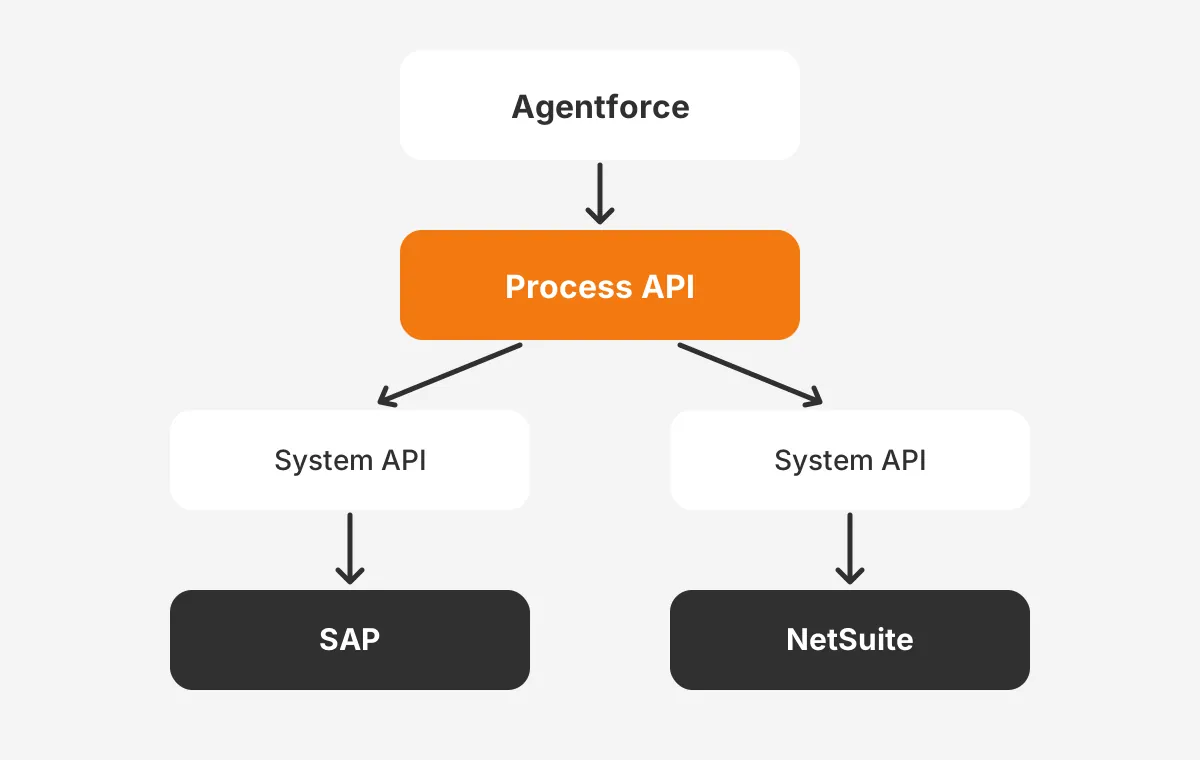
A single ERP with a documented order status API rarely needs middleware. Salesforce External Services imports the OpenAPI file, and Named Credentials store the OAuth details. The AI agents Salesforce ERP integration then runs through a Flow action with no custom code.
Replication suits teams already syncing ERP data into Salesforce objects. NetSuite Agentforce connectors on the AppExchange copy sales orders and payment data into Salesforce. The agent queries those objects directly, so check the sync interval against your real-time order status target.
Grounding works the same way in every pattern. The agent uses retrieval-augmented generation: it fetches the order record first, then writes its answer from that record. In AI agents Salesforce ERP integration, the ERP response is the only source the agent may quote for order facts.
An SAP Salesforce integration shows why the Process API layer helps. SAP may split one order across deliveries and billing documents. The Process API joins them into one status before the agent sees anything, which keeps the agent's instructions short.
Whatever the pattern, keep the ERP order API read-only for the first release. Read-only ERP access limits the damage of a bad prompt to a wrong sentence, not a changed order. Middleware and API management add rate limits and logging on top.
How Should Agentforce Actions Call the ERP?
Agentforce actions should call the ERP through one narrow action per question, wrapped in a topic with clear instructions. In Agent Builder, a topic groups the instructions and the actions the agent may use. Agentforce topics keep the order status agent focused on that job.
A sound design has three actions. "Verify customer" matches the email or account number to a Salesforce contact. "Get order status" takes an order number and returns status, promised date and tracking number. "Create handoff case" opens a Service Cloud case with the transcript.
Salesforce Flow actions are the default building block for AI agents Salesforce ERP integration. A Flow can call External Services, a MuleSoft API or an Apex class. Apex suits complex parsing, such as merging line statuses from SAP into one summary sentence.
Instructions matter as much as code. Tell the agent to quote only returned fields. Ask it to give dates in the customer's time zone. Make it hand off when a field is blank. These rules turn the AI agent tool requirements into predictable behaviour.
MuleSoft for Agentforce adds two shortcuts. The API Catalog lists approved APIs in one place. Topic Center lets architects define topics and actions while designing the API. Both cut the gap between the ERP team and the CRM team.
Agentforce for order management can later add write actions, such as changing a delivery address. Hold those until the read-only AI agents Salesforce ERP integration has run cleanly for a full quarter. For build detail, the Agentforce implementation guide covers planning, building and launch.
How Do You Secure AI Agents Salesforce ERP Integration?
You secure AI agents Salesforce ERP integration with least privilege, verified identity, masked data and full audit logging. Together these controls keep the agent from showing one customer's order to another.
Start with least privilege. In an AI agents Salesforce ERP integration, the service identity reads the order status API and nothing else. Role-based access control in the ERP enforces the same limit, so a stolen token still cannot change orders.
Limit the fields, too. The same Salesforce 360 blog post describes API management that exposes 50 of an API's 100 fields to an agent. Apply that rule to the ERP order API, and never return pricing or margin fields an answer does not need.
AI agent identity verification comes before any order detail. Match the logged-in Experience Cloud portal user, or ask for the order number plus the billing postcode. The agent should refuse politely when the two values do not match the ERP record.
The Agentforce Trust Layer adds data masking for card numbers and other personal data. It also applies zero data retention, so external models do not store customer data. These AI agent security controls sit on top of your own rules, not in place of them.
Audit logging is the last control. Log the agent identity, the action called, the order number and the result for every reply. When a customer disputes an answer, the log shows exactly what the ERP returned and when.
How Do You Test AI Agents Salesforce ERP Integration?
You test AI agents Salesforce ERP integration in four stages. They are a prompt library, offline evaluation, sandbox evaluation and a live pilot. Each stage has a pass mark. The agent moves forward only when it meets that mark.
- Build a prompt library of 100 real customer questions taken from past cases.
- Run offline evaluation against known answers and score accuracy per question type.
- Run the agent in a full-copy sandbox with masked ERP and CRM data.
- Pilot with one region or channel, then widen after two clean weeks.
Salesforce recommends a full-copy sandbox because it duplicates production. Data Mask then replaces personal data with realistic values. Its team also stress-tested an internal agent with 1,000 simultaneous requests and tried malicious inputs before release.
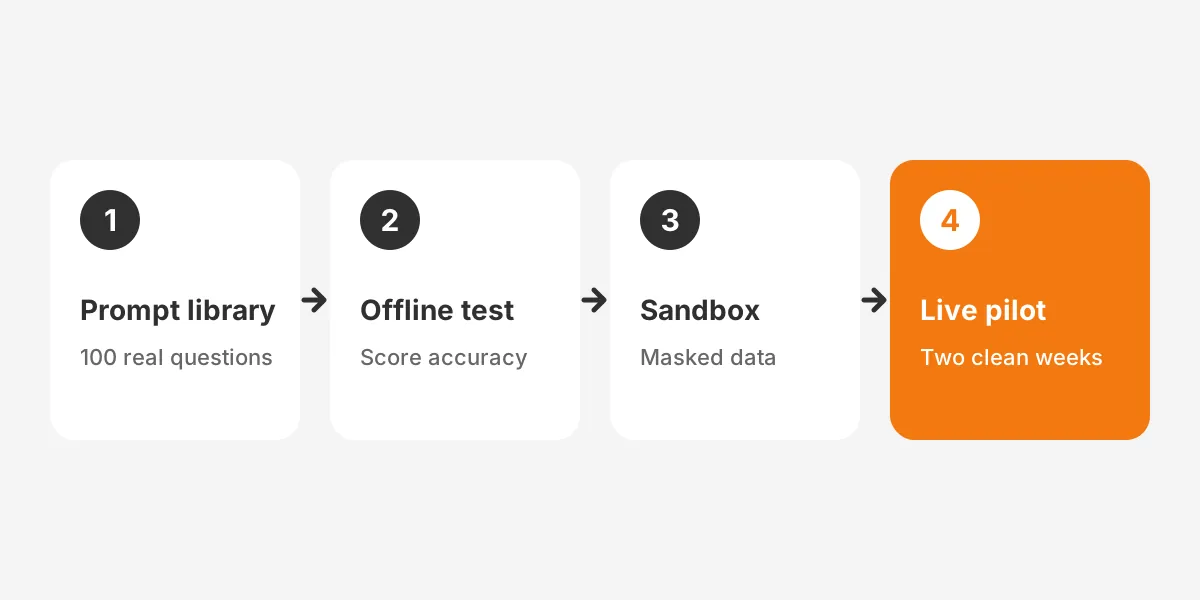
Testing AI agents Salesforce ERP integration needs fixed targets. Measure four numbers at each stage: answer accuracy, response time, handoff rate and blocked out-of-scope requests. A worked example, using assumed figures, shows how the marks work. A team sets 95% accuracy, five seconds and a 15% handoff ceiling.
In that example, the sandbox run scores 91% because 9 of 100 answers quote a stale shipment date. The fix is to read tracking data from the carrier field, not the order header. The rerun scores 97%, and the pilot begins.
Keep the human handoff path in every test. An AI agent human handoff passes the transcript and order number to a person. The customer never repeats the question.
How long does it take to build an AI agent like this? With a clean order status API, plan four to eight weeks from checklist to pilot. Without an API, add the time to build MuleSoft RPA or a new endpoint. These ranges are planning estimates, not benchmarks.
How Do You Measure Results After Launch?
You measure results by comparing resolved order status conversations against the cases agents handled before launch. Pick the baseline month before go-live. Then track the same four numbers every week, split by channel and by question type.
The first number is containment: the share of order status conversations closed without a person. The second is accuracy, checked by sampling 50 transcripts a week against the ERP. The third is handoff quality, measured by how often a person must ask the customer again.
The fourth number is cost per resolved question. Compare the agent's run cost with the handling time it replaced. A healthy AI agents Salesforce ERP integration shows rising containment while accuracy stays at or above its pass mark.
The logs also show where to act. A rising count of blank-field handoffs points to ERP data gaps. Slower replies usually trace back to the ERP order API. Repeated out-of-scope requests show demand for a new topic, such as returns or invoice copies.
Review these signals monthly with the ERP owner and the service lead. Each review should end with one change, such as a new field, a clearer instruction or a new action. Small, logged changes keep the AI agents Salesforce ERP integration predictable as volume grows.
Expansion follows the same checklist. Each new question, such as a return request, gets its own action, its own fields and its own test set. The AI agents Salesforce ERP integration grows one question at a time. Every answer stays traceable to an ERP record.
Frequently Asked Questions
Can Agentforce read ERP data without MuleSoft?
Yes, Agentforce can read ERP data without MuleSoft. Salesforce External Services with Named Credentials can call a documented REST order API through a Flow action. MuleSoft helps when you connect three or more ERPs or need central API management. It also reaches older ERPs that have no API.
Should the agent update orders in the ERP?
Not in the first release. Keep the agent read-only until its answers stay accurate for a full quarter. Then add one write action, such as an address change, with a human approval step. Write access raises the risk of a bad prompt from a wrong sentence to a changed order.
Which ERPs work with Salesforce AI agents?
Any ERP with an API or a connector can work with Salesforce AI agents. NetSuite, SAP, Microsoft Dynamics 365 and Odoo all have REST APIs or AppExchange connectors. Older on-premise ERPs may need middleware, MuleSoft RPA or a small custom endpoint before an agent can read order data.
How do you stop invented delivery dates?
Instruct the agent to quote only fields returned by the order status action. If the promised date or tracking number is blank, it should say so and hand off. Test this rule with prompts that ask for dates the ERP does not hold, then review the transcripts.
What does an order status agent cost to run?
Cost depends on your Agentforce pricing model, your conversation volume and any MuleSoft licence. Build cost depends on whether the ERP already has an order status API. Price the pilot first with real volume, then compare it to the cost of handling those cases by hand.
How Can Unboxx Help You Start?
Unboxx plans and builds AI agents Salesforce ERP integration projects for B2B teams. The work runs from the prerequisites checklist to the sandbox tests. Our AI-native CRM services cover Agentforce topics, actions and the ERP connection behind them.
If you want a second opinion on your data map or pattern choice, schedule a consultation. The team will review your order status questions and your ERP order API. You then get a read-only first release plan with clear pass marks for your AI agents Salesforce ERP integration.
Let's create something out of this world together.
Have a project in mind? Contact us for expert design and development solutions. Let's discuss how we can help grow your business.
Ready to Unboxx Your Potential?
Build smarter systems. Automate faster. Scale confidently.