
CRM for Tax Preparers: Intake, Filing Season and Security

Every January, a tax office reopens last year's inbox and starts chasing the same clients for the same documents. Paid preparers carry most of that load. Of 154.9 million individual returns e-filed in 2025, tax professionals sent 87.9 million, per IRS filing season statistics (2025).
A CRM for tax preparers keeps that work in one place. It shows who is coming back, what each client still owes the office, and who referred them.
This guide covers what the system tracks and how it differs from tax software. It also covers the security and consent rules, and when to set it up.
Key Takeaways
- A CRM for tax preparers manages clients, documents and follow-up, while tax software prepares and e-files the return.
- The FTC Safeguards Rule treats tax preparers as financial institutions, so the CRM belongs inside a written security plan.
- Section 7216 requires signed client consent before a preparer uses return data to market other services.
What Is a CRM for Tax Preparers?
A CRM for tax preparers is a shared client database for a tax practice. It tracks each person or business from first inquiry to filed return and rebooking. Contacts, document requests, deadlines, messages and referral sources all sit on one client record.
Ask what is a crm for tax preparers in practical terms. The answer is a client list that knows what happens next. A tax office crm shows that a client signed the engagement letter but has not uploaded a W-2. It also shows who has not returned since last April.
Tax client management software usually covers six jobs:
- Capturing new leads from the website, phone calls and referrals in one list.
- Sending the engagement letter and tax organizer, then tracking signatures.
- Collecting documents through a secure client portal instead of email.
- Moving each return through pipeline stages, from intake to filed.
- Sending email automation and SMS reminders for missing items and deadlines.
- Rebooking clients for next season and tracking who referred them.
A tax preparer crm serves enrolled agents, seasonal storefront offices and CPA practices with a tax department. Bookkeepers who add returns in spring can use it as a crm for bookkeepers too. Unboxx sets up CRM for accounting and tax firms around those same workflows.
The common thread is volume in a short window. A CRM for tax preparers earns its place when one person can no longer remember every open request. Missed follow-ups and repeat document requests are the warning signs.
How Does a CRM Differ From Tax Software?
Tax software prepares and transmits the return, while a CRM manages the client relationship around it. Professional tax software such as Drake Tax, UltraTax CS, Lacerte and ProSeries calculates the return and handles e-file. These packages are not built to chase a missing 1099 or ask for a review.
Clients often ask what software do tax preparers use, and the answer is three layers. The first layer is tax preparation software. The second is a client layer: a CRM or tax practice management software. The third is accounting, often QuickBooks, for practices that also keep books.
Tax practice management software such as TaxDome, Canopy and Karbon blends the client layer with workflow, billing and a portal.
A general CRM such as HubSpot, Salesforce or Zoho CRM is stronger at sales pipelines, marketing and custom reporting. An office can run one tool from each layer, or a platform that covers two.
| Layer | Example tools | Owns | Does not own |
|---|---|---|---|
| Tax preparation software | Drake Tax, UltraTax CS, Lacerte, ProSeries | Return calculation, forms, e-file | Lead tracking, reminders, marketing |
| Tax practice platform | TaxDome, Canopy, Karbon | Portal, workflow, e-signature, billing | Complex sales pipelines, custom objects |
| General CRM | HubSpot, Salesforce, Zoho CRM, Pipedrive | Leads, pipeline, campaigns, reporting | Return preparation, tax forms |
The decision rule is simple. Keep the return in tax software, and keep every conversation, document request and follow-up in the client layer. The same split applies in larger practices, as the guide to CRM for CPA firms explains for advisory work.
The split shapes the budget as well. A CRM for tax preparers adds cost only where it replaces manual work, such as reminders and status calls. It should never duplicate the return data that tax software already holds.
What Should a CRM for Tax Preparers Track?
A CRM for tax preparers should track the client, the return, the documents and the relationship as linked records. In a crm for tax preparers, linked records let one search answer most front-desk questions in seconds.
A workable data model for a tax client crm has five records:
- Client: name, filing status, household members, preferred contact method and referral source.
- Return: tax year, form type, preparer, pipeline stage, fee and filing date.
- Document request: item, due date, status and the portal upload that satisfied it.
- Communication: emails, texts, calls and portal messages logged against the client.
- Consent: signed Section 7216 consents with the product named and the date signed.
Add an extension tracking field to the return record. When a client files Form 4868, the CRM should move that return to an extension stage with the October deadline. Otherwise extensions disappear from view until the fall rush.
Referral tracking for tax preparers belongs on the client record too. A practice that knows which clients send new business can thank them. It can also see which sources bring higher fees.
Keep the data lean. Store document status and links in the CRM, and leave full returns and workpapers in tax software. Less tax return information in the CRM means less exposure if an account is compromised.
How Does the Filing Season Pipeline Work?
The filing season pipeline moves each return through fixed stages, and the CRM triggers the next action at every stage. A clear pipeline turns a busy inbox into a queue the whole team can read.
A typical crm for tax preparers uses these pipeline stages:
- Inquiry: the lead arrives from the website, a call or a referral.
- Engaged: the client signs the engagement letter for tax preparation and receives the tax organizer.
- Documents in: every requested item is uploaded and checked.
- In preparation: a preparer builds the return in tax software.
- Review and sign: the client reviews and signs Form 8879 by e-signature.
- Filed: the return is transmitted, and the CRM schedules a rebooking message.
In a crm for tax preparers, each stage carries one automated task. Workflow automation sends a reminder three days after a document request stalls, for example. It alerts the reviewer when a return reaches review, and it sends a thank-you and review request after filing.

Tax season client follow up is where the pipeline pays off. A report of returns stuck at the documents stage gives the front desk a daily call list. Sort it by days waiting, and the oldest requests get called first.
Appointment scheduling fits the same flow. A booking link in the engagement email lets clients pick a review slot. The meeting then lands on the client record.
Business returns need their own pipeline. Partnership and S corporation returns follow a March deadline and need different documents. A crm for tax preparers that mixes both in one list hides the earlier deadline.
How Should Document Intake and Client Portals Work?
Document intake should run through a secure portal that ties each upload to a request on the client record. Email attachments scatter tax documents across inboxes and make every mailbox a security risk.
A client portal for tax preparers should do four things well:
- Show the client a checklist built from last year's return and this year's organizer.
- Accept uploads from a phone camera as well as a computer.
- Mark each checklist item complete when the right file arrives.
- Require multi-factor authentication for every client login.
Tax document collection gets faster when the checklist is specific. "Upload your 2025 W-2 from each employer" draws a better response than "send your documents". Prefill the checklist from the prior-year return where the software allows it.
The client intake form for new clients should capture filing status, dependents, income types and prior preparer. That data sets the fee and the checklist before anyone opens tax software. It also flags complex cases, such as rental property or a business return, early.
Secure file sharing matters for outbound files too. Send the draft return and Form 8879 through the portal, not as an email attachment. E-signature inside the portal keeps the signed form attached to the right return.
The portal and the CRM must agree on status. A client may upload a 1099 at midnight. The CRM for tax preparers should then mark the request complete without staff action. Manual status updates fail first when the office is busiest.
Which Security Rules Apply to Tax Preparer CRMs?
Federal law treats tax preparers as financial institutions, so a CRM holding client data falls under the FTC Safeguards Rule. The IRS says tax professionals "are considered financial institutions and must implement a data security plan."
The IRS and Security Summit (2026) reminder states that tax professionals must keep a written information security plan. It lists four core steps:
- Designate one or more employees to coordinate the security program.
- Identify and assess the risks to customer information.
- Create, monitor and test safeguards for those risks.
- Select service providers that protect data, and require it by contract.
The vendor behind a crm for tax preparers is one of those service providers. Ask for its security documentation, and record the answer in the WISP. IRS Publication 5708 gives smaller practices a WISP template, and IRS Publication 4557 covers recommended safeguards.
The Tax Adviser (2023) summary of the amended rule adds specific controls. Firms must encrypt customer information they store or transmit. Multi-factor authentication should cover every user, including clients using a portal.
The same summary notes some requirements apply only to firms holding data on 5,000 or more customers. The IRS release adds a reporting duty. Covered firms must report security events affecting 500 or more people to the FTC, generally within 30 days.
For the CRM, that translates into five settings:
- Multi-factor authentication for staff and clients.
- Role-based access, so seasonal staff see only assigned clients.
- Encrypted storage for files and records.
- Audit logs that show who opened or exported a record.
- A written offboarding step that removes seasonal staff after April.
How Does Section 7216 Limit CRM Marketing?
Section 7216 bars preparers from using or disclosing tax return information without permission, which limits how a CRM can market. The IRS Section 7216 FAQ sets the core rule and the penalties.
The IRS defines tax return information broadly. It covers all information a preparer obtains "in connection with the preparation of returns." That includes data captured in a CRM during intake.
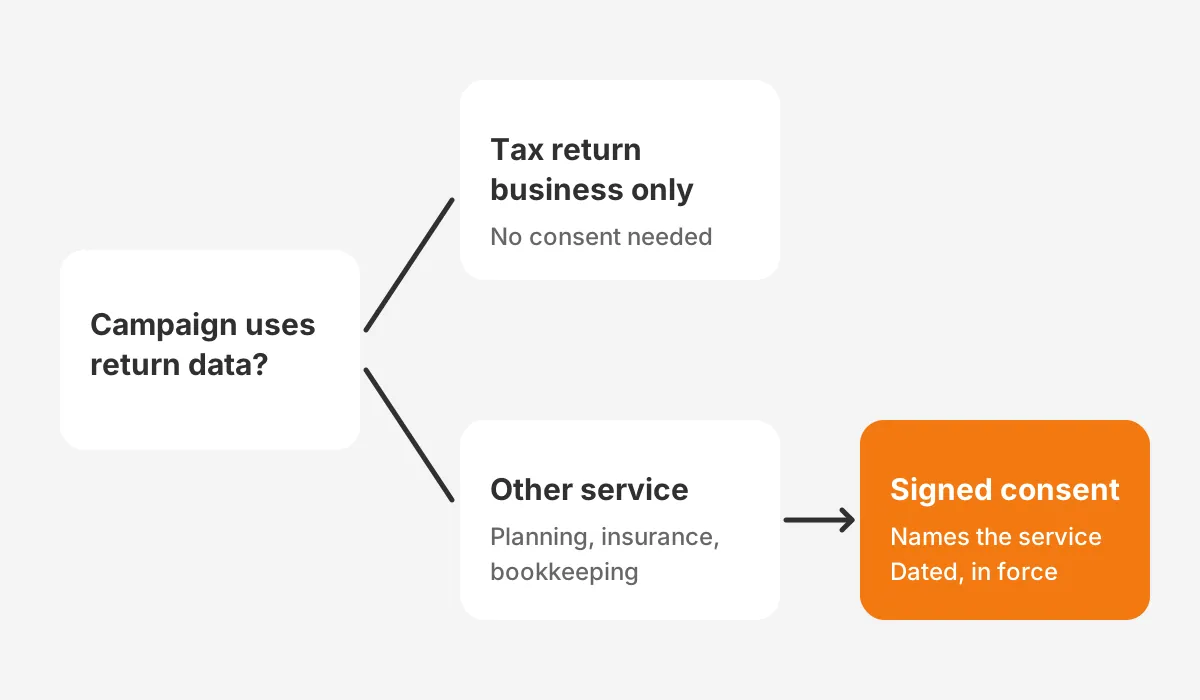
Some uses need no consent, such as soliciting tax return business. Other uses need advance signed consent from the client. Tax preparer marketing for financial planning, insurance or bookkeeping usually falls in that second group.
The consent rules shape the CRM setup:
- Consent must be signed and dated, on paper or electronically.
- It must identify the product or service the information will be used for.
- A consent with no stated period lasts one year from signing.
- A preparer cannot request solicitation consent after handing over the completed return for signature.
The penalties apply per violation. The FAQ cites a criminal fine of up to $1,000, up to a year in prison, or both, per violation. A civil penalty of $250 per violation also applies.
Build the rule into the crm for tax preparers. Store consent as a record with product, signature date and expiry, and filter campaign lists on it. Request consent during intake, well before the return is ready for signature.
A crm for tax preparers makes this check automatic. A campaign for bookkeeping services pulls only clients with a current consent naming bookkeeping. Everyone else stays off the list, and the CRM records why.
Which Reports Should a Tax Office CRM Run?
A tax office CRM should run five reports that answer daily and seasonal questions without a spreadsheet.
- Documents outstanding: returns waiting on client items, sorted by days waiting.
- Returns by stage and preparer: workload for each team member this week.
- Extensions open: returns on extension with the October deadline and missing items.
- Rebooking rate: last season's clients who have signed this season's engagement letter.
- Referral sources: new clients by source, with average fee per source.
The rebooking report drives client retention for tax preparers. In December, it lists every client who has not returned the engagement letter. The office can call those clients before they book elsewhere.
The workload report protects the April deadline. If one preparer holds 40 returns in review and another holds 10, the manager can rebalance before the final week. A crm for tax preparers makes that visible on one screen.
Good client management for tax preparers depends on reports people open. Five that staff check every week beat 20 that nobody reads. Add a new report only when a recurring question has no answer.
Which CRM for Tax Preparers Fits Your Practice?
The right CRM for tax preparers depends on office size, services sold beyond returns, and who will run it. No single product is the best crm for tax preparers in every office.
Use these decision rules when comparing a crm for tax professionals:
- Choose a tax practice platform such as TaxDome, Canopy or Karbon for a returns-first office.
- Choose a general CRM such as HubSpot or Zoho CRM when marketing and advisory sales drive growth.
- Choose Salesforce when a multi-office firm needs custom objects, complex permissions and deep reporting.
- Choose Pipedrive or a similar sales tool only if another tool already handles portals and security.
A crm for small tax firms with two to five staff usually fits a tax practice platform. One system covers portal, e-signature and billing, which keeps the security review short.
A growing crm for tax firms with bookkeeping and advisory lines often pairs the two. The tax platform runs returns, and a general CRM runs leads and campaigns. The accounting software integrations guide shows which client data should sync between systems.
Ask every vendor the same questions. Does it support client multi-factor authentication? Which tax software does it integrate with, in writing? Can it store consent records? How does it export data if you leave? A CRM requirements list keeps those answers comparable.
Weight the answers before demos start. Security and portal fit should outweigh marketing features for a returns-first office. A crm for tax preparers that fails the security questions should leave the shortlist, whatever its price.
When Should a Tax Practice Set Up a CRM?
A tax practice should set up a CRM between May and October. That window opens after the April deadline and closes when next season's engagement letters are due. A rollout during filing season competes with client work and rarely sticks.
A practical timeline for crm software for tax preparers runs four phases:
- May to June: list requirements, compare two or three tools and update the WISP.
- July to August: configure pipeline stages, portal checklists, templates and consent records.
- September: run data migration from spreadsheets and the old system, then test with five clients.
- October to December: train staff, finish extension returns, and send engagement letters for the next season.

Clean the data before it moves into the crm for tax preparers. Duplicate households and old addresses cause misdirected reminders on day one. The CRM data cleansing runbook covers deduplication and field rules.
Client onboarding in the new crm for tax preparers starts in December. Send each returning client a portal invitation and a short note on what changed. Seasonal staff then train on live records before the January rush.
Plan the budget in three lines: subscriptions per user, setup time and data migration. As an assumed example, a five-person office might budget 60 hours of setup across the summer. That figure is illustrative, not a benchmark.
Measure the result after the first season. Compare days from engagement to documents complete, returns filed by April 15, and the share of clients who rebooked. If all three improved, the CRM for tax preparers changed how the office works.
Frequently Asked Questions
Do tax preparers need a CRM?
An office that juggles client follow-up in inboxes and spreadsheets usually does. A CRM replaces them with one client list, document status and reminders. Solo practices can start with the portal inside a tax practice platform. They can add a CRM once marketing or advisory sales grow.
How much does a tax CRM cost?
Cost has three parts: per-user subscriptions, setup time and data migration. Vendor list prices change often, so request current quotes for your user count. Budget setup hours in the off-season, and count seasonal staff as users, since they need logins during filing season.
Can a CRM integrate with tax software?
Some can, but integrations vary by product and change each year. Ask each vendor which tax software it connects to, and what data moves. Where no connector exists, link records with a shared client ID. The return stays in tax software, and the relationship stays in the CRM.
How do tax preparers get more clients?
A CRM tracks referral sources, so the office can thank clients who send business. It also runs rebooking campaigns after filing and reminders before the season opens. Those two habits improve client retention for tax preparers, which costs less than winning new clients.
How is a CRM for accountants different?
A crm for accountants usually focuses on advisory sales and year-round services. A tax CRM centers on the filing season: organizers, document collection, signatures and extension deadlines. Firms offering both often run one system configured with separate pipelines for tax returns and advisory work.
How Should a CRM for Tax Preparers Start?
A CRM for tax preparers starts with three pieces: the pipeline, the portal checklist and the consent record. Have them live, along with the WISP update, before the first engagement letter of the season. For the full rollout, read the accounting firm CRM implementation plan.
Unboxx sets up HubSpot, Salesforce, Dynamics 365 and Odoo for professional services firms, including data migration and integrations. To plan a CRM for tax preparers before next season, schedule a consultation with the Unboxx team.
Let's create something out of this world together.
Have a project in mind? Contact us for expert design and development solutions. Let's discuss how we can help grow your business.
Ready to Unboxx Your Potential?
Build smarter systems. Automate faster. Scale confidently.