
HubSpot for SaaS: Data Model, Billing Sync, Tiers and Cost

A SaaS company earns most of its revenue after the first deal closes, yet most CRM setups stop at closed-won. SaaS Capital's 2025 retention research puts median net revenue retention at 102%. That figure covers private B2B SaaS companies with annual contracts of $25,000 to $50,000.
A 2-point margin leaves no room for missed renewals. HubSpot for SaaS works when the portal tracks subscriptions, product usage, trials and renewals as clearly as new deals. This guide covers the data model, billing sync, product signals, plan gates and yearly cost of HubSpot for SaaS teams.
Key Takeaways
- HubSpot for SaaS starts with a data model that links subscriptions, usage and renewals to each company.
- Billing sync with Stripe needs an Enterprise tier for subscriptions, because they land in custom objects.
- A 10-seat Sales Hub Professional team pays about $12,300 in year one at list price.
Is HubSpot for SaaS the Right CRM Choice?
HubSpot for SaaS fits B2B software companies that want marketing, sales and success on one database. The HubSpot Smart CRM holds contacts, companies, deals and tickets. Sales Hub, Marketing Hub, Service Hub and the HubSpot Revenue Hub add tools on top of that one record.
A recurring revenue business depends on that shared record. A customer success manager sees the same company record that sales used to close the deal. Marketing sees which accounts are up for renewal before it sends an upsell campaign.
Whether HubSpot is good for SaaS companies with complex billing depends on where billing lives. HubSpot can create subscriptions, but growth-stage SaaS teams often bill in Stripe or Chargebee already. The rest of this guide assumes billing stays there and HubSpot reads from it.
The fit is weaker in three cases. Usage-based pricing with millions of metered events is the first. Multi-entity revenue recognition and deep CPQ rules are the other two. Those teams keep a data warehouse or a billing system as the source of truth.
A HubSpot SaaS CRM also suits teams that lack a full-time admin. Its standard objects and workflow builder cover most early needs without code. For HubSpot for SaaS companies at an early stage, that lowers the cost of the first build.
Before you commit, list the five questions your revenue team asks each week. Examples include active trials, shrinking accounts and renewals due. If HubSpot for SaaS can answer each one from a single record, the platform fits. If an answer needs three systems, plan the sync first.
For a wider view of CRM options for software companies, see CRM for SaaS companies. It covers Salesforce and HubSpot builds, trial-to-paid conversion and Stripe or Chargebee billing links.
How Should You Model SaaS Data in HubSpot?
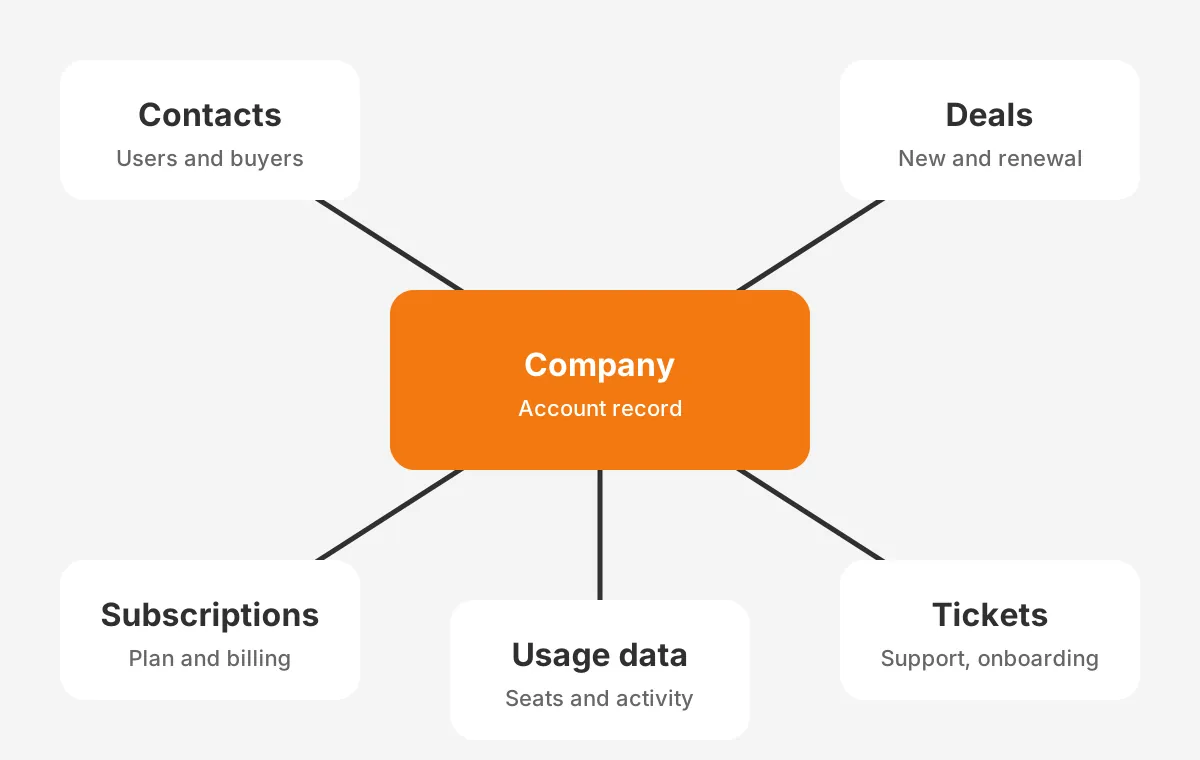
Model SaaS data in HubSpot around the company record, because contracts, usage and renewals belong to accounts. Contacts are users and buyers. Deals are new business, expansions and renewals. Subscriptions hold the recurring contract that billing creates.
A clear HubSpot for SaaS data model has six objects. Each one answers a different question for the revenue team:
- Contacts: who signed up, who uses the product and who signs the contract.
- Companies: the account that owns the workspace, plan and health score.
- Deals: new business, upgrades and renewals, each in its own pipeline.
- Subscriptions: plan, billing frequency, amount, status and next billing date.
- Tickets: support requests and onboarding tasks in HubSpot Service Hub.
- Custom objects: workspaces, licenses or usage snapshots that do not fit standard objects.
Keep product facts on the company record as properties. Examples include plan name, seats purchased, seats active, last login date and workspace ID. The workspace ID is the key that joins HubSpot records to your product database.
HubSpot custom objects need an Enterprise tier, according to the HubSpot Knowledge Base. On Professional, store usage as company properties and keep detailed event history in a data warehouse. The split holds until usage history itself has to drive sales tasks.
Which company properties should a SaaS portal hold?
The company record in HubSpot for SaaS needs a short list of properties with one owner each. The table below shows a starting set and where each value comes from:
| Property | Type | Written by | Used for |
|---|---|---|---|
| Workspace ID | Text | Product sync | Joining records |
| Plan name | Dropdown | Billing sync | Segments and reports |
| Seats purchased | Number | Billing sync | Expansion triggers |
| Seats active | Number | Product sync | Health and expansion |
| Current MRR | Currency | Billing or warehouse | Revenue reports |
| Contract end date | Date | Billing sync | Renewal deals |
Name properties with a clear prefix, such as "product_" for usage and "billing_" for subscription fields. The prefix keeps HubSpot for SaaS reports readable when the property list passes 200 fields. It also shows which system owns each value.
How Do HubSpot Subscriptions and Stripe Sync Work?
HubSpot subscriptions record recurring payments, and the Stripe integration feeds billing data into HubSpot. Subscriptions are available on all HubSpot plans. Line items with the same billing frequency, terms, start date and payment count share one record.
Recurring payments post to the subscription record, which links to its deals. Sales and success then have one place to read monthly recurring revenue, the next billing date and payment status. Payments must exceed $0.50, or the same value in the settlement currency.
The HubSpot Stripe integration syncs data in set directions. Customers sync both ways with contacts. Invoices and products sync one way into HubSpot. Stripe subscriptions and payment transactions sync one way into custom objects.
The custom object detail decides your tier. Because Stripe subscriptions land in custom objects, syncing them needs an Enterprise HubSpot subscription. A Professional portal still gets customers, invoices and products, but not the subscription object.
Can HubSpot handle recurring billing on its own? Yes, for simple plans. HubSpot payments and Stripe both run as payment processors for subscriptions. HubSpot lists migration from a third-party billing platform as not supported, so teams sync rather than migrate.
Keep subscription billing in Stripe or Chargebee when you price by usage, run prorations or bill from two entities. Use native HubSpot subscriptions when plans are flat, monthly or annual, and billed from one entity. In both setups, HubSpot integrations write billing data and reps only read it.
How Do You Get Product Usage Data Into HubSpot?
Product usage data reaches HubSpot through a direct API sync, a reverse ETL tool or an event pipeline. The right method depends on where product events live today. SaaS teams often store them in a data warehouse such as Snowflake or BigQuery.
To sync product usage data to HubSpot, follow these four steps:
- Pick 5 to 10 signals that drive action, such as activation, seats used and key feature use.
- Roll raw events up to account-level numbers in the warehouse, such as weekly active users.
- Sync those numbers to company properties with a reverse ETL tool such as Hightouch or Census.
- Trigger HubSpot workflows from property changes, not from raw events.
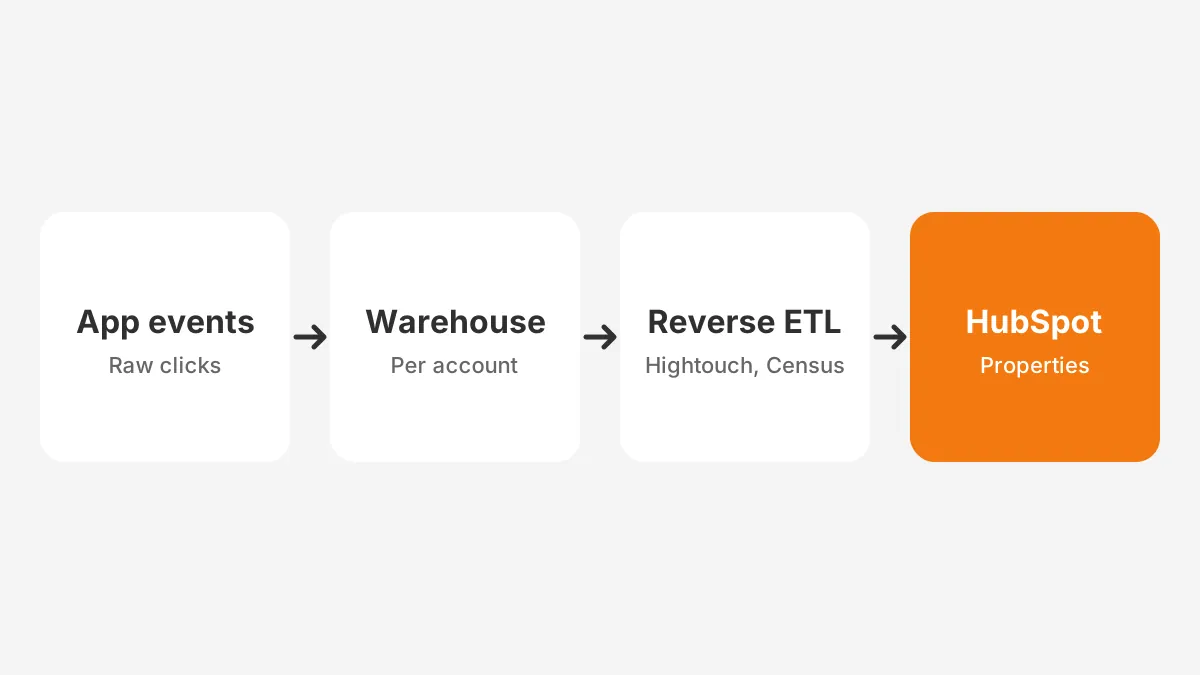
Raw clickstream data does not belong in HubSpot. It inflates storage, slows reports and rarely changes a sales action. A rep acts on a property such as "weekly active users", not on 10,000 page view events.
Smaller teams without a warehouse can post events through webhooks or the HubSpot API. It is faster to start and harder to maintain. Plan to move to a warehouse sync as event volume grows.
Check data quality after the first sync. Compare seat counts in HubSpot with the billing system for 20 accounts. Mismatches often point to a broken workspace ID join, so fix the join before building workflows.
Set a sync schedule that matches the action. Daily syncs suit health scores and renewal alerts. Hourly syncs suit trial scoring, where a sales reply within a day can decide the deal. HubSpot for SaaS teams rarely need real-time usage data in the CRM.
How Do You Track Free Trials and PQLs?
Track free trials in HubSpot with trial date properties, a trial lifecycle stage and a PQL score. A product qualified lead, or PQL, is a trial user whose product behavior shows buying intent.
A HubSpot trial to paid workflow follows this order in most HubSpot for SaaS portals:
- Create trial start date, trial end date and trial plan properties on the contact and company.
- Set the lifecycle stage to a custom "Trial" stage when the signup syncs.
- Score usage signals, such as invited teammates or a connected integration.
- Mark the company as a PQL when the score passes your threshold.
- Create a deal and assign an owner when a PQL appears.
- Send day-based emails only to trial users who are not yet active.
Product qualified leads in HubSpot work best with a short, tested rule set. A sample rule: three invited teammates plus one connected integration within seven days. Test the rule against last quarter's paid conversions before you route leads with it.
HubSpot lead scoring handles the scoring step. The Unboxx guide to HubSpot lead scoring covers point values and thresholds. Use product signals for the PQL score and keep marketing engagement in a separate score.

Measure free trial conversion by cohort, not by month. A cohort report groups trials by start week and shows how each group converts by day 14 or day 30. With cohorts, the effect of a new onboarding email or sales step shows up clearly.
Product-led growth teams should route PQLs fast. Sales-led growth teams can use the same model with demo requests as the entry point. For trial and onboarding emails, see marketing automation for SaaS.
How Should HubSpot for SaaS Handle Renewals?
HubSpot for SaaS should handle renewals in a separate renewal pipeline that opens 90 to 120 days before contract end. A workflow creates the renewal deal from the subscription or company record. It sets the amount from current recurring revenue.
Good renewal management needs four stages at minimum: upcoming, in review, committed and renewed or churned. Keep this HubSpot deal pipeline apart from new business. Mixing them distorts win rates and sales cycle reports.
Customer success teams also need a customer health score. Build it as a score property on the company record. Combine three signal groups: product usage, support tickets and billing status. A company with falling usage, urgent tickets and a failed payment needs a call this week.
HubSpot expansion revenue follows the same logic. When seats active reach 90% of seats purchased, a workflow can create an upgrade deal. Seat data becomes a task for the account owner, not a line in a quarterly spreadsheet.
HubSpot churn tracking closes the loop. Record a churn reason property on every lost renewal. After two quarters, a churn reason report shows whether onboarding, product gaps or pricing drive the churn rate.
HubSpot customer success teams work from the same company record. A Service Hub ticket view, the health score and the renewal deal sit on one screen. A success manager can prepare a renewal call from that screen without pulling exports.
Assign one owner per renewal stage. Customer success owns upcoming and in review. The account executive owns committed when price or terms change. Finance confirms renewed once the invoice is paid.
Which Reports Should a SaaS HubSpot Portal Include?
A SaaS HubSpot portal should include five core reports: MRR, net revenue retention, churn rate, trial conversion and renewal pipeline. HubSpot reporting can build each one from deals, subscriptions and company properties.
- Monthly recurring revenue and annual recurring revenue, by plan and by segment.
- Net revenue retention by quarter, using starting and ending recurring revenue per cohort.
- Logo churn and revenue churn rate, with the churn reason breakdown.
- Free trial conversion by signup cohort and by acquisition source.
- Renewal pipeline value for the next 120 days, by stage and owner.
Each report depends on clean inputs. MRR needs one recurring revenue value per company, written by billing or the warehouse. Hand-edited amounts drift away from billing and make the report unreliable.
Put the five reports on one dashboard for the weekly revenue meeting. Leaders then see new revenue, retained revenue and risk on one screen. Running HubSpot for SaaS this way replaces separate sales and success reports with one shared view.
Which HubSpot Plan Do SaaS Companies Need?
Start SaaS companies on Sales Hub Professional, and move to Enterprise once Stripe subscriptions need to sync. Professional unlocks sequences, forecasting and workflows. Enterprise adds custom objects and higher limits.
The table below maps common SaaS needs to the HubSpot tier that supports them:
| SaaS need | Starter | Professional | Enterprise |
|---|---|---|---|
| Trial and PQL properties | Yes | Yes | Yes |
| Workflows for trials and renewals | Limited | Yes | Yes |
| Native subscriptions record | Yes | Yes | Yes |
| Stripe subscriptions sync | No | No | Yes |
| Custom objects for usage or licenses | No | No | Yes |
| Required onboarding fee (Sales Hub) | None listed | $1,500 | $3,500 |
HubSpot Data Hub, formerly Operations Hub, adds data sync and custom field mappings for apps such as Stripe. Add it when two-way sync rules matter more than a basic integration.
The HubSpot Marketing Hub covers trial nurture, product announcements and webinar programs. Service Hub covers tickets, customer onboarding projects and feedback surveys. Buy each hub when a team owns its use, not in advance.
Review the tier choice once a year. Seat counts, Stripe sync needs and reporting gaps change as the company grows. A HubSpot for SaaS portal that fit at 10 sellers may need Enterprise objects at 40.
For a HubSpot for SaaS startup with one or two sellers, Starter can work for the first months. Move up before you build trial workflows, so they are not rebuilt after the upgrade.
What Does HubSpot for SaaS Cost Per Year?
HubSpot for SaaS costs from about $12,300 in year one for a 10-seat Sales Hub Professional team at list price. The HubSpot Sales Hub pricing page lists Professional from $90 per seat per month and Enterprise from $150. It also lists one-time onboarding fees of $1,500 and $3,500.
The worked example below uses those list prices and assumes 10 sales seats. It is an example, not a quote, and excludes Marketing Hub, Service Hub, Data Hub and taxes.
| Cost line | Professional (10 seats) | Enterprise (10 seats) |
|---|---|---|
| Seats per month | $900 | $1,500 |
| Seats per year | $10,800 | $18,000 |
| One-time onboarding | $1,500 | $3,500 |
| Year one total | $12,300 | $21,500 |
So how much does HubSpot cost for SaaS teams in year two? The onboarding fee drops away, leaving $10,800 on Professional and $18,000 on Enterprise. HubSpot seat pricing scales with each added seat, so model next year's hires too.
The gap between tiers in year one is $9,200 for this example. Compare it with the cost of building a custom Stripe sync on Professional. Someone also has to maintain that sync after launch.
Implementation work sits on top of license cost. The Unboxx HubSpot implementation guide breaks down phases, timeline and team for a typical rollout.
Where Does HubSpot for SaaS Fall Short?
HubSpot for SaaS falls short on deep usage-based billing, complex revenue recognition and high event volumes. Those jobs belong in billing tools such as Stripe or Chargebee and in a data warehouse. HubSpot should show their results, not run them.
Four limits come up most often in SaaS portals:
- Stripe subscription sync and custom objects need an Enterprise tier.
- Record, property and pipeline limits vary by tier, so check them before you model usage.
- MRR and ARR reports depend on clean subscription data, which HubSpot does not repair.
- Account-based selling across parent and child companies needs careful association design.
HubSpot vs Salesforce for SaaS is a common question at this stage. Salesforce suits teams with complex CPQ, two or more legal entities and an in-house admin. Teams running both systems can read the Unboxx guide to HubSpot Salesforce integration.
Moving to HubSpot for SaaS from another CRM adds a migration step. Map old deal stages to the new pipelines first, then import companies, contacts and open deals. Closed history can follow once the live pipeline works.
RevOps owners should plan reporting before the build starts. Unboxx used HubSpot RevOps automation to end manual revenue reconciliation for one client. The work depended on clean subscription and deal data.
Frequently Asked Questions
Is HubSpot good for SaaS startups?
Yes, HubSpot is good for SaaS startups that sell to businesses and want one database for marketing, sales and support. Start on Starter or Professional with trial properties and a simple pipeline. Move to Enterprise when you need custom objects or a Stripe subscriptions sync.
How do you track MRR in HubSpot?
Track MRR in HubSpot with subscription records or a recurring revenue property on deals and companies. Native subscriptions show billing frequency and amount. If Stripe bills customers, sync subscriptions on Enterprise or push MRR from your warehouse into a company property for reports.
What HubSpot plan do SaaS companies need?
A typical HubSpot for B2B SaaS setup starts on Sales Hub Professional for workflows, sequences and forecasting. Custom objects and Stripe subscription sync need Enterprise. Add Marketing Hub for trial nurture emails and Service Hub for tickets, customer onboarding and health tracking.
How do you build a HubSpot customer health score?
Build a customer health score in HubSpot as a score property on the company record. Add points for active usage and on-time payments. Subtract points for urgent tickets, falling logins and failed payments. Then trigger customer success tasks when the score drops below your threshold.
Can HubSpot handle usage-based pricing?
HubSpot can display usage-based pricing results, but it should not calculate them. Meter usage in your product or billing tool, such as Stripe or Chargebee. Then sync the billed amount and key usage totals into HubSpot properties, so sales and success teams see current numbers.
How Can Unboxx Set Up HubSpot for SaaS?
Unboxx sets up HubSpot for SaaS with a clear data model, billing sync, usage signals and renewal pipelines. Each build starts with the questions your revenue team needs answered. Those questions then map to objects, properties and reports.
Planning a new portal or fixing an existing HubSpot CRM for SaaS? Schedule a consultation with Unboxx to review your setup and the HubSpot for SaaS tier that fits your billing model.
Let's create something out of this world together.
Have a project in mind? Contact us for expert design and development solutions. Let's discuss how we can help grow your business.
Ready to Unboxx Your Potential?
Build smarter systems. Automate faster. Scale confidently.