
A buyer signs a purchase contract on Tuesday. By Friday they have chosen a lender, booked an inspector and bought homeowners insurance from someone else. The agent who held the relationship was busy with the next deal, and three service referrals went to strangers.
Teams that automate cross-selling stop losing those moments. The CRM stores which services each client already has. Deal events decide when a service becomes relevant, and workflows send the offer or create the task.
Frederick Reichheld of Bain linked a 5% retention gain to 25% to 95% higher profits. The finding was cited by Harvard Business Review in 2014.
This article is general information, not legal advice. Confirm referral and disclosure questions with your own counsel.
Key Takeaways
- To automate cross-selling, the CRM must record which services each client already has and which they could still use.
- Deal stage changes, dates and partner status make better triggers than generic newsletters sent to every contact.
- Mortgage and inspection referrals fall under RESPA Section 8, so workflows must never pay or track referral fees.
What Does It Mean to Automate Cross-Selling Services?
To automate cross-selling services, the CRM decides when a client is ready for a related service. Then it acts. The action is an email, a text, a task for the agent or a hand-off to a partner. A person still closes the conversation, but no client is forgotten.
A cross-sell differs from an upsell. An upsell moves a client to a bigger version of what they bought, such as a premium listing package. A cross-sell offers a different service. Examples are a mortgage pre-approval, a home inspection, title services or a homeowners insurance quote.
Real estate is the clearest example. One transaction creates demand for four or five services within 30 to 45 days.
The same pattern appears elsewhere. An insurance agency offers umbrella cover after an auto policy. An accounting firm offers payroll after tax filing. A clinic offers a follow-up program after a first visit.
Whatever the industry, the CRM needs three answers before it acts. It must know what the client owns and what happened in their deal this week. Only then can it pick the service that fits. When you automate cross-selling without those answers, the wrong offer reaches the wrong person.
Why Automate Cross-Selling Instead of Asking Agents?
You automate cross-selling because agents remember the deal and forget the add-on. A busy agent juggling 12 active files will mention the inspector on some files and skip it on others. The client then picks a provider from a search result or a friend.
Manual cross-selling also produces bad data. If the offer happens in a phone call, nobody records whether the client said yes, no or later. The firm cannot tell which partner converts, which agent offers consistently, or which services clients ignore.
A workflow fixes both problems. It fires on the same rule every time and writes the outcome to the record.
Agents keep the relationship, while the system handles timing, reminders and logging. Every eligible client gets the same offer at the same point in the deal. Firms that automate cross-selling this way also gain an audit trail, which matters for the regulated services covered later.
There is a limit. Automation should not replace judgment on sensitive offers. A client who lost a deal yesterday does not need an insurance email. Good designs automate cross-selling for routine moments. Edge cases go to a person as a task, not a message.
The AI business automation services Unboxx delivers start from this split. Rules handle the routine, people handle exceptions, and a log covers both.
Which CRM Data Do You Need First?
You need a record of services offered, accepted and declined for every client before you automate cross-selling. Most CRMs store contacts and deals well but have no place to say a client already has a lender. Without that field, workflows offer mortgages to people who closed financing last week.
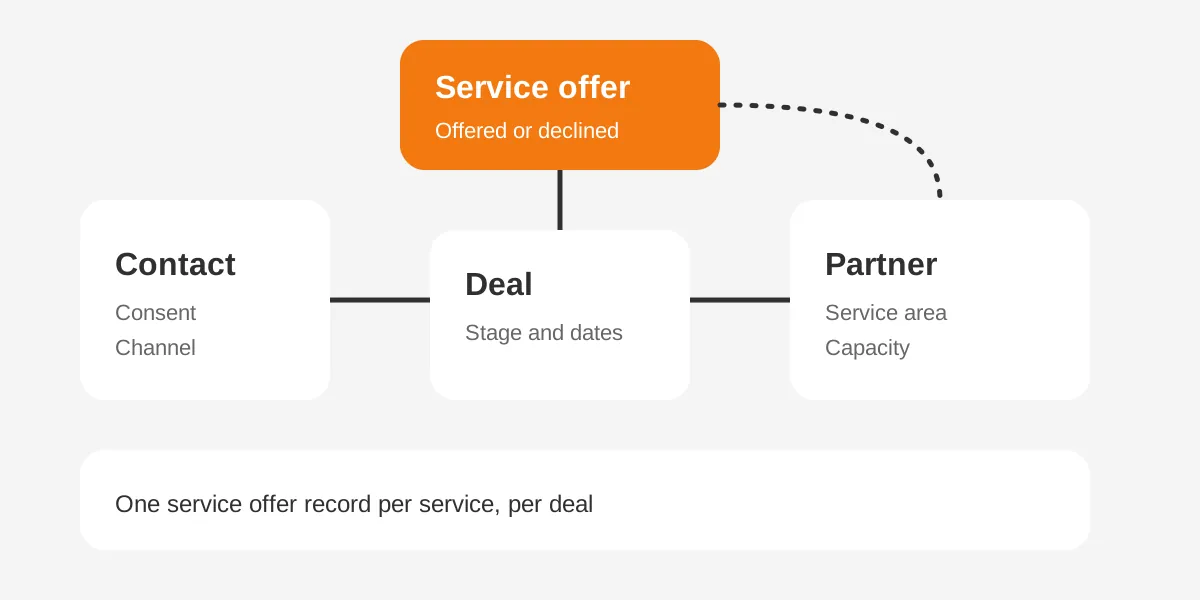
A practical CRM data model has four parts:
- Contact: the person, their consent status and preferred channel.
- Deal or transaction: the stage, key dates and the agent who owns it.
- Service offer: one record per service per deal, with a status of offered, accepted, declined or not eligible.
- Partner: the lender, inspector or insurer, with service area, capacity and agreement type.
The service offer record is the one that makes automation possible. It turns a vague idea, "we should mention inspection," into data a workflow can read. When the status is blank and the deal reaches the right stage, the CRM knows an offer is due.
Add two fields to the contact as well: marketing consent and partner-sharing consent. They are different permissions. A client may accept emails from the brokerage but refuse to have their number passed to a lender. Workflows should read both fields before any offer or hand-off goes out.
Keep the data clean before you build anything. Duplicate contacts cause double offers, and missing closing dates break time-based triggers. A short data cleanup sprint usually saves more trouble than any workflow setting.
The same model works for a mortgage CRM on the lender side. There, the service offer list holds insurance, title and realtor referrals instead of loans.
Which Life Events Should Trigger a Cross-Sell Offer?
The best triggers are events that create a real, near-term need, such as an accepted offer or a scheduled closing. Calendar blasts and monthly newsletters miss the window. A buyer needs an inspector in the first days of the contract, not three weeks later.
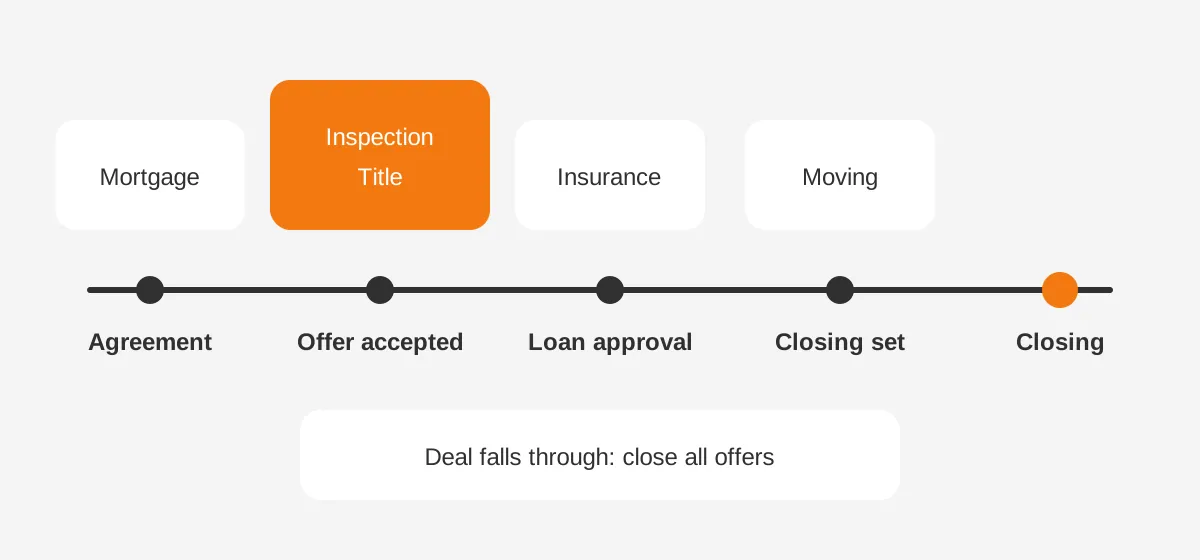
Map each service to the event that creates demand and the window in which the client will choose a provider. The table below shows a typical residential purchase.
| Service | Trigger event | Best timing | Action |
|---|---|---|---|
| Mortgage pre-approval | Buyer signs agreement | Within 1 day | Agent task plus intro email |
| Home inspection | Offer accepted | Same day | Partner hand-off with consent |
| Homeowners insurance | Loan approval stage | 14 days before closing | Quote request email |
| Title and escrow | Offer accepted | Within 2 days | Agent task |
| Moving or utility setup | Closing date set | 7 days before closing | Checklist email |
Each trigger needs an exit rule as well. If the client already has a lender, the workflow marks the mortgage offer as not eligible and stops. If the deal falls through, every pending offer closes at once.
Outside real estate, the events change but the method holds. An insurance agency can trigger on a new vehicle, a renewal date or a home purchase. The article on how insurance producers use CRM for renewals and cross-sell covers those triggers for agencies.
How Do You Automate Cross-Selling in HubSpot?
In HubSpot, you automate cross-selling with deal-based workflows that check the service offer data and then send, assign or log. Workflows require a Professional or Enterprise subscription. The HubSpot workflows guide lists filter-based, event-based, scheduled and webhook enrollment triggers.
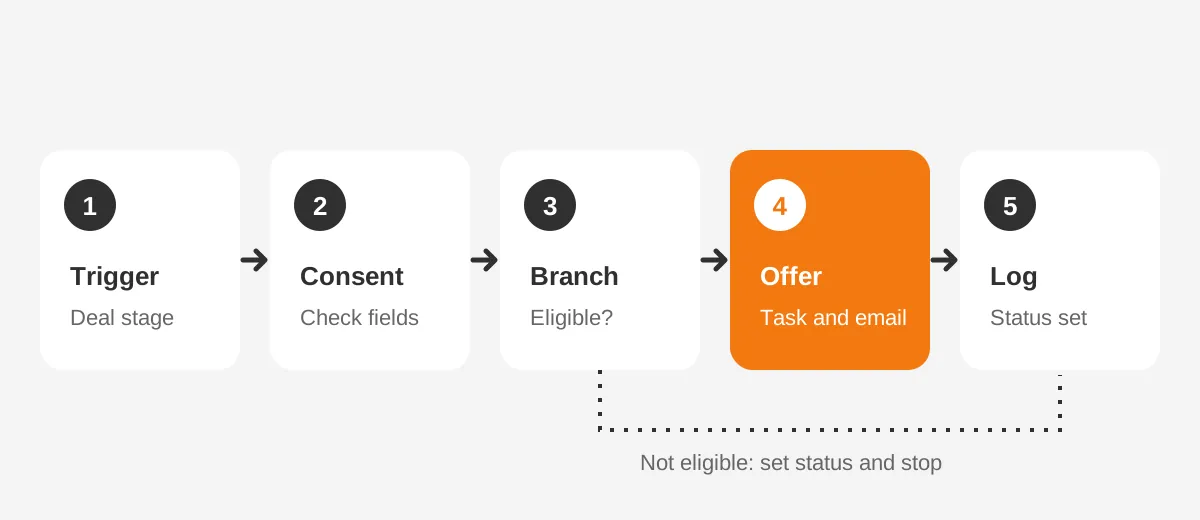
A typical inspection workflow follows five steps:
- Enroll deals when the deal stage changes to "Offer accepted."
- Check that the inspection offer property is empty and the contact has given consent.
- Branch with an if/then step: buyers with an inspector get "not eligible," others continue.
- Create a task for the agent and send a short email with two vetted inspector options.
- Set the inspection offer property to "offered" and record the date.
Store the service statuses as deal properties, or as a custom object if each deal carries five or more services. Custom objects need an Enterprise tier. Most small brokerages manage with deal properties and a naming rule.
Use delays for time-based offers. A homeowners insurance workflow can wait until 14 days before the closing date property, then send the quote request. Re-enrollment needs care, because HubSpot keeps a record out of a workflow until it finishes the current run.
Agents who prefer personal outreach can use sequences in Sales Hub instead of marketing emails. A sequence sends one-to-one emails from the agent's inbox and stops when the client replies.
The workflow still decides when the offer is due. The sequence keeps the message personal and logs replies on the contact record.
Pair the workflow with lead routing rules when partners serve different areas. Routing decides which inspector or lender gets the hand-off.
How Do You Automate Cross-Selling in Salesforce?
In Salesforce, you automate cross-selling with record-triggered flows built in Flow Builder, usually on the Opportunity object. A flow starts when a record is created or updated. It checks conditions, then creates tasks, sends email alerts or adds related records.
Most teams create a custom object named Service Offer, related to the Opportunity and the Contact. Each record holds the service type, status, partner and dates. A flow on Opportunity creates the offer records at the right stage, so reports can count every offer.
Scheduled paths handle timing. A path can run seven days before the close date to send a moving checklist. Another can start an insurance quote 14 days before. A decision element routes clients who already have a provider to "not eligible."
Salesforce suits brokerages and agencies that need approval steps, partner portals or detailed reporting. Experience Cloud can give partners a portal where they accept or decline hand-offs. HubSpot can be quicker to set up for a team under 30 users with simpler rules.
A Salesforce build to automate cross-selling usually needs four pieces. These are the Service Offer object, one flow per service, email templates and a status report. Add a permission set so only admins can edit partner records.
Salesforce also lets you automate cross-selling across business lines. A firm with lending and insurance arms can share one Service Offer object. Sharing rules keep each team's records separate.
Whichever platform you use to automate cross-selling, test each flow in a sandbox with sample deals. Check three paths: eligible client, client with an existing provider, and a cancelled deal. More examples of this testing approach appear in these workflow automation examples.
How Should Partner Referrals Be Tracked and Routed?
Partner referrals should be tracked as records with a status, an owner and a timestamp for every step. A note saying "sent to Mike the inspector" cannot be reported, audited or routed. A structured hand-off can.
Track these fields on each referral:
- Partner name and service type.
- Date the client gave consent to share their details.
- Date sent, date accepted and date the partner first contacted the client.
- Outcome: booked, declined, no response or chose another provider.
- Any affiliated business disclosure given, with the date.
Routing rules decide which partner receives the hand-off. Common rules include service area, partner capacity, client language and client preference. Round robin works for partners of equal quality. A weighted rule suits partners with different capacity.
Give clients a choice of at least two providers where you can. Choice improves trust, and it keeps the offer about service rather than steering. Record which option the client picked, so partner quality can be compared over time.
Partners should confirm receipt inside the system, by portal, form or email reply that updates the record. A referral with no partner response after 24 hours should create a task for the agent. That rule catches hand-offs that would otherwise go quiet.
Firms that automate cross-selling through partners should also review partner performance each quarter. Remove partners with slow responses or low client ratings, and record the reason on the partner record. Clients judge the firm by the partner it suggests.
What Compliance Rules Limit Automated Cross-Sell Offers?
For mortgage, inspection and title services, RESPA Section 8 is the main limit on how you automate cross-selling. Regulation X, section 1024.14, covers settlement services on a federally related mortgage loan. No person may give or accept a fee, kickback or thing of value for those referrals.
Regulation X counts inspections, title work and hazard insurance among settlement services. So a workflow can refer a client to an inspector. The CRM must never calculate, request or record a per-referral payment from that inspector.
Documents provided under section 1024.14 must be kept for five years. Store disclosures and partner agreements where staff can retrieve them.
Affiliated businesses carry a disclosure duty. Section 1024.15 requires a written disclosure of the ownership relationship. It goes on a separate piece of paper, no later than each referral. A workflow can attach that form to the referral step and record its delivery.
Email offers fall under CAN-SPAM. The FTC compliance guide says opt-outs must be honored within 10 business days. It lists penalties up to $53,088 per violating email. Text messages carry their own consent rules, so check them before adding SMS steps.
Compliance works best inside the workflow. Consent checks, disclosure steps and opt-out suppression belong inside each flow, so every automated offer follows the same rule.
Privacy rules apply as well. Before a CRM shares a client's phone number with an inspector, the client should agree to that hand-off. Store the consent date and wording on the referral record. When you automate cross-selling across state lines, ask counsel which state privacy and licensing rules apply.
Insurance offers bring licensing questions. Only licensed producers should quote or advise on policies. So an automated insurance offer usually ends in a hand-off to a licensed agent.
How Do You Measure Cross-Sell Automation Results?
Measure cross-sell automation by attach rate: the share of eligible clients who accept at least one additional service. Count only eligible clients, because offering insurance to someone with a policy inflates the base and hides real performance.
Track five numbers each month:
- Attach rate by service, such as inspection accepted per eligible buyer.
- Time from trigger to offer, in hours.
- Partner response time and booking rate.
- Opt-out and complaint rate on cross-sell emails.
- Offers skipped because data was missing.
Here is a worked example with assumed figures, not industry data.
A brokerage closes 400 buyer deals a year. Before automation, agents offer inspection on about half of them. After it, every eligible deal gets an offer within a day. If acceptance stays at 40%, booked inspections rise from 80 to 160.
That gain comes from consistency, not persuasion. The fifth metric matters for the same reason. If 15% of offers are skipped for missing closing dates, fixing data entry is worth more than rewriting emails.
Report by agent and by partner as well. An agent whose clients decline every offer may be overriding the workflow. A partner with slow responses may need replacing.
Build one dashboard for these numbers and review it monthly with the team that owns the workflows. Teams that automate cross-selling and never look at the results tend to keep sending offers nobody accepts. A monthly review keeps each workflow earning its place.
What Mistakes Break Cross-Sell Automation?
The first mistake is building workflows before the service data exists. Teams try to automate cross-selling on top of plain contact lists. Those lists do not show who already has a lender or a policy. The result is irrelevant offers and annoyed clients.
The second mistake is one giant workflow for every service. It becomes hard to read, hard to test and impossible to pause for one partner. One workflow per service, with shared consent and eligibility checks, is easier to own.
The third mistake is ignoring the agent. If agents learn about an offer only when the client mentions it, they feel bypassed. Send the agent a task or a notification first, and let them add a personal note when it helps.
Other mistakes show up in audits of existing CRMs:
- No exit rule when a deal cancels, so clients receive offers for a home they did not buy.
- Hard-coded partner names inside emails, which break when a partner leaves.
- No suppression for clients who opted out of marketing email.
- Fields for referral payments added "for tracking," which creates RESPA risk.
- No owner for the workflows after launch, so broken triggers go unnoticed.
Each of these is cheap to prevent at design time and costly to fix later. A short design review before launch catches these issues early. Teams that automate cross-selling well treat workflows as a product. Each has an owner, a change log and a monthly review.
When firms automate cross-selling across three or more offices, naming rules matter too. Use the same service names, status values and partner fields everywhere, so reports compare offices fairly.
Frequently Asked Questions
Can agents earn referral fees from lenders or inspectors?
Generally no, for federally related mortgage loans. RESPA Section 8 bars fees or things of value for referring settlement services. These include mortgage, inspection and title work. Affiliated business arrangements are allowed with proper disclosure. Confirm your situation with counsel, as state rules can add further limits.
Which CRM is best for automated cross-selling?
HubSpot suits small and mid-sized teams that want quick workflows and email in one place. Salesforce fits larger brokerages that need custom objects, partner portals and approval steps. Real estate platforms such as Follow Up Boss also offer automation. The right choice depends on data model needs and reporting.
How many cross-sell emails should one client receive?
Keep each client to one offer per service, plus one reminder at most. Space services by deal stage, so a buyer sees inspection, then insurance, then moving help. More messages raise opt-out rates. Agent tasks can replace a second email when a personal call fits better.
Can AI agents run cross-sell offers in a CRM?
AI agents can draft offers, summarize deal notes and suggest which service fits next. Tools such as Salesforce Agentforce and HubSpot Breeze add these features inside the CRM. Keep humans approving regulated referrals, and log every AI-generated message on the record for later review.
How long does cross-sell automation take to set up?
A focused build with clean data takes about four to eight weeks. That covers the data model, three to five service workflows, partner routing and testing. Messy data or a platform migration adds time. Starting with one service, usually inspection, shortens the first release.
Where Should You Start to Automate Cross-Selling?
Start to automate cross-selling with one high-volume service and one clear trigger, such as inspection at offer acceptance. Add the service offer record, a consent check and a single workflow. Measure attach rate for a month, then add the next service.
Unboxx designs the data model, workflows and partner routing for this work. Teams then automate cross-selling in HubSpot or Salesforce without risking compliance. To plan the build for your firm, schedule a consultation with Unboxx.
Let's create something out of this world together.
Have a project in mind? Contact us for expert design and development solutions. Let's discuss how we can help grow your business.
Ready to Unboxx Your Potential?
Build smarter systems. Automate faster. Scale confidently.