
A plant sales team comes home from a trade show with 400 badge scans. Three weeks later, most contacts have heard nothing. The hot ones have already asked a competitor for a quote.
Tooling is part of the reason. Only 21% of manufacturing marketers say they have the right technology, according to the Content Marketing Institute 2025 manufacturing research.
Marketing automation for manufacturing closes that gap. Its rules send the right follow-up, score each lead and alert a rep at the right moment. The sections below follow marketing automation for manufacturing from the booth to the reorder.
Key Takeaways
- Marketing automation for manufacturing works best when each workflow maps to one stage of a long B2B buying cycle.
- Quote follow-up, trade show follow-up and spare parts reorders usually return value faster than generic newsletters.
- CRM and ERP data decide how precise the automation can be, so integration comes before campaign volume.
What Is Marketing Automation for Manufacturing?
Marketing automation for manufacturing is software that runs repeatable marketing and follow-up tasks from rules and data. It sends emails, scores leads, updates CRM records and creates sales tasks without a person starting each step.
Here is what marketing automation in manufacturing looks like day to day. A design engineer downloads a spec sheet and gets a related application note two days later. The rep receives a task once the engineer views pricing. The same logic runs for thousands of contacts at once.
Manufacturing marketing automation differs from retail email tools in three ways. Deals take months, a buying committee shares the decision, and the product data lives in an ERP system. Generic advice about abandoned carts does not fit a company that sells pumps, castings or control panels.
A typical stack has four parts:
- A CRM that stores accounts, contacts, opportunities and quotes.
- A marketing automation platform that sends emails, hosts forms and runs workflows.
- An ERP that holds orders, prices, part numbers and the installed base.
- Reports that tie campaigns to pipeline and revenue.
How Is It Different From a CRM?
A CRM records what happened with each account. Marketing automation for manufacturing acts on those records by sending, scoring and assigning work. The two systems share one database in HubSpot and Odoo, and connect through a sync in Salesforce and Dynamics 365.
That split matters for planning. A clean CRM makes marketing automation for manufacturing accurate. A messy CRM makes it send the wrong email to the wrong buyer, faster than any person could.
Why Do Manufacturers Need Marketing Automation Now?
Manufacturers need marketing automation because industrial buyers now research alone and involve more people in each decision. On average, 13 internal stakeholders and nine external participants influence buying decisions, according to Forrester's State of Business Buying 2026.
The same Forrester research found that procurement professionals act as decision-makers 53% of the time. A rep cannot hold separate, timely conversations with 22 people by hand. Automated email campaigns keep each role informed. The rep then focuses on the two or three people who matter most.
The CMI research also shows the tooling gap. It reports that 58% of manufacturing marketers say their stack lacks the ability to automate repetitive tasks and workflows. Sixty-four percent report difficulty attributing ROI to content and tracking customer journeys.
Firm size matters too. The National Association of Manufacturers reports that 93.1% of US manufacturing firms have fewer than 100 employees.
Those firms rarely have a full marketing team. For them, marketing automation benefits are largest, because software does the follow-up a missing hire cannot. Unboxx sets up these programs through its AI growth marketing services.
Channels are shifting as well. CMI found that 67% of manufacturing marketers increased their use of LinkedIn over the last 12 months. Marketing automation for manufacturing can pull LinkedIn form leads into the CRM. They then join the same nurture track as website and event leads.
A manufacturing marketing strategy that relies on events and reps alone leaves gaps between conversations. Marketing automation for manufacturing fills those gaps with timed, relevant contact. Buyers keep hearing from the supplier while they research alone.
Which Workflows Matter Most for B2B Manufacturers?
The workflows that matter most follow the manufacturing sales cycle, from first contact to repeat order. Answering what marketing tasks can manufacturers automate starts with this map. Each stage has a clear trigger, message and owner.
The table below lists seven marketing automation workflows that fit most industrial B2B marketing teams. Each row names the trigger that starts it and the result it should produce.
| Stage | Workflow | Trigger | Goal |
|---|---|---|---|
| Event | Trade show lead follow up | Badge scan import | Meeting booked within 10 days |
| Research | Role-based nurture | Spec sheet or CAD download | Engaged contact at the account |
| Qualification | Lead scoring and routing | Score crosses a threshold | Rep task with full history |
| Quote | Quote follow up automation | Quote sent from CRM | Reply, revision or order |
| Channel | Distributor lead routing | Inquiry in a dealer territory | Partner accepts the lead |
| Order | Onboarding sequence | First order in ERP | Correct setup and fewer support calls |
| Aftermarket | Spare parts reorder | Usage or time since last order | Repeat order |
Start with the two rows where leads are already being lost. For most plants, that means trade show leads and open quotes. Customer segmentation by role, industry and installed base then lets one workflow serve different audiences with different content.
Manufacturing lead generation improves once these workflows run, because fewer inquiries go unanswered. Marketing automation for manufacturing does not create demand by itself. It makes sure the demand already arriving from shows, search and distributors turns into conversations.
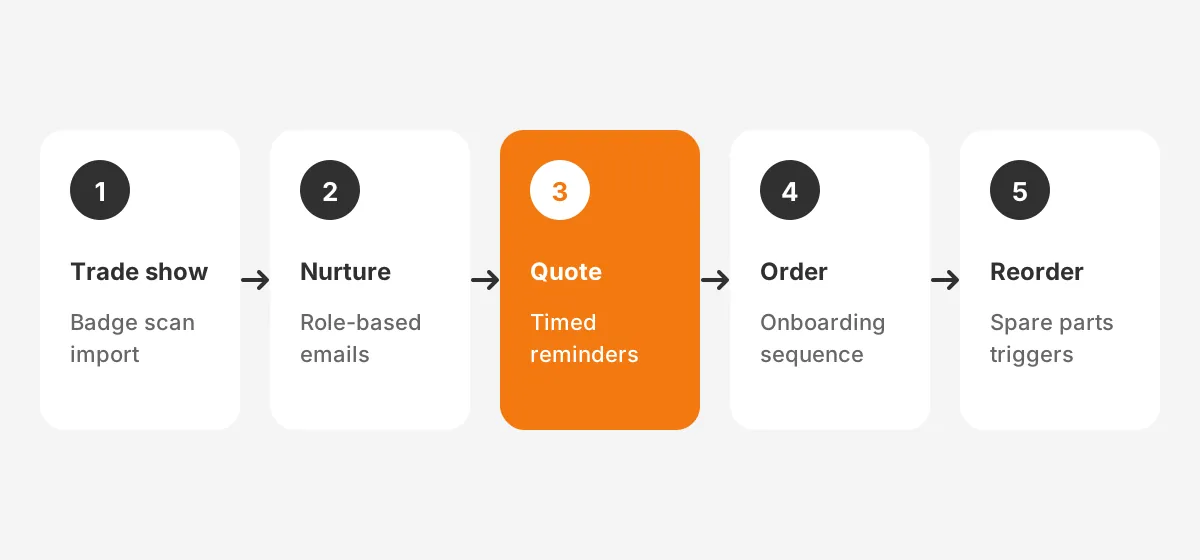
How Should Trade Show Leads Be Followed Up?
Trade show leads should get a first email within 48 hours and a rep call within one week. Marketing automation for manufacturing makes that timing the default.
Manufacturing marketers rate in-person events (51%) as their most effective distribution channel, according to the same CMI study. That value disappears when the badge scans sit in a spreadsheet.
A trade show lead follow up workflow in marketing automation for manufacturing runs in five steps:
- Import the badge scans into the CRM on the last show day, with the event as lead source.
- Remove duplicates and match each contact to an existing account where one exists.
- Send a thank-you email with the product sheet that matches the booth conversation.
- Score each lead on fit (industry, company size, role) and on engagement (opens, clicks, page visits).
- Create a rep task for every lead above the threshold, and move the rest into a 60-day nurture.
Booth staff should tag each scan with a short note, such as "needs quote" or "student". Those tags drive the first email and keep low-fit contacts out of the sales queue. Check consent rules for each region before adding scanned contacts to marketing lists.
The payoff is measurable. Closed loop reporting counts the meetings, quotes and orders each show produced. That number decides whether next year's booth budget is justified, which a stack of business cards cannot do.
How Do You Nurture Engineers and Procurement Separately?
Nurture engineers and procurement with separate email tracks, because each role asks different questions at a different time. Marketing automation for manufacturing handles this through role fields and branching rules. Lead nurturing for manufacturers fails when one generic newsletter goes to the whole buying committee.
Design engineers want proof that the part works. Their email nurture sequence carries spec sheets, tolerances, CAD files, test data and application notes. Procurement wants price stability, lead times, payment terms, certifications and supplier risk information. Plant managers want uptime, service response and total cost of ownership.
Personalization is worth the setup effort. McKinsey research from 2021 found that personalization most often drives a 10 to 15 percent revenue lift. That study covers consumers, so treat it as direction for industrial buyers rather than a promise.
To build role-based tracks, follow four rules:
- Capture the job role on every form with a short pick list.
- Write three to five emails per role, each with one asset and one call to action.
- Space emails 7 to 14 days apart to suit a long buying cycle.
- Stop the sequence the moment a contact books a meeting or requests a quote.
Lead scoring improves sales efficiency by ranking contacts on fit and engagement. Reps call the engineer who viewed pricing twice, not every name on the list. The HubSpot lead scoring setup guide shows how to set points, thresholds and decay.
What Does a Simple Lead Score Look Like?
The points below are an example for illustration, not a benchmark. Adjust them after reviewing which past leads became orders.
- Target industry and company size: 20 points.
- Engineer, buyer or plant manager role: 15 points.
- Spec sheet or CAD download: 10 points.
- Pricing or lead time page visit: 15 points.
- No activity for 30 days: minus 10 points.
In this example, a lead at 50 points creates a rep task. Marketing automation for long sales cycles needs that decay rule. Without it, a contact who went quiet months ago still looks hot. Review the threshold each quarter with the sales team.
How Does Quote Follow-Up Automation Work?
Quote follow-up automation starts a timed sequence the moment a quote or RFQ response is sent from the CRM. It reminds the buyer, alerts the rep when the buyer engages and records the outcome before the quote expires.
Open quotes hold pipeline that is already qualified, yet they are often the least watched. Reps chase the newest quote and forget the one from three weeks ago.
A rule-based sequence gives every quote the same attention. Among uses of marketing automation for manufacturing, this one sits closest to revenue. The buyer has already asked for a price.
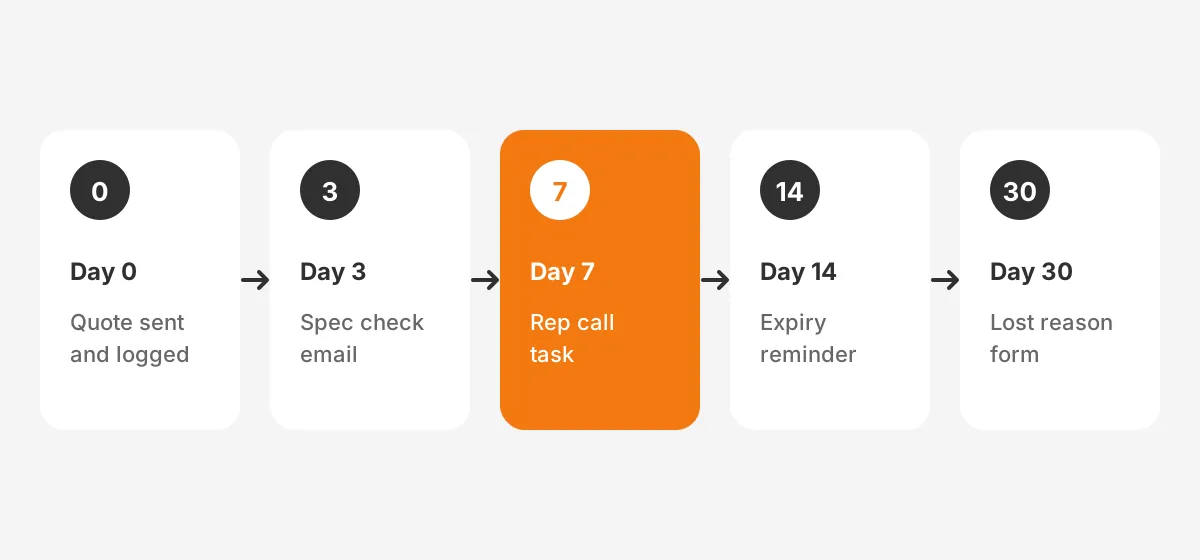
Here is an example sequence. The day counts are an illustration, so set them to match your own quote validity period:
- Day 0: the CRM sends the quote and logs the date, value and expiry.
- Day 3: if the buyer has not opened it, an email asks whether the specification is correct.
- Day 7: the rep gets a task to call, with the buyer's email and web activity attached.
- Day 14: a reminder states the expiry date and the current lead time.
- Day 30: if the quote is lost, a short form asks for the main reason.
Unboxx built a similar flow for a catering client. There, each new quote triggers an AI-drafted follow-up that staff review before sending. The AI-powered quote follow-up case study reports a 96% reduction in manual follow-up effort. The same pattern applies to an industrial RFQ.
How Do Distributors and Dealers Fit In?
Distributors and dealers fit in through lead routing rules, shared content and feedback on every lead they receive. When part of the volume sells through channel partners, the automation must decide who owns each inquiry.
Distributor lead routing usually follows three rules. Inquiries from a dealer's territory go to that dealer. Inquiries above a set order size, or from named strategic accounts, stay with the direct sales team. Everything else goes to the partner with the best response record.
Marketing automation for manufacturing can run these rules inside the CRM and log every handoff.
A partner portal makes the handoff visible. The dealer accepts or rejects the lead within an agreed window, such as 48 hours. If nobody accepts it, the workflow reassigns the lead and alerts the channel manager.
Dealer marketing also benefits from shared assets. The manufacturer builds co-branded email templates and product sheets once, and each partner sends them to its own list. Track partner results in the CRM. The channel team then sees which dealers convert leads and which let them go cold.
How Does ERP Data Drive Reorders and Cross-Sell?
ERP data drives reorders and cross-sell by telling the automation what each customer bought, when and for which machine. Without that data, marketing automation for manufacturing can only guess. Guessed offers read like spam to industrial buyers.
ERP integration usually moves four data types into the CRM: accounts, order history, product lines and the installed base. The installed base lists serial numbers, install dates and service history for equipment a customer owns.
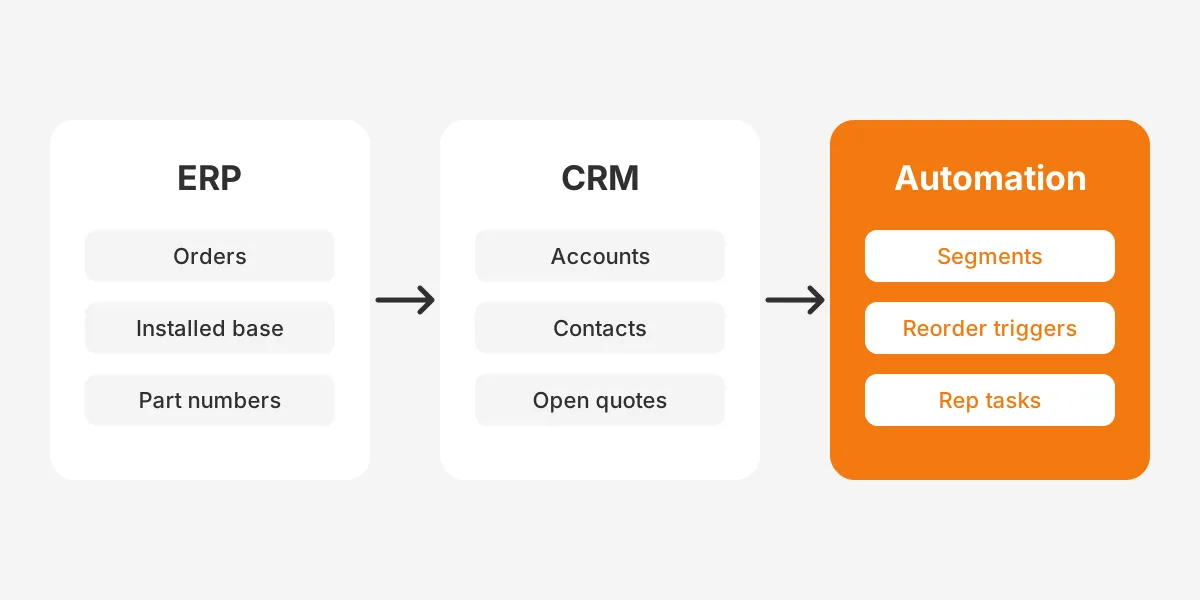
With that data in place, three high-value workflows become possible:
- A spare parts reorder reminder sent before a wear part usually runs out, based on past order intervals.
- A service reminder tied to the install date and the maintenance schedule of each machine.
- A cross-sell email that offers an accessory or upgrade only to owners of a compatible model.
CRM integration benefits marketing automation by giving every workflow one clean customer record to read. The CRM ERP integration planning guide covers which fields to sync and how often. Start with a nightly sync of orders and assets before building real-time links.
Data quality decides whether these offers land. Marketing automation for manufacturing reads part numbers and model names exactly as the ERP stores them. Map product families to plain names before the first campaign, so emails say "hydraulic pump" rather than an internal code.
Which Marketing Automation for Manufacturing Platforms Fit Best?
The best marketing automation for manufacturing is usually the platform that connects cleanly to your current CRM and ERP. Feature lists overlap, so data fit and team skills matter more than brand.
| Platform | Workflow builder | Best fit | Watch for |
|---|---|---|---|
| HubSpot Marketing Hub | HubSpot workflows with filter, event and schedule triggers | Small and mid-sized manufacturers wanting one tool for CRM and marketing | Workflows need the Professional or Enterprise tier |
| Salesforce Marketing Cloud Account Engagement (Pardot) | Engagement Studio with triggers, rules and actions | Teams on Salesforce Sales Cloud or Manufacturing Cloud | Programs must be paused before editing |
| Dynamics 365 Customer Insights - Journeys | Trigger-based and segment-based journeys | Manufacturers running Dynamics 365 Sales or Business Central | Edit a new journey version while the live one runs |
| Odoo | Email marketing and marketing automation apps | Firms already running Odoo as their ERP | The Marketing Automation app needs Odoo Enterprise |
Test each shortlisted tool against one real workflow before signing. A two-week pilot of marketing automation for manufacturing, built on your own quote data, shows more than any demo.
HubSpot suits teams that want fast setup and simple reporting. Account Engagement fits companies whose sales data already sits in Salesforce. The Pardot vs HubSpot comparison covers that choice in detail. Microsoft documents both journey types in its Customer Insights - Journeys overview.
How much marketing automation will cost depends on the licence tier, setup and content. Licence prices change often, so check each vendor's current pricing page. Budget separately for setup, integration and content, which often cost more than the first year of licences.
Salesforce Manufacturing Cloud adds sales agreements and account forecasting on top of Sales Cloud. Manufacturers on that platform usually pair it with Account Engagement. Marketing automation for manufacturing then reads the same agreement and forecast data as sales.
How Do You Roll Out Marketing Automation for Manufacturing?
Roll out marketing automation for manufacturing in phases, starting with clean data and one revenue workflow. A rollout that launches ten campaigns at once usually stalls on bad contact data and unclear ownership.
- Audit and clean CRM contacts, accounts and job roles.
- Connect the CRM to the ERP for orders and installed base.
- Agree lead definitions and a sales handoff rule with the sales manager.
- Launch one workflow, usually quote follow-up or trade show follow-up.
- Add role-based nurture and lead scoring once the first workflow runs cleanly.
- Add distributor routing and aftermarket reorders.
- Review results monthly and retire emails that nobody opens.
Sales and marketing alignment decides whether the program survives its first year. Both teams should agree what a qualified lead is, how fast reps respond and what happens to rejected leads. The marketing automation implementation plan breaks these phases into owners and weeks.
Which Mistakes Stall a Rollout?
- Sending the same newsletter to engineers, buyers and dealers.
- Importing old contact lists without consent checks or cleanup.
- Launching lead scoring before sales agrees on what a good lead is.
- Leaving quote data in spreadsheets outside the CRM.
- Measuring opens and clicks instead of quotes and orders.
The fix for each is to run marketing automation for manufacturing as a sales process. Every workflow needs a business owner, a goal and a monthly review.
Measure four numbers from the start: lead response time, quote win rate, pipeline by source and repeat order rate. Marketing attribution then links each figure to the workflow behind it. That answers the ROI question the CMI study found so hard.
Frequently Asked Questions
Is marketing automation only for large manufacturing companies?
No. Marketing automation helps small manufacturers most, because they lack staff for manual follow-up. A 30-person shop can run quote reminders and trade show follow-up from one platform. Marketing automation for small manufacturers usually starts with one workflow and a CRM. It grows as the team sees results.
Why is email automation important for manufacturers?
Email automation keeps long sales cycles moving without constant manual effort from reps. Industrial buyers research for months and involve four or more roles. Timed emails deliver spec sheets, lead times and reminders at each stage. Reps then spend their time on calls with buyers who show real buying signals.
How does marketing automation benefit manufacturers?
Marketing automation helps manufacturers answer leads faster, follow up every quote and sell more to existing customers. It scores leads so reps call the right people first. It also connects campaigns to pipeline, revealing the events, ads and content that produce orders.
What does account based marketing for manufacturers look like?
Account based marketing for manufacturers targets a short list of high-value accounts with tailored content for each role. Marketing builds the list with sales and tracks engagement across every contact at the account. The rep gets an alert when interest rises. It suits large equipment deals with long cycles.
How long does it take to see results?
Quote and trade show follow-up usually show results first, because they act on leads that already exist. Nurture programs take longer, often a full sales cycle, before the pipeline effect is clear. Track response time and quote win rate from day one to see progress early.
Where Should Marketing Automation for Manufacturing Start?
Marketing automation for manufacturing should start where leads are already lost: open quotes, trade show scans and silent dealer leads. Fix one of those with clean CRM data. Then add nurture, scoring and ERP-driven reorders, one workflow at a time.
Unboxx designs and builds marketing automation for manufacturing on HubSpot, Salesforce, Dynamics 365 and Odoo. That work sits alongside its CRM for manufacturers service. To map your first workflow, schedule a consultation with the Unboxx team.
Let's create something out of this world together.
Have a project in mind? Contact us for expert design and development solutions. Let's discuss how we can help grow your business.
Ready to Unboxx Your Potential?
Build smarter systems. Automate faster. Scale confidently.