
Common Salesforce Implementation Challenges and Fixes
A Salesforce org goes live on a Monday. By Friday, reps are back in spreadsheets, the pipeline report shows duplicate accounts, and the ERP sync has stopped. In Salesforce's State of Sales report (2026), 51% of sales leaders with AI blamed disconnected systems for slow AI work.
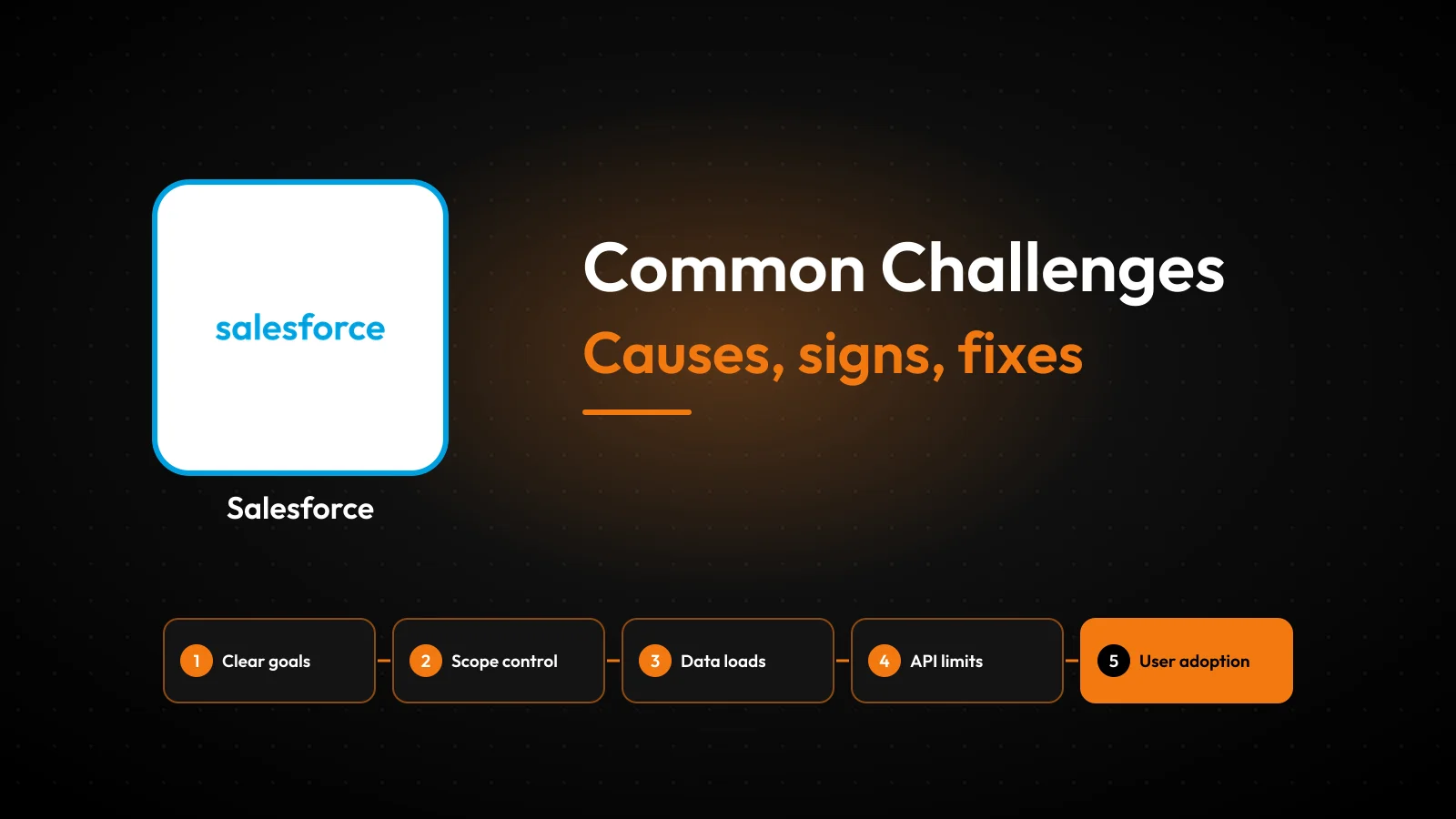
Common salesforce implementation challenges are the repeat problems that stall a Salesforce rollout. They include unclear goals, scope creep, bad data, integration limits, over-customization, release gaps and low adoption. This guide explains why each one happens, the early warning sign to watch for, and the fix that works.
Key Takeaways
- Common salesforce implementation challenges start in planning, then show up later as data, integration and adoption failures.
- Each challenge has an early warning sign that a project lead can check in a weekly status meeting.
- Real platform limits on imports, API calls and sandbox refreshes should shape the plan from day one.
What Are Common Salesforce Implementation Challenges?
Common salesforce implementation challenges are the problems that appear in most Salesforce projects, whatever the cloud or company size. They are predictable. A team that names them at kickoff can plan around them instead of discovering them in user acceptance testing.
The same seven salesforce implementation challenges come up again and again. Some are people problems, such as unclear ownership. Others are platform problems, such as API request limits or sandbox refresh intervals. Most failures mix both kinds.
Salesforce implementations rarely fail because the software breaks. They fail because decisions about goals, data and process stay open too long. Salesforce implementation problems are usually delayed decisions that surface as technical errors.
The table below lists the seven common salesforce implementation challenges. It shows the phase where each starts and where it usually becomes visible.
| Challenge | Where it starts | Where it shows up |
|---|---|---|
| Unclear goals | Discovery | Disputes in testing |
| Scope creep | Requirements | Missed go-live date |
| Bad data migration | Data mapping | Duplicate and orphaned records |
| Integration limits | Architecture | Failed syncs after launch |
| Over-customization | Build | Slow changes in year two |
| Release gaps | Environment setup | Untested changes in production |
| Low adoption | Training plan | Reps working outside the CRM |
These crm implementation challenges also apply to HubSpot and Dynamics 365 projects. The Salesforce versions differ in the platform limits involved. They hit Sales Cloud and Service Cloud projects alike. The sections below cover each one in the order it appears in a Salesforce implementation.
Why Do Salesforce Projects Start With Unclear Goals?
Salesforce projects start with unclear goals because the buying decision and the build decision are made by different people. Leadership buys licenses to "improve visibility." The project team then has to turn that phrase into fields, reports and automation.
Without written success metrics, every stakeholder brings a private definition of done. Sales wants faster quoting. Finance wants clean revenue forecasts. Service wants case routing. Together the requests have no order.
This is where what causes salesforce projects to fail first becomes visible. A Salesforce project with five goals and no ranking will build a little of each and finish none. Testing then turns into a debate about what the system was meant to do.
The fix is a short charter signed before requirements gathering begins. It should name three things:
- An executive sponsor who breaks ties between departments.
- Three to five success metrics with a baseline and a target date.
- The processes that are out of scope for the first release.
Good success metrics are measurable inside Salesforce. Examples include the share of opportunities with a next step and days from lead to first contact. Forecast accuracy by quarter is another. If a metric needs data the org will not hold, change the metric or add the data source to scope.
Unclear goals are the first of the common salesforce implementation challenges, and they feed the rest. Project governance also needs a weekly rhythm. A 30-minute steering check run by the sponsor keeps common salesforce implementation challenges in view. At that stage they are still cheap to fix.
Why Does Scope Creep Stall a Salesforce Rollout?
Scope creep stalls a Salesforce rollout because every added request costs build time, test time and training time. A field that takes an hour to create can take a week to test and teach. That happens once it touches automation.
Salesforce scope creep is hard to spot because Salesforce makes small changes look free. An admin can add a picklist value in minutes. The cost appears later, when reports, validation rules and integrations all depend on that value.
Scope creep is one of the common salesforce implementation challenges that hits the salesforce implementation timeline hardest. Each new request pushes testing back and invites the next request.
It also moves the salesforce implementation cost. Partner work is usually billed by time, so every added sprint adds fees. Finance teams notice this before any of the other common salesforce implementation challenges.
A change control rule, agreed in the charter, keeps requests in order. Every new request after the requirements sign-off goes into a backlog with three labels: business value, effort and risk. Only the executive sponsor can move an item into the current release.
A second rule helps: configure before you customize. If a standard Salesforce feature covers 80% of a request, use it and adjust the process. The Salesforce implementation best practices guide covers this decision rule in more detail.
Why Does Salesforce Data Migration Break So Often?
Salesforce data migration breaks so often because old data was never as clean as people believed. Legacy CRMs and spreadsheets tolerate duplicates, blank owners and free-text fields. Salesforce enforces rules that expose those gaps during the load.
Salesforce data migration challenges fall into three groups. Records fail to load. Records load but link to the wrong parent. Records load correctly but duplicate existing ones. Each group needs a different check.
Load failures often come from validation rules. Trailhead's Import Data module states that Salesforce runs validation rules before import, and records that fail are not imported. A rule built for daily users can silently reject thousands of historical rows.
Tool choice causes the next group of errors. Salesforce's Data Loader guide recommends the Data Import Wizard for loads under 50,000 records. Data Loader handles up to 150,000,000 records and objects the wizard does not support.
Teams that use the Data Import Wizard for a large migration split files by hand. Split files lose their order, and child records arrive before their parents. Data Loader can also run through the Bulk API instead of the SOAP API, which processes large batches in parallel.
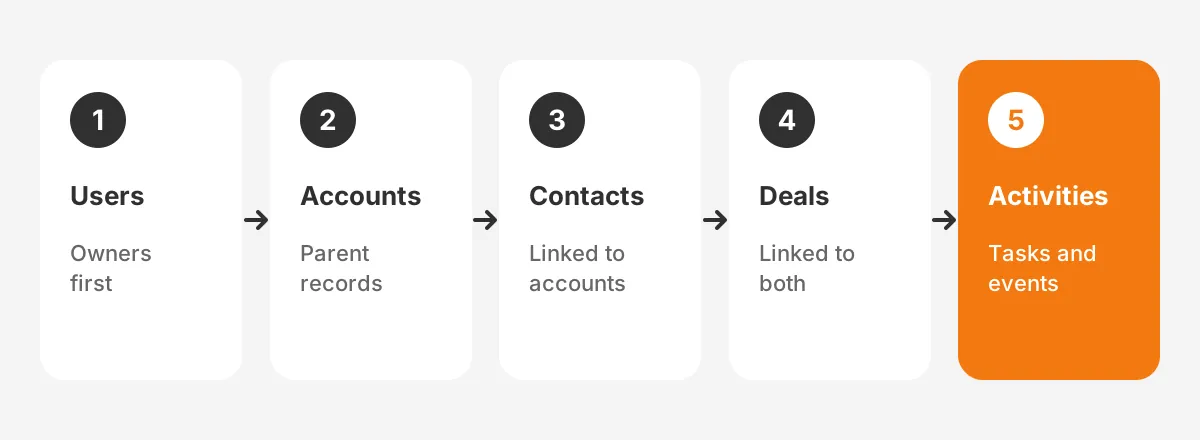
In data work, most common salesforce implementation challenges trace back to load order, which matters as much as the tool. Users must exist before records can be assigned to them. Accounts must exist before contacts can link to them. Opportunities need both before activities can attach.
Duplicates need duplicate rules and matching rules switched on before the load. Run a sample load of 200 rows first. Trailhead's Import Data module recommends a small test file. Then compare record counts by object against the source.
The Salesforce data migration guide lists what to clean before, during and after the move. A data owner should sign off counts for each object before cutover. Of all the common salesforce implementation challenges, data errors are the hardest to undo after launch.
Why Do Integrations Hit API and Sync Limits?
Integrations hit API and sync limits because Salesforce allocates API calls to the whole org, not to each integration. An ERP sync, a marketing tool and a phone system all draw from one daily pool.
Salesforce's API request limits page sets the Enterprise Edition allocation at 100,000 calls, plus calls per license, plus purchased add-ons. A full Salesforce license adds 1,000 calls. The page notes that limits apply across the org over 24 hours.
Here is a worked example with assumed figures. An org with 40 Salesforce licenses receives 100,000 plus 40,000, or 140,000 calls a day. That sounds generous until each integration's polling is added up.
| Integration (example) | Pattern | Calls per day |
|---|---|---|
| ERP order sync | Polls 4 objects every 5 minutes | 1,152 |
| Marketing platform | Writes 1 call per updated lead, 20,000 leads | 20,000 |
| Nightly data warehouse export | Record-by-record reads of 90,000 rows | 90,000 |
| Total against a 140,000 allocation | Example org, 40 licenses | 111,152 |
The example uses 79% of the pool before any new integration is added. One more connector, or a bulk update that triggers the marketing sync, can push the org over its allocation. Calls then fail until the 24-hour window moves on.
Salesforce integration challenges also come from timing. Two systems that both own the same field will overwrite each other. Say a customer address is edited in the ERP and in Salesforce on the same day. A written rule must say which system wins.
The answers are architectural. Pick one system of record for each field. Use the Bulk API for large batch reads. Replace polling with events where the other system supports them. For three or more connected systems, middleware such as MuleSoft can queue, retry and log calls in one place.
Integration limits rarely appear in the sales demo. That is why they rank among the common salesforce implementation challenges that surprise IT teams after launch.
Why Does Over-Customization Create Technical Debt?
Over-customization creates technical debt because every custom object, Apex class and Lightning Web Component needs upkeep. That upkeep lasts as long as the org runs. Each platform release can change how custom code behaves, so it needs retesting.
Salesforce customization is tempting during a build. A stakeholder describes an old process, and the team rebuilds it exactly, workarounds included.
The difference between salesforce configuration and code matters here. Configuration uses page layouts, record types, Salesforce Flow and permission settings. Code uses Apex and Lightning Web Components. Both create upkeep, but code also needs developers, test classes and deployment tooling.
Flow carries debt too. One record-triggered Flow with 30 branches is hard to test. Smaller flows with one job each are easier to debug.
Salesforce technical debt from the first build is the most expensive kind, because it shapes every later change. The Salesforce technical debt guide explains how to score and pay it down once it exists.
Before any custom build, run a three-step test:
- Check whether a standard feature or setting already does the job.
- Check AppExchange for a supported package that covers the gap.
- Build custom only when the process gives a clear business advantage.
A clean salesforce setup is easier to explain to users. Fewer custom screens mean shorter training and fewer support tickets. That links over-customization directly to the adoption problems covered later. Among common salesforce implementation challenges, it is the one most often created by the project team itself.
Why Do Sandbox and Release Problems Delay Go-Live?
Sandbox and release problems delay go-live because teams test in environments that do not match production. A change that passes in a near-empty sandbox can fail against real data volumes, real sharing rules and real integrations.
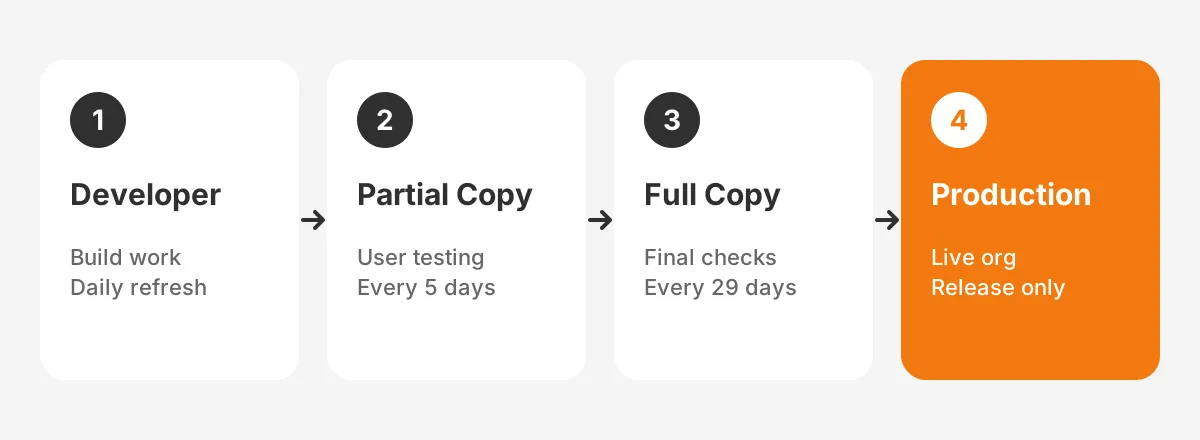
Salesforce's sandbox guide lists four sandbox types with different data and refresh limits:
- Developer sandbox: metadata only, 200 MB of data, refresh once a day.
- Developer Pro sandbox: metadata only, 1 GB of data, refresh once a day.
- Partial Copy sandbox: a data subset set by a template, 5 GB, refresh every 5 days.
- Full Copy sandbox: full production data, refresh every 29 days.
Those refresh intervals shape the salesforce implementation timeline. A full copy sandbox used for final testing can only be refreshed every 29 days. If it drifts from production, the team waits or tests against stale data.
A partial copy sandbox suits user acceptance testing when the template pulls realistic records for each team. Developer sandboxes suit build work, one per developer or work stream. A written salesforce sandbox strategy assigns each environment a job.
Release problems come from changes made directly in production. A quick fix in the live org never reaches the sandboxes, so the next deployment overwrites it. Change sets or DevOps Center keep every change on one path.
The salesforce go-live needs exit criteria as well as a date. Use a passed regression test, signed data counts and a tested rollback plan. Without them, the salesforce deployment happens on schedule and the problems arrive the following week. Release gaps turn small common salesforce implementation challenges into production incidents.
Why Do Users Resist the New Salesforce Org?
Users resist the new Salesforce org when it adds work without removing any. Picture reps who must log calls, update stages and still send the old weekly spreadsheet. They will keep the spreadsheet and drop the CRM.
Adoption is the last of the common salesforce implementation challenges to appear. Salesforce user adoption challenges are often blamed on training, though the cause usually sits earlier. Page layouts with 60 fields, unclear stage definitions and missing mobile access all push users away.
Time pressure makes this worse. The same 2026 State of Sales report found the average seller spends 40% of their time selling. Any salesforce org that adds data entry eats into that share.
Salesforce adoption improves when the org gives something back on day one. Examples include a pipeline view that replaces a manager's spreadsheet, or activity capture that removes manual logging. Reps use tools that save them time.
Access design matters as well. Permission sets grant features to the people who need them without cloning profiles for every role. Users who see only their own fields and apps learn faster.
Change management closes the gap. Name a champion in each team and run role-based sessions on Trailhead modules. Then retire the old tools on a set date. The CRM adoption guide shows how to measure usage in the first 90 days.
Treat the crm rollout as a business change with a software part, and plan the software around the change. Low adoption is one of the common salesforce implementation challenges that no amount of configuration fixes on its own.
Which Common Salesforce Implementation Challenges Cost the Most?
The common salesforce implementation challenges that cost the most are the ones found after go-live. Bad data migration and low adoption lead the list, because both need rework and retraining at the same time.
Cost grows with the distance between cause and discovery. An unclear goal found in discovery costs a meeting. The same unclear goal found in testing costs a rebuild of the fields, reports and automation that depend on it.
A simple way to rank common salesforce implementation challenges is to score each on two questions. What share of records or users does it touch? What share of later steps depends on it? A problem that scores high on both deserves attention first.
Using that test, the order for most B2B projects looks like this:
- Data migration errors, because every report and automation reads the migrated records.
- Low adoption, because unused data makes every other fix worthless.
- Integration limits, because failed syncs corrupt data in two systems at once.
- Over-customization, because custom code slows every change for years.
- Unclear goals, scope creep and release gaps, which mainly cost time.
The ranking changes with context. Heavy ERP traffic can push integration limits to the top. Rank the common salesforce implementation challenges for your own project at kickoff, then revisit the order at each phase gate.
How Do You Spot Common Salesforce Implementation Challenges Early?
You spot common salesforce implementation challenges early by tracking one warning sign for each challenge in the weekly status report. Each sign is visible weeks before the problem reaches users.
The salesforce implementation risks below follow the same order as the sections above. A project lead can check each one in under five minutes.

- Unclear goals: no signed success metrics two weeks after kickoff.
- Scope creep: the backlog grows faster than items are closed for two sprints in a row.
- Data migration: the first sample load has no record count reconciliation.
- Integration limits: nobody can state the daily API calls each connector will use.
- Over-customization: custom objects or Apex appear before standard options were reviewed.
- Release gaps: changes are made in production during the build.
- Low adoption: no named champion in each team one month before launch.
This list shows common salesforce implementation challenges while they are still cheap to fix. Learning how to avoid salesforce implementation mistakes starts here. A salesforce implementation checklist then turns each sign into a dated task with an owner. The Salesforce implementation checklist covers owners, timing and gates for each phase.
Outside help is worth considering when three or more signs appear at once. The CRM consulting and implementation services from Unboxx include a project health review. It scores each warning sign and sets a recovery plan.
Salesforce implementation mistakes found in week three cost hours. The same mistakes found after launch cost rework, retraining and lost trust in the data. A salesforce implementation failure is rarely sudden; the signs were in the status reports first.
Frequently Asked Questions
How long does a Salesforce implementation take?
How long a Salesforce implementation takes depends on clouds, integrations and data volume. A single-cloud sales rollout with one integration takes less time than a multi-cloud program with ERP sync. Scope sign-off, data quality and sandbox refresh cycles usually set the real pace more than build work does.
Who should own a Salesforce implementation?
A business executive should own a Salesforce implementation, supported by a project manager and a lead admin. The executive sponsor sets priorities and settles disputes between departments. IT owns security, integrations and environments. Owning the project inside IT alone often leads to low adoption by sales teams.
What is hypercare after Salesforce go-live?
Hypercare is a fixed support period right after Salesforce go-live, when the project team stays on call. It covers fast fixes, data corrections and extra user help. Teams usually set daily check-ins, a ticket queue and clear exit criteria before handing support to the regular admin team.
How often can you refresh a Salesforce sandbox?
Salesforce sets a refresh interval for each sandbox type. Developer and Developer Pro sandboxes can refresh once a day. A Partial Copy sandbox can refresh every 5 days, and a Full Copy sandbox every 29 days. Plan final testing around the Full Copy interval.
When should you hire a Salesforce implementation partner?
Hire a salesforce implementation partner when the project includes data migration, two or more integrations, or custom code. A partner brings tested methods and certified staff. Small single-cloud rollouts with clean data and a skilled admin can often succeed with internal staff and an outside review.
How Can Unboxx Help With Common Salesforce Implementation Challenges?
Unboxx helps teams plan around common salesforce implementation challenges before they reach users. As a Salesforce Crest Partner, Unboxx sets success metrics, data load plans, integration budgets and sandbox paths at the start. See how one client built its Salesforce CRM right from day one.
If a project already shows common salesforce implementation challenges, a short review can rank the fixes. Schedule a consultation to walk through your plan, your data and your integrations with a Salesforce consultant.
Let's create something out of this world together.
Have a project in mind? Contact us for expert design and development solutions. Let's discuss how we can help grow your business.
Ready to Unboxx Your Potential?
Build smarter systems. Automate faster. Scale confidently.