
When a nonprofit outgrows its email tool, the shortlist splits in two. One side holds general marketing automation platforms like HubSpot, ActiveCampaign and Mailchimp. The other side holds nonprofit-specific tools such as Keela, Virtuous and Bloomerang. Both promise automated donor journeys. Their pricing pages rarely explain how they differ.
The choice matters because email still raises money. Rework's 2026 guide reports M+R Benchmarks data showing $2.40 in email revenue per subscriber in 2025.
Pick general marketing automation when your donor CRM is strong and your team can configure it. Pick a nonprofit-specific tool when giving history must drive every message without custom work.
Key Takeaways
- General marketing automation wins on channel depth, integrations and price when donor data lives in a capable CRM.
- Nonprofit-specific tools win when gift history, receipts and fundraising reports must work on day one with a small team.
- A 30-day evaluation that tests real donor segments against both tool types prevents a costly switch two years later.
What Separates General Marketing Automation From Nonprofit Tools?
The main difference is the data model underneath the tool. General marketing automation is built around contacts, companies, deals and website behavior. Nonprofit-specific tools are built around donors, gifts, funds, campaigns and households. Everything else, from segmentation to reporting, follows from that starting point.
A general platform such as HubSpot Marketing Hub treats a donor as a contact with properties. It can store a last gift date or lifetime giving total. Someone has to create those fields and keep them in sync.
That gap is the core issue. Rework's guide puts it plainly: a generic email tool stores "a contact and a tag, not a giving history."
A nonprofit-specific tool stores each gift as its own record, linked to a fund, an appeal and a payment method. That structure lets the tool segment by giving history without extra setup. Lapsed donors, recurring givers and major gift prospects appear as ready-made lists.
In practice, nonprofits end up with one of two layouts.
- Paired stack: a donor CRM such as Salesforce Nonprofit Cloud or Bloomerang syncs gift data into general marketing automation.
- All-in-one stack: one nonprofit platform, such as Keela or Givebutter, holds donors, donations and email in a single database.
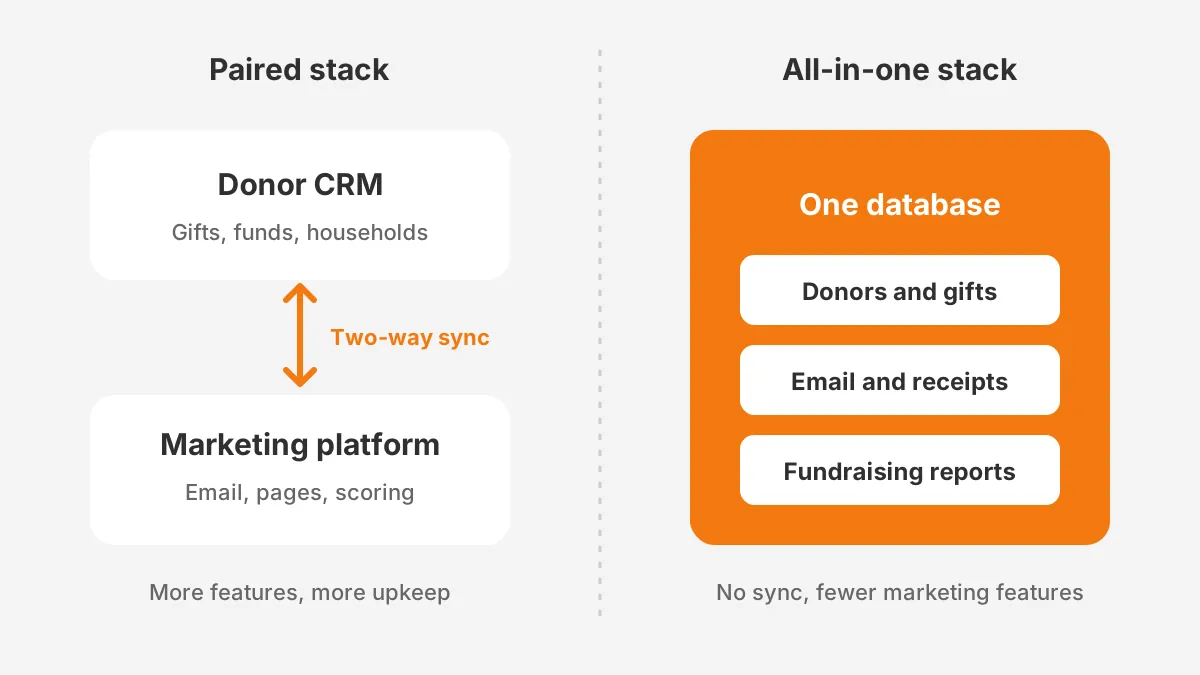
Neither layout is better in every case. The paired stack gives more marketing power but adds a sync to maintain. The all-in-one stack removes the sync but limits you to the marketing features one vendor builds.
What Does General Marketing Automation Do Well for Nonprofits?
General marketing automation does three things better than most nonprofit tools: channel depth, integrations and testing. HubSpot alone reports over 278,000 customers, and that scale pays for strong email builders, landing pages, forms and behavior tracking. Nonprofits get the same tools at a discount.
A 2020 NonProfit PRO article lists four features that separate true marketing automation from automated email. They are landing pages and forms, data-driven list building, website tracking, and lead scoring with alerts. General marketing automation platforms usually include all four. Simpler nonprofit email tools may cover only the first two.
Each feature maps to a real fundraising job.
- Website tracking shows which supporters read the planned giving page three times this month.
- Lead scoring alerts a major gifts officer when a donor's engagement score crosses a threshold.
- Landing pages and forms capture event sign-ups and petition signatures without a developer.
- A/B testing compares two appeal subject lines before the full send.
Integrations are the second strength. HubSpot's nonprofit page names connections to DonorPerfect, Salesforce Nonprofit Cloud and Mailchimp, plus Zapier, Slack and Zoom. ActiveCampaign advertises over 1,000 app integrations. Breadth like this makes general marketing automation easier to fit into an existing donor CRM, payment processor and event platform.
Price per feature is the third strength. HubSpot's Marketing Hub for nonprofits page offers eligible nonprofits up to 40% off paid subscriptions. Mailchimp and Zapier each offer eligible nonprofits a 15% discount, according to Givebutter's 2025 tool roundup. These discounts make general marketing automation competitive with nonprofit tools on cost.
Each discount applies only to eligible organizations, and the rules differ by vendor. ActiveCampaign, for example, asks for proof of nonprofit status before applying its 20% nonprofit discount. Unboxx's guide to HubSpot for nonprofits covers eligibility, real cost and setup steps in more detail.
The weakness is fundraising logic. General marketing automation has no native idea of a gift, a fund or a soft credit. Scalero's 2026 platform review notes that HubSpot's nonprofit features, such as gift processing and fundraising reports, are not native. They need third-party tools or custom configuration.
What Do Nonprofit-Specific Tools Add Over General Platforms?
Nonprofit-specific tools add fundraising features that work without configuration. The donor record, the gift record and the receipt are built in. A small development team can launch a monthly giving journey in an afternoon instead of building custom properties first.
Rework's 2026 guide lists the jobs nonprofit email must do that generic tools do not:
- Segmentation on giving history, such as last gift date, lifetime giving and fund designation.
- Recurring gift receipts sent automatically after each charge.
- Lapsed donor triggers that start when a supporter misses an expected gift.
- Board reporting on retention, revenue by appeal and donor counts.
- Household deduplication, so two spouses do not receive two copies of one appeal.
Any of these can be rebuilt inside general marketing automation. What changes is who builds it and who fixes it when a field changes. In a nonprofit tool, the vendor owns that work. In a general platform, your team or a partner owns it.
Specialist tools also bundle features beyond email. Scalero's review describes Keela's built-in donation processing, automated tax receipting and peer-to-peer tracking. It describes Virtuous as a relationship-first platform with predictive analytics and prompts for gift officers. CharityEngine and Givebutter combine donor management, payments and marketing in one system.
The trade-off is marketing depth. Nonprofit tools often have simpler landing page builders, fewer automation branches and fewer native integrations. Scalero notes that Keela's Zapier integration is not as deep as HubSpot's. A nonprofit that runs advocacy campaigns, content marketing and paid ads may hit those limits within a year.
How Do the Main Options Compare Side by Side?
The table below compares general marketing automation, nonprofit-specific tools and the paired stack on the factors that decide most evaluations. It reflects the vendor pages and reviews cited in this article, not hands-on benchmark testing.
| Factor | General marketing automation | Nonprofit-specific tool | Paired stack |
|---|---|---|---|
| Examples | HubSpot, ActiveCampaign, Mailchimp | Keela, Virtuous, Bloomerang | Salesforce Nonprofit Cloud plus HubSpot |
| Donor and gift records | Custom properties you build | Native gift, fund and household data | Native in the CRM, synced out |
| Landing pages and forms | Advanced builders | Basic to moderate | Advanced builders |
| Lead scoring and tracking | Native | Limited or predictive add-ons | Native |
| Receipts and gift acknowledgment | Custom workflows | Built in | Handled in the CRM |
| Integrations | Hundreds to 1,000+ | Smaller catalog | Wide, plus the CRM catalog |
| Setup effort | Medium to high | Low | High |
| Best fit | Teams with marketing staff | Small fundraising teams | Mid-size and large nonprofits |
The paired stack scores well on features but carries the highest setup effort. The sync between the donor CRM and the marketing tool is a second system to test, monitor and document. That cost is easy to underestimate during a demo.
Nonprofit-specific tools need the least setup. For that reason, Scalero's selection framework points budget-conscious and mission-centric teams toward tools such as Mailchimp and Keela. It points all-in-one growth teams toward HubSpot and relationship-first teams toward Virtuous.
Where Does Your Donor Data Live Today?
Your donor database decides more than any feature list. If gifts already live in a capable donor CRM, the marketing tool only needs to read that data. If donor records are scattered across spreadsheets and a payment processor, the new tool will become the system of record.
Start with the donor CRM question. Nonprofit Tech for Good's 2024 guide lists the whole tech stack as one of five selection steps. It asks how hard the sync will be with the systems you already run.
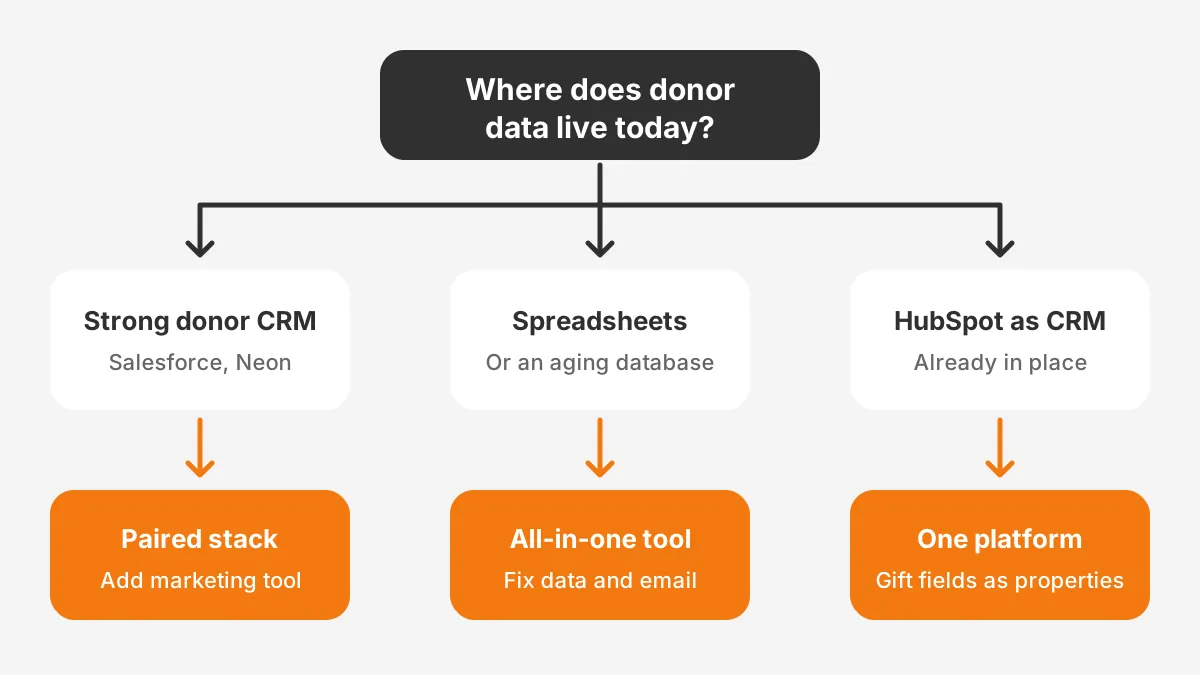
Most nonprofits recognize themselves in one of these situations.
- A strong donor CRM is already in place, such as Salesforce Nonprofit Cloud, Neon CRM or DonorPerfect. General marketing automation can sit beside it, provided the integration syncs gift fields both ways.
- Donor data sits in spreadsheets or an aging database. An all-in-one nonprofit tool solves the data problem and the email problem together.
- The nonprofit runs HubSpot as its CRM already. General marketing automation inside the same platform avoids a sync, and gift fields become custom properties.
Check the sync before you check the email builder. Rework's guide recommends confirming which fields move: last gift date, lifetime giving, recurring status and fund designation. A one-way nightly CSV import is not the same as a native, two-way integration.
Data quality shapes the decision too, since segments built on giving history are only as good as that history. Duplicate donors, missing gift dates and inconsistent fund codes break segments in any platform.
Judge the database layer before the marketing layer. The Unboxx guide to comparing general and donor CRMs walks through that review.
How Do Costs Compare After Nonprofit Discounts?
List prices mislead in both directions. General marketing automation looks expensive at the top tier but discounts heavily for nonprofits. Nonprofit tools look affordable at entry level but price by contact count, which grows with the donor file.
Published figures give a starting point. Givebutter's 2025 roundup lists HubSpot paid plans from $15 per user per month, and Givebutter Plus from $29 per month. HubSpot offers eligible nonprofits up to 40% off paid subscriptions. Mailchimp offers eligible nonprofits 15% off. Prices change often, so confirm each quote directly.
Weigh cost against the revenue email produces. M+R Benchmarks 2026 data, as reported in Rework's guide, shows email produced 11% of all online revenue in 2025. Nonprofits raised $54 for every 1,000 fundraising emails sent.
The subscription is only one line of the real cost. A fair comparison adds the following.
- Implementation: setup partner fees, data migration and template design.
- Integration: connector fees, middleware such as Zapier, and sync monitoring time.
- Contact growth: the price at two and three times today's contact count.
- Staff time: hours each month to build segments, journeys and reports.
- Exit cost: the effort to export data and rebuild journeys if the tool fails.
Ask each vendor for the price at your expected contact count in three years, in writing. A quote tied to today's file size hides the cost that matters most for a growing donor base.
Watch the contract length as well. Nonprofit Tech for Good's guide notes that longer contracts usually earn better rates. It also warns that upgrading is easy but downgrading is hard, so start at the tier you need today.
A worked example helps, using assumed figures for illustration only. Picture a nonprofit with 8,000 contacts comparing two options over three years.
Option A is general marketing automation at an assumed $9,000 a year after discount, plus $12,000 of one-time setup. Option B is a nonprofit tool at an assumed $6,000 a year with $3,000 of setup.
On subscription and setup alone, Option B costs $21,000 over three years against $39,000 for Option A. The gap narrows if Option A replaces two other tools, such as a landing page builder and an SMS platform. It narrows again if lead scoring lifts major gift revenue.
That lift can be estimated before purchase. The marketing automation ROI guide on the Unboxx blog sets out the formula.
Which Team Skills Does Each Option Require?
General marketing automation needs a marketing operations skill set. Someone must design custom properties, build workflows with branches, manage lists and maintain the donor CRM sync. In a small nonprofit, that person is often also writing appeals and running social media.
Nonprofit Tech for Good's guide lists team capability as its fourth selection step. A powerful tool that nobody can configure produces less than a simpler tool used every week. Ask who will own the platform and what monthly hours they have. Also ask what happens when they leave.
Team size points toward a tool type.
- One development staff member with no marketing support: a nonprofit-specific tool with built-in templates and receipts.
- A small team with one marketing generalist: either option, chosen by donor data location and budget.
- A marketing team with an operations role or a partner: general marketing automation paired with a donor CRM.
Training time differs as well. A nonprofit tool usually ships with fundraising templates for welcome series, year-end appeals and lapsed donor outreach. General marketing automation ships with business templates that need rewriting for donors. As a planning estimate, allow two to four extra weeks for that rewriting.
Outside help can close the skill gap. A partner can build the data model, the sync and the first five journeys, then hand over documentation. The AI growth marketing services at Unboxx cover that setup work for nonprofit teams running HubSpot or Salesforce.
How Do You Run a Fair 30-Day Evaluation?
Knowing how to choose marketing automation starts with a fair test. A fair evaluation tests both tool types against your real donor data and your real campaigns. Demos show the vendor's best case. A structured 30-day trial shows how each tool handles your segments, your sync and your staff time.
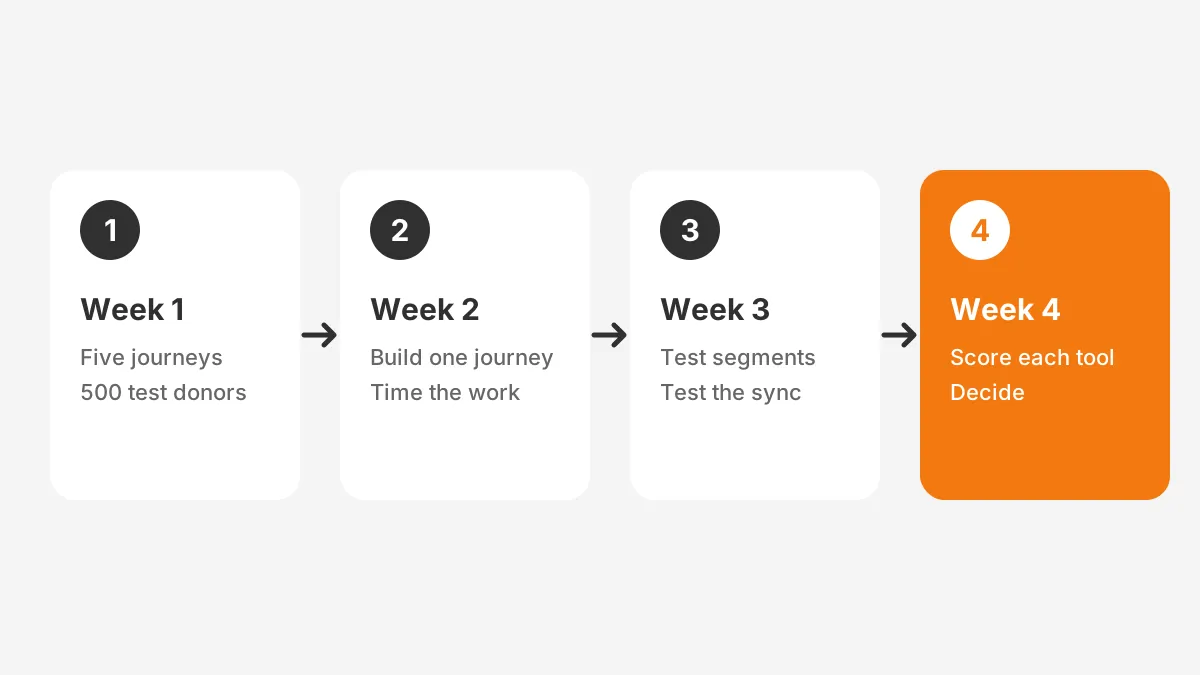
- Week 1, define requirements: list five must-have journeys, such as lapsed donor win-back and a year-end appeal.
- Week 1, export a test file: pull 500 real donor records with gift history, after removing sensitive fields.
- Week 2, build one journey in each tool: time the work, count the custom fields created, and note every workaround.
- Week 3, test segmentation: build a lapsed donor segment and a major gift prospect segment in each tool.
- Week 3, test the sync: change a gift in the donor CRM and time its arrival in the marketing tool.
- Week 4, score and decide: rate each tool on fit, effort, cost over three years and team confidence.
Use a simple weighted score so the decision does not rest on the best demo. One workable split gives donor data fit 35%, team effort 25%, three-year cost 25% and marketing features 15%. Set the weights before testing starts, so no tool gets scored to win.
Include the person who will run the tool every day. Their build time in week two is a strong signal of future adoption. If general marketing automation takes them three days to build one journey, multiply that by every journey on the list.
Measure results, not message volume. Dataro's 2026 guide notes that automation scales sending but does not improve targeting on its own. Score each tool on whether it can rank donors by likely next gift. Email volume alone proves little.
Check deliverability support during the trial. Rework's guide notes Google's sender rules for bulk mail: SPF and DKIM are required, and spam rates must stay low. Confirm that each vendor helps set up authentication on your domain before launch.
What Mistakes Push Nonprofits Into the Wrong Tool?
The most common mistake is choosing on features instead of data fit. A nonprofit buys general marketing automation for its landing pages, then discovers gift history never syncs cleanly. Segments break, receipts go out late, and the team returns to spreadsheets.
Five other errors come up again and again.
- Trusting vendor rankings: Givebutter ranks itself first, and CharityEngine's HubSpot comparison is written by CharityEngine.
- Ignoring contact growth: one strong year-end campaign can push a contact-priced tool into a higher tier.
- Skipping consent records: imported donors without email consent dates create compliance risk in any platform.
- Buying the top tier early: Nonprofit Tech for Good warns that downgrading later is hard.
- Leaving the board out: board reporting needs drive which retention and revenue reports the tool must produce.
Treating the choice as permanent is a mistake of its own. Some nonprofits start with a nonprofit-specific tool and move to general marketing automation after hiring a marketing role. A clean export plan from day one keeps that move cheaper.
Whichever tool wins, the first workflows matter most. The Unboxx article on marketing automation for nonprofits lists which ones to build first.
The reverse move also happens. A nonprofit on general marketing automation with no operations owner may move to an all-in-one tool to cut maintenance. Neither move is a failure if the evaluation criteria are written down and reviewed each year.
Frequently Asked Questions
Is HubSpot a good fit for a small nonprofit?
HubSpot fits a small nonprofit that already uses HubSpot as its CRM or has a marketing generalist. Eligible nonprofits get up to 40% off paid subscriptions. Gift processing and fundraising reports are not native. Teams without setup support often prefer a nonprofit-specific tool with built-in receipts.
Can a donor CRM replace marketing automation?
A donor CRM can replace basic email marketing when it includes built-in email, as Keela and Bloomerang do. It rarely replaces full marketing automation. Website tracking, lead scoring and advanced landing pages usually require general marketing automation. That platform then connects to the donor CRM.
Why do nonprofits switch marketing automation tools?
Nonprofits switch when the tool stops matching the team or the data. Common triggers are a new marketing hire, a donor CRM migration and a broken sync. Contact growth that raises the price is another. Writing selection criteria down at purchase makes the next review faster and more objective.
Who should own marketing automation in a nonprofit?
One named person should own the platform, its data model and its sync. In small nonprofits this is often the development or communications lead. Larger nonprofits assign a marketing operations role. Shared ownership without a named owner usually leads to broken segments and outdated journeys.
How long does marketing automation setup take?
As a planning range, a nonprofit-specific tool with templates can launch journeys in two to six weeks. General marketing automation paired with a donor CRM often takes six to twelve weeks. Fields, sync rules and donor templates need building first. Clean data shortens both timelines more than any feature does.
Is General Marketing Automation Right for Your Nonprofit?
General marketing automation is right when donor data already lives in a capable CRM and someone can own the configuration. A nonprofit-specific tool is right when a small team needs gift history, receipts and fundraising reports to work immediately. Run the 30-day test on real donor records before signing.
Unboxx helps nonprofits compare both paths, build the donor CRM sync and launch the first journeys on HubSpot or Salesforce. Review the CRM for nonprofits page, then schedule a consultation to test general marketing automation against your own donor data.
Let's create something out of this world together.
Have a project in mind? Contact us for expert design and development solutions. Let's discuss how we can help grow your business.
Ready to Unboxx Your Potential?
Build smarter systems. Automate faster. Scale confidently.