
Is HubSpot a ERP? What It Covers and What It Leaves Out
A sales rep closes a deal in HubSpot, and then someone in finance types the same order into another system. Stock counts, invoices and purchase orders live elsewhere.
Soon the team asks whether one platform could do it all. HubSpot's own App Marketplace lists 70 ERP apps for HubSpot, a strong hint for anyone searching "is HubSpot a ERP".
So, is HubSpot a ERP? No. HubSpot is a CRM platform with quoting, invoicing and payment tools. It has no general ledger, inventory, procurement or manufacturing modules. A useful answer to "is HubSpot a ERP" shows where the CRM stops and how an ERP connects behind it.
Key Takeaways
- Asked "is HubSpot a ERP", the answer is no: HubSpot is a CRM for marketing, sales, service and billing.
- Revenue Hub covers quotes, invoices, subscriptions and payments, but it does not keep the books.
- Most companies that sell physical goods connect HubSpot to an ERP such as NetSuite, Business Central or Odoo.
Is HubSpot a ERP or a CRM?
HubSpot is a CRM. Its products cover marketing, sales, customer service, content, data and revenue work, all built around contact, company and deal records. The question "is HubSpot a ERP" asks whether it also runs finance and operations. It does not.
An ERP system records what happens after the sale. It books revenue to a general ledger, reduces stock, raises purchase orders and plans production. HubSpot records who the customer is, what was promised and what was quoted. The two systems hold different facts about the same customer.
The HubSpot CRM itself is free to start, and paid hubs add features. Sales Hub manages pipelines and deals. Marketing Hub runs campaigns and email. Service Hub handles tickets.
Data Hub syncs and cleans data across connected apps. Revenue Hub, called HubSpot Commerce Hub before June 2026, adds quoting and billing. People search it two ways: "is HubSpot a ERP" and "is HubSpot an ERP system". Both get the same answer.
None of these hubs includes a chart of accounts, a stock ledger or a bill of materials. That settles the short version of "is HubSpot a ERP". The longer answer depends on what the business sells, how it buys and how its finance team closes the month.
The name confusion has a simple source. HubSpot markets itself as a customer platform, and ERP vendors market their suites as one system for everything. Neither label tells a buyer which records each product stores.
For any team, the fastest test of "is HubSpot a ERP" is to list the records it must keep. The next sections walk through that list.
What does an ERP do that CRM does not?
An ERP system runs the back office: accounting, purchasing, inventory, production and fulfillment. Oracle's ERP definition calls ERP software a tool for day-to-day business activities. Its list includes accounting, procurement, project management, risk management and supply chain operations.
ERP software is built on double-entry accounting. Every sale, receipt and payment posts to the general ledger, so the books balance at month end. Accounts receivable tracks what customers owe. Accounts payable tracks what the business owes suppliers. A CRM such as HubSpot stores none of these ledgers.
ERP vendors also add operations modules. Inventory management counts stock by warehouse and lot. Procurement software raises purchase orders and matches supplier bills. Manufacturing modules hold the bill of materials and run material requirements planning (MRP). Order management turns a sales order into picks, shipments and invoices.
Measured against that module list, "is HubSpot a ERP" gets a clear no. HubSpot covers none of the ledger or operations modules, only the customer records around them.
CRM vs ERP is a split between front office and back office. The CRM wins and keeps customers. The ERP delivers the order and accounts for it.
Some ERP products include a CRM module, such as NetSuite and Dynamics 365. HubSpot works in the opposite direction and includes no ERP module.
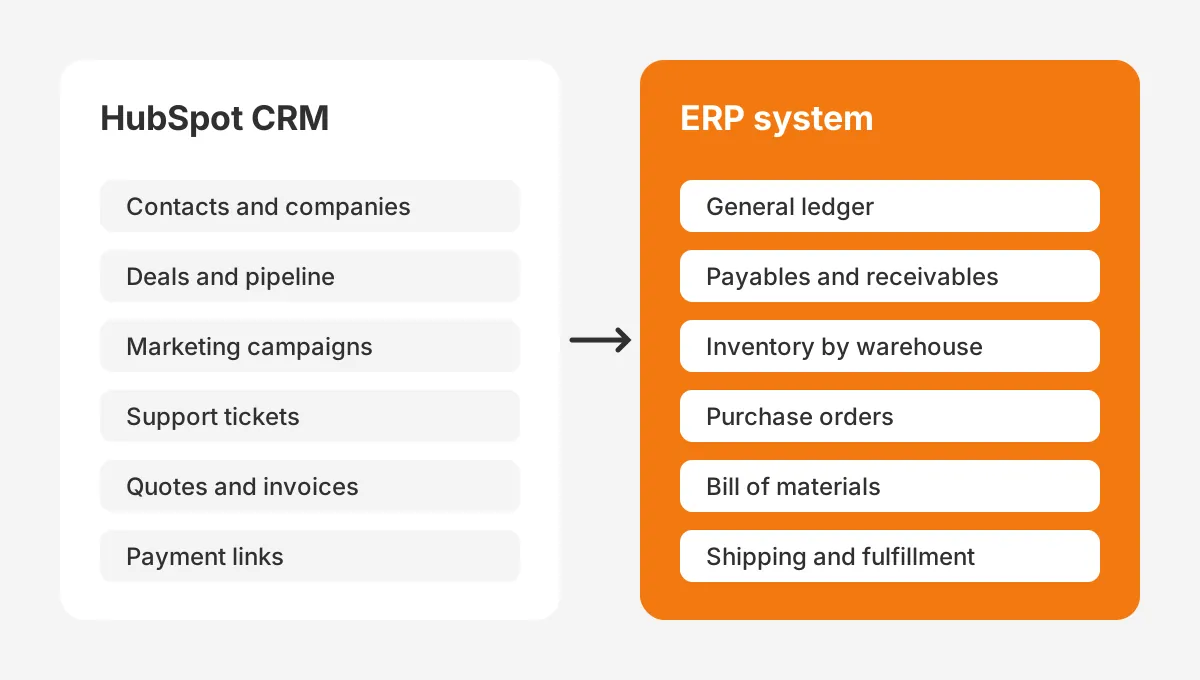
The split also shows in who uses each system daily. Sales reps, marketers and support agents live in the CRM. Controllers, buyers, warehouse staff and planners live in the ERP. Each group needs a small set of fields from the other side.
Those shared fields, more than any product label, decide how the two systems should connect.
What does HubSpot cover for quotes, billing and payments?
HubSpot covers quote-to-cash for the customer-facing part of a sale. HubSpot's Revenue Hub page sums it up as "Quote, bill, and collect" inside the CRM. This feature set is what prompts the "is HubSpot a ERP" search in the first place.
Here is what Revenue Hub includes, by tier, from HubSpot's pricing on that page. No tier adds a ledger, so none changes the answer to "is HubSpot a ERP":
- Free ($0 a month): invoices, payment links and subscriptions.
- Professional (from $95 a month): quotes, contracts, e-signature, revenue analytics and automated sales tax.
- Enterprise (from $140 a month): advanced quote approvals and quote rules.
HubSpot payments accept credit cards, ACH, recurring payments and payment links. Subscription billing sends recurring invoices, even when a customer changes the contract mid-term. HubSpot quotes pull approved items and prices from the product library. A rep can then build a proposal without typing prices by hand.
HubSpot CPQ (configure, price, quote) has also grown. The Q1 2026 Commerce Hub launch notes list credit memos and partial payments on large invoices. They add quotes created through the Breeze assistant. They also announced two-way invoice sync for Xero for all HubSpot customers.
These tools stop at the invoice and the payment. HubSpot invoices are not journal entries, and a paid invoice does not reconcile a bank account. Revenue recognition, tax filing and financial statements still need accounting software or an ERP.
With Revenue Hub switched on, the answer to "is HubSpot a ERP" is still no. Revenue Hub makes HubSpot a stronger billing front end. The finance system behind it stays the same.
Which ERP jobs can HubSpot not run?
HubSpot cannot close the books, count stock, buy from suppliers or plan production. Those four gaps decide whether a business needs an ERP next to its CRM. The table below compares the two by job.
| Business job | HubSpot (CRM) | ERP system |
|---|---|---|
| Contacts, companies and deals | Core feature | Basic or add-on CRM module |
| Quotes and e-signature | Revenue Hub Professional | Sales order and quote module |
| Invoices and payment links | Revenue Hub, free tier | Accounts receivable |
| General ledger and month-end close | Not available | Core feature |
| Inventory by warehouse | Not available | Core feature |
| Purchase orders and supplier bills | Not available | Procurement and accounts payable |
| Bill of materials and MRP | Not available | Manufacturing module |
| Shipping and fulfillment | Not available | Order management |
Read row by row, the table answers "is HubSpot a ERP" one job at a time. HubSpot covers the first three rows. The ERP covers all eight, though its CRM features are usually thinner.
Does HubSpot do accounting? Not in the ledger sense. It can send an invoice and record that a payment arrived. It cannot post that payment against a chart of accounts or produce a balance sheet.
Does HubSpot have inventory management? No native module exists. The product library stores items and prices for quotes. It holds no stock quantity that drops when an order ships. Teams that need live stock levels in HubSpot sync them from the ERP.
Manufacturers feel these gaps first. A bill of materials, routings and work orders sit at the center of production planning. A HubSpot for manufacturers setup handles leads, distributors and quotes, while the ERP runs the factory floor.
Purchasing is the gap service firms forget. A firm that resells software licences or hardware still raises purchase orders and pays suppliers. Without an ERP or accounting tool, those costs never meet the revenue in HubSpot, and margin reports go wrong.
Why do teams ask is HubSpot a ERP?
Teams search "is HubSpot a ERP" because HubSpot now handles money. Once invoices, subscriptions and payments run in the CRM, the line between CRM and ERP looks thin. The real question is usually whether the business can skip buying an ERP.
Three situations trigger the question most often:
- A service firm adds HubSpot invoices and wonders whether it still needs accounting software.
- A growing distributor wants one login for sales and stock, and hopes HubSpot can hold both.
- A finance team tires of retyping closed deals into the ERP and looks for one system.
In each case "is HubSpot a ERP" gets the same answer, but the next step differs. The service firm may need only an accounting tool. The distributor and the finance team need an ERP and a good integration. The HubSpot vs ERP choice is rarely either-or.
A worked example shows the cost of the retyping problem. The figures here are assumed for illustration, not sourced. A distributor enters 300 orders a month, and each takes 6 minutes to rekey from HubSpot into its ERP. That is 30 hours a month of copying, before any typing errors.
Getting "is HubSpot a ERP" wrong would cost this distributor time every month, not only licence fees.
Those 30 hours also delay the order. A deal closed on Friday afternoon may not reach the warehouse until Monday. An integration that creates the sales order on close removes both the hours and the delay.
When can a business skip an ERP?
A business can run on HubSpot without an ERP when it sells services, keeps no stock and has simple books. HubSpot plus a small-business accounting tool then covers the work. The answer to "is HubSpot a ERP" stays no, but the gap may not matter yet.
HubSpot for small business service firms usually pairs with QuickBooks Online or Xero. HubSpot sends the quote and the invoice. The accounting tool records the payment, reconciles the bank and supports tax filing. A HubSpot QuickBooks integration or a HubSpot Xero integration keeps invoices in step.
The signs that a company has outgrown that pairing are concrete:
- It starts holding inventory in one or more warehouses.
- It buys materials and needs purchase orders matched to supplier bills.
- It builds products and needs a bill of materials.
- It runs more than one legal entity or currency and needs consolidated books.
At that point an ERP for small business becomes the system of record for operations. Common choices include Odoo, NetSuite and Business Central. HubSpot stays in place for the customer side.
This is the stage where "is HubSpot a ERP" stops being a curiosity and becomes a buying question. Swapping HubSpot for the ERP's built-in CRM is possible, but sales teams often lose features they use daily.
What questions decide if HubSpot is enough?
Five yes-or-no questions decide whether HubSpot plus accounting software is enough, or whether an ERP is due. One "yes" is a warning sign. Two or more usually mean the business needs an ERP within the next budget cycle.
- Does the business hold stock that must be counted, reserved or reordered?
- Does it issue purchase orders to suppliers every week?
- Does it assemble, manufacture or kit products from components?
- Does finance close the month across more than one entity or currency?
- Do order volumes make manual rekeying a weekly bottleneck?
A five-person consultancy usually answers no to all five, so HubSpot and Xero are enough. A 60-person equipment distributor usually answers yes to the first, second and fifth. For that distributor, "is HubSpot a ERP" is the wrong question. The right one is which ERP to connect.
The checklist also helps avoid buying too early. An ERP project costs time, licences and training. A service firm that buys one before it holds stock pays for modules it will not use for years.
Run the checklist once a year. The answer to "is HubSpot a ERP" will not change, but the need for an ERP can.
How does HubSpot connect to an ERP?
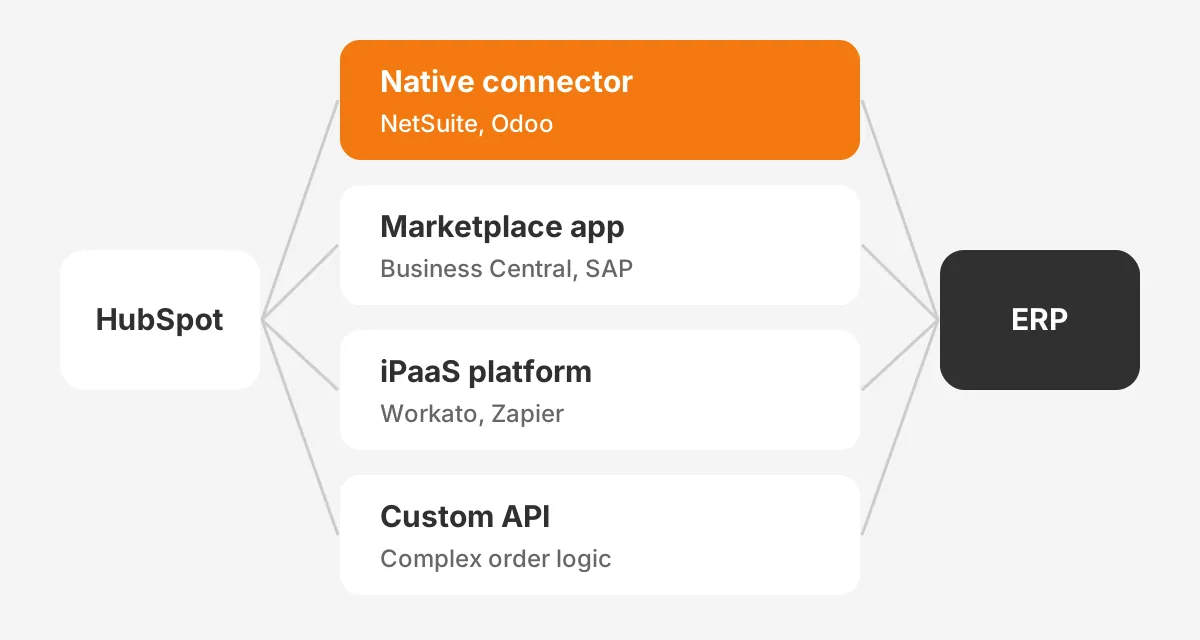
HubSpot connects to an ERP in four ways. The options are a native connector, a marketplace app, an iPaaS platform or a custom API build. The right method depends on the ERP, the data volume and the custom logic the order process needs.
Because the answer to "is HubSpot a ERP" is no, the integration carries the weight of the whole order process.
The HubSpot NetSuite integration is the clearest native example. HubSpot's NetSuite help article was updated in September 2026. It maps contacts, companies, deals to opportunities, invoices, orders to sales orders and products to items.
Each object can run as a one-way or two-way sync. Custom field mapping needs a Data Hub subscription.
Other ERPs connect through apps in the HubSpot App Marketplace. HubSpot publishes its own Odoo data sync app. A HubSpot Business Central integration is available from partners such as Cloudify. A HubSpot SAP integration can use an ERP bridge app that reads SAP data over OData, or a custom build.
| Method | Best fit | Trade-off |
|---|---|---|
| Native connector | NetSuite, Odoo and other ERPs HubSpot supports directly | Fast to start; limited custom logic |
| Marketplace app | Business Central, SAP Business One, Acumatica, Sage Intacct | Depends on the vendor's support and roadmap |
| iPaaS platform | Workato or Zapier flows across connected systems | Extra licence; someone must own the flows |
| Custom API build | Complex order logic or on-premises ERP | Highest cost; full control of field mapping |
Middleware sits between the systems when no single connector fits. An iPaaS tool such as Workato reads a closed deal from the HubSpot API. It creates the sales order in the ERP and writes the order number back. The detailed build steps are in the HubSpot ERP integration guide.
Every method shares one limit. A connector moves data; it does not decide which system wins a conflict. That decision belongs to the team, and the next section sets it out.
Which system should own each type of data?
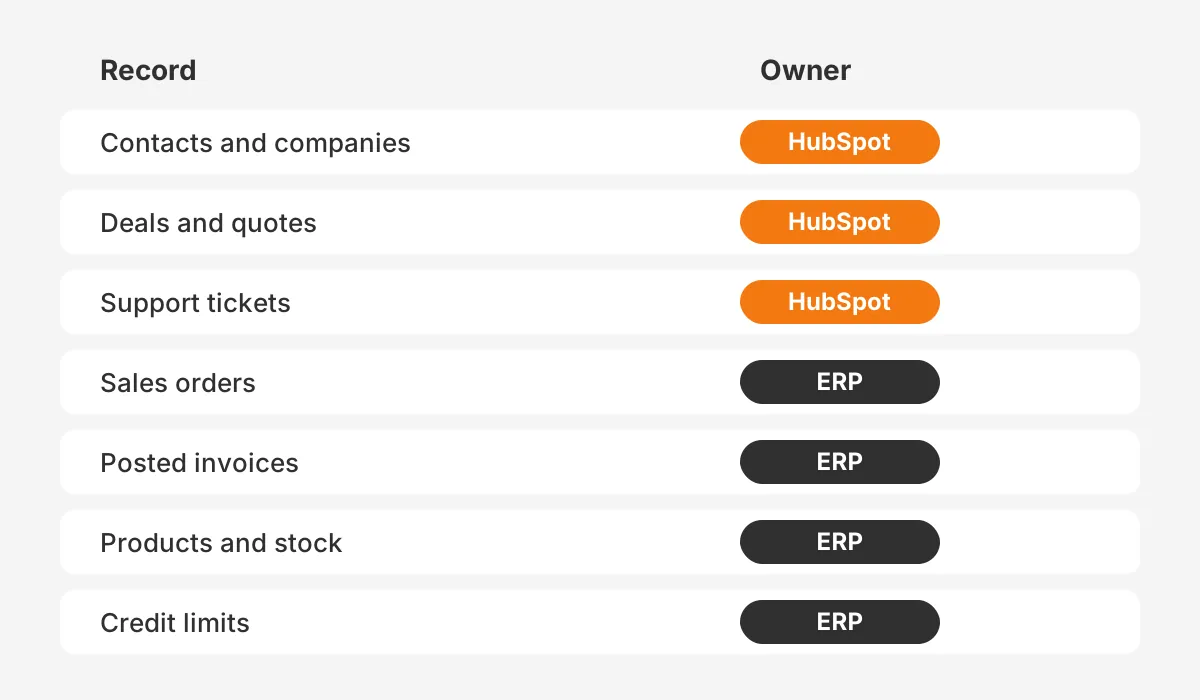
Each record type needs one system of record, the system whose value wins when the two disagree. HubSpot should own customer and pipeline data. The ERP should own financial, stock and order data. Writing this down before any data mapping prevents sync loops.
Here the "is HubSpot a ERP" question turns into field-level rules.
A typical ownership split looks like this:
- HubSpot owns contacts, companies, deals, marketing engagement and support tickets.
- The ERP owns customer account numbers, credit limits, posted invoices and payment status.
- The ERP owns products, prices and stock, and sends them to the HubSpot product library.
- HubSpot owns the quote until it is accepted; the ERP owns the sales order after that.
This split follows the order to cash flow. A deal closes in HubSpot, and the ERP creates the sales order, ships it and posts the invoice. Status then flows back, so sales and service teams see what was shipped and paid.
Field mapping turns the split into rules. For each field, the team records the source system, the target, the sync direction and the format. A two-way sync is safe only for fields both sides may edit, such as a phone number. Ledger values should flow one way, from the ERP.
How do you plan a HubSpot and ERP setup?
Plan the setup in five steps, from process mapping to a monitored go-live. Skipping the first two steps sinks most CRM ERP integration projects. The build then copies unclear processes into code.
Settling "is HubSpot a ERP" before step one keeps the scope clear. Nobody then expects the CRM to act as the ledger.
- Map the order process from first quote to paid invoice, and mark which team touches each step.
- Assign a system of record to every object and field, using the split above.
- Pick the connection method: native connector first, then a marketplace app, iPaaS or custom integration.
- Clean duplicates and standardize product codes in both systems before the first sync.
- Test with a sample of real orders, reconcile totals, then switch on and monitor sync errors daily.
Budget follows the method. HubSpot pricing for the connector is often low, but Data Hub, iPaaS licences and partner hours add up. A custom build costs the most and needs an owner after go-live. The CRM ERP integration planning guide covers scoping in more depth.
Platform choice matters too. Teams weighing Microsoft's suite can compare HubSpot vs Dynamics 365, where Business Central is the matching ERP. Teams that want one vendor for CRM and ERP can read Odoo vs HubSpot before deciding.
Unboxx builds these connections as part of its CRM integration services. Its Odoo ERP consulting team handles the ERP side. A new HubSpot account benefits from the HubSpot implementation plan before any ERP sync starts.
Frequently Asked Questions
Can HubSpot replace an ERP?
HubSpot cannot replace an ERP for a company that holds stock, buys materials or needs a general ledger. It can replace manual quoting and invoicing. A service business with simple books may run on HubSpot plus accounting software. That pairing can delay an ERP until operations grow more complex.
Does HubSpot have an ERP module or add-on?
HubSpot has no ERP module or add-on. Revenue Hub, formerly Commerce Hub, adds quotes, invoices, subscriptions and payments to the CRM. Accounting, inventory and procurement still come from a separate ERP or accounting tool. HubSpot connects to it through its App Marketplace or the HubSpot API.
Which ERP works best with HubSpot?
NetSuite has the most direct link, because HubSpot builds and supports the NetSuite connector itself. Odoo also has a HubSpot-built data sync app. Business Central, SAP Business One and Acumatica connect through partner apps. The best fit depends on industry, entity count and the budget for integration work.
Is HubSpot a system of record for finance data?
HubSpot should not be the system of record for finance data. It records invoices and payment status for sales visibility. The ledger, tax and revenue recognition belong in accounting software or an ERP. Keep financial values flowing one way, from the ERP or accounting tool into HubSpot records.
How long does a HubSpot ERP integration take?
A native connector with clean data can go live within weeks. A marketplace app usually takes similar time plus vendor setup. A custom integration with complex order logic can take months. Data cleanup and field mapping decisions often take longer than the technical build itself, so start them first.
So, is HubSpot a ERP for your business?
Is HubSpot a ERP? No, and it is not trying to be one. HubSpot runs the customer side of revenue, from first contact to paid invoice. An ERP runs the books, stock and fulfillment.
The strongest setups connect the two and give each record one owner. Treat "is HubSpot a ERP" as the start of a design decision, not the end of one.
Unboxx helps teams choose the ERP, map the data and build the HubSpot connection without double entry. To review your current setup, schedule a consultation with Unboxx.
Let's create something out of this world together.
Have a project in mind? Contact us for expert design and development solutions. Let's discuss how we can help grow your business.
Ready to Unboxx Your Potential?
Build smarter systems. Automate faster. Scale confidently.