
HubSpot vs Dynamics 365: Cost, AI, ERP Fit and Setup
A sales director at a 60-person distributor gets two CRM proposals in the same week. One prices HubSpot Sales Hub Professional at $90 to $100 per seat per month. The other prices Dynamics 365 Sales Enterprise at $105 per user per month, paid yearly.
The licence lines look close, so the HubSpot vs Dynamics 365 decision moves to everything around them. HubSpot is a customer platform for marketing, sales and service. Dynamics 365 is a family of Microsoft business apps on one data platform.
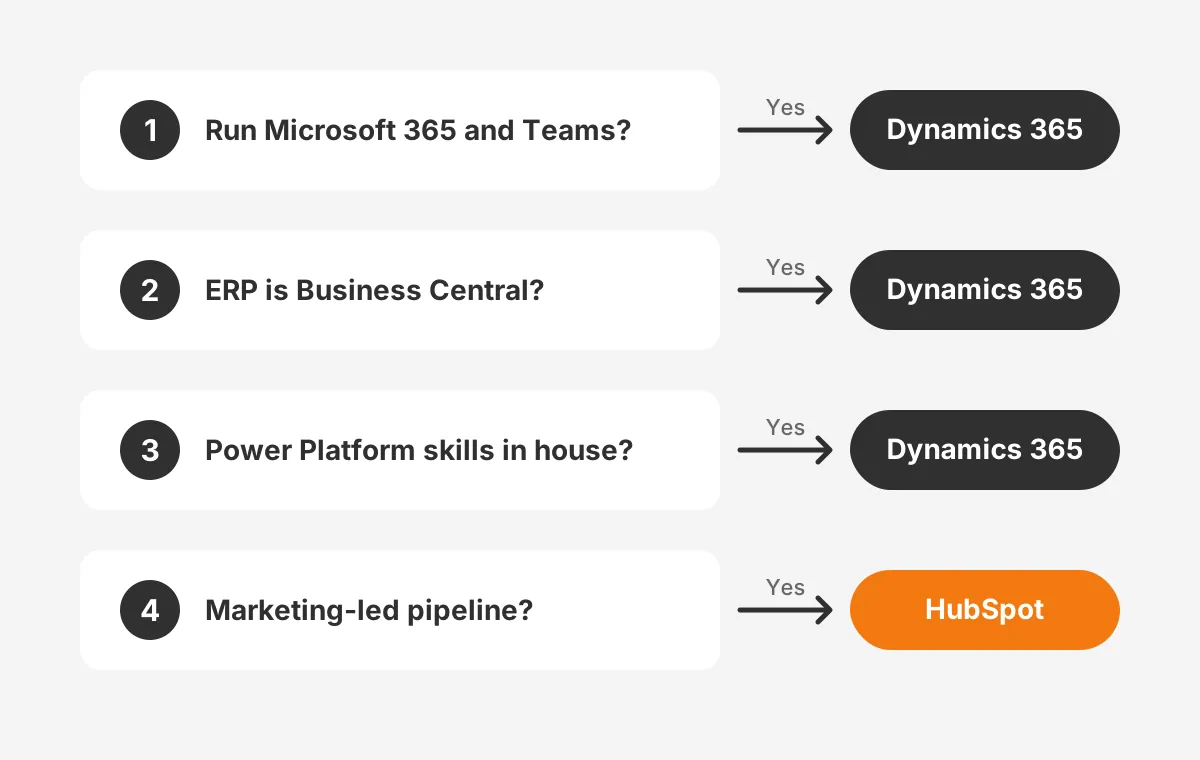
The better choice in HubSpot vs Dynamics 365 depends on three things. They are your Microsoft stack, your ERP and the person who will run the system.
Key Takeaways
- At list price, HubSpot vs Dynamics 365 licence costs for 25 sales users land close in year one.
- Dynamics 365 fits teams that run Microsoft 365, Power BI and Business Central with Power Platform skills.
- HubSpot fits teams that want marketing, sales and service in one tool that business users can configure themselves.
What Is the Difference in HubSpot vs Dynamics 365?
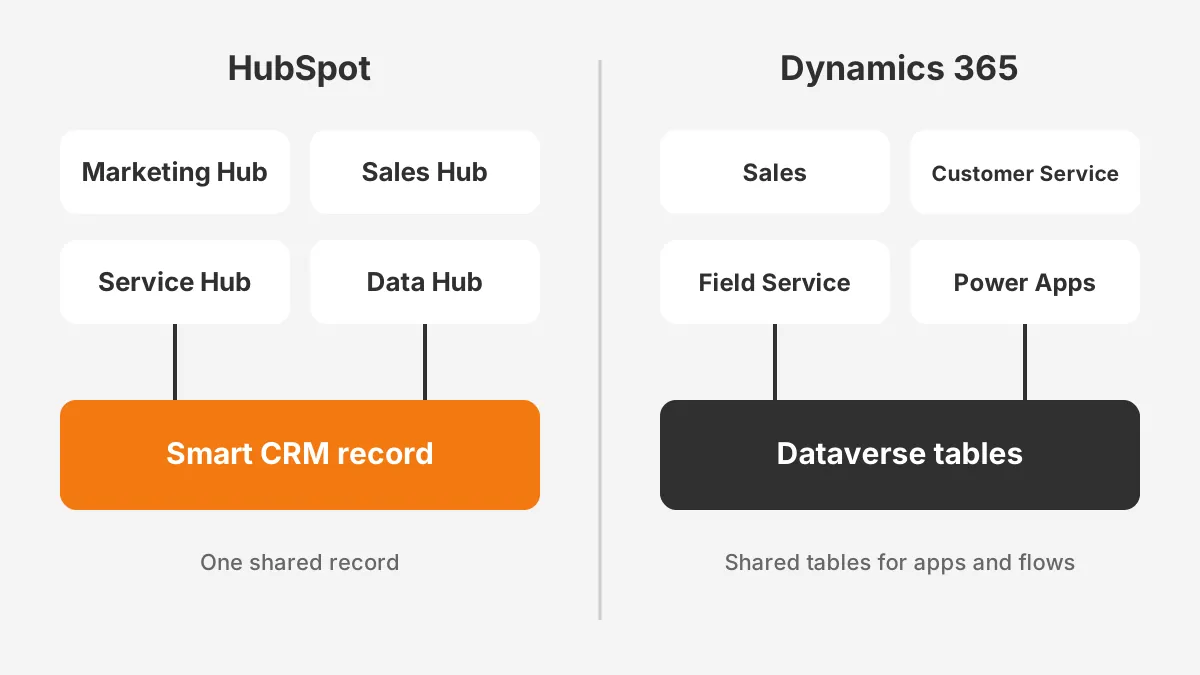
The real difference in HubSpot vs Dynamics 365 is the platform under each CRM, not the feature list. HubSpot builds every hub on its own Smart CRM database. Microsoft builds Dynamics 365 Sales and its sister customer apps on Microsoft Dataverse and the Power Platform.
HubSpot sells Marketing Hub, Sales Hub, Service Hub, Content Hub and Data Hub as separate products on one shared record. The HubSpot free CRM covers contacts, companies, deals and tickets for up to 2 users. Paid hubs add automation, reporting and seats.
Microsoft sells Dynamics 365 Sales, Customer Service, Field Service and Business Central as separate apps. Microsoft documents (2026) that Dynamics 365 apps use Dataverse to store and secure their data. Power Apps, Power Automate and Power BI all read that same store.
Why does the platform matter more than features?
Both products cover the same sales pipeline basics: leads, accounts, opportunities, quotes and forecasts. The gap appears when a team needs something outside those basics. In the HubSpot vs Dynamics 365 comparison, that is where cost and staffing diverge.
A HubSpot admin changes properties, pipelines and workflows in the browser without code. A Dynamics 365 admin works in Power Apps forms, Dataverse tables and Power Automate flows. The second skill set is deeper and also harder to hire for.
That makes the hubspot vs microsoft dynamics 365 question partly a hiring question. Decide who will own the CRM in year two, and pick the platform that person can run.
How Do HubSpot vs Dynamics 365 Sales Features Compare?
HubSpot vs Dynamics 365 sales features match closely on the basics and differ in depth. Both track leads, contacts, accounts, deals and forecasts. The differences show up in quotes, lead scoring and reporting.
| Feature | HubSpot Sales Hub | Dynamics 365 Sales |
|---|---|---|
| Sales pipeline | Deal pipelines with drag-and-drop stages | Opportunity stages with business process flows |
| Lead scoring | Rule-based and AI-assisted scores on contacts and companies | Predictive lead and opportunity scoring |
| Quotes | Quote templates linked to deals and products | Quotes, orders and invoices with price lists |
| Reporting | Built-in dashboards and custom reports | Built-in dashboards plus Power BI |
| Email and calls | Sequences, tracking and calling in the CRM | Sales accelerator, Outlook and Teams |
Lead scoring works in both tools, but the setup differs. A HubSpot admin builds scoring rules from form fills, page views and email clicks. Dynamics 365 Sales offers predictive scoring models trained on past wins.
The quote to cash flow is where Dynamics 365 pulls ahead for product companies. Quotes become orders and invoices inside Dynamics 365 Sales, then flow to Business Central. HubSpot quotes stop at the signed quote, and an ERP takes over from there.
For a services firm that sells time, that gap rarely matters. A distributor with 5,000 SKUs and customer price lists is different. For that team, quote to cash often decides HubSpot vs Dynamics 365 on its own.
How Does HubSpot vs Dynamics 365 Pricing Compare?
HubSpot vs Dynamics 365 pricing starts in a similar range at the middle tier but follows different rules. HubSpot charges per seat with a required onboarding fee on higher tiers. Microsoft charges per user per month on a yearly commitment.
| Tier | HubSpot Sales Hub | Dynamics 365 Sales |
|---|---|---|
| Entry | Sales Hub Starter, $7 to $20 per seat per month | Dynamics 365 Sales Professional, $65 per user per month |
| Middle | Sales Hub Professional, $90 to $100 per seat per month | Dynamics 365 Sales Enterprise, $105 per user per month |
| Top | Sales Hub Enterprise, from $150 per seat per month | Dynamics 365 Sales Premium, $150 per user per month |
| Onboarding | $1,500 (Professional), $3,500 (Enterprise), one time | No vendor onboarding fee listed |
| Billing | Monthly or annual, by tier | Paid yearly |
The HubSpot figures come from the HubSpot Sales Hub pricing page (2026). HubSpot sales hub pricing shows two rates per paid tier, set by billing choice and a current offer. View-only seats cost nothing, so managers who only read reports need no paid seat.
Dynamics 365 sales pricing comes from the Microsoft Dynamics 365 Sales pricing page (2026). Microsoft Relationship Sales adds LinkedIn Sales Navigator to Sales Enterprise. It has variable pricing and a 10-seat minimum.
What does a 25-user team pay in year one?
A worked example shows how close the licence lines sit. The example assumes 25 sales users, list prices and no discounts. These are assumed figures for illustration, not quotes.
- Sales Hub Professional at $100 per seat: 25 × $100 × 12 = $30,000, plus $1,500 onboarding, totals $31,500.
- Dynamics 365 Sales Enterprise at $105 per user: 25 × $105 × 12 = $31,500.
- Sales Hub Enterprise at $150 per seat: $45,000, plus $3,500 onboarding, totals $48,500.
- Dynamics 365 Sales Premium at $150 per user: 25 × $150 × 12 = $45,000.
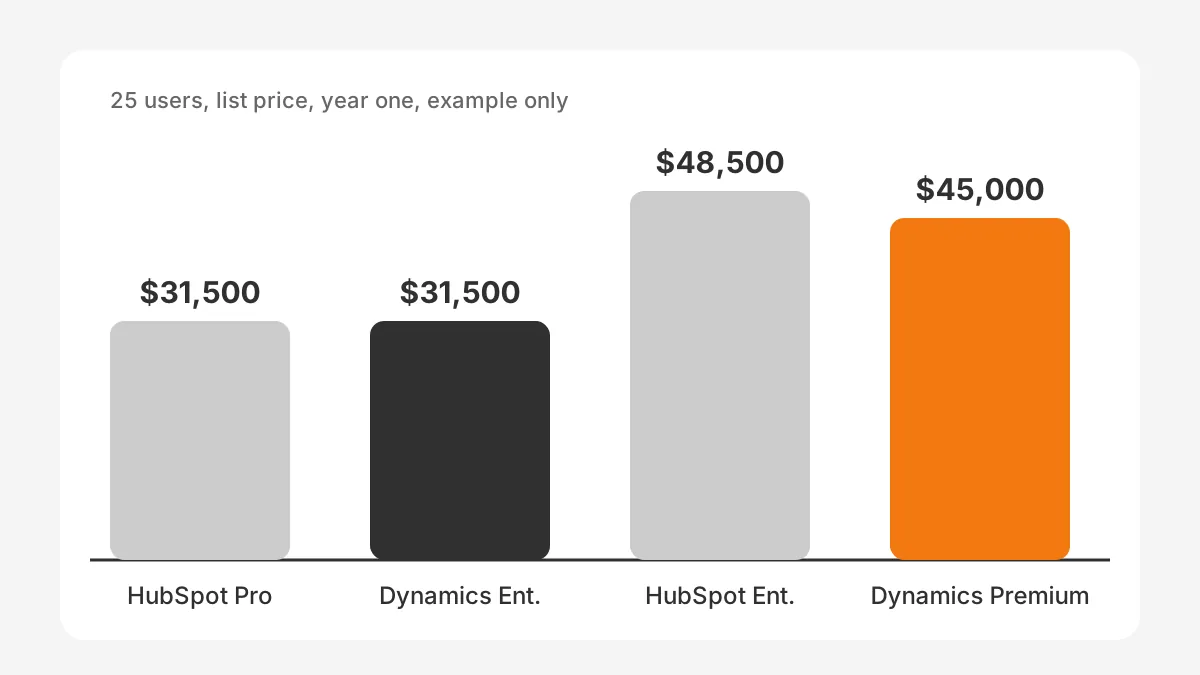
On licences alone, HubSpot is not much cheaper than Dynamics 365 at the middle tier. The real gap in crm total cost of ownership sits outside the licence.
Which Costs Sit Outside the Licence Price?
The costs outside the licence are implementation, administration, add-on apps and AI usage. In most HubSpot vs Dynamics 365 projects, these lines decide the three-year budget more than seat prices do.
Start with the HubSpot onboarding fee. HubSpot lists a required one-time fee of $1,500 for Sales Hub Professional and $3,500 for Enterprise. Most teams also pay a crm implementation partner for data migration, integrations and training.
Dynamics 365 has no onboarding fee on its pricing page. Most mid-sized teams still hire a Microsoft partner to configure Dataverse tables, security roles and Power Automate flows. That partner work is usually the largest single line in year one.
Use this checklist when you compare crm licensing quotes:
- Seat count by role, including view-only seats and occasional users.
- Partner fees for setup, data migration and integrations.
- Admin time each month, in-house or outsourced.
- AI usage beyond included credits.
- Connector or middleware fees for ERP integration.
- Renewal terms and price changes after year one.
A useful rule for HubSpot vs Dynamics 365 budgets is to price three years, not one. Renewal terms, seat growth and added hubs or apps change the total after year one.
Ask each vendor to price the same scope. A HubSpot vs Dynamics 365 quote that leaves out partner work or admin time is not a fair comparison. CRM consulting and implementation services can build that like-for-like scope before you sign.
How Do Customization and Data Models Differ?
Customization differs because Dynamics 365 is built for developers and makers, while HubSpot is built for business admins. Both can model a company's processes, but they get there in different ways.
In Dynamics 365, every record lives in a Dataverse table. An admin can add tables, columns and relationships, then build forms in Power Apps. Power Automate runs flows across Dynamics 365, Outlook, Microsoft Teams and SharePoint. Power BI reports read the same data.
HubSpot starts with standard objects: contacts, companies, deals, tickets and quotes. HubSpot custom objects need an Enterprise subscription, according to the HubSpot Knowledge Base (2026). On lower tiers, teams model extra data with properties and associations.
In HubSpot vs Dynamics 365 projects, the count of custom records is an early signal of partner cost. Each custom table or object adds design, testing and reporting work.
Custom workflow actions follow the same pattern. HubSpot offers custom-coded workflow actions in its automation tools. Dynamics 365 uses Power Automate connectors and, for complex logic, plug-ins written by developers.
Which crm data model suits a mid-sized B2B team?
Pick the model that matches your process count. A team with one sales process and standard deals rarely needs more than HubSpot properties. A manufacturer tracking equipment, service contracts and price lists across plants often needs Dataverse tables.
The test is simple to run. List the records your team tracks today, then count the ones that fall outside contacts, companies and deals. Three or more custom records usually point toward Dynamics 365 or HubSpot Enterprise.
Which Fits a Microsoft 365 and ERP Stack Better?
Dynamics 365 fits a Microsoft 365 and ERP stack better when the ERP is Business Central. Both products come from Microsoft, and Business Central ships with a standard connection to Dynamics 365 Sales. The link between sales and finance needs less custom work.
Business central pricing sits on the Business Central pricing page (2026). Business Central Essentials costs $80 per user per month and Premium costs $110, paid yearly. Team Members licences cost $8 per user per month for read and approval access.
For a Microsoft-first company, HubSpot vs Dynamics 365 often comes down to identity and licensing. One Microsoft tenant gives staff one sign-in and one security model for email and CRM.
That Team Members licence matters for warehouse, dispatch and finance staff. They can read orders and approve workflows without a full seat. A HubSpot stack has no direct match for that ERP licence, because HubSpot has no ERP.
HubSpot does integrate with Business Central, but through marketplace connectors or middleware rather than a native product link. The HubSpot ERP integration guide covers methods, data maps and sync rules.
How do Outlook and Teams compare on each?
Outlook integration exists on both platforms. HubSpot offers an Outlook add-in that logs emails and meetings to CRM records. Dynamics 365 shows CRM records inside Outlook and Microsoft Teams through Microsoft's own apps.
Microsoft teams integration is deeper on Dynamics 365, because both sit in one Microsoft tenant with one identity. HubSpot connects to Teams through its own app. For a team that lives in Teams all day, that difference shows up in daily use.
A company with a different ERP sees a smaller gap. For SAP, NetSuite or Sage, both CRMs need a connector. The Salesforce vs Dynamics 365 comparison covers the same stack question for Salesforce.
How Do Copilot and Breeze Compare on AI?
Copilot and Breeze both add AI to the CRM, but they are licensed in different ways. Dynamics 365 copilot features come with Sales Enterprise. HubSpot Breeze AI features run on HubSpot Credits included in each paid tier.
Microsoft states that Sales Enterprise includes Copilot in Dynamics 365 and agentic capabilities. Sales Premium adds 1,000 Copilot Credits per user per month. Teams that build their own agents in Copilot Studio buy capacity separately.
HubSpot includes HubSpot Credits by tier: 500 on Sales Hub Starter, 3,000 on Professional and 5,000 on Enterprise. Breeze agents and AI features draw from that pool. Heavy use beyond the included credits costs extra.
On the question of which CRM has better AI, neither wins outright. Copilot credits suit teams whose day runs in Outlook, Teams and Excel. Breeze suits teams whose work starts in HubSpot marketing and sales records.
AI is the line most likely to move in a HubSpot vs Dynamics 365 budget. Check the current credit terms at each renewal, because usage-based costs are the hardest to forecast.
In a HubSpot vs Dynamics 365 trial, test AI on your own data. Ask each tool to summarise a real account, draft a follow-up and flag a stalled deal. Then compare the answers with what your best rep would write.
Which Teams Should Choose HubSpot vs Dynamics 365?
Dynamics 365 is usually the better pick for teams that run Microsoft for email, reporting and ERP. HubSpot suits teams that want marketing and sales in one easy tool. The hubspot or dynamics 365 choice gets clearer by industry.
For HubSpot vs Dynamics 365 for manufacturing, the ERP decides most cases. A manufacturer on Business Central gets order, stock and invoice data next to the pipeline. A manufacturer on another ERP may prefer HubSpot for dealer marketing and quote follow-up. See CRM for manufacturers for industry workflows.
Professional services firms often pick HubSpot. Their pipeline depends on content, referrals and email nurture, which Marketing Hub and Sales Hub handle in one place. Firms that bill projects through Microsoft tools may prefer Dynamics 365.
No industry rule replaces a fit test. Treat these patterns as starting points in any HubSpot vs Dynamics 365 review, then check them against your own processes.
Logistics companies tend to split the decision. Account managers want simple pipelines and email tracking. Operations teams want service cases, SLAs and ERP links, which favour Dynamics 365 on a Microsoft stack.
Which crm is easier to use day to day?
HubSpot is usually easier for sales reps and marketers to learn. Its screens follow one design across hubs, and admins can change most settings without code. Dynamics 365 is easier for staff who already work in Outlook, Excel and Teams.
For crm for mid-sized b2b companies, the deciding factor is often the admin, not the rep. Check who will own the system, then match the platform to that person's skills.
What Does Implementation Look Like on Each?
Implementation on HubSpot is usually shorter, because most setup happens in settings rather than code. Dynamics 365 projects often take longer, because Dataverse design, security roles and flows need more build time. Both follow the same core steps:
- Map your sales process, records and reports before touching the software.
- Clean and deduplicate data from the old CRM and spreadsheets.
- Configure pipelines, properties or tables, and user permissions.
- Build integrations to email, ERP and quoting tools.
- Load data, test with a pilot group and fix gaps.
- Train users by role, then retire the old system.
Plan HubSpot vs Dynamics 365 timelines around data quality first. Duplicate accounts, missing owners and old picklist values slow both platforms in the same way.
How long does crm implementation take? It depends on scope, data quality and integrations more than the platform. The HubSpot implementation guide breaks phases, owners and timelines down step by step.
A dynamics 365 to hubspot migration needs careful mapping. Dataverse tables map to HubSpot objects, and Power Automate flows become HubSpot workflows. A hubspot to dynamics 365 migration runs the other way, and custom properties become Dataverse columns.
The Power Platform optimization success story shows how fragile Dynamics flows get fixed after go-live. Teams weighing an all-in-one suite can also read the Odoo vs HubSpot comparison.
What to Test in HubSpot vs Dynamics 365 Demos?
Test your own records, your own reports and your own admin tasks in every HubSpot vs Dynamics 365 demo. A vendor's demo data always looks clean, so bring a sample of yours.
Give both vendors the same script a week before the demo. Then score each answer on the same scale. A simple script covers five tasks:
- Create a lead from a web form and route it to the right rep.
- Move a deal through your real stages and build a quote with your price list.
- Show your weekly pipeline report and the forecast your sales director uses.
- Add a new field and change a workflow, done live by the vendor's admin.
- Show the ERP sync for one order, from quote to invoice.
Watch the fourth task closely. It shows what your own admin will face every week after go-live. In most HubSpot vs Dynamics 365 trials, that task tells you more than any feature slide.
Also ask each partner for one reference customer in your industry and size band. A 40-person distributor learns little from a 5,000-person bank. A reference call often settles the hubspot vs dynamics crm question faster than a second demo.
Frequently Asked Questions
Is HubSpot cheaper than Dynamics 365?
HubSpot is cheaper at the entry tier, where Sales Hub Starter costs $7 to $20 per seat. At the middle tier, Sales Hub Professional and Dynamics 365 Sales Enterprise land close for 25 users. Partner fees and admin time usually decide the real difference.
Can HubSpot and Dynamics 365 work together?
Yes, HubSpot and Dynamics 365 can work together through a connector or middleware. A common setup runs marketing in HubSpot and sales or ERP in Dynamics 365. The sync needs clear rules for which system owns contacts, companies and deals.
How much does Dynamics 365 Sales cost per user?
Dynamics 365 Sales costs $65 per user per month for Sales Professional, paid yearly. Sales Enterprise costs $105 and Sales Premium costs $150. Microsoft Relationship Sales has variable pricing and a 10-seat minimum. Partner implementation costs come on top of the licence price.
How much does HubSpot cost per user?
HubSpot Sales Hub costs $7 to $20 per seat on Starter and $90 to $100 on Professional. Enterprise starts at $150 per seat. Professional and Enterprise also need a one-time onboarding fee of $1,500 or $3,500. View-only seats are free for report readers.
Is Dynamics 365 better for large companies?
Dynamics 365 often suits large companies with complex data, two or more business units and a Microsoft stack. Dataverse, Power Apps and Business Central let IT teams build deep custom processes. HubSpot Enterprise also serves large teams that value ease of use over deep custom builds.
How Should You Decide on HubSpot vs Dynamics 365?
Decide on HubSpot vs Dynamics 365 with a scoped comparison of your own processes. A feature list will not settle it. Write down your records, integrations and AI use cases. Then ask each vendor or partner to price that same scope.
Unboxx works with HubSpot and Microsoft Dynamics 365 for B2B teams in manufacturing, professional services and logistics. To test the fit before you sign, schedule a CRM consultation with Unboxx.
Let's create something out of this world together.
Have a project in mind? Contact us for expert design and development solutions. Let's discuss how we can help grow your business.
Ready to Unboxx Your Potential?
Build smarter systems. Automate faster. Scale confidently.