
A development director opens the donor database on Monday. She cannot answer a simple question: which five prospects are closest to a gift? The notes sit in inboxes, the ask amounts live in a spreadsheet, and the pledge payments sit in accounting.
The gap costs real money. The Fundraising Effectiveness Project Q4 2025 report found giving rose 5% while donor numbers fell 3.6%. Fewer, larger donors now carry the result. Major gift tracking in a nonprofit CRM puts every prospect, ask and pledge in one place.
Key Takeaways
- Major gift tracking links a prospect, a pipeline stage, a dated next move and a pledge schedule.
- Every prospect needs one assigned gift officer, a capacity rating, a target ask amount and an expected close date.
- Pipeline value, time in stage and ask-to-close ratio show whether the major gift program is healthy.
What Is Major Gift Tracking in a Nonprofit CRM?
Major gift tracking is the practice of recording each large-gift prospect, every contact and every commitment in one nonprofit CRM. It turns a fundraiser's private knowledge into shared, dated data that a manager can report on.
A "major gift" has no single dollar line. The Fundraising Effectiveness Project groups major and supersize donors as people giving more than $5,000 a year. A small community charity may set its line at $1,000. A university may set it at $25,000 or higher.
Whatever the line, major gift tracking covers four kinds of data:
- Who the prospect is: contact details, household, relationships, interests and giving history.
- Where the relationship stands: the current moves management stage and the assigned gift officer.
- What happens next: the next move, its owner and its due date.
- What was promised and paid: the ask amount, the pledge, the payment schedule and the designation.
Major gift tracking differs from annual fund reporting in one more way. It looks forward. An annual fund report counts gifts already received. A major gift pipeline estimates gifts that may close next quarter or next year.
A general CRM can hold all four. The difference in a nonprofit CRM is that pledges, soft credits and fund designations come built in. Our guide on what a nonprofit CRM is explains that data model in more depth.
Why Does Major Gift Tracking Need Its Own Process?
Major gift tracking needs its own process because a major gift takes months of personal contact, not one email. The record has to hold relationships, timing and promises that may pay out over years.
The timeline alone makes the case. Bloomerang's 2026 moves management guide puts the cultivation stage at six to 18 months. Across that span, one donor record collects dozens of calls, visits and notes.
Major gift fundraising rewards patience over volume. Each relationship pays off only when it has a clear, dated next step.
The dollars at stake keep growing. Giving USA 2026 estimates total U.S. giving at $617.20 billion for 2025. Individuals gave $394.20 billion of it, and bequests rose to $62.19 billion.
The FEP release adds a second signal. Its 2025 growth came from the Major and Supersize giving levels. Overall donor retention edged up only from 43.1% to 43.3%. A shrinking donor base makes each large relationship worth more, so a missed follow-up costs more.
Without a defined process, three problems appear:
- Two staff members approach the same donor in the same month.
- A promising prospect sits untouched because nobody owns the next step.
- Leadership forecasts revenue from memory rather than stages and dates.
Each of these problems stays hidden until the data sits in one place. Major gift tracking turns them into weekly reports a director can act on.
Which CRM Records Hold a Major Gift?
A major gift usually lives across six linked CRM records: donor, opportunity, interaction log, commitment, payments and designation. Each record answers a different question, and together they show the full history of one gift.
In Salesforce Nonprofit Cloud, the Trailhead module on prospects says fundraisers track potential major gifts with the Opportunity object. After the donor says yes, the gift moves to the Gift Commitment object. Payments then arrive as Gift Transaction records.
| CRM record | What it holds for a major gift | Salesforce Nonprofit Cloud name |
|---|---|---|
| Donor profile | Contact data, household, interests, wealth screening results | Person account and Donor Support Profile |
| Pipeline record | Stage, ask amount, expected close date, gift officer | Opportunity |
| Contact log | Calls, visits, meeting notes, next steps | Interaction and Interaction Summary |
| Promise | Pledge total, schedule, status | Gift Commitment and Gift Commitment Schedule |
| Payment | Each installment received or missed | Gift Transaction |
| Restriction | Fund or program the gift supports | Gift Designation |
Any fundraising CRM needs these six records, whether it is a dedicated moves management CRM or a general platform. Only the labels change.
Raiser's Edge NXT tracks prospect stages and Actions with due dates. HubSpot can hold major gifts as deals in a custom pipeline. Donor CRMs such as Bloomerang and DonorDock show moves on a visual board.
The interaction log needs a light structure. Record the date, the contact type, who attended, what the donor said and the agreed next step. Free-text notes still matter, but the next step belongs in a dated task, not inside a paragraph.
Soft credits deserve their own field. A board member who opened the door should get credit in reports. The gift itself stays recorded under the donor's name.
How Do Moves Management Stages Map to CRM Fields?
The five moves management stages map to one stage picklist on the pipeline record, with entry criteria for each value. Identification, qualification, cultivation, solicitation and stewardship become the picklist values a gift officer selects as the relationship advances.
The Blackbaud moves management overview recommends a custom Stage field for every prospect. It also recommends logging every call, email and meeting as a move. That pairing is the core of reliable major gift tracking.
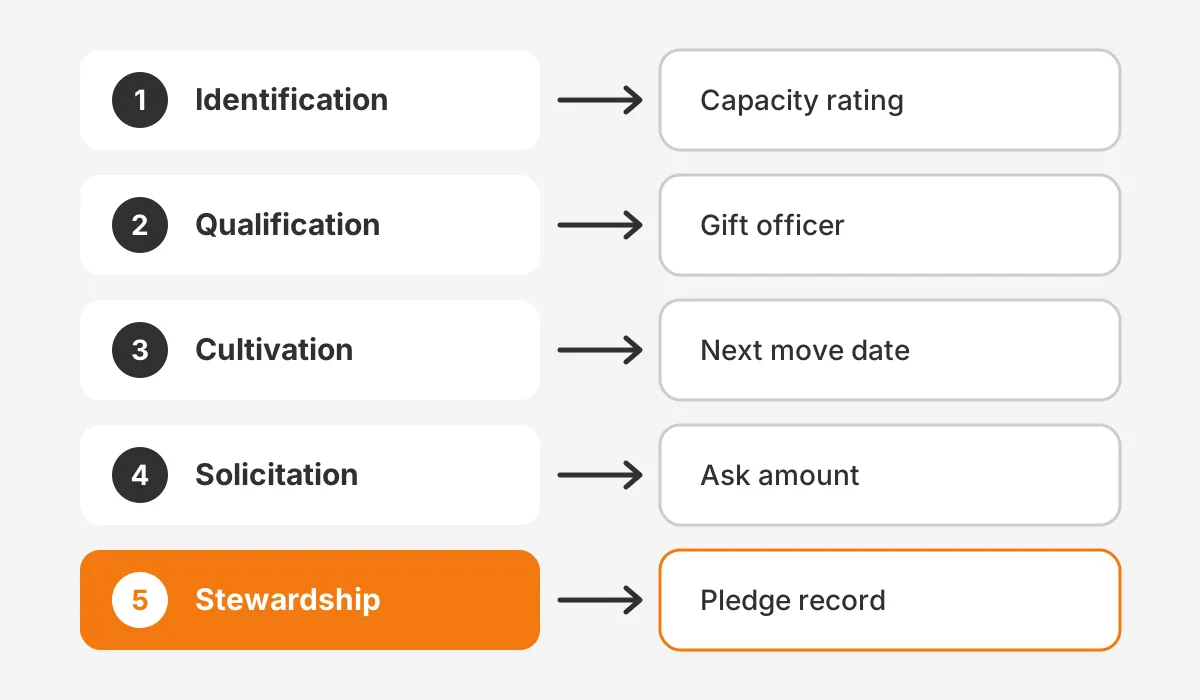
Here is what each stage should record:
- Identification: a prospect flag, the source of the lead and a wealth screening or capacity rating.
- Qualification: an assigned gift officer, a confirmed interest area and an estimated gift capacity.
- Cultivation: dated moves, a next step with a due date and a planned ask month.
- Solicitation: the ask amount, the ask date, the proposal and the donor's answer.
- Stewardship: the pledge, thank-you dates, impact reports and the next renewal or upgrade date. Donor stewardship records keep the next gift in view.
Identification deserves extra care, because it decides who enters the pipeline at all. Bloomerang suggests ranking prospects on giving history, engagement, wealth indicators and affinity. A donor with modest capacity but ten years of loyal giving may be a better prospect than a wealthy stranger.
Entry criteria keep the stages honest. A prospect should not reach solicitation without a recorded ask amount. A record should not reach stewardship without a linked pledge or payment. Validation rules in the CRM can enforce both.
Bloomerang's six-to-18-month range is a fair answer to how long the cultivation stage should last. Anything longer should trigger a review in your major gift tracking reports.
Time in stage is the field most teams forget. Store the date each stage began. That single date lets the CRM calculate how long prospects sit in cultivation, which is where most pipelines stall.
How Does a CRM Track Portfolios and Gift Officers?
A CRM tracks portfolios by assigning each prospect to one gift officer and grouping those assignments into a named portfolio. Bloomerang states the rule plainly: every prospect needs a single assigned owner, called the moves manager.
One owner prevents double approaches. It also makes accountability visible, because each open task carries a name and a date. Blackbaud adds that teams should cap the number of prospects each fundraiser actively manages.
Good portfolio tracking adds these fields to each prospect:
- Primary gift officer, as a lookup to the user record.
- Secondary contact, such as the executive director or a board member.
- Portfolio status: active, on hold or removed.
- Portfolio priority: top 25, middle tier or watch list.
- Date added to the portfolio and date of the last face-to-face visit.
In Salesforce Nonprofit Cloud, this sits under Fundraising Portfolio Management. A GoFundMe Pro guide written with Fíonta describes portfolios that show status, priority and upcoming tasks for each donor.
Each major gift portfolio should stay small enough for real contact. A gift officer who cannot name the next step for every prospect holds more records than one person can serve.
A portfolio review then becomes a report, not a meeting full of guesses. The development director filters by gift officer, sorts by days since last contact and sees who needs attention this week.
Confidentiality matters here too. Salesforce Interaction Summary records carry a Confidentiality field with Public and Confidential values. Sensitive notes about a donor's family or finances should use the restricted setting.
Who Should Own Major Gift Tracking Data?
The development director should own major gift tracking as a process. Each gift officer owns the accuracy of their own prospect records. Shared tools still need named owners for each type of data.
Bloomerang lists eight roles that touch moves management, from the executive director to program staff. In practice, five of them shape the data in the CRM:
| Role | What they own in the CRM |
|---|---|
| Development director | Stage rules, portfolio limits, monthly pipeline review |
| Gift officer | Moves, next steps, ask amounts, stage changes |
| Prospect researcher | Wealth screening results, capacity ratings, new prospect lists |
| CRM administrator | Fields, validation rules, task templates, dashboards |
| Finance or gift processing | Pledge records, payment entry, write-offs |
Board members and the executive director also open doors to donors. Their role in major gift tracking is to report each contact to the assigned gift officer for logging.
Smaller teams often combine roles. One development director may act as gift officer, researcher and administrator at once. The ownership table still helps, because it shows which hat each update belongs to.
Write the ownership rules into a one-page policy. New staff then learn major gift tracking from the policy, not from whoever trained them last.
How Are Pledges and Payments Tracked After the Ask?
Pledges are tracked as a commitment record linked to a payment schedule. Each payment arrives as its own transaction against that commitment. This split shows the promised total and the amount received side by side.
The Salesforce Trailhead unit on gift commitments lists pledges, planned gifts and recurring donations as commitment types. A Gift Commitment Schedule holds the start date, end date, interval and amount for each payment.
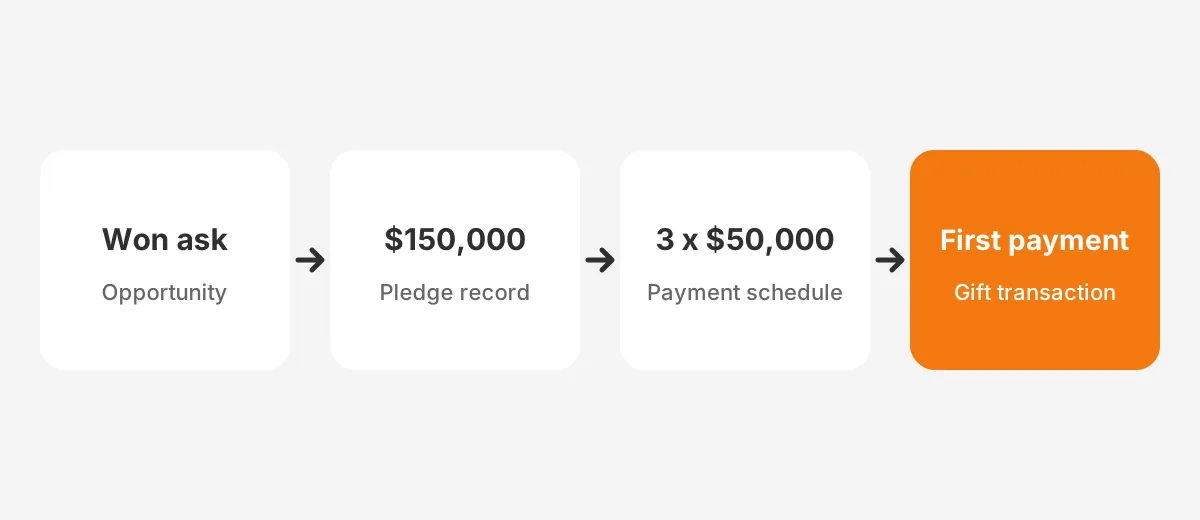
Here is a worked example with assumed figures. A donor pledges $150,000 over three years for a new clinic wing. The gift officer closes the opportunity as won, then creates one commitment for $150,000.
The schedule creates three annual payments of $50,000, each due on 1 March. The designation points 100% of the money to the clinic wing fund. When the first check arrives, finance records one $50,000 transaction against the commitment.
The CRM now shows $150,000 committed, $50,000 received and $100,000 outstanding. That outstanding balance feeds next year's revenue forecast directly.
Missed payments need a defined path. In Salesforce, closing a commitment marks unpaid transactions as Canceled or Written Off. That keeps the forecast clean without deleting the history of the original promise.
Planned gifts follow the same model with a longer horizon. Our article on a planned giving platform versus a CRM module covers when a separate tool makes sense.
Which Reports Show Major Gift Tracking Is Working?
Five major gift reports show whether major gift tracking is working. They cover pipeline value, time in stage, moves, ask-to-close ratio and pledge fulfillment. Together they show volume, speed, effort, conversion and follow-through.
| Report | What it measures | Warning sign |
|---|---|---|
| Pipeline value by stage | Sum of ask amounts at each stage | Most value stuck in identification |
| Average time in stage | Days since each stage began | Cultivation past 18 months |
| Moves per gift officer | Logged contacts per month | Officers with no moves for 30 days |
| Ask-to-close ratio | Asks won divided by asks made | Asks made without a recorded amount |
| Pledge fulfillment | Payments received versus scheduled | Overdue payments with no follow-up task |
Bloomerang's list of moves management metrics also includes qualified prospects, completed moves, upgrade rate and second-gift rate. Blackbaud suggests a dashboard showing the number of prospects in each stage and fundraiser progress against goals.
Data discipline decides whether these reports can be trusted. Blackbaud's sample team policy says every meaningful donor interaction must be logged in the CRM within 48 hours. A report built on half-logged visits will mislead the board.
Take an assumed example.
A team of three gift officers holds 90 active prospects with $2.4 million in open asks. Cultivation holds 60% of that value, and 11 prospects have sat there for over a year. That one view tells the director where to focus major gift tracking reviews next month.
Review the reports monthly with each gift officer. Review the full pipeline quarterly with the executive director and finance, because pledge balances shape the budget.
How Do You Set Up Major Gift Tracking?
You set up major gift tracking by defining the gift threshold first. Then build stages, fields, assignments, pledge records and reports, in that order. The steps below fit Salesforce, HubSpot, Raiser's Edge NXT or a donor CRM.
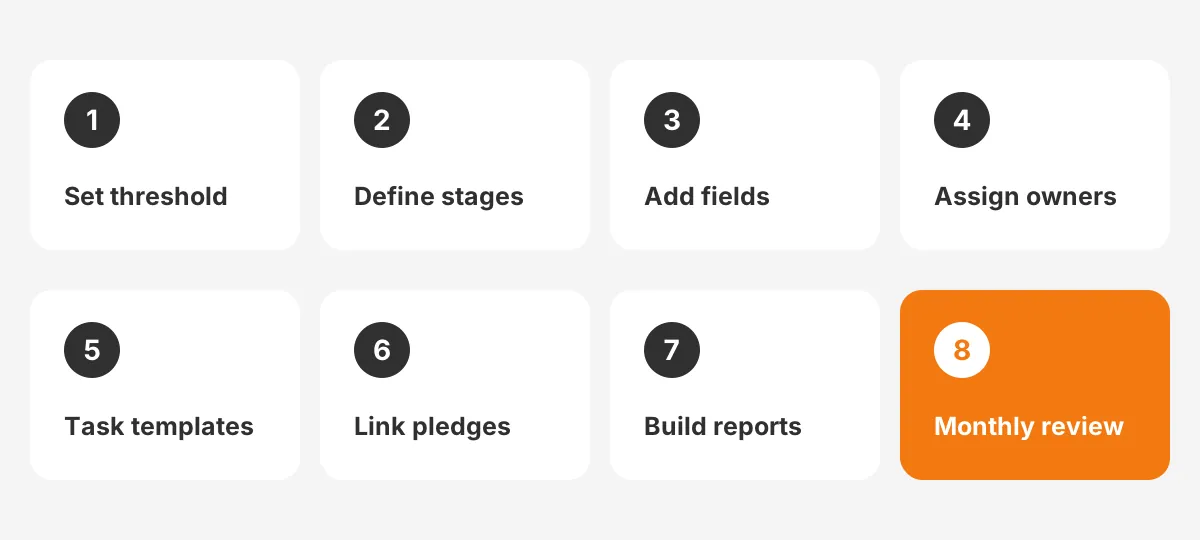
- Set the major gift threshold in writing, such as $5,000 or $10,000.
- Define the five stages and the entry criteria for each one.
- Add the fields: capacity rating, ask amount, expected close date and stage start date.
- Assign one gift officer to every prospect and build named portfolios.
- Create task templates for common moves, such as a visit follow-up.
- Connect pledges to payment schedules and fund designations.
- Build the five reports and one dashboard per gift officer.
- Train staff, then review the data monthly for the first two quarters.
Data comes before any of this. Prospects often sit in spreadsheets with duplicate names and mixed date formats. Our guide to moving donor data into a nonprofit CRM covers cleanup and import.
To set up moves management in Salesforce, start with the Opportunity stage picklist and a record type for major gifts.
Then add Action Plan templates, which create a set of dated tasks from one click. A visit template might add a thank-you email the next day and a call one week later.
Keep the first version small. Five stages, eight fields and five reports are enough to start. Add wealth screening integrations and predictive scores after the team logs moves every week.
What Mistakes Break Major Gift Tracking?
The most common mistake is treating the CRM as a filing cabinet. Records fill with old notes but show no dated next step. The CRM should be where the next move gets planned.
Six other mistakes break major gift tracking:
- Stages with no entry criteria, so "cultivation" means something different to each officer.
- Ask amounts stored in notes, which no report can add up.
- Pledges entered as one large gift, which hides the unpaid balance.
- Shared ownership, where three staff "own" a donor and nobody calls.
- No soft credit for the board member or volunteer who opened the door.
- Prospects never removed, so portfolios swell with people who will not give.
The last point needs a rule. Set a review date for any prospect in cultivation longer than 18 months. The gift officer then decides to advance, pause or remove the record.
Platform choice can add friction too. A general sales CRM may need custom objects for pledges and designations. Our nonprofit CRM software comparison shows which platforms include them by default.
Watch the data after launch, too. A stage nobody updates, or a blank ask amount, usually means the rule is unclear. The officer is rarely the problem.
Adoption is the final risk. Gift officers log moves when it takes under a minute on a phone. Mobile entry, short picklists and a single required field for the next step raise logging rates more than reminders do.
Frequently Asked Questions
How does a nonprofit CRM handle major gift tracking?
A nonprofit CRM handles major gift tracking by linking four records. These are a donor profile, a pipeline record with an ask amount, a log of moves and a pledge. Reports then roll them into pipeline value and pledge balances for each gift officer.
What dollar amount counts as a major gift?
Each nonprofit sets its own major gift threshold based on its donor base and budget. The Fundraising Effectiveness Project groups major and supersize donors as people giving more than $5,000 a year. Smaller charities often use $1,000, while universities and hospitals set the line far higher.
Can HubSpot track major gifts for a nonprofit?
HubSpot can track major gifts as deals in a custom pipeline with moves management stages. Pledge schedules, soft credits and fund designations usually need custom objects or properties. Teams with large pledge volumes often choose Salesforce Nonprofit Cloud or a donor CRM instead.
How many prospects should a gift officer manage?
Portfolio size depends on gift size, travel and the other duties the gift officer carries. Blackbaud advises setting a written limit for each fundraiser rather than one fixed number. Review the portfolio quarterly and remove prospects who have shown no movement for 18 months.
How is a move different from a touchpoint?
A move is a planned contact that advances a donor toward a gift, like a site visit. A touchpoint is any contact, such as a newsletter, so the difference between a move and a touchpoint is intent. Major gift tracking focuses on moves with an owner and date.
How Can Unboxx Help With Major Gift Tracking?
Unboxx sets up major gift tracking in Salesforce Nonprofit Cloud, HubSpot and other donor CRM platforms. The work runs from stage design to portfolio dashboards. Our Salesforce Nonprofit Cloud consulting team also migrates prospect spreadsheets and trains gift officers. Our CRM for nonprofits page shows the full scope.
If your pipeline lives in inboxes today, start with a short review of your stages, fields and reports. Schedule a consultation to map a major gift tracking setup that fits your team. For monthly giving programs, see our guide to recurring giving in a nonprofit CRM.
Let's create something out of this world together.
Have a project in mind? Contact us for expert design and development solutions. Let's discuss how we can help grow your business.
Ready to Unboxx Your Potential?
Build smarter systems. Automate faster. Scale confidently.