
Recurring Giving: Donation Platforms vs Nonprofit CRMs
A monthly donor who signs up in December can still be giving years later. Neon One's 2026 recurring giving statistics put the average recurring donor's tenure at 7.77 years. Other donors stay for 1.7 years. That value depends on two systems that are easy to blur together.
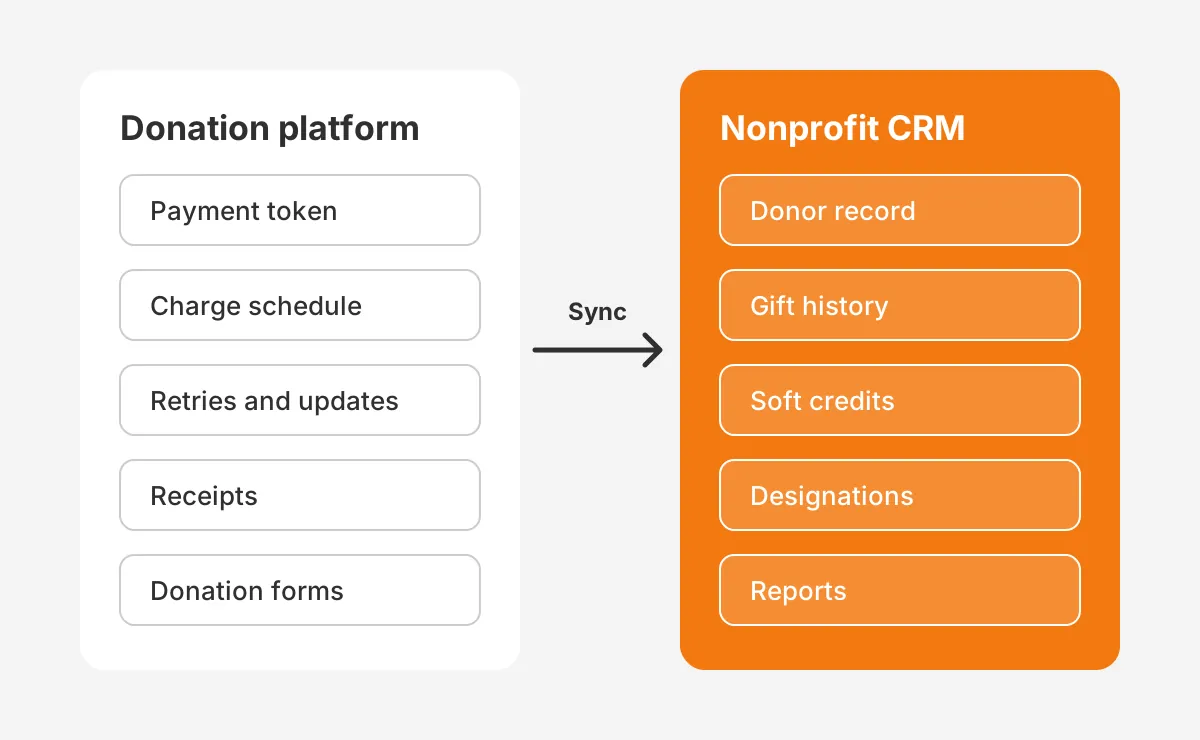
Recurring giving runs on a donation platform and a nonprofit CRM, and each does a different job. The donation platform collects the card, charges it on schedule and recovers failed payments. The nonprofit CRM holds the donor record, the gift history, the soft credits and the reports.
Key Takeaways
- A donation platform owns the payment: the card token, the charge schedule, payment retries and card updates.
- A nonprofit CRM owns the relationship: the donor record, gift history, soft credits, designations and reports.
- Recurring giving works best when every plan change and installment syncs into one CRM record per commitment.
How Does Recurring Giving Differ Across Both Systems?
Recurring giving differs because the donation platform manages money movement while the nonprofit CRM manages donor history. The platform asks whether this month's charge succeeded. The CRM asks who the donor is and what should happen next.
A donation platform such as Fundraise Up, Donorbox or Zeffy keeps a payment token with the processor. It runs the schedule, sends receipts and handles declines. Staff rarely see the card itself, and they should not.
A nonprofit CRM such as Salesforce Nonprofit Cloud, Bloomerang or Neon CRM stores the commitment as a record. It links that record to the household, the campaign and the designation. It also feeds the reports a development director reads each month.
The split matters for monthly giving because the two jobs fail in different ways. A broken payment loses revenue this month. A broken record loses the donor's story, which weakens every future ask.
So how do recurring giving features differ in daily work? A gift officer opens the CRM to plan a call. A finance manager opens the platform to check a payout. Both should see the same recurring gift, described in the language of their own job.
What Does a Donation Platform Do for Recurring Giving?
A donation platform turns a donor's intent into a working payment plan. It owns the donation forms, the payment processor connection and the billing calendar. Every recurring donation starts here, even when the CRM later holds the record.
Donation forms and frequency options
The form sets the sign-up rate for monthly donors. Good forms pre-select monthly, suggest an amount and let the donor pick a billing date. Weekly, quarterly and annual options help donors who budget on other cycles.
Payment processing and tokens
The platform never needs to store raw card numbers. It passes them to a payment processor such as Stripe, which returns a token. The token lets the platform charge the same card each month without asking the donor again.
Cards dominate recurring payments. Neon One's 2024 Recurring Giving Report found 91% of recurring donors give by credit or debit card. Another 8.24% use ACH payments or eCheck, and the rest use options such as PayPal.
Upgrade asks and donor self-service
The better platforms also help the program grow. They offer a monthly upgrade on the thank-you page after a one-time gift. They send a link where donors can change the amount, swap a card or pause the plan.
That donor self-service cuts staff calls and keeps the plan current. The upgrade ask also matters. Neon One's 2026 report found 58.6% of recurring donors started without being asked. A deliberate ask reaches the people who would not have started on their own.
How to upgrade monthly donors
Upgrades work best on a calendar, not at random. A common pattern asks for a small increase on the donor's first anniversary. The platform sends the email with a one-click link. The CRM records the old and new amounts, so the gift history stays accurate.
Keep the ask specific. Suggest a raise of $5 a month, explain what it funds, and thank the donor whatever they decide. A donor who declines should not hear the same ask again for 12 months.
What Does a Nonprofit CRM Do With Recurring Gifts?
A nonprofit CRM turns each recurring plan into donor management data the whole team can use. It answers who gives, how long they have given and what they should hear next. For the basics, see what a nonprofit CRM is and how it supports fundraising.
One commitment, a series of installments
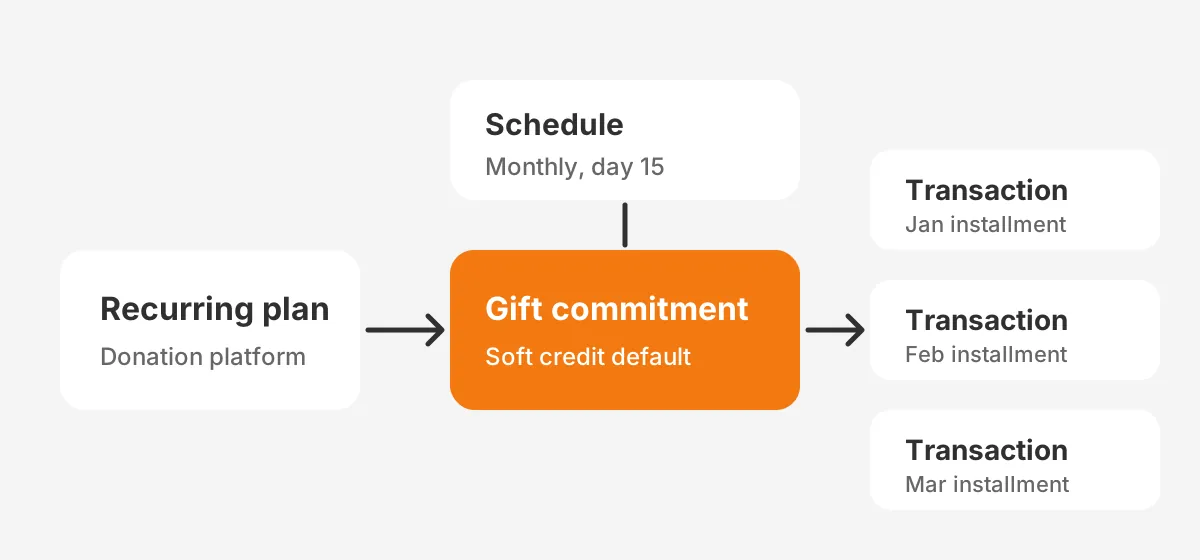
Salesforce Nonprofit Cloud models a recurring gift as a gift commitment. Salesforce Trailhead calls it "the promise of a gift, one that is planned but not entirely paid from the beginning."
A gift commitment schedule then sets the period, interval, amount and day of each charge. Each payment becomes a gift transaction linked to that commitment. The older Nonprofit Success Pack (NPSP) uses a Recurring Donation record with an opportunity for each installment.
Both designs keep the promise and the payments as separate, linked records. That structure is what lets a CRM show a pledge, a recurring donation and a one-time gift side by side. Unboxx builds these models through its CRM for nonprofits services.
Soft credits, designations and campaigns
The CRM adds context the platform does not track well. Soft credits recognise a board member who recruited the donor. Designations can split each gift between two funds, and a campaign tag shows the gift began on GivingTuesday.
Timing matters as well. Neon One reports that October, November and December lead for new recurring sign-ups, while January and February are the slowest. A CRM with campaign links shows which year-end appeal drove each new sustaining donor.
Retention and lifetime value reports
Board-level numbers come from the CRM too. Neon One's 2026 report puts recurring donor retention at 78% to 80%, against 32.41% for one-time donors. It puts the 2025 lifetime value of a recurring donor at $7,288.26.
A CRM lets a nonprofit compare its own donor retention with those benchmarks. A cohort report by sign-up month shows whether a recurring giving program keeps donors past the first year.
The recurring donor retention rate is simple to define. Count the recurring donors active 12 months ago, then count the number still active today. A platform can show charges, but only the CRM can tie that rate to households, campaigns and staff actions.
Which Recurring Giving Features Belong in Each System?
Most recurring giving features belong to one system, and the rest need a copy in both. The table below assigns each feature an owner, based on which system acts on it first.
| Feature | Donation platform | Nonprofit CRM |
|---|---|---|
| Donation forms and frequency | Owns | Receives the source |
| Payment token and processor link | Owns | Never stores |
| Charge schedule and receipts | Owns | Mirrors the schedule |
| Payment retries and card updates | Owns | Shows the status |
| Upgrade, downgrade and pause | Takes donor changes | Records the change history |
| Soft credits and designations | Captures at sign-up | Owns and reports |
| Donor record and household | Basic profile | Owns |
| Retention and lifetime value reports | Basic totals | Owns |
Read the table as a rule for conflicts. When the platform and the CRM disagree about a payment, the platform wins. When they disagree about a donor, a household or a credit, the CRM wins.
The same rule settles duplicate records. Matching runs in the CRM. The platform should send an email, a name and its own plan ID with every sync. The CRM matches on those fields before it creates a new contact.
A shared plan ID is the key that makes recurring giving reconcile. Without it, the CRM cannot tell a new plan from a changed one. Staff then merge duplicates by hand every month.
Recurring giving vs one-time donations also differ here. A one-time gift needs one record and one receipt. A recurring gift needs a parent record, a schedule, a status and a transaction for every charge.
How Do Failed Payments and Card Updates Work?
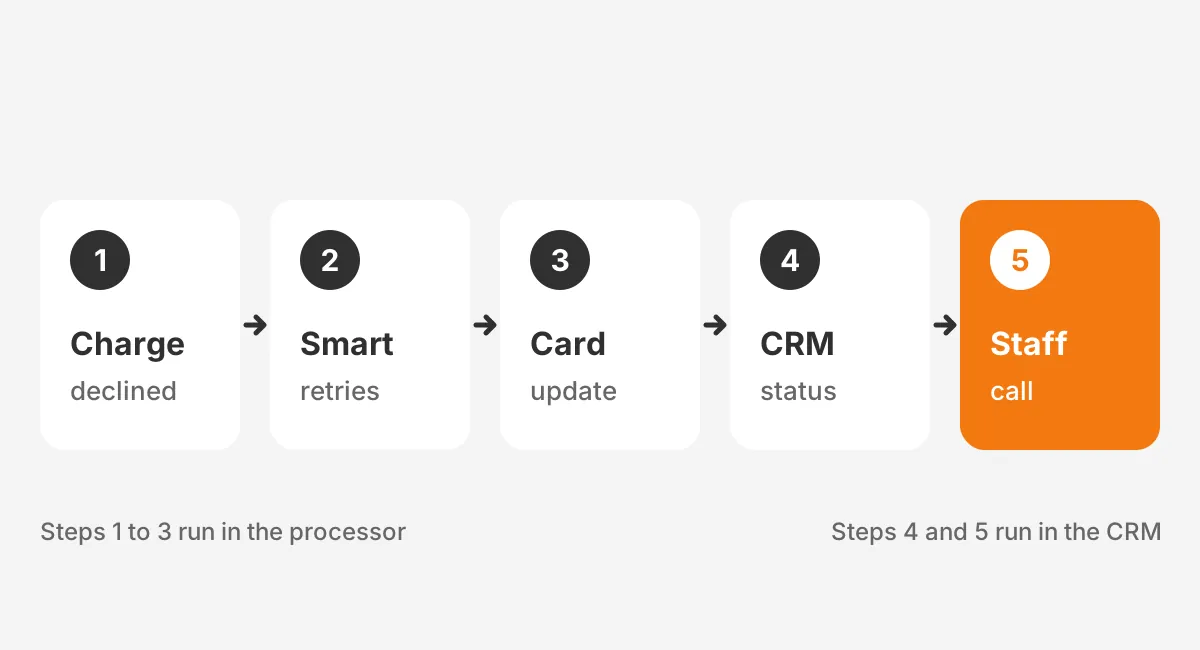
Failed payments are handled in the donation platform, because only the platform can charge the card again. A failed charge is a common way a recurring donor leaves without choosing to. Cards expire, get replaced after fraud or hit their limit.
Payment retries
Processors retry declined charges on a schedule. Stripe's Smart Retries documentation says new accounts get up to 8 retries within 2 weeks by default. Stripe uses AI to choose the retry times.
Bank payments retry less often. Stripe allows 2 retries over 40 days for ACH Direct Debit. A hard decline, such as a card reported stolen, stops the charge until the donor adds a new payment method.
Automatic card updates
Card networks can also refresh saved card details. Stripe's card documentation says it attempts to update saved cards when a customer receives a new card. It calls this widely supported in the United States, while international support varies.
This card updater for recurring donations runs inside the processor, not the CRM. It prevents a credit card expiration from ending a plan the donor never meant to stop.
Not every card updates this way, so a reminder email still helps. Send it 30 days before the card on file expires, with a secure link to the donor's own page. The donor updates the card without calling the office.
What the CRM should see
The CRM should see the recurring donation status, not run the recovery. Fundraise Up's Salesforce Nonprofit Cloud integration maps a retrying plan to Active and a failed plan to Failing. A canceled plan maps to Lapsed.
That status drives the human follow-up for failed recurring payments. A plan in Failing for 10 days can trigger a task for a staff call. The call works because the CRM shows the donor's full gift history.
How Does Recurring Giving Data Sync Into the CRM?
Recurring giving data syncs as one commitment record plus one transaction for each installment. Fundraise Up's Nonprofit Cloud setup guide documents this pattern for Salesforce.
A recurring plan arrives as a gift commitment with a gift commitment schedule. Each charge then arrives as a gift transaction. With soft credit sync turned on, the platform also sets a default soft credit on the commitment. Future installments then inherit it.
Changes flow the same way. The same guide says amount changes and cancellations sync automatically. There is one caveat. The payment method is set when the record is created and does not change on later syncs.
That caveat shows why a sync test matters. A donor who moves from card to ACH may still show the card in the CRM. Reports that split revenue by payment type would then be wrong.
Sync settings to check before launch
- Turn on automatic sync so new donations arrive in real time.
- Map every platform status to a CRM status, including paused and failed.
- Map frequency values, such as monthly and quarterly, to the schedule fields.
- Activate duplicate and matching rules before the first record syncs.
- Decide how refunds appear: as a status, a zero amount or a reversal.
- Run a test donor through sign-up, change, failure and cancellation.
How Should You Set Up Recurring Donations?
Set up recurring donations in a fixed order: data model first, payments second, sync third. Teams that start with the donation form often rebuild the CRM side later. The order below avoids that rework.
- Choose the CRM object that will hold each commitment and each installment.
- Pick recurring donation software that has a native connector for that CRM.
- Connect the payment processor and turn on retries and automatic card updates.
- Build the donation forms with monthly selected and a suggested amount.
- Map fields so the platform can sync donations to CRM records in real time.
- Test recurring gift processing end to end with a test card and a test donor.
- Launch, then review the first 30 days of charges against CRM transactions.
Step 1 decides how hard every later step will be. A clear commitment object makes reporting, upgrades and reconciliation simple to build. A vague model forces staff to rebuild reports by hand.
Step 7 catches the problems tests miss. Real donors use old cards, foreign banks and shared emails. A 30-day review finds mismatches while the volume is small and each fix is cheap.
How to set up recurring donations also depends on who will run the program. A team without a CRM administrator should pick a connector with a visible sync log. Staff can then see failed records without opening the integration settings.
How Do Salesforce and HubSpot Store Recurring Gifts?
Salesforce and HubSpot store recurring gifts differently, and the difference shapes the integration work. Salesforce has purpose-built fundraising objects. HubSpot needs a design decision first.
Salesforce Nonprofit Cloud and NPSP
Nonprofit Cloud includes gift commitments, schedules, transactions and default designations. Trailhead notes that gift transactions inherit default designations from their commitment. It also shows flows to upgrade, downgrade, pause or close a commitment.
Closing a commitment updates unpaid or failed transactions to Canceled or Written Off. NPSP orgs use the Recurring Donation object instead. Recurring donations in Salesforce therefore need a field map when an org moves from NPSP to Nonprofit Cloud.
That migration is a common reason teams bring in Salesforce Nonprofit Cloud consulting. The work covers the object map, the history load and the integration switch.
HubSpot for nonprofits
HubSpot does not ship a fundraising gift model the way Nonprofit Cloud does. Teams store each installment as a deal, or build a custom object for commitments on Enterprise tiers. The donation platform's integration must then write to the chosen object.
The trade-off is reporting depth. Deals work for small programs with simple monthly giving. A custom object suits programs that need commitment status, schedules and upgrade history for recurring donations in HubSpot.
Either model can support recurring giving well if the platform writes to it consistently. The risk is a portal where some gifts land as deals and others as contacts with notes. That split breaks every recurring giving report later.
The nonprofit CRM software comparison covers how general CRMs and donor CRMs differ on this point.
Who Should Own Recurring Giving Records and Reports?
A named person in development operations should own recurring giving records, with finance owning the payment side. Shared ownership with no name is how failed plans sit unnoticed for months.
A workable split looks like this:
- The development operations lead owns CRM records, statuses, soft credits and recurring giving reports.
- The finance team owns the processor account, payouts, refunds and reconciliation.
- The digital fundraising lead owns donation forms, upgrade asks and donor emails.
- An administrator or partner owns the integration, its field map and its error log.
Reconciliation ties the owners together. Each month, payouts from the processor should match gift transactions in the CRM. A gap points to a sync error, a refund or a missed status.
Clean fundraising data makes this easier. Teams moving off spreadsheets should clean records first. The guide to moving donor data into a nonprofit CRM covers those steps.
A short list of recurring giving best practices keeps the owners aligned. Review failed plans every week. Reconcile payouts every month. Review the upgrade and retention reports every quarter. Each review should end with a named action and a date.
How Do You Choose the Right Recurring Giving Setup?
Choose the setup by program size, staff capacity and the CRM already in place. Three patterns cover the usual cases, and each has a clear trade-off.
Pattern 1: All-in-one platform
A rough rule helps here. A nonprofit with fewer than 100 recurring donors and no CRM admin can use one tool. That tool runs forms, payments and basic records together. The cost is weaker reporting and a harder migration later.
Pattern 2: Platform plus nonprofit CRM
A mid-sized program pairs a specialist online donation platform with a nonprofit CRM through a native integration. This pattern suits organisations already on Salesforce Nonprofit Cloud or a donor CRM.
Pattern 3: One CRM, 3 or more channels
A larger organisation may take recurring gifts from events, peer-to-peer pages and a main form. Each channel syncs into one CRM, which becomes the single source for recurring giving reports.
Integration design matters most in this pattern, as covered in integrations that help nonprofit companies. Planned gifts follow similar logic on a longer schedule. The guide on a planned giving platform versus a CRM module explains that choice.
Frequently Asked Questions
What is recurring giving?
Recurring giving is a donation a supporter schedules to repeat automatically, usually each month. The donor gives permission once. The payment processor then charges the saved card or bank account on each billing date. It continues until the donor changes or cancels the plan.
Why do recurring donors give more over time?
Recurring donors give more over time because the gift continues without a new decision each month. Neon One's 2026 report puts the average recurring donor's annual giving near $938. A tenure averaging 7.77 years multiplies that figure into a far larger lifetime value.
Who should be asked to give monthly?
Ask recent one-time donors first, especially those who gave twice in one year. Event attendees, volunteers and GivingTuesday donors are strong candidates, since they already know the cause. Make the ask on the thank-you page, in the next email and during year-end appeals.
When should recurring gifts move to a new CRM?
Move recurring gifts when the current system cannot show commitment status, soft credits or retention by cohort. Plan the move outside October to December, the peak sign-up months. Keep payment tokens with the processor, so donors never re-enter cards during the switch.
Can recurring donations run without a CRM?
Recurring donations can run without a CRM, because the donation platform handles charges, receipts and retries alone. The gap appears in stewardship. Without a CRM, staff cannot see households, soft credits or full history. Thank-you calls and board reports then rely on exports.
Where Should Your Recurring Giving Program Start?
Start your recurring giving program by drawing the line between the two systems. Let the donation platform own payments, retries and card updates. Let the nonprofit CRM own donors, credits and reports, with one tested sync between them.
Unboxx helps nonprofits design that split on Salesforce Nonprofit Cloud and HubSpot, from the field map to the first reconciliation. Schedule a consultation with Unboxx to review your recurring giving setup.
Let's create something out of this world together.
Have a project in mind? Contact us for expert design and development solutions. Let's discuss how we can help grow your business.
Ready to Unboxx Your Potential?
Build smarter systems. Automate faster. Scale confidently.