
What Is a Nonprofit CRM? Data, Uses and Fundraising Role

A development director opens three spreadsheets every Monday. Gifts sit in one file, event sign-ups in another and volunteer hours in a third. Donor counts are falling across the sector. The Fundraising Effectiveness Project (Q1 2026) estimated donor counts fell 0.8% while dollars raised rose 4.3%.
So what is a nonprofit CRM? It is one shared database that records every donor, gift, pledge, volunteer and campaign. Fundraisers use it to keep fewer donors giving more, and to prove results to the board.
Key Takeaways
- A nonprofit CRM stores donors, gifts, households and campaigns in one record, so no gift history is lost.
- In fundraising, the CRM drives segmentation, thank-you receipts, recurring gifts and donor retention reports.
- Salesforce, HubSpot and Dynamics 365 all offer nonprofit pricing, but setup and data migration set the real budget.
What Is a Nonprofit CRM, in Plain Terms?
A nonprofit CRM is software that manages relationships with donors, volunteers, members, grantors and program participants. CRM stands for customer relationship management. In the sector, the same letters often mean constituent relationship management, because a nonprofit serves more than customers.
The short answer to what is a nonprofit CRM is this: a donor database with memory and rules. It remembers who gave, when, how much, through which campaign and with what restrictions. The rules turn that memory into tasks, receipts, emails and reports.
A general CRM tracks leads, deals and accounts. A nonprofit CRM tracks gifts, pledges, soft credits, households and funds. The data model is different, even when the platform underneath is the same Salesforce or HubSpot product. Seen that way, what is a nonprofit CRM comes down to its data model.
Three groups ask what is a nonprofit CRM most often. Small charities outgrowing spreadsheets ask it first. Growing teams with a dedicated donor management system ask it when that tool stops connecting to email or finance. Large organizations ask it when programs, grants and fundraising sit in separate systems.
There is also a practical side to what is a nonprofit CRM. A CRM is only useful when one person owns the data and the whole team enters gifts the same way. Software without that discipline becomes a slower spreadsheet.
How Does a Nonprofit CRM Differ From Spreadsheets?
A nonprofit CRM differs from a spreadsheet by linking records instead of listing them. A spreadsheet row holds one donor. A CRM record connects that donor to a household, every gift, each event ticket, every email and each volunteer shift.
That link matters the moment two people edit the same file. A spreadsheet has no audit trail, no duplicate check and no permission levels. A CRM records who changed a gift amount and when.
The question of what is a nonprofit CRM gets easier to answer side by side. Here are the two tools on weekly development tasks.
| Task | Spreadsheet | Nonprofit CRM |
|---|---|---|
| Find a donor's full gift history | Search across three or four tabs by hand | One record with every gift listed |
| Spot lapsed donors | Manual filter by last gift date | Saved report that refreshes each day |
| Send a gift receipt | Mail merge after export | Automatic email when the gift posts |
| Count household giving | Rarely possible | Household roll-up totals |
| Control who edits data | Shared file, full access | Profiles and field permissions |
A spreadsheet still works for a team with fewer than 200 donors and one person entering gifts. Past that point, errors grow faster than the list. The usual trigger is a board request the spreadsheet cannot answer, such as retention by campaign.
When a team asks what is a nonprofit CRM worth compared with free spreadsheets, the honest answer depends on volume. A team logging 50 gifts a month gains time. A team logging 2,000 gifts a month gains accuracy it cannot get any other way.
How Does a Nonprofit CRM Work Day to Day?
A nonprofit CRM works by capturing every gift and interaction as it happens. It then turns that record into tasks and reports. That is how a nonprofit CRM works on a normal Tuesday, not only at year end.
Picture a donor giving $100 on the website. The donation form sends the gift, and the card details stay with the payment processor. The CRM creates or updates the contact. A receipt goes out within minutes, and the gift joins its campaign total.
Next, the rules run. A first-time donor enters a welcome series. A lapsed donor returning after two years triggers a call task for a fundraiser. A gift of $1,000 or more alerts the development director, who decides on a personal thank-you.
At the end of each week, the gift processor reconciles the batch with finance. The CRM total and the bank deposit must match before the batch closes. That routine is the quiet part of what is a nonprofit CRM, and it protects audit results.
Donor tracking also runs in the background. Every email open, event check-in and volunteer shift lands on the contact. When a fundraiser prepares a visit, the full history sits on one screen.
Seen across a full day, what is a nonprofit CRM doing is recording, triggering, reconciling and reporting. Staff then spend their time with donors instead of files. That daily loop explains what a nonprofit CRM does better than any feature list.
What Data Does a Nonprofit CRM Store?
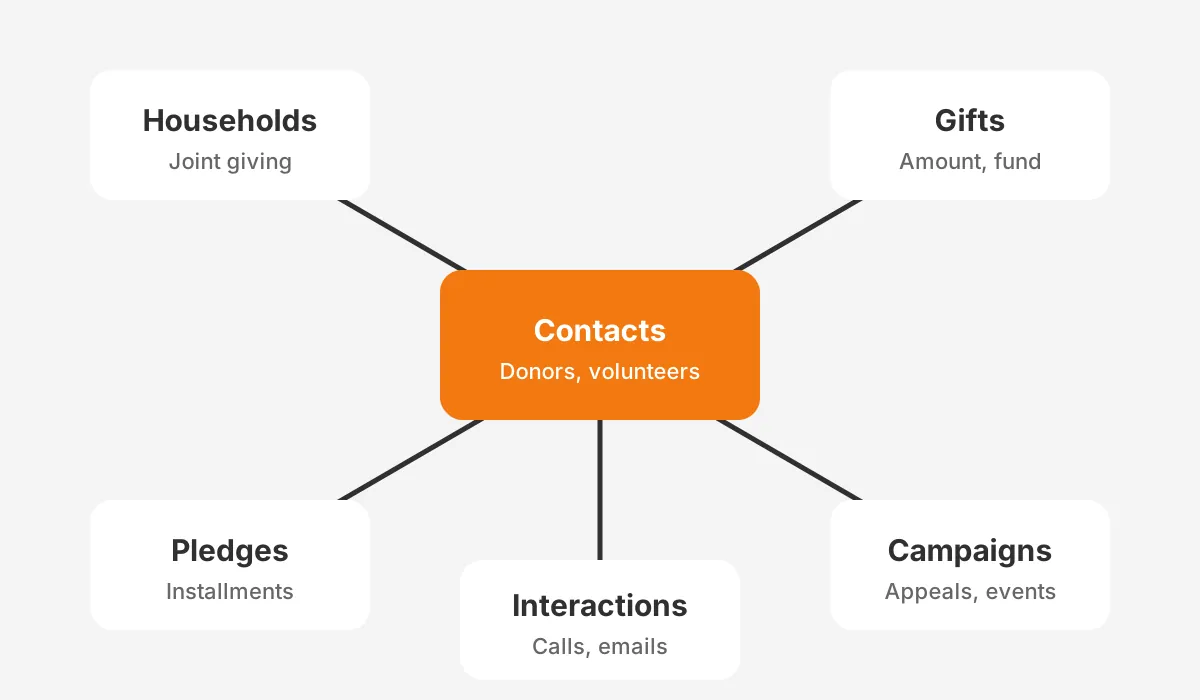
A nonprofit CRM stores six core objects: contacts, households or accounts, gifts, pledges, campaigns and interactions. Every report, receipt and automation reads from these six. Getting them right is most of what is a nonprofit CRM in practice.
- Contacts hold people: donors, volunteers, board members, staff at funders and program participants.
- Households or accounts group contacts, so a couple giving jointly counts once in household totals.
- Gifts record each donation with amount, date, fund, payment method and restriction.
- Pledges and recurring gifts hold promised or scheduled giving, with installment dates.
- Campaigns group gifts by appeal, event or channel, so results can be compared.
- Interactions log calls, meetings, emails and event attendance against the contact.
Soft credits are the detail that separates a real donor database from a contact list. A soft credit links a gift to someone who influenced it without paying. A board member who made the ask is the usual case. Moves management depends on that link.
They are also a fair test of what is a nonprofit CRM and what is only a mailing list. A list tool cannot credit two people for one gift.
Salesforce once delivered this model through the Nonprofit Success Pack (NPSP), an add-on package. Salesforce Nonprofit Cloud now builds gifts, programs and grants into the platform itself. HubSpot stores gifts as deals or a custom object, which needs setup before the first import.
Fields matter as much as objects. A donor management system needs fund designation, tribute details, acknowledgment status and communication preferences. Missing fields at launch become missing history later, because old gifts rarely get re-entered.
Grants management and program management extend the same model. A grant becomes a pipeline record with deadlines and reports due. A program participant becomes a contact with service records. That is why the question what is a nonprofit CRM now covers more than fundraising.
What Is a Nonprofit CRM Used for in Fundraising?
In fundraising, a nonprofit CRM is used to find, keep and upgrade donors. That is the plain answer to what is CRM in fundraising. It is a system that turns gift history into the next ask.
Retention comes first, and it is where the case for what is a nonprofit CRM pays back soonest.
M+R Benchmarks (2026) reported overall donor retention of 48% for 2025, and new donor retention of 24%. A CRM shows exactly which donors sit in each group, so stewardship goes to the right people.
Monthly donors need their own handling. The same M+R study found monthly giving made up 27% of online revenue in 2025. Recurring gifts need failed-payment alerts, card update emails and upgrade asks, all run from the donor record.
Year-end timing raises the stakes. M+R found nonprofits received 37% of 2025 online revenue in December. A fundraising CRM lets a team build year-end segments in October, not in a rush on December 20.

Major gifts run on a different rhythm. A gift officer manages a portfolio of 100 to 150 prospects, with stages and next steps. Moves management in the CRM keeps those steps visible to the director, not only in one person's inbox.
Receipts carry legal weight as well as courtesy. The IRS (2026) requires a written acknowledgment for any single contribution of $250 or more. It must state whether goods or services were given in return.
A CRM for fundraising sends that acknowledgment automatically and logs that it went out. Donor segmentation then splits thank-you messages by gift size, first gift or lapsed donors returning. Put together, what is a nonprofit CRM used for in fundraising covers every step from first gift to legacy gift.
Which Features Should a Nonprofit CRM Include?
A nonprofit CRM should include donor management, gift processing, reporting, communication tools and integrations. Nonprofit CRM features fall into two groups: must-have at launch and add later. Use the lists below to test what is a nonprofit CRM offering in each vendor demo.
Must-Have at Launch
- Donor management with households, soft credits and duplicate checks.
- Gift entry with funds, restrictions, tributes and batch processing.
- Recurring gifts and pledges with installment schedules.
- Automatic receipts and acknowledgment tracking.
- Saved reports for retention, lapsed donors and campaign results.
- Role-based permissions and an audit history.
Add in Year Two
- Volunteer management with shifts and hours.
- Event management with ticketing and check-in.
- Peer-to-peer fundraising pages linked to the donor record.
- Grants management with deadlines and report tracking.
- Wealth screening and major gift scoring.
Whether the CRM stays accurate depends on its integrations. The online donation form, the payment processor and email marketing should write straight into the CRM. Accounting integration should send gift batches to the general ledger, so finance and development report the same totals.
Our guide to integrations that help nonprofit companies lists six connections in order of value. Start with donations and email, then accounting, then events.
A feature list is only half of choosing a platform. Asking what is a nonprofit CRM supposed to do for your team is the other half. Write the five reports the board asks for, then confirm each platform can produce them without exports.
What Is Nonprofit Software Beyond the CRM?
Nonprofit software is the full set of tools a mission-driven organization runs, and the CRM is its center. The answer to what is nonprofit software usually includes six categories, each with a different owner.
| Category | What it does | Connects to the CRM by |
|---|---|---|
| Donor CRM | Donors, gifts, campaigns, receipts | It is the hub |
| Online fundraising forms | Donation pages and peer-to-peer pages | New gifts and contacts |
| Email marketing | Newsletters and appeals | Lists, opens and unsubscribes |
| Accounting | General ledger and restricted funds | Gift batches and fund codes |
| Program management | Services, cases and outcomes | Participants and service records |
| Grants management | Applications, awards and reports | Funders and grant deadlines |
Some nonprofit CRM software covers three or four rows in one product. Blackbaud Raiser's Edge NXT, Bloomerang, Neon CRM and DonorPerfect are built only for nonprofits. Salesforce, HubSpot and Microsoft Dynamics 365 are general platforms with nonprofit editions.
The difference shows up in setup. A donor-specific tool works on day one with fewer options. A general platform needs configuration, but it can also run programs, service and marketing in one system. Our nonprofit CRM software comparison covers that trade-off by platform.
Whichever route a team takes, the answer to what is a nonprofit CRM stays the same. It is the record every other tool reads from and writes back to.
How Much Does a Nonprofit CRM Cost?
A nonprofit CRM costs between nothing and $285 or more per user per month in licenses, plus setup. The license is usually the smaller part of the first-year budget. A pricing page answers only half the question of what is a nonprofit CRM going to cost.
The Salesforce Nonprofit Cloud pricing page (2026) lists Core at $70 and Advanced at $125 per user per month. Sales Max is $285, and all need an annual contract. The same page says eligible nonprofits receive 10 Nonprofit Cloud licenses at no cost.
The Microsoft nonprofit Dynamics 365 page (2026) lists Sales Enterprise at $23.80 per user per month for eligible nonprofits. Power Apps is free for up to 10 users. HubSpot gives eligible nonprofits 40% off Professional and Enterprise tiers, as our HubSpot for Nonprofits guide explains.
| Platform | Nonprofit license terms | Typical setup need |
|---|---|---|
| Salesforce Nonprofit Cloud | 10 licenses at no cost, then $70+ per user per month | Partner-led configuration |
| HubSpot for Nonprofits | 40% off Professional and Enterprise tiers | Gift object and form setup |
| Dynamics 365 Sales Enterprise | $23.80 per user per month | Configuration and data model build |
| Donor-specific tools | Priced by record count or tier | Import and light configuration |
Here is a worked example with assumed figures, not a benchmark. A charity with 15 staff users chooses Salesforce Nonprofit Cloud Core. Ten licenses are donated, so five are paid at $70 each. That is $350 a month, or $4,200 a year in licenses.
Setup then adds the larger cost: data cleanup, migration, configuration and training. Those depend on the years of gift history that move, and the number of systems that connect. Ask every partner to price migration as a separate line, so quotes compare fairly.
Free and low-cost options exist, but "free" rarely means free to run. Someone still owns the data, the reports and the integrations. Staff time belongs in the budget too.
How Do You Choose a Nonprofit CRM?
You choose a nonprofit CRM by matching your reports, data volume and staff skills to a platform. Then test it with your own data. Demos with sample data hide the hard parts.
Knowing how to choose a nonprofit CRM starts with scope. A single-program charity focused on gifts fits donor-specific fundraising software. A multi-program organization running services, grants and marketing usually fits a general platform with a nonprofit edition.
- Data model: confirm the nonprofit CRM data model handles households, soft credits and restricted funds without custom code.
- Reports: ask each vendor to build your donor retention rate report live, using a sample of your records.
- Integrations: check native connectors for your donation forms, email tool and accounting system.
- Admin effort: estimate the weekly hours the platform needs, and who on staff will give them.
- Total cost: compare nonprofit CRM pricing over three years, with setup and migration included.
Score each option on those five points with the people who will use it. A gift processor and a major gifts officer will spot different gaps in the same demo.
Reference checks matter too. Ask two organizations of similar size what is a nonprofit CRM like after year one, not during the sales cycle. Their answer on support and reporting is more useful than any brochure.
Finally, decide who will run it. A platform that needs a full-time administrator is the wrong choice for a team with none. The right answer to what is a nonprofit CRM for your team includes the people, not only the software.
How Do You Set Up a Nonprofit CRM?
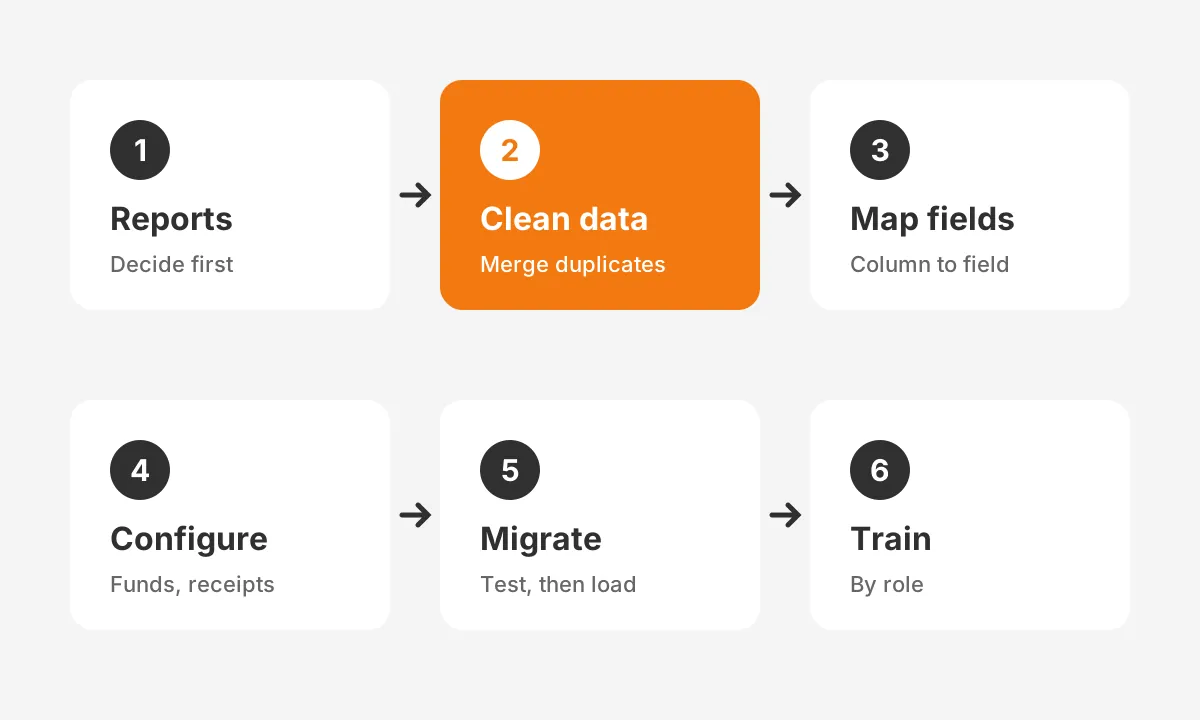
You set up a nonprofit CRM in six steps. Decide the reports, clean the data, map fields, configure, migrate and train. Teams that skip the first two steps usually repeat the last three. Setup decides whether what is a nonprofit CRM on paper becomes a working system.
- Write the reports first. List the 5 to 10 reports the board, finance and fundraisers need.
- Clean the donor data. Merge duplicates, fix addresses and mark deceased or opted-out donors.
- Map every field. Match each spreadsheet column to a CRM field, and drop columns nobody uses.
- Configure the platform. Set up funds, campaigns, receipt templates and permission levels.
- Migrate in two passes. Load a test batch, check totals against finance, then load the rest.
- Train by role. Gift processors, fundraisers and managers each need a different session.
Migrating donor data from spreadsheets needs one check above all: totals must match. Compare gift counts and amounts by year between the old files and the CRM. A gap of even 1% means a mapping error, and it is cheaper to find before launch.
Timelines vary with history and integrations. Our article on how long it takes to implement a fundraising CRM breaks the schedule down by organization size.
A partner can shorten the work. Unboxx runs CRM for nonprofits projects on Salesforce, HubSpot and Dynamics 365, from data cleanup to training. For Salesforce teams, Salesforce Nonprofit Cloud consulting covers Nonprofit Cloud setup and NPSP upgrades.
When a team finishes setup, the question changes from what is a nonprofit CRM to who owns it. Name one administrator, give that person a weekly hour for data hygiene, and review reports monthly.
Frequently Asked Questions
Why do nonprofits need a CRM?
Nonprofits need a CRM because donor retention depends on timely, personal follow-up. A CRM shows who gave, who lapsed and who is ready to upgrade. It also produces gift receipts, board reports and audit trails. Spreadsheets cannot do that reliably once a team logs hundreds of gifts monthly.
Who uses a nonprofit CRM day to day?
Gift processors, fundraisers, development directors and finance staff use a nonprofit CRM daily. Gift processors enter donations and receipts. Fundraisers manage portfolios and tasks. Directors read retention and campaign reports. Finance reconciles gift batches against the general ledger so both teams report the same totals.
Is there a free CRM for nonprofits?
Yes, at least two major platforms offer free or donated licenses. Salesforce gives eligible nonprofits 10 Nonprofit Cloud licenses at no cost. Microsoft offers Power Apps free for up to 10 users. Free licenses still need setup, data migration and an administrator, which is where most first-year cost sits.
How does a CRM differ from donor management software?
Donor management software focuses on gifts, receipts and donor records. A nonprofit CRM covers those plus volunteers, programs, grants and marketing. Comparing CRM vs donor management software comes down to scope. Smaller teams often start with donor tools, while multi-program organizations usually need a full CRM platform.
When should a nonprofit get a CRM?
A nonprofit should get a CRM once more than one person enters gifts, or donors pass about 200. Other signs include missed receipts, duplicate records and board questions about retention that take days to answer. Starting earlier means cleaner history and an easier migration later.
Is Your Team Ready for a Nonprofit CRM?
Your team is ready when gift history, receipts and reports no longer fit in shared files. Knowing what is a nonprofit CRM is the first step. Choosing the data model, cleaning records and naming an owner are the steps that make it pay off.
Unboxx helps nonprofits plan, migrate and configure donor CRMs on Salesforce, HubSpot and Dynamics 365. Still weighing what is a nonprofit CRM worth for your team? Schedule a consultation and bring your current donor reports.
Let's create something out of this world together.
Have a project in mind? Contact us for expert design and development solutions. Let's discuss how we can help grow your business.
Ready to Unboxx Your Potential?
Build smarter systems. Automate faster. Scale confidently.