
Patient Relationship Management: PRM vs CRM, HIPAA, Setup

A patient books a follow-up, gets no reminder and misses the visit. The slot goes empty, the care plan slips and nobody calls to rebook. A 2013 Cochrane review covered 6,615 patients. Attendance was 67.8% without reminders and 78.6% with text reminders (Cochrane Database of Systematic Reviews, 2013).
Patient relationship management is how a provider manages every patient contact outside the exam room. It covers reminders, follow-ups, feedback, referrals and outreach. Done well, patient relationship management turns each touchpoint into a scheduled, tracked task. Nobody has to remember it.
Key Takeaways
- Patient relationship management organizes the patient contact that happens between visits, from booking and reminders to feedback and referrals.
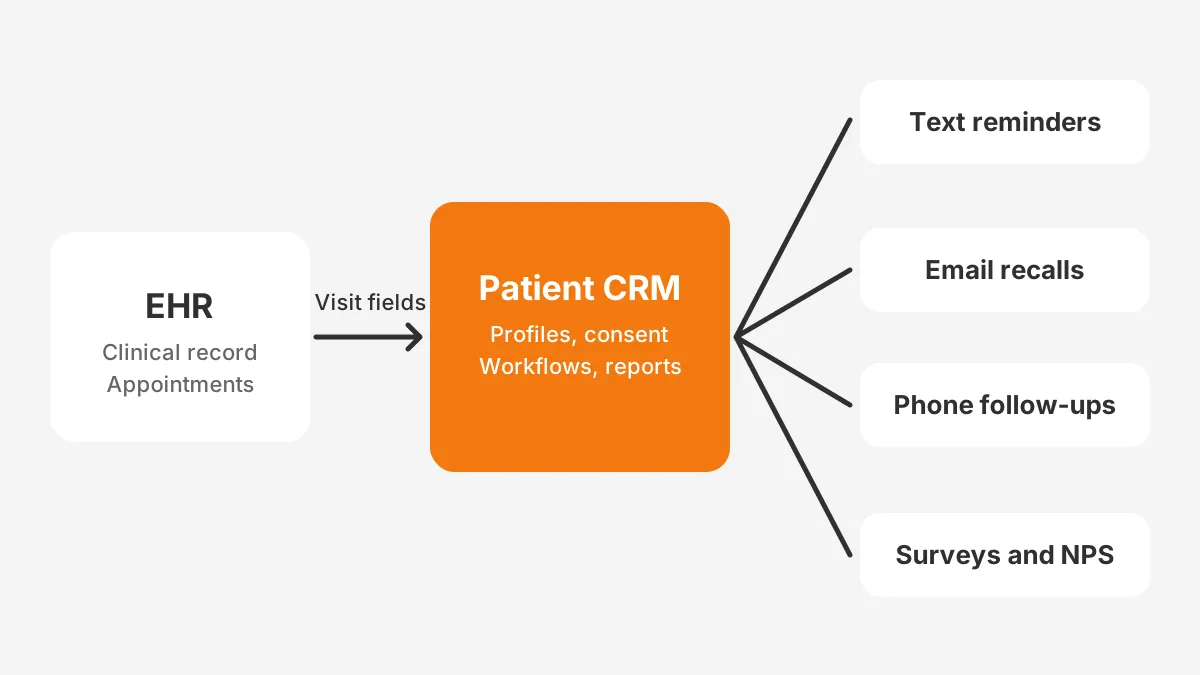
- A PRM system usually runs on a healthcare CRM that reads data from the EHR and never replaces it.
- Any vendor that stores protected health information for a provider needs a signed business associate agreement.
What Is Patient Relationship Management?
Patient relationship management is the set of processes and tools a provider uses to attract, engage and keep patients. The term is usually shortened to PRM. In healthcare, PRM covers the patient journey from the first inquiry to recall visits years later.
The idea comes from customer relationship management. A company tracks buyers, conversations and deals in a CRM. A clinic tracks patients, appointments and messages in a patient relationship management system. The difference is the data. Patient records hold protected health information, so privacy rules shape every design choice.
PRM has two layers. The first is a strategy: who contacts which patients, through which channel and how often. The second is the technology that runs that strategy at scale.
A small practice can run a basic patient relationship management strategy with a shared calendar. A group with 12 locations cannot. Each site books differently, and nobody sees the whole patient list.
A written patient relationship management strategy fixes that. It names an owner for each contact point and a channel for each message. It also sets a target for each result, such as a recall completion rate.
Typical PRM work falls into five areas:
- Patient acquisition: web forms, call tracking and referral intake.
- Patient communication: appointment reminders, test result notices and recall reminders.
- Patient engagement: education content, surveys and portal messages.
- Patient retention: rebooking lapsed patients and closing care gaps.
- Reporting: no-show rate, patient satisfaction and referral volume.
Patient relationship management examples are easy to spot. A dental group texting six-month recall reminders is running PRM. So is a physical therapy clinic that calls patients who skip their third session. Each one turns a missed contact into a scheduled visit.
The patient engagement side of PRM is easy to overlook. Engagement means the patient acts on a message: books, answers a survey or reads a care instruction. A PRM system records each of those actions. Staff can then see which patients respond and which need a phone call.
How Does PRM Differ From CRM and EHR?
PRM differs from CRM in its subject and its rules, and from an EHR in its purpose. A CRM manages relationships with customers. A PRM manages relationships with patients under HIPAA. An electronic health record stores clinical data for treatment and billing.
Clinics rarely need all three. The usual setup is an EHR plus one relationship system. That system is a dedicated PRM tool or a healthcare CRM configured for patients. The table compares the three.
| Factor | EHR | Healthcare CRM | Dedicated PRM tool |
|---|---|---|---|
| Main job | Clinical record, orders, billing | Relationships, outreach, pipeline | Patient communication and feedback |
| Typical users | Clinicians and billing staff | Front desk, marketing, operations | Front desk and practice managers |
| Data held | Diagnoses, notes, medications | Contacts, preferences, messages, referrals | Contacts, appointments, survey scores |
| Examples | Epic, athenahealth, eClinicalWorks | Salesforce Health Cloud, HubSpot | WebPT Reach, Carepatron |
| Flexibility | Low, built for clinical workflow | High, built to be configured | Medium, built for one specialty |
The PRM vs EHR question matters most during setup. The EHR stays the system of record for clinical facts. The PRM or CRM reads the fields it needs, such as appointment times and visit types. It should never become a second clinical chart.
A simple decision rule helps. A single-specialty clinic with one location can often run patient relationship management in a dedicated PRM tool.
A group with 3 or more specialties, a referral network or plans to grow usually needs a healthcare CRM. The CRM costs more to set up. It does not need replacing when the group adds a new service line.
The PRM vs CRM question is mostly about configuration. A general CRM becomes a patient CRM once it has patient objects, consent fields, HIPAA controls and an EHR connection.
That is why healthcare customer relationship management and patient relationship management now overlap so closely. For a deeper look at platform choice, see this guide to medical CRM features, HIPAA rules and cost.
What Are the Core Parts of a PRM System?
A PRM system has seven core parts: a patient profile, segmentation, intake, scheduling links, communication, feedback and analytics. Each part answers one question about the patient relationship. Together they give staff one view of every contact.
- Patient profile. Contact details, preferred channel, consent status and assigned location. Salesforce calls this a 360-degree patient view.
- Patient segmentation. Groups such as new patients, lapsed patients, chronic care patients and high-value referral sources.
- Patient intake. Web forms and call logs that create a record before the first visit.
- Scheduling link. Appointment data synced from the EHR or practice management system.
- Patient communication. Text, email and phone workflows for reminders, recalls and follow-ups.
- Feedback. Patient satisfaction surveys and Net Promoter Score after each visit.
- Analytics. Dashboards for no-shows, retention, referrals and response times.
Specialists depend on referring physicians, so referral management earns its own place. A PRM system can track each referral source, the patients it sent and whether those patients booked. Care coordination teams use the same records to follow a patient across providers.
Patient intake is where most data problems start. A web form that asks for a name, phone number, insurer and reason for visit creates a clean record.
A form that asks only for an email creates a contact nobody can match to the EHR later. Design intake fields with the EHR match in mind.
The parts only work when the data flows in one direction. Clinical facts start in the EHR. Relationship data starts in the CRM. A nightly or real-time sync passes appointment and visit-type fields across, and nothing else.
Patient portals sit beside this setup. A portal gives patients access to records and messages. The PRM layer decides when to prompt them to use it.
Why Does Patient Relationship Management Matter for Clinics?
Patient relationship management matters because a missed contact turns into missed care and lost revenue. Appointment reminders have the strongest evidence behind them. The 2013 Cochrane review pooled eight randomized trials with 6,615 participants.
Attendance was 67.8% for patients with no reminder. It rose to 78.6% with text reminders and 80.3% with phone call reminders. Text reminders raised attendance with a risk ratio of 1.14 against no reminder. Text and phone reminders performed about the same.
That gap is why appointment reminder text messages tend to be the first PRM workflow a clinic builds. Calls work as well, but they cost staff time. A text workflow runs every day without anyone dialing.
The patient relations team affects the numbers too. Patient relations staff handle complaints, billing questions and service recovery after a poor visit.
When their notes live in the same system as reminders and surveys, a manager can see the full story. A patient who scored a visit 3 out of 10 gets a call, not another marketing email.
The benefits of patient relationship management go further than reminders:
- Patient retention improves when lapsed patients get a recall message before they drift to another provider.
- Patient satisfaction rises when follow-ups arrive on time and answer the right question.
- Referral volume grows when referring physicians receive updates on the patients they sent.
- Staff time drops when reminders, surveys and intake run as workflows.
Patient experience also depends on consistency across locations. Left alone, 8 clinics can end up with 8 different reminder habits. One PRM system gives every location the same patient journey and the same reporting.
Consistency is why multi-site groups invest in a CRM for clinics rather than separate tools at each site.
Which Platforms Support Patient Relationship Management?
Three kinds of platforms support patient relationship management: enterprise healthcare CRMs, configurable marketing CRMs and specialty PRM software. The right choice depends on size, specialty and how much custom work the group can support.
Salesforce Health Cloud is the enterprise option. Salesforce states that Health Cloud is HIPAA compliant and offers 360-degree patient views and flexible care plans. Its published price starts at $350 per user per month, billed annually (Salesforce Health Cloud FAQ, 2026).
HubSpot suits groups whose PRM work is mostly outreach and patient acquisition. HubSpot accepts protected health information only in services it lists as covered. Its BAA is an annex to its Sensitive Data Terms (HubSpot, 2026). Prohibited data, such as biometric data, is not allowed in any feature.
Specialty patient relationship management software targets one field. WebPT Reach serves physical therapy practices. Carepatron targets therapy and allied health practices. These tools start faster, but they bend less when the group grows into new specialties.
Choosing patient engagement software comes down to four questions. Does the vendor sign a BAA for every module the clinic will use?
Does it connect to the EHR already in place? Can it report across locations and specialties? What will licenses, setup and support cost over three years? A tool that fails the first question is out, however good its features look.
| Platform type | Best fit | Strength | Watch for |
|---|---|---|---|
| Enterprise healthcare CRM | Groups with 10+ locations | Care plans, referrals, deep configuration | License cost and admin skill |
| Marketing CRM with a BAA | Outreach-led practices | Campaigns, forms, healthcare marketing automation | Which features are covered for PHI |
| Specialty PRM software | Single-specialty clinics | Fast setup, specialty workflows | Limited reporting across specialties |
Microsoft Dynamics 365 is a fourth option for groups already on Microsoft tools. It follows the same rule as the others: confirm the BAA covers every module that will hold patient data. Unboxx helps clinics compare these platforms through its CRM consulting and implementation services.
What Does HIPAA Require From a PRM Vendor?
HIPAA requires a business associate agreement with any PRM vendor that stores or handles protected health information for a provider. The provider is the covered entity. The vendor is a business associate.
HHS defines a business associate as a party that handles PHI on behalf of a covered entity. Handling means creating, receiving, maintaining or transmitting it. Its examples include cloud service providers, IT vendors and app developers that send patient messaging (HHS business associate guidance, 2026).
Encryption does not remove the duty. HHS guidance on cloud computing says a cloud provider storing only encrypted ePHI is still a business associate. This holds even when the provider lacks the encryption key (HHS cloud computing guidance, 2022). The covered entity and the provider must sign a BAA.
HHS also lists one exception. A BAA is not required when a provider shares PHI with another provider for treatment, including care coordination. That exception covers clinicians, not software vendors. A PRM platform that stores the shared record is still a business associate.
So is a PRM HIPAA compliant? No software is compliant on its own. A HIPAA compliant CRM is a platform with a signed BAA and the right security settings. Staff must also follow the rules. Check these five points before signing:
- A signed BAA that names every module holding patient data.
- Role-based access, so front desk staff see contact data, not clinical notes.
- Audit logs for every record view and export.
- Consent fields for text and email, stored per patient.
- A data map showing which EHR fields sync and which stay behind.
Message content needs the same care. A reminder can say a patient has a visit on Tuesday at 10:00. It should not name a diagnosis. Keep clinical detail inside the portal, where the patient signs in first.
How Do You Set Up Patient Relationship Management?
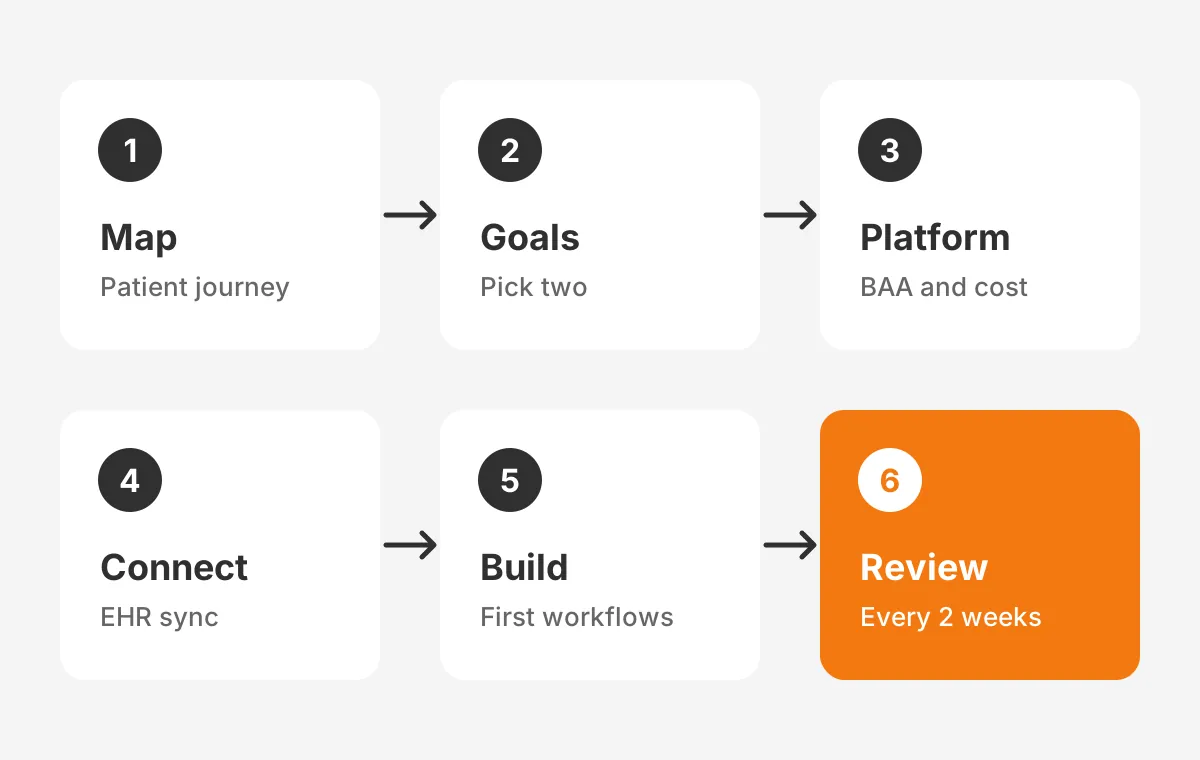
Set up patient relationship management in six steps, starting with one workflow and one location. Launching every workflow at once tends to produce messy data and staff who work around the system.
- Map the patient journey. List each contact point from first inquiry to recall, and note who owns it today.
- Pick two goals. A lower no-show rate and more completed recalls are a common first pair.
- Choose the platform. Confirm the BAA, the EHR connection and the total cost for three years.
- Connect the EHR. Sync appointment, provider and visit-type fields through the vendor's API or an HL7 FHIR interface.
- Build the first workflows. Start with appointment reminders and a post-visit patient satisfaction survey.
- Train and review. Train front desk staff, then review the numbers every two weeks for the first quarter.
Steps one and two set the scope of patient relationship management. The journey map shows where patients drop out, such as after a first consult or before a recall.
Automate the 2 contact points that lose the most patients, and park the rest for later phases. A short first phase builds trust with staff before bigger changes arrive.
As a planning assumption, not a benchmark, allow 8 to 12 weeks for one location.
Platform choice and the BAA take 2 to 3 weeks in that plan. The EHR connection takes 3 to 5 weeks. Workflow build, testing and training fill the rest. Each new location after the first goes faster, because the workflows already exist.
Data quality decides whether step four works. Duplicate patient records cause double reminders and wrong names in messages. Clean the contact list before the first sync, using the same methods described in this guide to CRM data cleansing.
Integration is where timelines slip. Each EHR exposes data differently, and some charge for interface access. Plan the connection early, or work with a team that offers CRM integration services for healthcare systems.
Adoption is the last risk. A new screen feels like extra work to a busy front desk. Show them the tasks the system removes, such as reminder calls. Practical tactics appear in this article on CRM adoption.
Which Patient Relationship Management Metrics Should You Track?
Track six patient relationship management metrics. They are no-show rate, reminder attendance, recall completion, retention, Net Promoter Score and response time. Each one ties a PRM workflow to a result the practice can see.
- No-show rate: missed appointments divided by booked appointments.
- Attendance after reminders: attended visits among patients who received a reminder.
- Recall completion: patients who booked after a recall reminder.
- Patient retention: patients with a visit this year who also visited last year.
- Net Promoter Score: the share of promoters minus the share of detractors.
- Response time: hours from a patient message or inquiry to a staff reply.
Patient lifetime value sits behind most of these. It estimates revenue from one patient across every visit. Retention and recall gains raise it, which makes the PRM budget easier to defend.
A worked example puts numbers on it. The figures below are assumed for illustration, apart from the Cochrane attendance rates. Take a clinic group with 2,000 booked visits a month and no reminders.
At the Cochrane no-reminder rate of 67.8%, about 1,356 visits happen. At the text-reminder rate of 78.6%, about 1,572 happen. That is 216 more attended visits a month. At an assumed $150 per visit, the gain is about $32,400 a month.
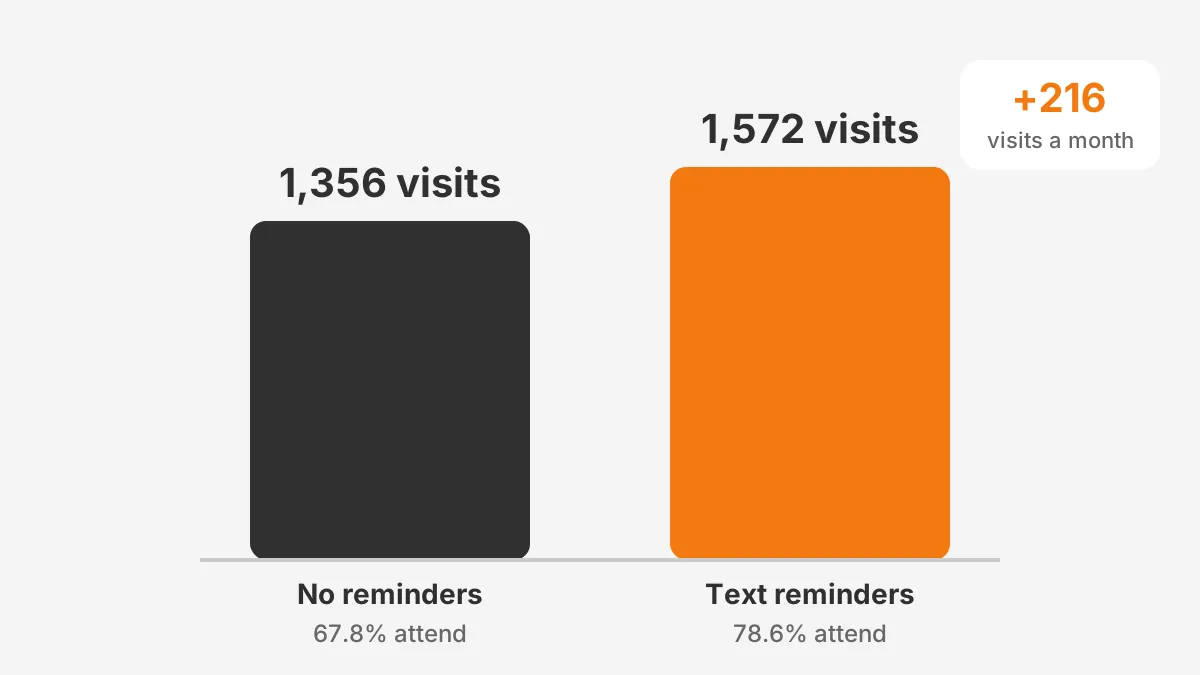
Real results vary by specialty, patient mix and message timing. The point of the example is the method: measure the baseline first, then compare after each workflow goes live. A broader list of measures appears in this guide to CRM metrics.
Report these numbers by location, provider and visit type. A group-wide average can hide one weak clinic behind 4 clinics doing well.
Review the dashboard every two weeks in the first quarter, then monthly. Each review should end with one change to test, such as sending a reminder 48 hours ahead instead of 24.
Frequently Asked Questions
What is PRM in healthcare?
PRM in healthcare means patient relationship management. It is the processes and software a provider uses to manage patient contact between visits. It covers intake, reminders, recalls, surveys and referrals. Most practices run it on a healthcare CRM connected to their EHR, with a signed business associate agreement in place.
How does a PRM differ from a CRM?
A PRM is a CRM configured for patients instead of customers. It adds consent fields, HIPAA access controls, EHR appointment data and recall workflows. A general CRM becomes a PRM once those parts are in place and the vendor signs a business associate agreement.
Does a CRM need a business associate agreement?
Yes, if the CRM stores, receives or sends protected health information for a provider. HHS treats the vendor as a business associate in that case, even when data is encrypted. Ask the vendor which modules its BAA covers, because some platforms allow health data in only part of their product.
How can a clinic reduce patient no-shows?
Send automated reminders by text or phone before each visit, and offer an easy way to reschedule. A 2013 Cochrane review found text reminders raised attendance from 67.8% to 78.6%. Track the no-show rate by location and visit type, then adjust reminder timing where the rate stays high.
Who manages patient relationship management in a practice?
A practice manager usually owns patient relationship management, with front desk staff running daily tasks. Larger groups add a CRM administrator to maintain workflows and reports, plus a marketing lead for outreach. Clinicians stay involved through referral updates and by approving the wording of clinical follow-up messages.
How Can Unboxx Help With Patient Relationship Management?
Unboxx designs and builds patient relationship management on Salesforce, HubSpot and Microsoft Dynamics 365 for clinics and multi-site groups. The work covers platform choice, BAA checks, EHR integration, reminder and recall workflows, and reporting on no-shows and retention.
A good patient relationship management setup starts with one workflow and clean data, then grows location by location. To plan yours, schedule a consultation with Unboxx.
Let's create something out of this world together.
Have a project in mind? Contact us for expert design and development solutions. Let's discuss how we can help grow your business.
Ready to Unboxx Your Potential?
Build smarter systems. Automate faster. Scale confidently.