
How Professional Services Firms Manage CRM for Retainers

A consulting firm signs a $10,000 monthly retainer, and the CRM marks the deal closed won. Three months later, the account is losing money, and nobody in sales can see it. Billable utilization fell to 66.4% in 2025, the lowest level SPI has recorded.
That figure comes from Certinia's summary of the SPI Research benchmark (2026). Professional services firms manage CRM well when it tracks relationships and revenue over time, not single sales. Retainers carry monthly value, renewal dates and hour budgets. Projects carry milestones and change orders.
Key Takeaways
- Model retainers as recurring revenue with renewal dates, and model projects as phased work with milestones and change orders.
- Give every field one owner system, and pass five fields from CRM to delivery at closed won.
- Report on utilization, margin per retainer and renewal risk, because pipeline value alone hides losing accounts.
How do professional services firms manage CRM differently?
Professional services firms manage CRM around the client account and its ongoing revenue. Product companies manage it around single deals. A software reseller closes a deal and moves on. A consultancy, agency or accounting practice starts its real work after the signature.
That shift changes three things in the data model. First, the account record matters more than the deal record, because one client buys again and again. Second, a deal needs a start date, an end date and a billing pattern. Third, the CRM needs a view of delivery health.
Revenue models in service firms fall into four common patterns:
- Monthly retainers with a fixed fee and a set number of hours.
- Fixed-fee projects billed at milestones.
- Time and materials work billed on hours used.
- Productized services sold at a fixed price and scope.
These patterns change how professional services firms manage CRM setups. One starting point is shared: the deal record must describe how money arrives.
Most firms run two or more of these patterns at once. IT services firms often mix project work and recurring retainers. Engineering firms often bill fixed-fee or milestone contracts. A CRM built for one pattern will misreport the other.
The practical rule is easy to state. Professional services firms manage CRM records by revenue pattern. Each deal type gets its own pipeline, stages and required fields. A retainer pipeline and a project pipeline should never share one stage list.
This matters for every firm type. A marketing agency, an engineering consultancy and a CPA practice look different on the surface. Underneath, the question is the same. Professional services firms manage CRM data to answer it: what will this client pay over time, and at what margin?
Why does transactional CRM design fail service firms?
Transactional CRM design fails service firms because it treats closed won as the finish line. Default setups in Salesforce, HubSpot and Microsoft Dynamics 365 assume one amount and one close date. Service revenue arrives over months and changes as scope moves.
Four problems appear when a firm keeps the default design:
- Forecasts count a 12-month retainer as one lump of revenue in the close month.
- Renewals vanish, because nobody creates the next deal until the client asks.
- Scope creep stays invisible, since extra hours never reach the account record.
- Account managers walk into renewal calls without margin or utilization data.
The cost shows up in the numbers. Firms lost an average of 4.5% of revenue to leakage in 2025. Top firms used automation to cut that loss below 3%. Both figures come from Deltek's review of the SPI benchmark (2026).
Leakage usually starts at the handoff between sales and delivery. Unbilled change orders sit in the gap. So do unused retainer hours that roll over without a fee, and late invoices. A transactional CRM has no field for any of them.
Ask the CRM which retainers renew next quarter and what margin each earns. If the answer needs a spreadsheet, the design is transactional. The usual fix is new fields rather than new software. That is how professional services firms manage CRM gaps like this one.
Professional services firms manage CRM design better when sales operations and delivery leads agree on the data model first. That agreement decides which deal types exist and which fields each type needs. It also names who updates them after the signature. Without it, each team keeps its own spreadsheet.
What should a retainer pipeline track in CRM?
A retainer pipeline should track six things: monthly fee, included hours, start date, term length, renewal date and delivery health. These fields let sales forecast recurring revenue and plan renewals months ahead.
Without them, a retainer looks like a one-off sale. That is the opposite of how professional services firms manage CRM revenue.
Professional services firms manage CRM retainers best with a separate pipeline that runs past closed won. The stages continue into the life of the agreement. The account owner always knows what comes next.
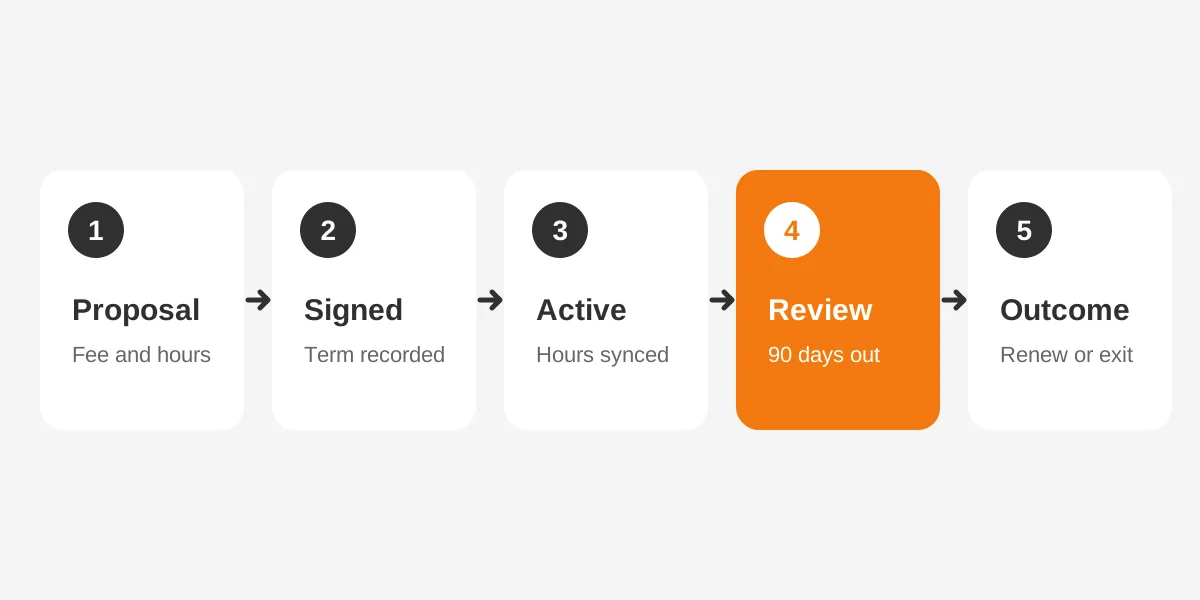
- Proposal sent: scope, monthly fee and included hours agreed in draft.
- Signed: contract value, start date and term recorded.
- Active: delivery running, with hours used synced each month.
- Renewal review: opened 90 days before the end date.
- Outcome: renewed, upgraded, downgraded or churned.
The renewal review stage is where most of the value sits. A task opens automatically 90 days out. The owner checks utilization, budget burn and client feedback. The owner then proposes a renewal, a scope change or a price change.
Retainer hours need their own fields. Track included hours, hours used this month, and the rollover rule in the contract. Set a flag for accounts whose used hours pass 90% of budget two months running. That flag starts a scope talk before the overrun becomes normal.
Client health also belongs on the account record. A simple score can combine on-time delivery, invoice status and the last satisfaction rating. The score does not replace judgment. It tells the account owner which conversation to have first.
For hour budgets, professional services firms manage CRM updates more easily when the time system posts usage each month.
When professional services firms manage CRM retainers this way, the forecast changes shape. Revenue appears month by month across the term. Renewal risk appears as a list of named accounts, not a surprise in the final month.
How should project-based deals be modeled in CRM?
Project-based deals should be modeled as a parent opportunity with milestones beneath it. Each milestone has its own value and expected date. This structure spreads revenue across the months when work is billed. It also gives change orders a clear place to live.
Professional services firms manage CRM project deals through four record types that link together:
- Opportunity: the full engagement value, close date and win probability.
- Milestone or phase lines: billable amounts with target dates.
- Statement of work: the signed scope, attached or linked to the deal.
- Change order: a separate deal tied to the parent, with its own value.
Salesforce supports this pattern through product schedules on opportunity products. The Salesforce REST API guide (Summer '26) lists schedule types of Quantity, Revenue or Both. Installments can run daily, weekly, monthly, quarterly or yearly. A schedule can hold 1 to 150 periods.
Here is a worked example with assumed figures. A firm wins a $90,000 implementation project billed in three milestones. The revenue schedule places $30,000 in each of three months. The forecast now matches the invoices.
Change orders deserve separate deals rather than edits to the original amount. A separate record keeps the original scope visible and shows how much the project grew. It also gives sales credit for expansion. Teams then log scope changes instead of absorbing them.
Time and materials work needs a different field set. Record the rate card, the estimated hours and a not-to-exceed amount. The forecast uses the estimate, and delivery updates actual hours each month.
Milestone dates also drive staffing. If delivery leads can see upcoming phases, they book consultants before the deal closes. This is one reason professional services firms manage CRM milestone data in the pipeline itself.
Where does CRM end and PSA begin?
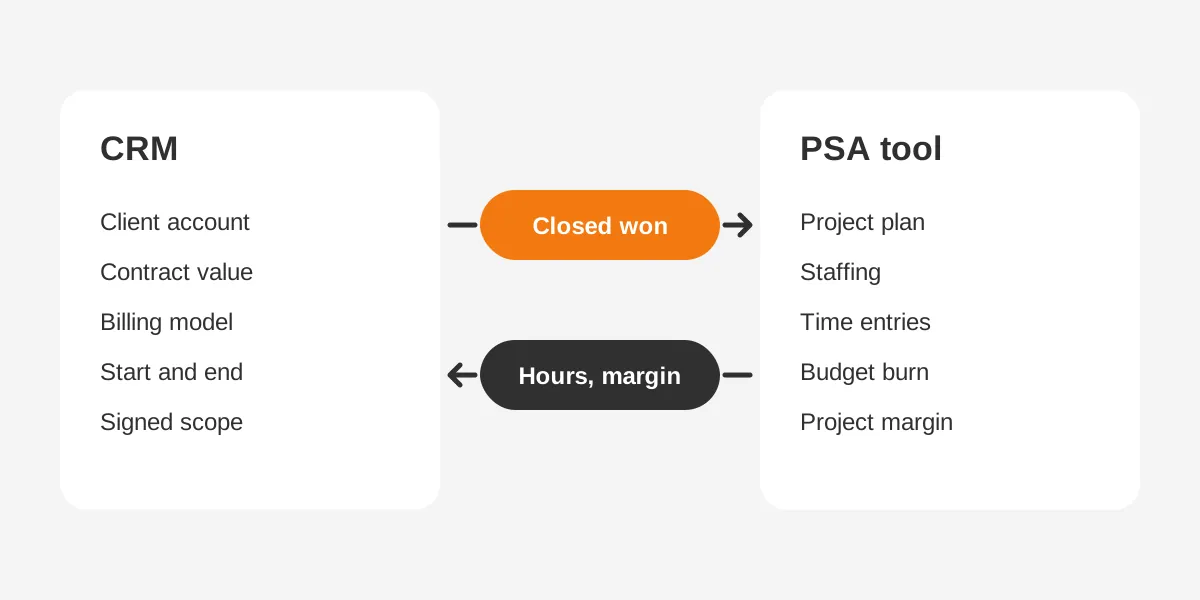
CRM ends at the signed deal and the client relationship. Professional services automation (PSA) begins with the project plan, staffing and time. CRM owns pipeline value, win rate and deal velocity. PSA owns billable utilization, budget burn and margin per retainer.
That split comes from Teamwork.com's 2026 PSA vs CRM comparison. Firm size decides whether both systems are needed. Its rule of thumb says a CRM alone fits fewer than 15 to 20 delivery staff on fixed fees. Agencies past 50 people usually need both systems, connected.
| Record or metric | Owner system | Who updates it |
|---|---|---|
| Account and contacts | CRM | Account owner |
| Deal value and close date | CRM | Sales |
| Statement of work | CRM | Sales, approved by delivery |
| Project plan and tasks | PSA | Project manager |
| Time entries | PSA | Consultants |
| Budget burn and margin | PSA, synced to CRM | Project manager |
| Invoices and payments | Accounting system | Finance |
| Renewal date and risk | CRM | Account owner |
The table follows one principle: every field has one home. Two systems storing hours or contract value drift apart within weeks. Reports then disagree, and teams argue about whose number is right.
Platform choice shapes the build. Salesforce offers PSA apps built on its data model, such as Certinia. HubSpot firms often connect a separate PSA through an app. Odoo keeps CRM, project, timesheet and invoicing modules in one database. That removes the sync for smaller teams.
A PSA tool is optional at first. Until headcount or billing complexity grows, professional services firms manage CRM and timesheets together.
Once both systems run, professional services firms manage CRM and PSA together under one rule. The CRM stays the system of record for the client. Delivery tools can change over the years. The client history, contract values and renewal dates should stay in one place.
Which fields must cross at closed won?
Five fields must cross from CRM to delivery at closed won. They are client account, contract value, billing model, start and end dates, and signed scope. With them, the project manager builds the plan without a second intake call. Missing any one causes rework.
The cleanest way professional services firms manage CRM handoffs is an automated trigger, not an email. The deal stage changes to closed won, and an integration creates the project in the PSA tool. It copies the five fields. The project ID then writes back to the deal.
- Client account: links the project to the right client and contacts.
- Contract value: sets the budget the project manager tracks against.
- Billing model: retainer, fixed fee, milestone or time and materials.
- Start and end dates: drive staffing and the renewal reminder.
- Signed scope: the statement of work, so delivery builds what was sold.
Validation rules protect the handoff. A deal should not reach closed won unless all five fields are filled. In Salesforce, a validation rule on the opportunity does this. In HubSpot, required properties on the closed won stage do the same job.
The return flow matters as much. Each week or month, the PSA tool should send hours used, budget burn and project margin back to the account. The guide to CRM and ERP integration planning covers sync options and error handling in more detail.
Firms without a PSA tool can still run this handoff. A project object inside the CRM can hold the five fields. A timesheet app can post hours to it. The rule stays the same: one home per field.
Testing comes before go-live. Professional services firms manage CRM integrations safely by closing a sample deal in a sandbox first. Check that the project appears and that its ID writes back.
How do Salesforce and HubSpot handle recurring revenue?
Salesforce handles recurring revenue through revenue schedules on opportunity products. HubSpot uses recurring revenue deal properties and its revenue analytics report. Both can forecast retainers correctly once configured. Neither does it by default.
HubSpot's method is property-based. HubSpot's knowledge base (August 2026) lists four properties: recurring revenue amount, deal type, inactive date and inactive reason. The amount is a monthly value. Deal types are new business, renewal, upgrade and downgrade.
The HubSpot feature has limits worth knowing. It is available with Sales Hub Enterprise or Service Hub Enterprise. The properties need manual updates, and only deals in the closed won stage count. A deal's close date becomes the start date for revenue reporting.
| Need | Salesforce | HubSpot |
|---|---|---|
| Spread revenue over months | Revenue schedules on opportunity products | Recurring revenue amount property |
| Track renewals and upgrades | Renewal opportunities, often automated with Flow | Recurring revenue deal type values |
| Record churn | Custom fields or a closed lost renewal | Inactive date and inactive reason |
| Edition needed | Product schedules enabled by an admin | Sales Hub or Service Hub Enterprise |
| Main risk | Schedules not re-established after edits | Manual property updates missed |
Microsoft Dynamics 365 and Odoo can support the same model. Dynamics 365 firms often add Project Operations for delivery. Odoo firms use subscriptions for retainers and the project module for milestones.
The choice between platforms rarely turns on recurring revenue alone. It depends on the PSA tool and the accounting system, such as QuickBooks or Xero. Admin capacity matters too. Unboxx CRM consulting and implementation services start with that fit check before any build.
Whichever platform runs the pipeline, professional services firms manage CRM revenue data with one named owner. A revenue operations lead or CRM admin checks schedules and properties each month.
Which reports show retainer and project health?
Four reports show retainer and project health: utilization by account, margin per retainer, renewal pipeline and revenue leakage. Together they show which clients make money and which renewals are at risk. Pipeline value alone shows none of this.
Benchmarks give each report a reference point. Deltek's review of the 2026 SPI report puts average project margin at 37.7% in 2025. Revenue per billable consultant averaged $210,000. Utilization averaged 66.4% across benchmarked firms.
Margin per retainer is the report most firms lack. Teamwork.com gives an illustrative case. A $10,000 monthly retainer delivered in 64 hours at a $70 cost rate keeps a 55.2% margin. At 88 hours and $80, margin drops to 29.6%.
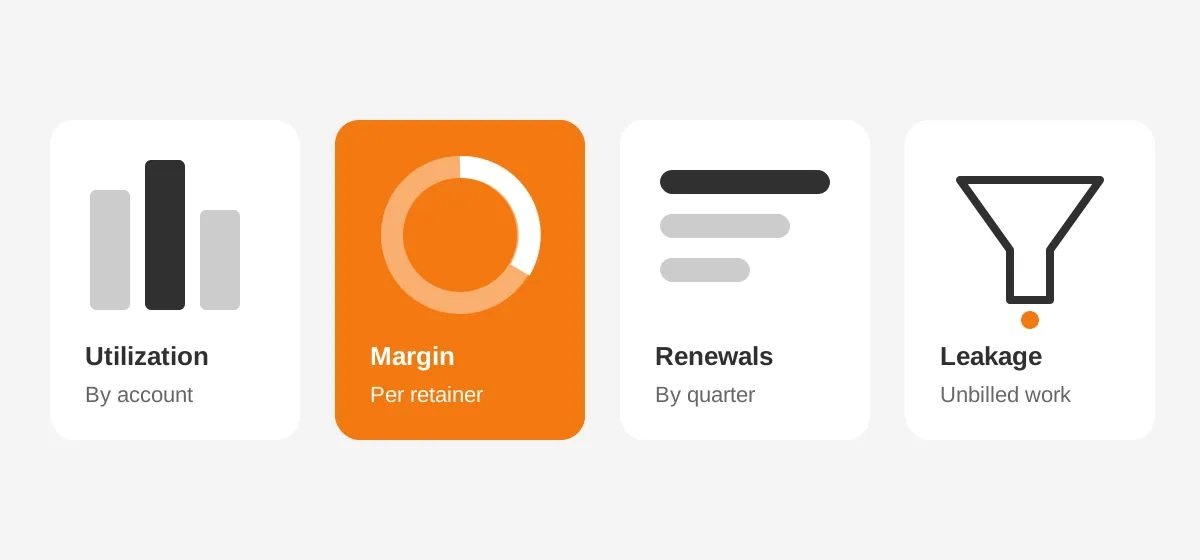
That gap equals $30,720 over a year on one account. The CRM sees the same $120,000 contract both times. Only the synced delivery data shows the difference.
Build these reports on one dashboard for account owners and one for leadership. Account owners need their own clients, sorted by renewal date and margin. Leadership needs totals by service line and month. The article on CRM dashboard types and build steps explains the layout by platform.
Review cadence matters as much as design. A monthly account review of these four reports catches most problems before renewal. Weekly reviews suit firms with short projects or high staff turnover.
Consistency helps more than volume. Professional services firms manage CRM reporting best when the same four reports open every review. Twenty reports nobody reads help no one.
How should professional services firms manage CRM renewals?
Professional services firms manage CRM renewals by creating the renewal deal when a retainer or project starts. The renewal record carries the end date, current value and an owner from day one. That timing turns renewals into planned work.
Automation does most of the setup. In Salesforce, a Flow can create a renewal opportunity when a contract activates. In HubSpot, a workflow can create a renewal deal with the deal type set to renewal.
- Create the renewal deal at contract start, dated to the end date.
- Open a review task 90 days before the end date.
- Pull margin, utilization and satisfaction into the review.
- Choose renew, upgrade, downgrade or exit, and log the reason.
- Update the recurring revenue fields the same day.
Renewals are also the moment to fix weak contracts. A retainer that runs over its hours for three months should renew at a new fee or scope. A project that ran over budget should inform the next estimate.
Overruns carry a wider cost. SPI Research finds that overruns above 10% hurt client satisfaction, margins and future bookings, per Deltek's 2026 summary. Logging the overrun reason on the account helps the next proposal avoid it.
Make the review outcome a required field. That one rule is how professional services firms manage CRM renewal data reliably.
Accounting firms face this pattern every tax season. The guide on how to implement CRM in an accounting firm covers recurring engagements and seasonal renewals. Firms reviewing vendor delivery can check what a CRM professional services team should deliver.
When professional services firms manage CRM renewals this way, churn becomes a reported number with reasons. Leaders can see whether clients leave over price, results or staffing. Each reason points to a different fix.
Frequently Asked Questions
How do professional services firms manage CRM when their revenue model is retainer-based or project-driven rather than transactional?
They split deals into retainer and project pipelines, each with its own stages and fields. Retainers carry monthly value, hours and renewal dates. Projects carry milestones and change orders. Delivery data such as hours and margin syncs back, so account owners see client health before renewal.
Do small consulting firms need a PSA tool?
Small consulting firms often manage without one. Teamwork.com's rule of thumb says a CRM alone can work below 15 to 20 delivery staff on fixed fees. Firms that bill hours, run retainers or share consultants across clients usually need PSA features.
Can a CRM track billable hours?
A standard CRM does not track billable time against project budgets. That job belongs to a PSA tool or timesheet app. The CRM should receive hours used and budget burn as synced fields. Account owners then see delivery effort without logging time twice.
How should unused retainer hours be recorded?
Record included hours, hours used and the rollover rule as fields on the retainer deal or account. A monthly sync from the time system updates usage. Reports then show unused hours by client. That supports renewal pricing and stops unbilled rollover from becoming revenue leakage.
Which CRM suits a project-based professional services firm?
Salesforce suits firms needing revenue schedules and PSA apps such as Certinia. HubSpot suits firms wanting simpler setup with Enterprise recurring revenue tracking. Odoo suits smaller firms wanting CRM, projects, timesheets and invoicing in one system. Fit depends on billing models and admin capacity.
How can Unboxx help professional services firms manage CRM?
Unboxx helps professional services firms manage CRM through retainer and project pipelines, the CRM to PSA handoff and margin reports. The team works across Salesforce, HubSpot, Microsoft Dynamics 365 and Odoo. See how the approach fits on the CRM for professional services page.
Start with a review of current deal types, renewal steps and delivery data. A short audit shows where revenue leaks and which fields need one home. Schedule a consultation to map the changes and the order to make them.
Let's create something out of this world together.
Have a project in mind? Contact us for expert design and development solutions. Let's discuss how we can help grow your business.
Ready to Unboxx Your Potential?
Build smarter systems. Automate faster. Scale confidently.