
A donor gives online on Friday. On Monday, the same donor gets a generic appeal that ignores the gift. The donation form, the email tool and the CRM never shared the record. Fixing that gap is the practical answer to what integrations help nonprofit companies most.
The stakes are measurable. M+R Benchmarks 2026 reports that only 24% of new online donors gave again the next year. What integrations help nonprofit companies keep those donors? The ones that move gifts, events and email activity into one supporter record.
Key Takeaways
- Connect the donation platform to the CRM first, because every later integration depends on clean gift data.
- Email, website forms, events and accounting come next, in that order, for most small and mid-sized nonprofits.
- Pick native connectors where they exist, middleware for simple gaps, and custom API work only for core data.
What Integrations Help Nonprofit Companies Most?
Six integrations help nonprofit companies most. The first three are donation platform to CRM, CRM to email and website forms to CRM. The next three are events, accounting and analytics. Together they turn separate tools into one nonprofit tech stack. The order matters as much as the list.
Most marketing software for nonprofits already sells these links. HubSpot lists more than 2,000 integrations. Salesforce runs the Nonprofit Success Pack (NPSP) with its own app marketplace.
So what integrations help nonprofit companies in practice? Availability is rarely the problem. The real work is deciding which data must move, and in which direction.
The table below ranks the six by impact for a typical nonprofit running inbound marketing and online fundraising. It is a decision aid, not a vendor endorsement.
| Integration | Example tools | Data that moves | Main benefit |
|---|---|---|---|
| Donation platform to CRM | Givebutter, Donorbox, Fundraise Up, GoFundMe Pro | Gifts, recurring plans, campaign codes | One donor record, accurate thank-yous |
| CRM to email | HubSpot, Mailchimp, Constant Contact | Segments, consent, opens, clicks | Appeals that match giving history |
| Website forms to CRM | WordPress, Typeform, HubSpot forms | Sign-ups, volunteer interest, source | Lead capture forms that feed nurture |
| Events to CRM | Eventbrite, Zoom | Registrations, attendance, ticket revenue | Follow-up based on who attended |
| Accounting to CRM | QuickBooks, Xero | Deposits, fund codes, reconciled totals | Finance and marketing agree on revenue |
| Analytics to all | Google Analytics 4, Power BI | Traffic source, conversions, attribution | Budget goes to channels that raise money |
A nonprofit with fewer than five staff can often stop after the first three rows. A larger team with paid events and grant reporting needs all six. The next section shows what integrations help nonprofit companies at each size.
What Integrations Help Nonprofit Companies of Each Size?
What integrations help nonprofit companies depends on staff size, budget and the number of tools in use. A five-person charity and a national federation need the same data flow, but at different depth.
Small nonprofits with one fundraiser should ask what integrations help nonprofit companies save staff hours first. The answer is a donation platform connected to the CRM and an email tool fed by CRM segments. Native connectors cover both, so no developer is needed.
Mid-sized nonprofits with a development team and a marketing lead need more. At this stage, what integrations help nonprofit companies grows to include events, website forms and accounting. Salesforce integrations for nonprofits often appear here, because NPSP handles households, soft credits and grants well.
Large nonprofits with chapters or affiliates face a different problem: two or more databases. For them, what integrations help nonprofit companies usually means a data warehouse or a custom API layer. That layer keeps one supporter ID across chapters. Power BI then reports across all of them.
A size check prevents overspending. A small team that buys enterprise middleware pays for capacity it never uses. A large team that relies on free connectors hits task limits during year-end giving. Sizing the plan to the team keeps what integrations help nonprofit companies affordable to run after launch.
Why Does Disconnected Marketing Software Cost Nonprofits Money?
Disconnected marketing software costs nonprofits money in two ways. Staff time goes into copying data, and supporters receive messages that ignore their history. Both problems show up in retention, the metric that decides long-term revenue.
M+R Benchmarks 2026 puts overall donor retention at 48% and prior-donor retention at 66%. The jump from 24% for new donors to 66% for repeat donors shows why the second gift matters. Donor retention depends on timely, relevant follow-up, and follow-up depends on data that arrives without manual export.
Three costs appear when tools stay separate:
- Staff hours spent on CSV exports, imports and spreadsheet matching every week.
- Duplicate records, so one supporter receives the same appeal twice under two email addresses.
- Lost consent tracking, which creates compliance risk when an unsubscribe in one tool never reaches another.
Why integrate donor database and marketing tools at all? Because the donor journey crosses every system. A supporter reads a blog post, signs up for a newsletter, attends a webinar and then gives. Without nonprofit data integration, each step lives in a different tool, and nobody sees the full path.
Before buying another tool, list what integrations help nonprofit companies close that gap. Current tools often offer them already.
The cost is not only internal. Year-end giving concentrates revenue into a narrow window. M+R found that nonprofits received 37% of 2025 online revenue in December. A broken sync during that month can delay receipts and confuse donors at the worst possible time.
How Should Donation Platforms Connect to Marketing Software?
Donation platforms should connect to marketing software through the CRM. The CRM acts as the single source of truth for every gift. The donation tool records the payment, the CRM stores the donor, and the email tool reads segments from the CRM.
A donor management integration built this way is the base layer. Receipts, thank-you emails and renewal asks all read from it. It comes first on any list of what integrations help nonprofit companies thank donors on time.
This order prevents a common mistake. Teams often connect the donation form straight to the email tool. The email list grows, but the CRM never learns about the gift, and reporting breaks. A donation platform integration should write to the CRM first.
The fields to sync are specific. Map the donor name, email, postal address, gift amount, gift date, payment method, campaign code and recurring status. Add a field for consent, so the email tool knows who opted in. Field mapping done once, carefully, saves months of cleanup.

Recurring giving deserves its own logic. M+R reports that monthly giving produced 27% of online revenue in 2025.
To track recurring donors in a CRM, sync the plan status, the next charge date and failed payment events. A failed card should trigger an email from the marketing tool within a day.
Fundraising software integration also covers payment options. M+R found that 79% of donation pages offered PayPal, 57% offered Apple Pay and 44% offered Venmo. Each payment method must arrive in the CRM with the same donor identity, or one person becomes three records.
Good connectors match on email address and then on name plus postal code. Test that rule with real gifts. Identity matching is where what integrations help nonprofit companies most often breaks down.
Peer-to-peer fundraising adds another layer. Platforms such as GoFundMe Pro (formerly Classy) create fundraiser pages for supporters. Sync both the fundraiser and each donor they recruit, with a link between the two. That link shows which volunteers bring in new donors.
Which Email and CRM Connections Matter Most?
The CRM and email integration matters most, because email still produces measurable revenue for nonprofits. M+R Benchmarks 2026 reports that email produced 11% of online revenue and $2.40 in email revenue per subscriber in 2025.
The M+R email chapter also found $54 raised per 1,000 fundraising messages, and list sizes grew 5%. Those figures reward segmentation. A list that knows giving history can send a renewal ask to lapsed donors and a thank-you to recent ones.
Best integrations for nonprofit email marketing share four traits:
- Two-way sync, so unsubscribes in the email tool update the CRM.
- Segment sync, so CRM lists become email audiences without export.
- Engagement sync, so opens and clicks appear on the contact timeline.
- Consent sync, so legal basis and opt-in date travel with the contact.
Mailchimp and Constant Contact both offer native connectors to HubSpot and Salesforce. Salesforce Marketing Cloud and Account Engagement serve larger teams. Nonprofit email marketing integrations work best when the CRM owns the contact, and the email tool owns the send.
Because email revenue is tracked per subscriber, this pair is usually where what integrations help nonprofit companies pays back fastest.
HubSpot integrations for nonprofits remove the email question altogether. HubSpot combines CRM, email and landing pages in one platform. The HubSpot for Nonprofits program offers 40% off list prices for eligible new customers. The discount covers Professional and Enterprise products on annual terms.
How to integrate HubSpot for nonprofits depends on the donor system. Teams that keep Raiser's Edge NXT can use a connector such as RaiserSync. Teams that move donors into HubSpot can connect Donorbox or Fundraise Up directly. The guide to HubSpot for nonprofits covers eligibility and setup.
What Integrations Help Nonprofit Companies Run Inbound Marketing?
The integrations that help nonprofit companies run inbound marketing connect the website, search ads and analytics to the CRM. Inbound marketing works only when the team can see which content brings supporters in, and what they do next.
Search still drives a large share of visits. The M+R website chapter found that organic search produced 39% of nonprofit website visits in 2025. It also found donations from 1.6% of visitors, worth $1.33 per visitor.
How to run inbound marketing for a nonprofit, in integration terms:
- Connect website forms to the CRM, with hidden fields that capture the source page.
- Connect landing pages to email nurture, so a guide download starts a welcome series.
- Connect Google Analytics 4 to donation and sign-up events, so conversions are counted.
- Connect ad accounts to the CRM, so each gift carries its campaign.
Google Ad Grants gives qualifying nonprofits up to $10,000 per month in search ads. Google Ad Grants tracking needs GA4 conversions and UTM parameters stored in the CRM. Without that link, a team spends grant budget without knowing which ads raised money.
A nonprofit website CRM integration also supports attribution. When a sign-up form passes the first-touch source into the CRM, later gifts inherit it. The report then answers a direct question: which blog posts and ad groups lead to donations months later?
For content, what integrations help nonprofit companies most? A WordPress or HubSpot CMS connection that tags each form by topic.
Those tags drive segmentation, so a supporter who reads about food programs gets food program stories. Teams that want this built as one system can review Unboxx AI growth marketing services.
How Do Event and Volunteer Tools Feed Your Data?
Event and volunteer tools feed the CRM with attendance, hours and interest data. That data marks the supporters most likely to give again. An event management integration turns a ticket purchase into a CRM activity, not a separate spreadsheet.
Eventbrite connects natively to HubSpot and through partners to Salesforce. Zoom webinars sync registrations and attendance to both. The key field is attendance, not registration. A follow-up that thanks attendees and sends a recording to no-shows needs both values in the CRM.
Volunteer management integration follows the same pattern. Volunteer platforms record shifts and hours. Sync those hours to the contact record, and tag active volunteers. Volunteers who also donate deserve a different appeal from donors who never volunteered.
At galas and auctions, what integrations help nonprofit companies are ticketing, bidding and payment tools that share one donor ID. The test is simple. After the event, a single CRM report should show ticket revenue, auction revenue and new contacts, without manual matching.
Slack or Microsoft Teams alerts round out this layer. A notification when a major donor registers lets the development team prepare a personal welcome. That alert costs little to set up and supports the relationship work behind larger gifts.
Not every useful link moves money. Alerts like this one are part of what integrations help nonprofit companies manage relationships, and they rarely need a developer.
Why Connect Accounting Software to Marketing Data?
Connecting accounting software to marketing data matters because finance and fundraising must agree on revenue. Without an accounting integration for nonprofits, the CRM shows one total and the books show another.
A QuickBooks integration for nonprofits, or a Xero connection, should sync deposits, fund codes and restricted gift designations. The CRM keeps the donor relationship. Accounting keeps the official ledger. Reconciliation then becomes a monthly check rather than a quarterly argument.
The direction of sync matters here. Gift detail should flow from the CRM to accounting as summarized journal entries. Raw donor data rarely belongs in the ledger. Most teams also keep payment processor payouts, from Stripe or PayPal, as the bridge between the two systems.
Board and grant reporting benefits most. A funder asks how a campaign performed. With the accounting link in place, the team pulls campaign revenue from the CRM. Then it confirms the total against the ledger in minutes. Power BI or a CRM dashboard can show both side by side.
Data governance belongs in this section too. Decide who can edit gift records, who can change fund codes and who approves corrections. Write the rules down before the sync goes live. Integrations copy mistakes faster than people do.
With those rules in place, an audit can separate what integrations help nonprofit companies from links that quietly spread errors.
How Do You Choose Native, Middleware or Custom Integrations?
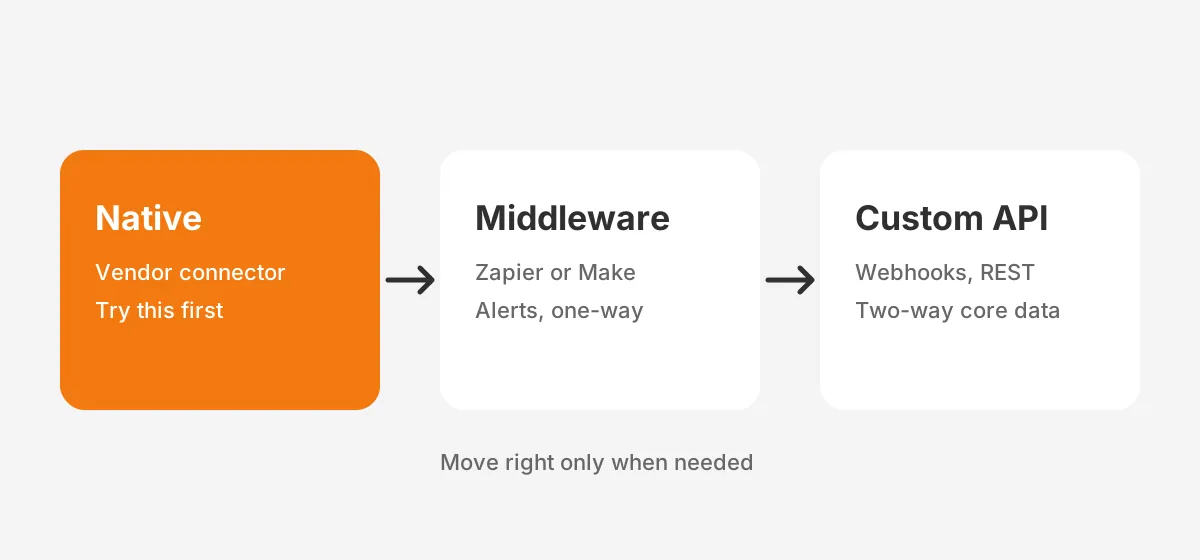
Choose native integrations first, middleware second and custom API work last. Native integrations are cheaper to run and are maintained by the vendor. Middleware integration fills simple gaps. A custom API integration fits core data that no connector handles correctly.
| Method | Best for | Typical tools | Watch out for |
|---|---|---|---|
| Native connector | Common pairs such as donation tool to HubSpot | Marketplace apps from the vendor | Limited field mapping options |
| Middleware | One-way triggers and small volumes | Zapier, Make | Task limits, silent failures |
| Custom API | Two-way sync of core donor data | Webhooks, REST APIs | Upfront build cost and upkeep |
Zapier for nonprofits works well for alerts and simple one-way updates. A Slack message when a major gift arrives is a good example. It fits less well for two-way donor sync, because errors can fail quietly. Make offers similar logic with more branching.
How much do nonprofit integrations cost? Native connectors are often included in the subscription. Middleware runs on monthly plans based on task volume. Connectors such as RaiserSync were listed at $179 to $199 per month on annual plans in a 2023 announcement. Custom work is priced per project.
Price the full year, including staff time to monitor syncs. Then decide what integrations help nonprofit companies at their current budget.
A decision rule helps. Core donor or gift data that must sync both ways needs a native or custom link. An alert or a one-way copy can run on middleware.
This rule answers what integrations help nonprofit companies without creating fragile links. Unboxx CRM integration services follow the same order.
How Do You Roll Out Integrations in 90 Days?
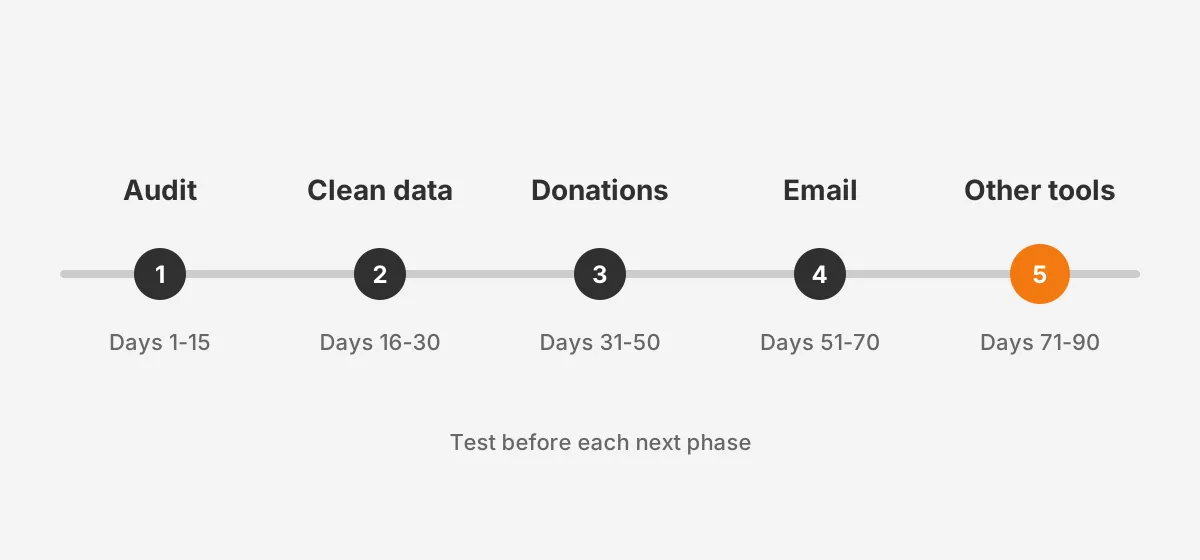
Roll out integrations in 90 days by auditing data first and connecting the donation platform second. Then add the remaining tools in order of revenue impact. Each phase ends with a test before the next begins.
- Days 1 to 15: run an integration audit. List every tool, its owner, its data and its current export habits.
- Days 16 to 30: clean data. Merge duplicate records, fix data hygiene issues and agree on required fields.
- Days 31 to 50: connect donation forms to the CRM, then test with real gifts and refunds.
- Days 51 to 70: connect the email tool, sync segments and consent, then send a test campaign.
- Days 71 to 90: connect events, website forms, accounting and analytics, then build one shared dashboard.
Consider a worked example with assumed figures. A nonprofit with 8,000 contacts, one donation platform and Mailchimp starts the audit. It finds 900 duplicates. Merging them first means the donation sync starts with 7,100 clean records instead of 8,000 messy ones.
Timing matters as well. Avoid starting the email phase in November, since December carries the largest share of online revenue. A rollout that finishes by October protects year-end giving.
Plan the calendar first, because launch timing shapes what integrations help nonprofit companies achieve in their first year. The marketing automation for nonprofits guide shows which workflows to switch on once the data flows.
Teams choosing or replacing the CRM itself should read the nonprofit CRM software comparison before the audit. A CRM chosen for its connectors makes every later step easier. The CRM for nonprofits page explains how Unboxx scopes that work.
Frequently Asked Questions
What software do nonprofits need first?
Nonprofits need a CRM first, because every other tool reads from it. Next comes a donation platform that syncs gifts to the CRM, then an email tool. Event, accounting and analytics tools follow once donor records are clean, accurate and owned by one named person on staff.
How long does a nonprofit CRM integration take?
A nonprofit CRM integration with native connectors takes two to six weeks per tool, including testing. Custom API work takes longer, often eight to twelve weeks. The fundraising CRM timeline guide breaks down the phases and the staff time each one needs.
Is Zapier enough for a small nonprofit?
Zapier is enough for alerts and simple one-way updates at a small nonprofit. It is weaker for two-way donor sync, because failed tasks can go unnoticed. Use it for notifications and form routing, and rely on native connectors for gift data and email consent records instead.
Who should own integrations at a nonprofit?
One named person should own integrations, usually the CRM administrator or the operations lead. That owner reviews sync errors each week, approves field changes and keeps a written map of every connection. Without a single owner, broken syncs often go unnoticed until year-end reporting exposes them.
When should a nonprofit hire an integration partner?
A nonprofit should hire an integration partner when donor data must sync both ways between two core systems. Another trigger is a team without API skills. A partner also helps during a CRM migration, when field mapping and data cleanup decide whether reporting works after go-live.
Where Should Your Nonprofit Start With Integrations?
Start with the donation platform and the CRM, then add email, website forms, events, accounting and analytics in that order. That sequence is the clearest answer to what integrations help nonprofit companies raise more and report accurately.
Each step needs clean donor data from the one before. The rest of what integrations help nonprofit companies depends on it. Unboxx builds them on HubSpot, Salesforce and Dynamics 365. To map what integrations help nonprofit companies like yours, schedule a consultation with the Unboxx team.
Let's create something out of this world together.
Have a project in mind? Contact us for expert design and development solutions. Let's discuss how we can help grow your business.
Ready to Unboxx Your Potential?
Build smarter systems. Automate faster. Scale confidently.