
Sales reps spend only 28% of their week selling, according to the Salesforce State of Sales research (2023). Deal management and data entry consume most of the remaining hours. Every manual update, reminder and handoff is time taken away from buyers.
Sales process automation is the use of CRM rules, workflows and integrations to run repeatable sales steps without manual effort. It assigns leads, logs activity and moves deals between stages. This guide maps what to automate at each stage and what to leave to reps.
Key Takeaways
- Sales process automation removes repeatable admin work so reps spend more of the week with buyers.
- Every rule needs a trigger, a condition, an action, an owner and a written exception path.
- Start with three rules in one stage, test them in a sandbox, then measure before adding more.
What is sales process automation?
Sales process automation is a set of CRM rules that carry out routine sales steps when a defined event happens. A form fill, a stage change or a missed deadline can start a rule. The rule then checks its conditions and acts without a rep touching the record.
Every automated sales process has the same three parts. A trigger starts it, such as a new lead or an opportunity moving to Closed Won. A condition filters it, such as deal size above $25,000. An action finishes it, such as creating a contract or assigning a task.
McKinsey estimates that about a third of sales and sales operations tasks can be automated with current technology. Its research also found that only one in four companies had automated at least one sales process (McKinsey, 2020). The gap between those two numbers is where most B2B teams still sit.
McKinsey's use cases show the scale of the gain. A chatbot that handles lead management can increase reps' selling time by 15 to 20 percent. Automated drafting can cut the time to prepare a request for proposal response by up to two-thirds.
Sales process automation examples include lead routing automation, automated lead assignment, follow-up tasks, activity logging, quote generation and contract creation. Each one replaces a step a rep or a sales ops analyst once did by hand. Together they form a CRM workflow that runs the same way for every deal.
The benefits of sales process automation are practical. Records stay complete because the system fills fields. Buyers get faster replies because routing takes seconds. Managers see a pipeline they can trust, since stage changes follow rules instead of memory.
Sales process automation software usually means the CRM itself. Salesforce, HubSpot, Microsoft Dynamics 365 and Odoo all include rule builders. Separate sales automation tools such as Outreach add sequencing and engagement features on top of the CRM.
How does sales process automation differ from sales automation?
Sales automation automates single tasks, while sales process automation connects those tasks into a governed sequence across stages. A scheduled email is sales automation. A chain that routes a lead, creates a deal and alerts a manager is sales process automation.
The difference matters for design. One rep can switch on task automation inside a sales automation platform. Process automation changes how the whole team works, so it needs an owner, documentation and testing.
Outreach draws the same line in its own guide. It frames sales process automation as automating whole workflows rather than isolated steps. It also lists complex negotiations among the things to keep manual.
The sales automation vs marketing automation question is about ownership. Marketing automation nurtures contacts until they meet a qualification threshold. Sales automation takes over once a lead is accepted and a rep owns it. The handoff point between them is usually a lead scoring threshold or a lifecycle stage change.
Both systems share data, so the rules must agree on definitions. If marketing marks a lead qualified at 60 points, the sales workflow must trigger at that same value. Mismatched thresholds create orphan leads that nobody follows up.
| Factor | Sales automation | Sales process automation | Marketing automation |
|---|---|---|---|
| Scope | One task | A chain of steps across stages | Campaigns and nurture |
| Typical owner | Individual rep | Sales ops or CRM admin | Marketing ops |
| Example | Scheduled follow-up email | Route, assign, create deal, alert manager | Lead scoring and email journeys |
| Needs testing | Light | Sandbox and debug runs | Test sends and list checks |
Which sales stages can sales process automation cover?
Sales process automation can cover every stage from lead capture to renewal. The share of automated work drops as deals get closer to signature. Early stages are high volume and rule based. Late stages involve judgment, pricing and relationships, so the automation supports reps instead of replacing them.
The sales task automation map below is a starting point, not a fixed rulebook. Each team should adjust it to its own stages, deal sizes and approval limits.
| Stage | What to automate | What the rep owns |
|---|---|---|
| Lead capture | Record creation, deduplication, enrichment | Nothing yet |
| Qualification | Lead scoring, routing, speed to lead alerts | Discovery call and fit decision |
| Discovery and demo | Meeting scheduling, email sequences, activity logging | Questions, notes and next step |
| Proposal | Quote generation, approval process routing | Scope, price and terms |
| Closing | Contract creation, signature reminders | Negotiation and final call |
| Handoff and renewal | Onboarding tasks, renewal reminders | Relationship and expansion talks |
Lead capture and qualification carry the most volume. Routing rules and lead scoring decide who gets each lead within seconds. Unboxx covers the routing models in detail in its guide to lead routing models and fallback rules.

Discovery and demo stages gain the most from email sequences and meeting scheduling. The rep still runs the call. Automated follow-up only fires if the rep has not logged a next step within an agreed number of days.
Proposal and closing stages use automation as guardrails. A quote above a discount limit routes to a deal desk for approval. A Closed Won opportunity creates a draft contract. The rep never waits for a manual handoff, and finance never receives an incomplete record.
After Closed Won, sales process automation creates onboarding tasks for the delivery team. It also sets a renewal reminder before the contract end date. Match that reminder window to the contract's notice period. The account owner then has time to plan the renewal conversation.
AI agents can take on more of these steps once the rules are in place. The AI-native CRM services from Unboxx combine rule-based CRM automation with AI sales agents for qualification and follow-up.
How does sales process automation work in Salesforce?
Sales process automation in Salesforce runs mainly through Flow Builder. Admins build a record-triggered flow that acts when a record is created or updated. Salesforce also offers assignment rules for leads and approval processes for discounts. Older guides still show Process Builder, but new builds use Flow.
Salesforce documents a typical example in its Trailhead module on record-triggered flows. The flow starts on the Opportunity object when a record is updated. It checks that Stage equals Closed Won and Amount is greater than 25,000. It then creates a draft Contract record.
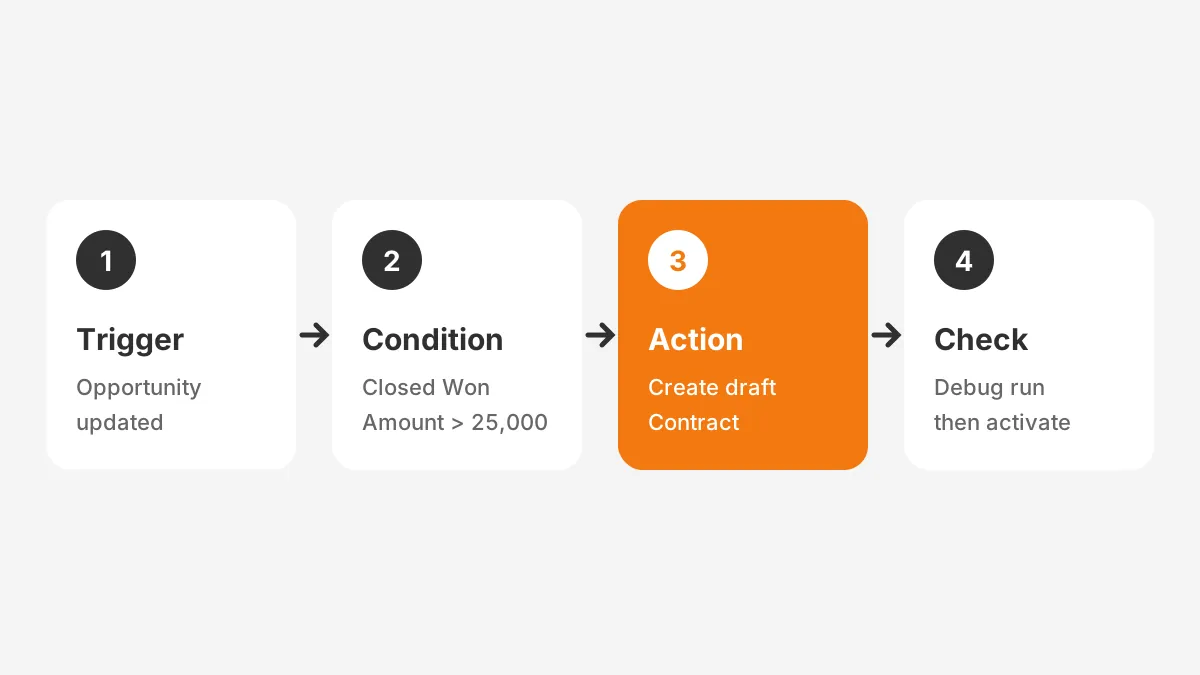
That flow uses the condition setting "Only when a record is updated to meet the condition requirements." Without it, every later edit to a won deal could create another contract. That single setting is what keeps one won deal from producing a pile of duplicate contracts.
Fast Field Updates handle a narrower job. A flow using Fast Field Updates runs before the record is saved to the database. It suits simple field changes on the same record, such as setting a region from a postal code.
The Flow debugger lets admins run the flow as if a record were updated, without changing live data. Salesforce flow sales automation should pass a debug run and a sandbox test first.
Lead scoring often feeds these flows. Compare Einstein, Account Engagement and Flow options in the Salesforce lead scoring guide.
Agentforce adds AI agents that can qualify leads and draft follow-ups inside Salesforce. Those agents still depend on clean flows and fields underneath. The article on Agentforce for sales explains what each agent does and how to start.
How does HubSpot handle sales workflow automation?
HubSpot sales automation runs through workflows, sequences and pipeline automation, each available at different subscription levels. The HubSpot Knowledge Base (2026) lists these as the main automation tools. Workflows require a Professional or Enterprise subscription.
Workflows automatically enroll records based on the criteria set in their enrollment triggers. A sales workflow can assign leads to the sales team, create records and set properties. HubSpot also lets admins generate triggers and actions with Breeze, its AI assistant, from a written prompt.
Sequences send a timed series of one-to-one emails and task reminders through the rep's connected work email address. By default, a contact is unenrolled after replying or booking a meeting through a sequence link. Sequences need Sales Hub Professional or Enterprise and an assigned seat.
Pipeline automation sets actions on deal stage changes. HubSpot's own example creates a task for the sales manager when a deal moves to Closed Won. Lead pipeline automation is limited to Sales Hub Professional and Enterprise.
A typical HubSpot design pairs the three tools. A workflow assigns the lead and creates the deal. A sequence handles the rep's first five touches. Pipeline automation then creates tasks as the deal moves through stages, so no stage change depends on memory.
Before turning on a workflow, admins can test it in the workflow editor. Enrollment settings can also block specific records or unenroll records automatically. Both controls stop a new workflow from emailing the wrong contacts.
Scores usually decide when a workflow fires, so settle the scoring model first. The HubSpot lead scoring setup guide explains how to build the score before any workflow depends on it.
How much does sales automation cost? It depends on seats and tiers. A G2 comparison (2026) lists HubSpot Sales Hub from $15 a month. It lists Agentforce Sales from $25 per user a month. Workflow features sit in higher tiers, so check them before budgeting.
What should sales teams never automate?
Sales teams should never automate negotiation, pricing exceptions or relationship-critical conversations. These steps depend on judgment that a rule cannot hold. Automating them saves minutes but risks deals worth months of work.
What not to automate in sales falls into four groups:
- Negotiation and final pricing, where context changes with every call.
- Executive and renewal conversations, where the relationship is the product.
- Early enterprise deals, where buying committees need tailored outreach.
- Disqualification of large accounts, which should always get human review.
Rules also need a written exception path. A five-day proposal deadline may suit small deals but fail on complex ones. ScienceSoft describes a "Complex" checkbox that pauses reminders once a manager approves the exception.
Exceptions need monitoring too. If one rep marks most deals as exceptions, the rule is either wrong or being bypassed. A monthly exception report keeps the automated sales process honest without adding manual checks.
Worked example: a five-day proposal rule
ScienceSoft published a worked example of sales process automation built around one manager's rule. Proposals for opportunities under $50,000 had to go out within five days. The rule had to remind reps without flooding the manager with alerts.
The design used four parts. Reps received reminders before the deadline, and repeat reminders if they missed it. The manager received one digest instead of an alert for every deal. A "Complex" checkbox let a rep request more time, which the manager then approved.
A report closed the loop. ScienceSoft flagged reps who mark 40% or more of opportunities as complex. That pattern can signal gaming of the rule. The original build used Process Builder. The same sales process automation design maps directly onto a record-triggered flow in Salesforce today.
How do you roll out sales process automation?
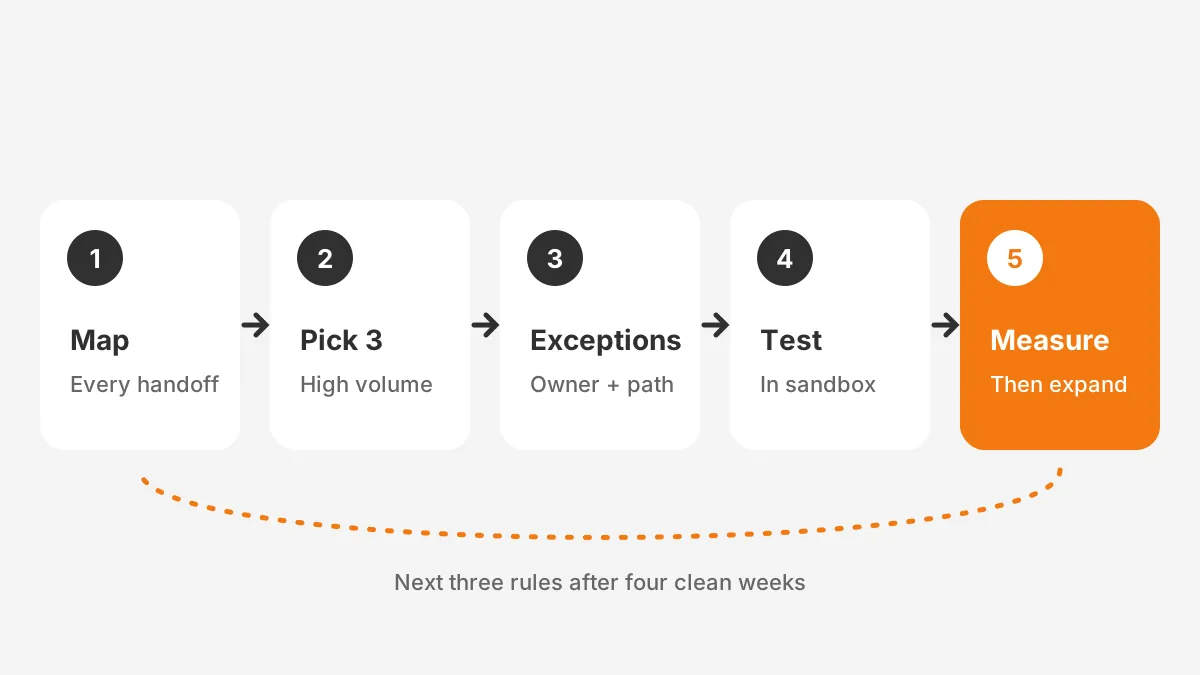
Roll out sales process automation in phases: map the current process, automate three rules, test them, measure, then expand. McKinsey reports that a full journey typically takes 12 to 18 months. Priority use cases show impact within six months.
These sales process automation steps keep each phase small enough to test:
- Map the current sales workflow stage by stage, including every manual handoff.
- Pick three rules with high volume and low judgment, such as routing and logging.
- Write each rule as trigger, condition, action, owner and exception.
- Build the rules in a sandbox and run debug or test enrollments.
- Activate for one team, then compare metrics against the previous month.
- Add the next three rules only after the first set runs cleanly for four weeks.
A short rule spec keeps sales, marketing and admins aligned. Here is one example. When a lead's score reaches 60, assign it to the territory owner. Create a call task due within one hour.
If no call is logged by then, alert the sales manager. The CRM admin owns the rule. Leads from named strategic accounts are the exception and go to the account director instead.
Change management decides whether the rules stick. McKinsey found that 90% of companies that scale automation spend over half their budget on change management. That budget also covers capability building. Training reps on why a rule exists matters as much as the rule.
How long does sales automation take for one team? The answer depends on the number of rules, objects and integrations the first phase touches. A routing rule on one object is far smaller than a quote-to-contract chain. Larger rollouts across regions follow the longer McKinsey range.
Sales automation best practices also include a named owner for every rule. CRM administration teams usually hold that role. The workflow automation examples for sales, finance, HR and IT show how other departments document the same pattern.
Sales automation for small business follows the same order with fewer rules. A ten-person team may need only routing, follow-up tasks and a won-deal handoff. Adding rules beyond real volume creates maintenance without saving time.
Which metrics prove the automation is working?
Five metrics prove whether automation works: selling time, speed to lead, data completeness, pipeline velocity and exception rate. Measure each for four weeks before activation, then compare after. Without a baseline, any improvement is a guess.
- Selling time: hours per week reps spend with buyers, from activity data or a short survey.
- Speed to lead: minutes from form fill to first rep contact.
- Data completeness: share of open deals with every required field filled.
- Pipeline velocity: deals times win rate times deal size, divided by cycle length.
- Exception rate: share of records that bypass a rule through an approved exception.
Speed to lead is the easiest metric to measure after go-live. Compare the form submission timestamp with the first logged call or email on the same record. Report the median rather than the average, because a single weekend lead can distort the mean.
CRM data quality is the first number to move. Once required fields fill automatically, pipeline reports stop depending on rep discipline. Pipeline velocity moves more slowly, since it depends on win rate and deal length.
McKinsey reports that early adopters of sales automation saw efficiency improvements of 10 to 15 percent. They also reported sales uplift potential of up to 10 percent. Treat those as directional figures, not targets for a first rollout.
Tool sprawl can hide these gains. Salesforce found that sales teams use an average of 10 tools to close deals. Revenue operations teams should retire one manual tool for each automated step they add.
The same research found that 94% of sales organizations planned to consolidate their tech stacks. Sales process automation tools inside the CRM support that goal. Each rule removes one reason to keep a separate point tool.
Worked example: estimating hours saved
The figures below are assumed for illustration, not measured results. A team has 12 reps who each log 25 activities a day. Manual logging takes four minutes per activity.
That is 1,200 minutes, or 20 rep hours, every working day. If automated activity logging removes three of those four minutes, the team regains 15 hours a day. Replace these assumptions with your own baseline before building a business case for sales process automation.
Frequently Asked Questions
What sales tasks can be automated first?
Lead routing, activity logging and follow-up task creation are the best first candidates. They run on clear rules, repeat every working day and carry little judgment. Automating them gives reps time back quickly and produces cleaner CRM data for every later rule.
Does sales process automation replace sales reps?
No. Sales process automation replaces admin steps, not the conversations that win deals. McKinsey states that a fully automated sales function is not likely. Reps still own discovery, negotiation and relationships, while CRM rules handle routing, records and reminders around that work.
How is sales pipeline automation different from lead routing?
Lead routing decides which rep owns a new lead. Sales pipeline automation acts later, as deals move through stages. It creates tasks, updates fields and alerts managers on stage changes. Most teams need both, with routing rules feeding clean records into the pipeline rules.
Can AI sales agents run the whole sales process?
AI sales agents can qualify leads, draft emails and book meetings, but they need rules and clean data underneath. Agents in Salesforce and HubSpot read the same fields that flows and workflows maintain. Human review remains necessary for pricing, negotiation and large-account decisions.
Do small teams need sales process automation software?
Most small teams already have it inside their CRM. HubSpot, Salesforce, Dynamics 365 and Odoo all include rule builders. A small team rarely needs a separate tool until outbound volume outgrows the CRM's built-in email limits. Start with the rules already included in the current subscription.
Where should your sales process automation start?
Your sales process automation should start with the stage that wastes the most rep hours. That is usually lead routing or activity logging. Map it, automate three rules, test them and measure for four weeks. Expand only when the first rules run cleanly.
Unboxx designs and builds sales process automation in Salesforce, HubSpot, Dynamics 365 and Odoo, from first rules to AI agents. Schedule a consultation with Unboxx to map which of your sales steps to automate first.
Let's create something out of this world together.
Have a project in mind? Contact us for expert design and development solutions. Let's discuss how we can help grow your business.
Ready to Unboxx Your Potential?
Build smarter systems. Automate faster. Scale confidently.