
A sales team with 400 new leads a week cannot call every one of them on day one. Reps pick familiar names, and good buyers wait. Salesforce's predictive model needs 1,000 leads from the last 200 days before it learns from your own data.
Salesforce lead scoring fixes the order of the queue. It gives every lead a number that reflects fit and buying intent, so reps work the likeliest buyers first. This guide compares the three Salesforce routes and shows how to build, test and tune each one.
Key Takeaways
- Salesforce lead scoring runs through Einstein, Account Engagement scores and grades, or a custom model built with Flow.
- Einstein Lead Scoring needs 1,000 recent leads and 120 conversions before it trains on your own data.
- A score earns trust only when conversion rates rise with each score band, so test it every quarter.
What Is Salesforce Lead Scoring?
Salesforce lead scoring is a method that ranks each lead record by how likely it is to convert. The score sits in a field on the Lead object. Reps sort list views by it, and automation routes leads by it.
Every model mixes two kinds of evidence. Explicit data is what the lead tells you or what you can look up. Examples are job title, company size, industry and country. Implicit data is what the lead does: email clicks, page visits, form fills and webinar attendance.
Explicit and implicit data answer different questions. Fit data, also called demographic scoring or firmographic data, asks whether the company matches your ideal customer profile. Behavioral scoring asks whether the person is active right now.
A strong lead scoring model needs both. A perfect fit who never engages is not ready to buy. A busy visitor from the wrong industry will never buy at all.
The output feeds lead qualification. A lead that crosses an agreed score becomes a marketing qualified lead (MQL). Sales then accepts it as a sales qualified lead (SQL) or sends it back to lead nurturing.
Lead prioritization is the daily benefit of Salesforce lead scoring. The best leads rise to the top of each rep's list. Weak leads stay with marketing until they show more interest.
Salesforce lead scoring also gives sales and marketing alignment a shared number. Marketing stops arguing about lead volume, and sales stops arguing about lead quality, because both teams read the same field.
Opportunity scoring is a different tool. Salesforce lead scoring ranks people before conversion, while Einstein Opportunity Scoring ranks open deals. The 2023 guide sets its minimum at 200 closed-won and 200 closed-lost opportunities in 24 months.
Which Salesforce Lead Scoring Options Exist?
Three Salesforce lead scoring options exist: Einstein Lead Scoring, Account Engagement scoring and grading, and a custom rule-based model. They differ in how the score is calculated, what licence they need and how much control the admin keeps.
Einstein Lead Scoring is predictive lead scoring. It studies your past conversions and finds the patterns itself. Account Engagement, formerly Pardot, scores prospect activity with points and grades fit with letters.
A custom model is manual lead scoring. An admin writes the lead scoring rules with a formula field or Flow, and every rule stays visible.
| Option | How it scores | What it needs | Best fit |
|---|---|---|---|
| Einstein Lead Scoring | Predictive model, score from 1 to 99 | Sales Cloud Einstein and enough conversion history | Teams with high lead volume and clean history |
| Account Engagement score and grade | Points for activity, A to F grade for fit | An Account Engagement licence | Marketing teams running nurture programs |
| Custom formula or Flow model | Points from rules the admin writes | Sales Cloud and an admin | Smaller teams or unusual sales motions |
Salesforce's 2023 implementation guide lists Sales Cloud Einstein for Performance Edition and Unlimited Edition. Enterprise Edition can add it for an extra cost. Check your current contract before planning around it, because packaging changes between releases.
Licence type matters as well. The same guide says Sales Cloud Einstein is only for users with standard Salesforce licences. For users on other licence types, a custom Salesforce lead scoring model may be the practical route.
A simple decision rule helps pick the right Salesforce lead scoring route. Choose Einstein when the org passes the data threshold and wants no rules to maintain. Choose Account Engagement when marketing already runs nurture programs there.
Choose a custom model when volume is low or the rules must be explainable line by line.
The options can run together. A common pattern uses the Account Engagement grade for fit and the score for engagement. An Einstein score then acts as a second opinion. The risk is three numbers that disagree.
Pick one field as the primary lead score and treat the others as inputs. Unboxx sets up this kind of scoring design through its AI-native CRM services.
How Does Einstein Lead Scoring Work?
Einstein Lead Scoring works by comparing new leads with leads that converted in the past. It finds the field values that separate buyers from non-buyers, then gives each lead a score from 1 to 99. Higher numbers mean a closer match to your conversion pattern.
The model needs history first. The Salesforce Sales Cloud Einstein implementation guide (2023) sets the minimum. At least 1,000 leads must be created in the last 200 days. At least 120 of those must be converted to an account and contact.
Those Einstein lead scoring requirements apply to every lead segment you create. A team that splits leads by region needs 1,000 leads and 120 conversions in each region. Segments help only when each one has enough volume of its own.
Take an example org with 600 leads in 200 days and 90 conversions. It misses both thresholds, so Einstein falls back to the global model. A custom Salesforce lead scoring model built on its own close rates may rank those leads better until volume grows.
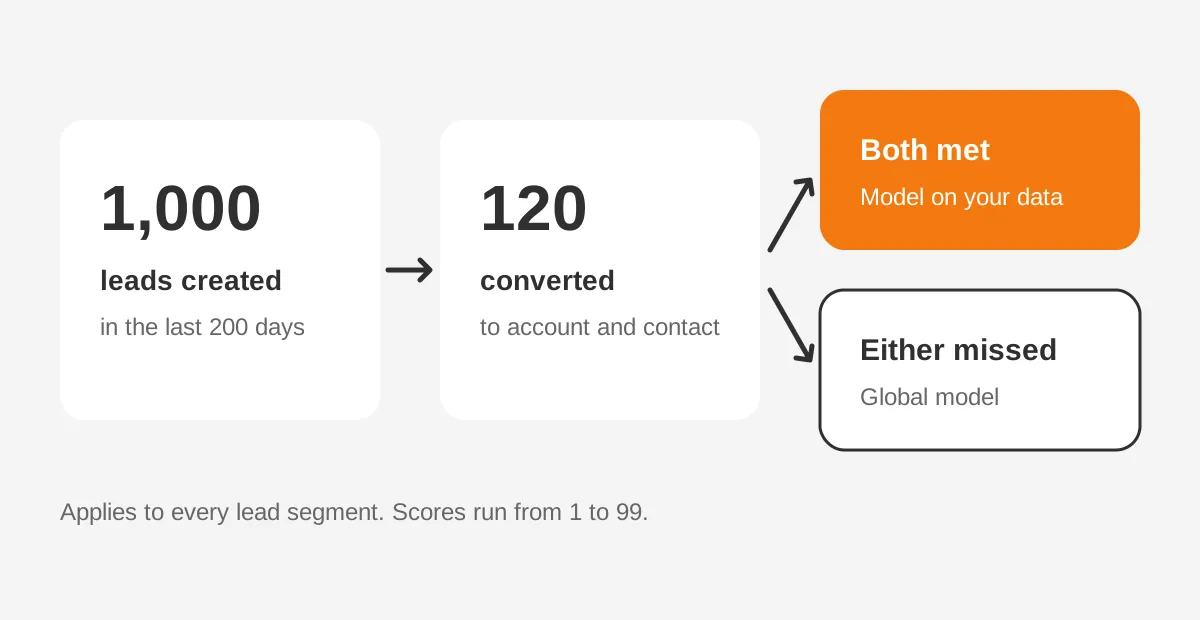
A shortfall does not stop scoring. When there is not enough conversion data, Einstein uses a global model built from anonymous data. As your own data grows, Einstein builds a model from it and keeps whichever model gives better results.
The same guide says Einstein reanalyzes leads approximately every 10 days. Hightouch's 2023 guide adds that the first analysis can take up to 48 hours. Teams asking how often Einstein lead scoring updates should plan for a slow refresh. That pace suits fit signals better than same-day intent.
Three setup details catch admins out. Reps need read access to the Company, Phone and Email fields on leads. Encrypted lead fields are left out of the analysis. Orgs with more than a million scored leads may see the Einstein Lead Scoring analytics app stop working.
Here is how to set up lead scoring in Salesforce with Einstein. Search for Einstein Lead Scoring in Setup, turn it on, and choose the fields to include. Then add the Einstein score field to lead page layouts and list views.
Einstein Lead Scoring runs in Lightning Experience and in Salesforce Classic.
How Do Account Engagement Scores and Grades Work?
Account Engagement scoring and grading uses two separate measures. The Pardot score is a number that rises with activity. The prospect grade is a letter from A to F that shows how well the person matches your ideal buyer.
Scoring is on by default. Each activity adds points, such as a form submission or an email click. Salesforce Ben's guide to Account Engagement scoring notes that model edits apply to past activity too. It also notes that score decay is not built in.
Scoring categories split one prospect's score by product line or business unit. A manufacturer selling pumps and valves can see interest in each line separately. Einstein Behavior Score gives a separate engagement score with a maximum of 100.
Account Engagement grading needs setup before it works. Salesforce Ben's guide to Pardot grading (updated 2024) explains that every prospect starts at a D. Each grading profile criterion moves the grade up by one third of a letter, two thirds, or one full letter.
The same guide advises 4 or 5 criteria per profile. Typical choices are job title, industry, company size and country. Each prospect has one profile, so a company selling to two different buyers needs two profiles.
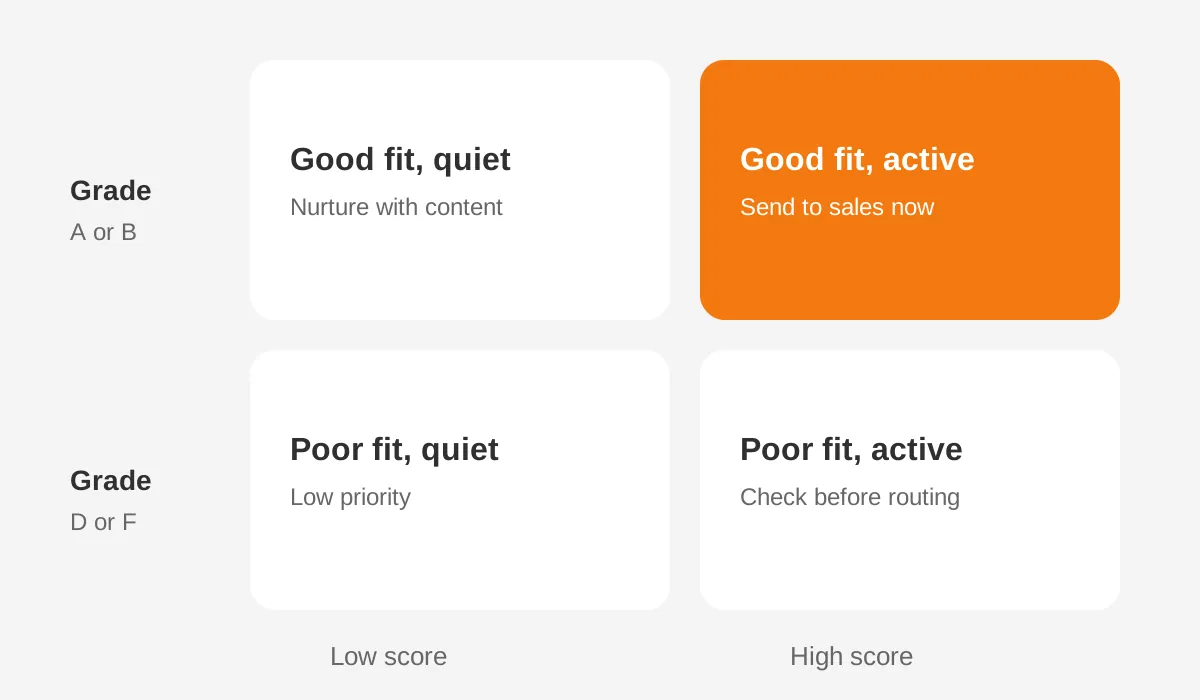
Pardot scoring vs grading is the core distinction. A prospect with an A grade and a score of 20 fits well but is quiet. A prospect with a D grade and a score of 300 is busy but may never buy. Routing rules should read both values together.
How Do You Build Custom Salesforce Lead Scoring?
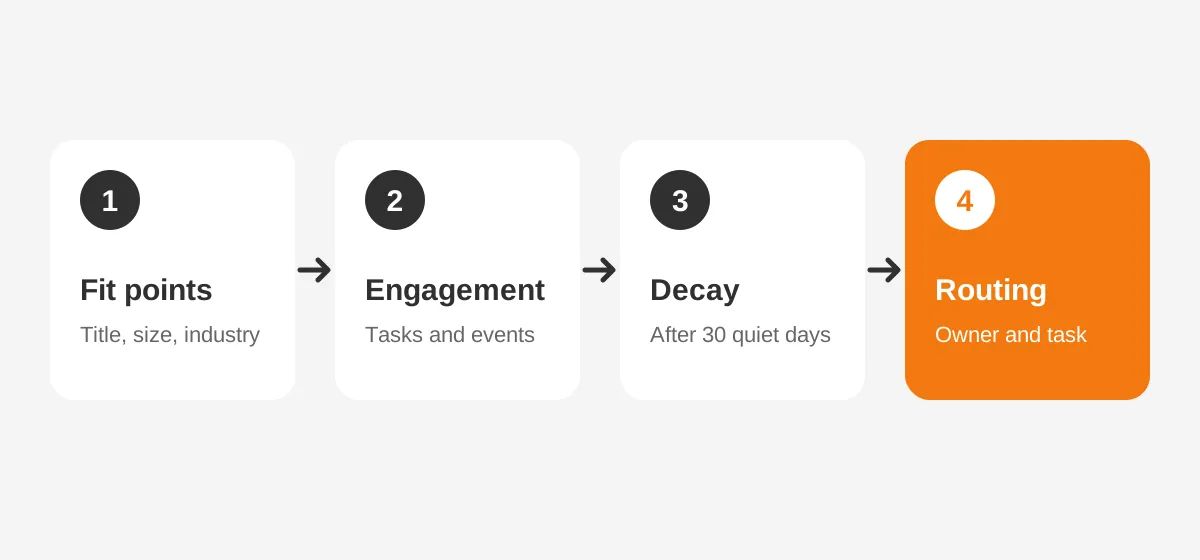
Custom Salesforce lead scoring runs on number fields on the Lead object and a record-triggered flow that adds points. This rule-based lead scoring route needs no extra licence. The seven steps below fit most B2B orgs.
- Define the ideal customer profile with sales leadership, using closed-won deals from the last year.
- Create two number fields on Lead: Fit Score and Engagement Score.
- Write a formula field that adds the two into one lead score field.
- Build a record-triggered flow on Lead that sets fit points when title, industry or size changes.
- Build flows on Task and Campaign Member that add engagement points for calls, meetings and events.
- Add a scheduled flow that removes engagement points after 30 days without activity.
- Add the lead score to list views, page layouts and a report grouped by score band.
A Salesforce lead scoring formula can handle fit alone. A CASE function on the Title field can return 20 for director titles and 10 for managers. Engagement needs Flow, because a formula cannot count activities on related records.
A Salesforce lead scoring flow should write its points to fields, never to the description or notes. Fields can be reported on, tested and reset. Keep the point values in custom metadata so an admin can change them without editing the flow.
Test every Salesforce lead scoring flow in a sandbox before release. Load 50 sample leads with known outcomes and check each score by hand. Einstein is harder to test this way. The 2023 guide says Einstein Lead Scoring needs at least six months of sandbox data.
Data quality decides whether rules fire. Free-text job titles and blank industry fields give wrong fit scores. Picklists and enrichment fix most of it, and a regular CRM data cleansing runbook keeps the inputs usable. Scoring also works best inside a wider Sales Cloud implementation plan.
What Should a Lead Scoring Model Measure?
A lead scoring model should measure the attributes and actions that separate past buyers from past non-buyers. Guesswork about what matters is the main reason scores drift away from reality. Start from your own conversion data.
The Salesforce guide to lead scoring gives a simple method. First calculate the baseline lead conversion rate. Then calculate the close rate for each attribute and compare it with the baseline. Attributes well above the baseline earn more points.
Its own example uses 200 leads and 100 customers, a 50% baseline. Webinar attendees closed at 75%, so the attribute earned 25 points. CTO titles closed at 65% and earned 15 points. The gap above the baseline sets the weight.
The table below is an example only, with assumed point values for a mid-sized B2B software seller. These lead scoring criteria examples show the shape of a model, not a benchmark to copy.
| Signal | Type | Example points |
|---|---|---|
| Director or VP title | Fit | 20 |
| Company with 200 to 2,000 staff | Fit | 15 |
| Target industry | Fit | 10 |
| Demo request form | Engagement | 30 |
| Pricing page visit | Engagement | 10 |
| Webinar attended | Engagement | 10 |
| Student or competitor email domain | Fit | minus 50 |
Negative points matter as much as positive ones. Job seekers, students, vendors and competitors fill forms too. A large negative value keeps them out of the sales queue without deleting the record.
Account scoring adds a second layer for account-based selling. It sums the engagement of every contact and lead at one company. Three people from one firm reading pricing pages say more than one person reading ten pages.
How Do You Set Score Thresholds and Routing?
A threshold is the score at which a lead moves to sales. Every lead above it routes to an owner. The lead score threshold is a business decision that sales and marketing agree in writing.
There is no universal answer to what is a good lead score. A useful threshold is the score above which leads convert at a rate sales accepts. Pull the last two quarters of leads, group them by score band, and find where conversion rises sharply.
In an example model with a 100-point scale, leads at 60 might become MQLs and go to an SDR queue. Leads at 80 with an A or B grade might go straight to an account executive. Both numbers are assumptions to test, not targets.
Lead scoring and routing work as one system. When the score crosses the line, a record-triggered flow can assign the owner, create a task and send an alert. The lead routing guide for B2B teams covers assignment rules, round robin and territory models in detail.
Speed matters once a lead qualifies. A high score that waits two days for a call loses its value. Add a service level, such as first contact within one business day, and report on it each week.
In an example week, Salesforce lead scoring might flag 40 of 400 new leads as MQLs. Two SDRs can call 40 leads within a day. If the threshold flags 150, it is too low for the team's capacity and needs raising.
Why Do Salesforce Lead Scoring Models Fail?
Salesforce lead scoring models fail for four common reasons. They are missing decay, poor data, rules nobody revisits, and reps who do not trust the number. Each one has a fix that an admin can schedule.
Missing decay inflates scores. Salesforce Ben notes that rule-based scores can spiral into the thousands when points only ever go up. A lead that downloaded three guides last year still looks hot. Score decay removes engagement points after a set period without activity.
Poor data breaks fit scoring. A blank industry field scores zero even when the company is a perfect match. Einstein has the same weakness, because it learns from whatever fields hold values. Fix the inputs before tuning the weights.
Static rules drift. Products change, new segments open, and campaigns change who fills forms. Review the Salesforce lead scoring model every quarter, using the conversion-by-band report described below.
Low trust kills adoption. Reps ignore a score they cannot explain. Show the reasons on the lead record. A custom model can show its fit and engagement fields side by side. A rep then sees why a lead scored 85.
How Do You Measure Whether Scoring Works?
The test of whether scoring works is the conversion rate by score band. If leads scoring 80 to 100 convert far more often than leads scoring 40 to 59, the model ranks well. If the bands convert at similar rates, the score adds nothing.
Build one report on converted and unconverted leads from the last 90 days. Group it by score band and show the count and conversion rate for each band. Put it on a sales dashboard so both teams see the same evidence.
Track three more measures. Time from MQL to first contact shows whether sales acts on the score. The MQL to SQL acceptance rate tells you whether sales agrees with it. Pipeline created per band is the revenue test.
For Einstein, compare the Einstein score with your own conversion report each quarter. For Account Engagement, review the lead scoring best practices on decay and grading profiles. For a custom model, adjust the point values in custom metadata and record each change with its date.
A 90-day rollout keeps Salesforce lead scoring honest. In month one, agree the ideal customer profile and build the fields. In month two, score leads silently and compare scores with outcomes. In month three, switch on routing and start the weekly service-level report.
Frequently Asked Questions
Does Salesforce have lead scoring built in?
Yes, but not in every edition by default. Einstein Lead Scoring comes with Sales Cloud Einstein, and Account Engagement includes points-based scoring. Any Sales Cloud org can build a custom model with formula fields and Flow. That route needs only admin time and agreed rules.
Who should own a Salesforce lead scoring model?
A marketing operations or revenue operations lead should own it, with sign-off from sales leadership. The owner keeps the scoring rules documented, runs the quarterly conversion review and approves changes. A Salesforce admin builds the fields and flows, but the business owner decides the weights.
Why do sales reps ignore lead scores?
Reps ignore lead scores they cannot explain or that sent them weak leads before. Show the reasons behind each score on the record, remove stale points with decay, and share the conversion-by-band report. Trust grows when high-scoring leads keep turning into meetings and pipeline for reps.
When should you rebuild a lead scoring model?
Rebuild a lead scoring model when conversion rates stop rising with score bands, or when the business changes. New products, new markets and a new ideal customer profile all change what a good lead looks like. A quarterly review catches drift before reps stop trusting the score.
Can Salesforce score accounts as well as leads?
Yes. Account scoring adds up engagement from every lead and contact at one company, which suits account-based selling. Admins can build it with Flow and a number field on Account. Three engaged contacts at one firm usually signal a stronger deal than one busy contact.
When Should You Get Help With Salesforce Lead Scoring?
Outside help pays off when data is messy, licences are unclear, or sales has stopped trusting the score. Unboxx designs Salesforce lead scoring in Einstein, Account Engagement and Flow. Its Salesforce Einstein consulting covers orgs ready for predictive scoring.
Unboxx has rebuilt Account Engagement automation for clients, as the Account Engagement automation success story shows. Teams on two platforms can compare approaches in the HubSpot lead scoring setup guide. To review your Salesforce lead scoring model, schedule a consultation with Unboxx.
Let's create something out of this world together.
Have a project in mind? Contact us for expert design and development solutions. Let's discuss how we can help grow your business.
Ready to Unboxx Your Potential?
Build smarter systems. Automate faster. Scale confidently.