
Salesforce for Law Firms: Intake, Conflicts, Cost, Setup

A prospective client fills in a web form on Tuesday night and hears nothing until Friday. In Clio's 2019 Legal Trends Report, only 40% of firms replied to a test email at all. Most lost clients never appear in any report.
Salesforce for law firms is a way to fix that gap. It is the Salesforce CRM set up around clients, matters, referral sources and intake. A firm can then track every relationship from first inquiry to closed matter. It runs beside the billing and document systems lawyers already use.
Key Takeaways
- Salesforce for law firms handles intake, conflicts, referrals and business development, while billing and documents stay in legal tools.
- The data model must be matter-centric, with ethical walls and audit history designed before any data moves.
- File storage, integrations and a legal app such as Litify decide most of the real cost.
What Is Salesforce for Law Firms?
Salesforce for law firms is the standard Salesforce platform adapted to legal work. Firms rename and extend objects so the system tracks clients, matters, engagements and referral sources instead of generic deals. The result is a legal CRM that holds every relationship a firm wants to grow.
A law firm CRM answers different questions from a sales CRM. A sales team asks which deal closes this quarter. A firm asks who referred this client and which partner owns the relationship. It also asks whether a new matter conflicts with an old one.
Salesforce does not ship a law-firm edition, so Salesforce for law firms is always a configured product. The legal fit comes from configuration, from apps on the AppExchange, or from both. That flexibility is the main reason firms choose it, and also the main source of project risk.
Adoption is the other problem a legal CRM must solve. A 2021 Ackert survey, reported by Law.com Legaltech News, found 12% of law firms had no CRM. Only 7% said their lawyers actively used one.
That gap shapes how Salesforce for law firms should be built. Lawyers will not maintain a system that adds clicks to their day. The design has to capture data from email, intake forms and matter opening. Attorneys should rarely type into it.
Unboxx's CRM for law firms service starts from that rule. A practical Salesforce for law firms build captures activity automatically. It asks lawyers for three things only: matter type, parties and referral source.
How Do Law Firms Use Salesforce Day to Day?
Salesforce for law firms covers four daily jobs: client intake, conflict screening, referral tracking and business development. Each job replaces a spreadsheet, an inbox or a partner's memory with a shared record. That is how law firms use Salesforce in practice.
Client intake and follow-up
Client intake starts when a web form, phone call or referral creates an intake record. Salesforce Flow assigns it to the right practice group, sends an acknowledgement and sets a follow-up task. Legal intake automation of this kind closes the response gap the Clio data exposed.
Salesforce client intake works best with a short qualification screen. Staff record the matter type, adverse parties, deadlines and the referral source before anyone books a consultation. Those fields feed the conflict check and the referral report later.
Here is an assumed example. An employment inquiry arrives at 9 p.m. through the website. Flow creates the intake record, emails the prospect a booking link and assigns the employment group's intake paralegal. By 9 a.m., the conflict search has already run on the employer's name and two related companies.
Referral tracking and origination credit
Referral tracking links each new matter to the person or firm that sent it. Partners can then see which referral sources produce paying work, not only introductions. Origination credit becomes a report instead of an argument at compensation time.
Business development and cross-selling
Salesforce for legal business development records pitches, events, panel appointments and client contacts. A litigation partner can see that a client already uses the firm's employment group. Lawyers who never open the CRM still benefit when the business development team keeps it current.
Salesforce for lawyers works best as a reporting tool, not a data-entry tool. A partner opens a dashboard on Monday and sees new inquiries, open proposals and dormant clients. Salesforce CRM for lawyers succeeds when that dashboard answers a question the partner already asks.
The same records support client service. A relationship partner sees every open matter, recent contact and outstanding proposal on one account page. That view is the core of legal client relationship management. It is also where Salesforce for law firms earns its licence cost.

Which Salesforce Products Fit a Law Firm?
Most Salesforce for law firms projects start with Sales Cloud and add products only when a clear need appears. Each product covers one part of the client relationship.
- Sales Cloud holds accounts, contacts, matters and pipeline for new work.
- Service Cloud manages client requests that need a tracked response time.
- Experience Cloud provides a secure client portal for documents, status updates and intake forms.
- Salesforce Shield adds encryption, event monitoring and longer audit history.
- Agentforce, Salesforce's AI agent platform, can draft follow-ups and summarise account activity.
A client portal built on Experience Cloud lets clients upload intake documents and check matter status. It cuts status-update calls, but it needs its own licences. Partners should also review exactly which fields clients can see.
Salesforce for legal teams inside a company follows the same pattern. Salesforce for legal departments usually tracks internal requests, contracts and outside counsel instead of new clients. The products are the same, but the objects and reports differ.
AppExchange adds legal-specific apps on top of the core platform. Litify, for example, is a legal app built on Salesforce that adds intake, matters, documents, timekeeping and eBilling. A Salesforce legal app saves build time, but it adds its own licence and its own upgrade cycle.
Firms that want Salesforce configured without a legal app usually work with a partner. Unboxx's Salesforce Sales Cloud consulting services cover this kind of build, from object design to reporting. The choice between a custom model and a legal app is the first design decision.
Which Objects Does a Law Firm Salesforce Org Need?
A law firm Salesforce org needs six core objects: accounts, contacts, matters, parties, referral sources and intake records. Salesforce for law firms works when each object has one clear job. Extra objects added later are cheap, while a wrong core model is expensive to change.
| Object | What it holds | Key fields |
|---|---|---|
| Account | Client company or individual | Relationship partner, industry, status |
| Contact | People at clients and referrers | Role, email, last activity |
| Matter | One piece of legal work | Matter number, practice group, responsible lawyer |
| Party | Adverse and related parties | Name, role, related company |
| Referral source | People and firms who send work | Matters referred, fees billed |
| Intake | New inquiries before engagement | Source, conflict status, decision |
Salesforce matter management starts with a custom Matter object, not the standard Opportunity. An opportunity tracks a sale that closes once. A matter has a lifecycle of its own, with deadlines, parties and a billing link.
Some firms keep opportunities for pitches and proposals. When a pitch is won, Flow creates the matter and copies the client, practice group and referral source. Pipeline reports and matter reports then stay separate and accurate.
Law practice CRM design also needs naming rules. Party names, company suffixes and former names must follow one format, because the conflict search depends on them. A Salesforce for law firms project should agree these rules before migration starts.
How Does Salesforce Handle Conflict Checks and Ethical Walls?
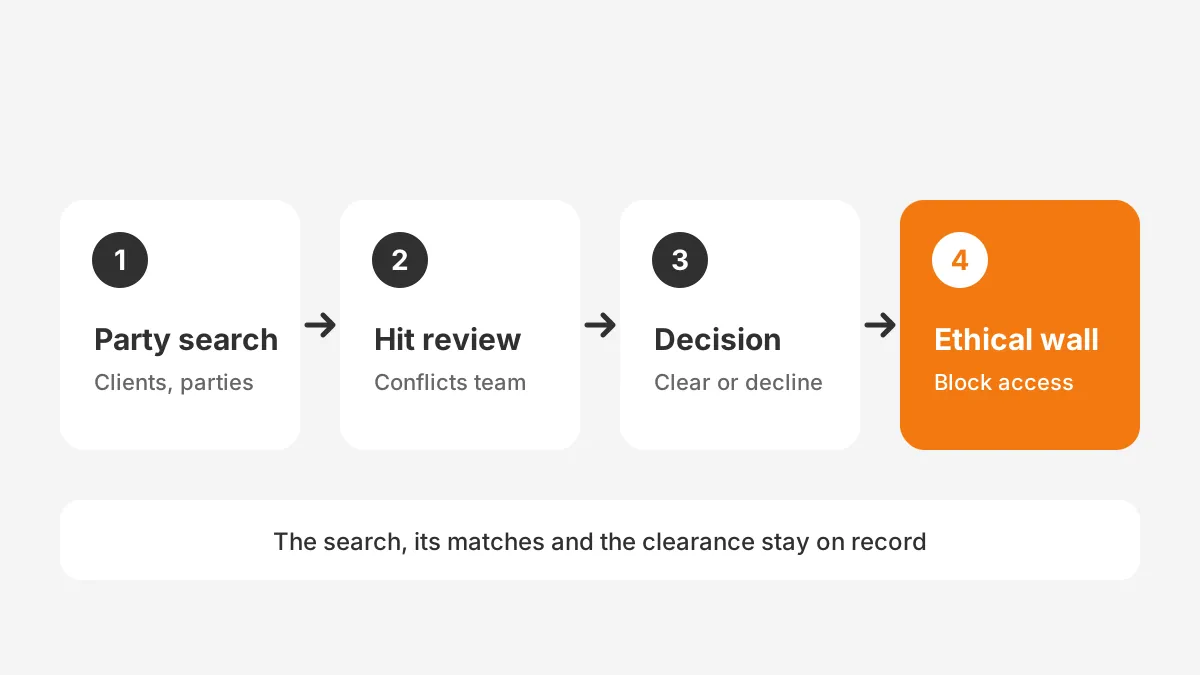
The conflict check runs before a matter opens. In Salesforce for law firms, it searches every party, related company and former client. Firms build the search with Flow or a custom component, then record the result on the intake record. A cleared check becomes evidence that the review happened.
A Salesforce conflict check needs clean party data to work. Adverse parties, subsidiaries and former names must sit in structured fields, not in free-text notes. Duplicate accounts hide conflicts, so data cleanup belongs before go-live.
- Capture every party and related entity during intake.
- Search accounts, contacts, matters and former clients for each name.
- Route possible hits to the conflicts team for review.
- Record clearance, a waiver or a decline on the intake record.
- Apply an ethical wall when a screened lawyer must stay out.
Ethical walls rely on sharing rules and permission sets. A screened lawyer loses access to the walled matter, its account and its files. The ABA Model Rules allow screening in some lateral hire cases, so the wall must be provable later.
A conflict of interest check is only as good as its record. A well-built Salesforce for law firms setup stores who ran the search, which names matched and who cleared them. That record answers a later challenge in minutes instead of days.
Proving a wall means keeping history. Field Audit Trail records who changed what on a record, and Event Monitoring shows who viewed or exported data. Both come with Salesforce Shield, which is a paid add-on.
How Does Salesforce Connect to Legal Practice Tools?
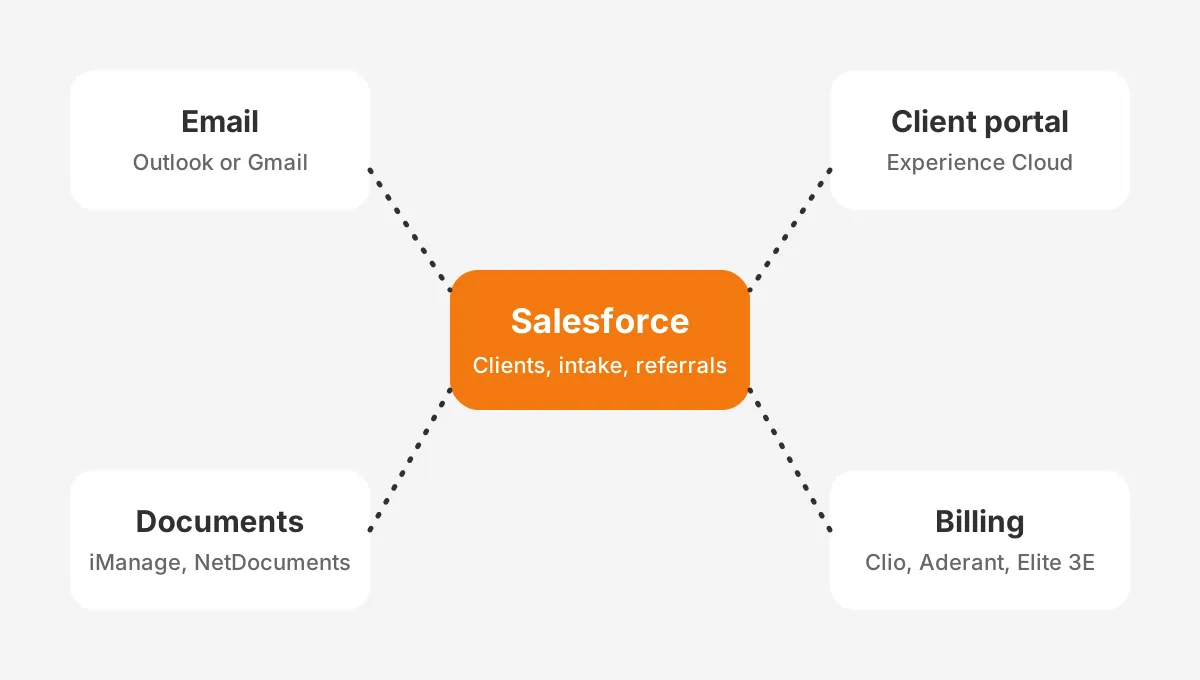
Connections run through APIs, AppExchange connectors or an integration platform, and Salesforce for law firms depends on them. The CRM rarely replaces billing, time entry or document storage. It shares client and matter data with the systems that already do that work.
Unboxx's law firm CRM projects most often connect five systems: Clio, iManage, NetDocuments, Aderant and Elite 3E. Each one owns a different record, as the table shows.
| Data | System of record | What Salesforce receives |
|---|---|---|
| Prospects, referrals, pitches | Salesforce | Owns the record |
| Matter number and status | Practice management software or Aderant | Read-only copy for reporting |
| Documents and email filing | iManage or NetDocuments | Link to the workspace |
| Time, invoices, trust funds | Clio, Aderant or Elite 3E | Billed totals per client |
| Email and calendar | Microsoft Outlook or Gmail | Logged activity |
A Salesforce integration with Clio usually syncs contacts and matters in one direction. Clio keeps time, billing and trust accounting, while Salesforce keeps the pipeline. Two-way sync is possible, but it doubles the rules about which edit wins.
A Salesforce iManage integration and a Salesforce NetDocuments integration work the same way. The document management system keeps the files, and Salesforce stores a link to the matter workspace. Files stay under the firm's existing retention and access rules.
For adoption, Outlook integration matters more than any other connector in Salesforce for law firms. When emails and meetings log automatically, partners see account activity without changing habits. DocuSign can also send engagement letters from the intake record.
Can Salesforce Replace Legal Case Management Software?
Only heavy customization or a legal app lets Salesforce for law firms replace legal case management software. Native Salesforce has no court-rules docketing or trust accounting, according to a Fast.io capability review (2026). Those gaps matter most to litigation and plaintiff firms.
Salesforce can be used for case management with Litify, or with custom matter objects, deadline rules and time entry. Salesforce legal case management then covers the whole matter, but the firm owns a larger system.
The Clio vs Salesforce choice comes down to scope. Clio is practice management software built for legal work, with billing and trust accounting included. Salesforce is a general platform that needs configuration before it fits a firm.
Salesforce vs Clio for law firms is often a false choice. A common pattern is Clio for matters and money, with Salesforce as the attorney CRM for growth. Three setups come up most often.
| Setup | Best for | Main trade-off |
|---|---|---|
| Salesforce plus Clio or Aderant | Firms that need business development and referral reporting | Two systems to keep in sync |
| Salesforce plus Litify | High-volume intake and matter work on one platform | Extra licence and a larger build |
| Clio alone | Small firms with simple growth needs | Limited pipeline and reporting depth |
Litify vs Salesforce is a different question. Litify runs on Salesforce, so a firm buying Litify also buys Salesforce licences. The decision is whether the legal features justify the second subscription.
Is Salesforce for Law Firms Secure Enough?
Configured on purpose, Salesforce for law firms can meet confidentiality duties through access control, encryption and audit history. The platform's defaults are only a starting point. Security for client data comes from role design, sharing rules and add-on controls.
Is Salesforce secure for legal data without add-ons? Standard sharing, profiles and multi-factor login cover most intake and business development data. Matters with sensitive facts need more, and that is where Salesforce Shield comes in.
- Platform Encryption encrypts fields, files and search indexes, with options for firm-managed keys.
- Event Monitoring detects bulk exports and unusual logins.
- Field Audit Trail keeps field history for up to 200 fields per object.
- Data Detect scans records for patterns such as Social Security numbers.
Platform encryption does not remove the need for good structure. A firm still decides which roles see which matters, and who can export lists. Partners should approve the sharing model before any client data loads.
Storage is the second risk in Salesforce for law firms. CloudFiles' summary of Salesforce Help (2026) lists 10 GB of file storage per Enterprise org. It lists 20 MB of data storage per user licence. Discovery sets and contracts belong in the document management system, not in Salesforce Files.
To use assumed figures, suppose a 30-lawyer firm uploads 2,000 scanned exhibits of 3 MB each, which is 6 GB. That one matter would use 60% of a 10 GB file allocation, which is why file storage design comes first.
What Does Salesforce for Law Firms Cost?
The bill for Salesforce for law firms has four parts: user licences, implementation, integrations and support. Licences are the predictable part. Build and integration work usually decides whether the budget holds.
Fast.io cites a Codleo estimate that Salesforce implementation and customization projects range from $10,000 to over $200,000. A single-practice intake build sits at the low end. A multi-office rollout with Litify, an iManage link and data migration sits near the top.
Beyond that range, how much Salesforce costs for a law firm depends on add-ons. Shield applies when the firm needs encryption or long audit history. A legal app licence, extra file storage and monthly administrator time come on top.
Unboxx's guide to CRM implementation cost breaks these lines into a budget. Firms comparing platforms can also read the legal CRM software guide before pricing Salesforce alone.
Plan ongoing costs as well as the build. Each new practice group, form or report adds administrator hours. A firm that budgets regular admin time every month keeps the system accurate and avoids a second clean-up project.
Salesforce for small law firms can stay lean. A five-lawyer firm may need only Sales Cloud, an Outlook connector and an intake form. The best CRM for law firms of that size is the one partners open every week.
How Do You Implement Salesforce in a Law Firm?
A law firm Salesforce implementation follows six stages: discovery, data model, security, integration, migration and launch. Each stage needs a named owner on the firm's side. Skipping security design is the most expensive mistake to fix later.
- Discovery: list the intake, conflict and reporting questions the CRM must answer.
- Data model: define clients, matters, parties and referral sources as objects.
- Security: design roles, sharing rules and ethical wall procedures.
- Integration: connect email, the document system and billing.
- Migration: clean and load contacts, matters and referral history.
- Launch: train partners on reports, not on data entry.
How long a Salesforce implementation will take depends on scope. An intake and referral build for one office is a short project. Matter management across practice groups is a longer programme.
Migration deserves its own owner. Old contact lists, referral spreadsheets and partner address books hold duplicate names. Each duplicate weakens the conflict search, so the clean-up has to finish before go-live.
The Salesforce implementation checklist sets out owners and approval gates for each stage. Firms with fewer than 25 users can also follow the Salesforce implementation for small business guide.
In any Salesforce for law firms rollout, law firm client intake software should go live first. Response times and conversion rates become visible within weeks. Matter management and cross-selling reports can follow once lawyers trust the data.
Frequently Asked Questions
Is Salesforce good for small law firms?
Salesforce suits small firms that want structured intake, referral tracking and growth reporting. A firm with five to ten lawyers can start with Sales Cloud and an email connector. Firms that only need billing and calendars usually get more from dedicated practice management software at lower cost.
Can Salesforce integrate with Clio?
Yes, Salesforce can integrate with Clio through connectors or an integration platform. Most firms sync contacts and matters from Clio into Salesforce for reporting. Clio keeps time entry, invoices and trust accounting, while Salesforce keeps intake, referrals and pipeline. Decide which system wins when both records change.
What is the difference between Salesforce and Litify?
Salesforce is the general CRM platform, and Litify is a legal application built on top of it. Litify adds intake, matters, documents, timekeeping and eBilling designed for law firms. A firm that buys Litify still needs Salesforce licences, so the two costs stack together.
Does Salesforce track attorney time and billing?
Native Salesforce does not include legal time entry, invoicing or trust accounting. Firms add those through a legal app such as Litify or keep them in Clio, Aderant or Elite 3E. Salesforce then receives billed totals per client, which supports profitability and cross-selling reports.
Who should own Salesforce inside a law firm?
A business development or operations leader should own Salesforce, with a named administrator handling changes. Partners approve the data model and the sharing rules, because they decide who sees which matters. Without a clear owner, field requests pile up and data quality falls within months.
Is Salesforce for Law Firms the Right Choice?
Salesforce for law firms is the right choice when growth, referrals and client relationships matter as much as matter work. It rewards firms that design security and integrations first. Firms that need only billing and calendars may be better served by legal practice management tools.
Unboxx designs and implements Salesforce for law firms, from intake and conflict workflows to Clio, iManage and Outlook connections. To scope a build for your firm, schedule a consultation with the Unboxx CRM team.
Let's create something out of this world together.
Have a project in mind? Contact us for expert design and development solutions. Let's discuss how we can help grow your business.
Ready to Unboxx Your Potential?
Build smarter systems. Automate faster. Scale confidently.