
Wealth Management CRM: Households, Data, Rules, Platforms
An advisory team can have every client file and still miss the call that matters. The spouse's IRA sits in one system, the trust in another, and the last review note lives in an inbox. Then a beneficiary change slips past compliance, and nobody can show who approved it.
Advisers know the tool that should fix this. The T3 and Inside Information survey (2026) found 91.08% of advisory firms use a CRM. A wealth management CRM is the client system that ties people, households, accounts and compliance records into one record.
Key Takeaways
- A wealth management CRM is built around households, financial accounts and advice records, not a sales pipeline.
- The value comes from custodian feeds, planning tools and an archive that keeps books and records audit-ready.
- Choose the platform after mapping data, integrations and Regulation S-P duties, then migrate in tested phases.
What Is a Wealth Management CRM?
A wealth management CRM is client relationship software for advisers who manage household money. It stores who the clients are, how they relate and which accounts they hold. It also logs every piece of advice. A sales CRM tracks deals. A wealth management CRM tracks relationships that last decades.
The difference shows up in the data model. A generic CRM has contacts, companies and opportunities. A CRM for wealth management adds households, financial accounts, holdings, goals and beneficiaries. It also adds service work such as account opening, required minimum distributions and annual client review meetings.
Wealth management client relationship management also carries a compliance load that a sales tool never sees. Advice, complaints and client instructions are regulated records. An examiner expects to find them in the wealth management crm, or at least an index that points to them.
For most firms, the wealth management crm sits at the center of the advisor technology stack. Portfolio management software, financial planning software, e-signature and archiving tools all feed it. The Kitces 2025 AdvisorTech report, via ThinkAdvisor, names client relationship management among the three core functions of an advisory firm.
The same report found a typical firm spends 4% to 6% of revenue on technology. It runs an average of 12 applications for 20 business functions.
Satisfaction is slipping too. Average ratings fell in all but three of 23 comparable tool categories between the 2023 and 2025 reports. Adding tools has not raised satisfaction. A crm for financial advisors is what keeps those 12 tools pointed at the same client.
How Does a Wealth Management CRM Model Households?
In a wealth management crm, the household is a group record. It links each family member and every account they own. The household is the unit an adviser bills, reviews and plans for. Individuals still keep their own records for identity, consent and communication preferences.
Salesforce documents this pattern clearly. In Trailhead's household module, a household is a business account. Members link to it through account-contact relationship records. Each person account can have only one primary group.
The same module explains rollups. Financial summary rollups total investments, liabilities and bank deposits at the household or client level. Salesforce Financial Services Cloud, now branded Agentforce Financial Services, ships eight predefined Data Processing Engine definitions to calculate those totals. The results land in the Account Financial Summary object.
The household data model matters for three daily jobs. Advisers need total household assets under management before a review. Billing needs the right accounts grouped under one fee schedule. Compliance needs to see every related party when an instruction arrives from a family member.
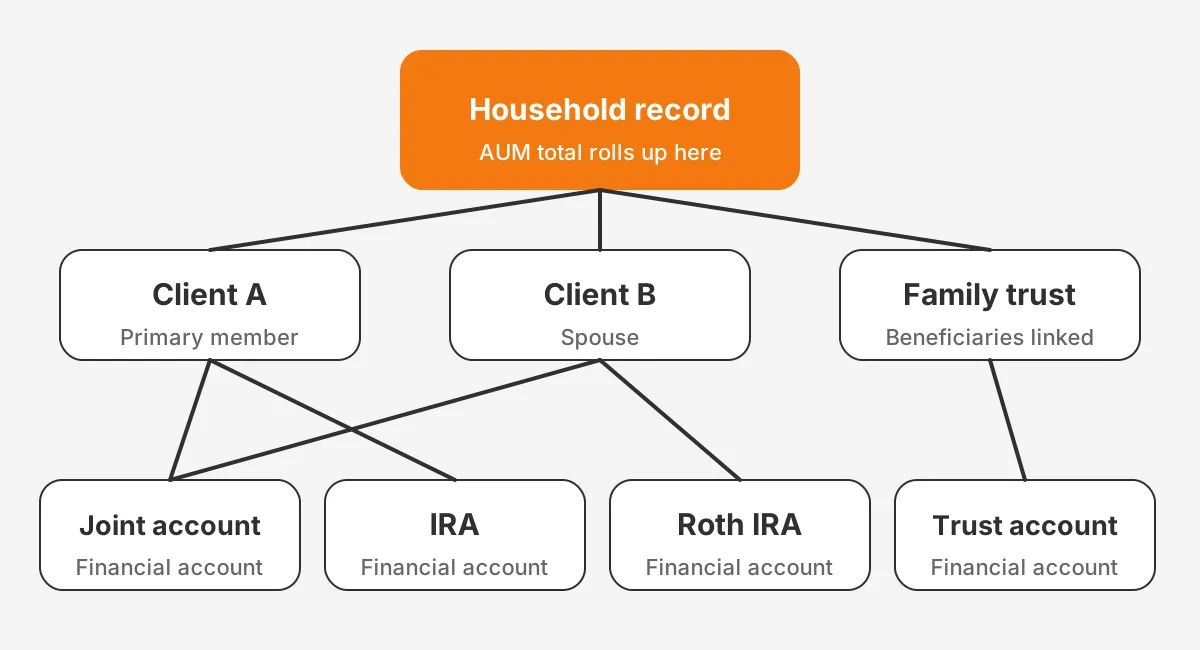
Watch for edge cases before configuring the model. Adult children may belong to two households. A trust has beneficiaries who are not clients. A divorced couple may split one household into two. The CRM should record these relationships, not flatten them into one contact list.
Which Data Should a Wealth Management CRM Hold?
Client identity, relationships, accounts, advice history and service tasks belong in a wealth management crm. Positions and trades usually stay in the portfolio system and arrive as summaries. That split keeps the CRM fast and avoids two systems competing to be the source of truth.
The table below shows a practical split for an RIA with one custodian and one planning tool. Each row names the system that owns the data, so updates flow in one direction.
| Data | System of record | What the CRM keeps |
|---|---|---|
| Client identity and KYC | CRM | Full record, consent and know your customer checks |
| Households and beneficiaries | CRM | Full record and relationship roles |
| Financial accounts | Custodian | Account number, type, registration and status |
| Holdings and trades | Portfolio management software | Daily balance and AUM summary |
| Goals and plans | Financial planning software | Plan status, next review date and link |
| Emails and texts | Archiving tool | Logged activity and archive reference |
| Fees and billing | Billing or portfolio system | Fee schedule name and billing household |
Two data sets cause most trouble. The first is beneficiaries, because they change after life events and rarely sync back from the custodian. The second is account registrations, such as joint, IRA or trust accounts, which drive paperwork and required minimum distributions.
Document management belongs here too. Signed advisory agreements, Form ADV delivery evidence and account paperwork should link to the client record. Some firms store files in a separate drive. They should still store the link and date in the wealth management crm.
Keep the field list short at launch. Every custom field is a field someone must fill in, report on and migrate later. A crm for wealth managers works best when each field answers a real question. That question comes from a review, a bill or an examiner.
How Do Custodian and Portfolio Feeds Connect?
Custodian and portfolio feeds connect through nightly files or APIs. They carry account, balance and transaction data. Custodians such as Charles Schwab, Fidelity and Pershing send them each business day. Often the CRM receives this data through the portfolio system, not from the custodian.
A typical flow has four hops. The custodian sends positions and transactions to portfolio management software such as Orion or Envestnet Tamarac. That system calculates performance and AUM. A wealth management crm integration then pulls account lists, balances and household totals on a schedule.
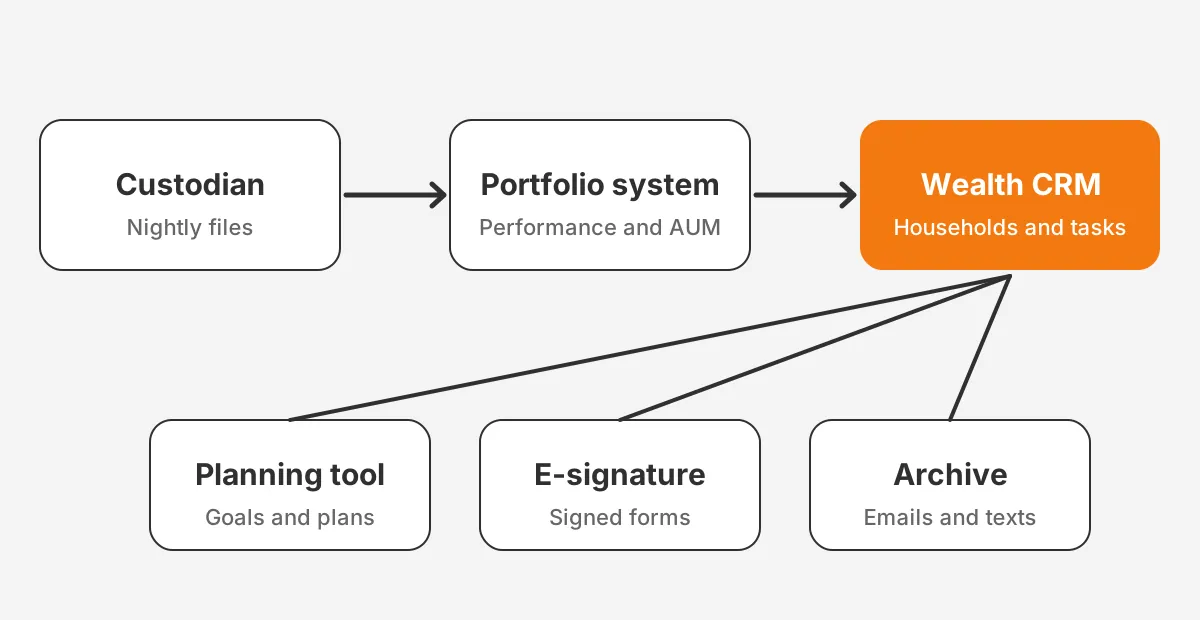
Planning and engagement tools connect beside that flow. Financial planning software such as RightCapital or eMoney shares client and goal data. E-signature tools such as DocuSign return signed account forms. A client portal shows the household what the adviser sees.
Decide the timing and direction for each wealth management crm integration before building it. A balance that updates nightly is fine for reviews. An address change must flow in near real time, because a stale address can send statements to the wrong place.
Before launch, test each feed against awkward records: a closed account, a renamed trust, a household split across two custodians. They expose matching errors faster than a clean sample. Credit unions face the same problem, as covered in the guide to core system links in credit union CRMs.
What Compliance Records Must the CRM Keep?
The CRM must keep, or point to, the books and records that securities rules require for advice and client communication. For registered investment advisers, that starts with Rule 204-2 under the Investment Advisers Act. A wealth management crm is often the first place examiners look.
Global Relay's summary of Rule 204-2 calls it the Books and Records Rule. It covers ledgers, trading instructions and banking records. It also covers copies of communications sent and received that relate to investment recommendations.
Regulation S-P adds privacy and incident duties. According to Paul Hastings (2024), the SEC amended it on May 15, 2024. Covered firms need a written incident response program. Customers must be told within 30 days after a firm learns of unauthorized access.
The amendments also reach vendors, who must notify the adviser no later than 72 hours after learning of a breach. Advisers must keep these records for five years, the first two in an easily accessible place. Larger advisers, at $1.5 billion or more in AUM, had 18 months to comply.
A wealth management crm vendor is a service provider under that rule. Ask each vendor for breach notice terms, data location, access logs and export rights. Retention and audit trail settings are covered in the article on audit and recordkeeping requirements for fund CRMs.
FINRA rules apply when the firm or its advisers are also registered with a broker-dealer. In that case, communications archiving usually runs through tools such as Smarsh or Global Relay. The CRM logs the activity, and the archive holds the immutable copy.
Which Wealth Management CRM Platforms Do Advisors Use?
Advisors mostly use a crm for investment advisors built for the industry, led by Orion Redtail, Wealthbox and Advyzon. The 2026 T3 and Inside Information survey collected data from 2,906 advisory firms between November 2025 and February 2026. It is the largest public read on wealth management crm software share.
In that survey, Redtail was used by 42.53% of respondents, up from 26.32% in 2025. Wealthbox held 17.48%, down from 21.62%. Advyzon held 10.19%, down from 11.84%. CRM also ranked as the most valuable tool category, ahead of financial planning and portfolio management.
| Platform | Built for | Household model | Best fit |
|---|---|---|---|
| Orion Redtail | Advisers | Native households | RIAs using Orion for portfolio work |
| Wealthbox | Advisers | Native households | Small and mid-sized teams that want simple workflows |
| Advyzon | Advisers | Native households | Firms that want CRM, reporting and billing in one product |
| Salesforce Financial Services Cloud | Financial services | Households, groups and rollups | Larger firms, banks and multi-entity groups |
| HubSpot | General business | Built with custom objects | Firms led by marketing and client acquisition |
Industry tools give advisers ready-made workflows and custodian links on day one. Salesforce Financial Services Cloud gives more control over data, security and automation. That control suits firms with banking, trust or insurance lines. It also needs an administrator or a partner to run it well.
HubSpot for financial services fits firms whose main problem is growth. It is a general platform, not a financial services crm by design.
HubSpot has strong email, forms and lead tracking. It has no household object out of the box, so firms model one with custom objects or company records. Compliance archiving still needs a separate tool.
The best crm for wealth management is the one that matches the firm's custodian, portfolio system and growth plan. A ten-person RIA and a bank trust department need different platforms. Unboxx compares these options on the Salesforce CRM services page and in client workshops.
How Do You Choose a CRM for Financial Advisors?
Choose a CRM for financial advisors by ranking requirements first, then testing two or three platforms against real client records. Start with integrations, because a missing custodian or portfolio link costs more than any missing feature. Then test households, service workflows and compliance exports.
Use these decision rules to narrow the list:
- Pick the platform your portfolio system integrates with natively, unless a rule below overrides it.
- Choose Salesforce when the firm runs banking, trust or insurance lines in one client record.
- Choose an adviser-built CRM when the team has no administrator and wants working templates quickly.
- Choose HubSpot only when lead generation is the main goal and archiving runs elsewhere.
- Reject any vendor that cannot show breach notice terms and a full data export.
Write the requirements as testable statements. "Show total household AUM on the review screen" can be tested in a demo. "Good reporting" cannot. The guide to gathering and scoring CRM requirements shows how to weight each one.
Run the demo with your own data. Give each vendor three anonymized households. Use a simple couple, a family with a trust and a business owner with a 401(k) plan. Ask the vendor to load them and run a review, an account opening and a beneficiary change.
Count the clicks and the gaps for each task, and note who on the team performed it. A wealth management crm comparison based on real tasks shows where staff will create workarounds. Those workarounds become the spreadsheets and sticky notes the new system was meant to replace.
Also check the cost beyond licences. Implementation, data migration, integrations and administration often exceed the first-year subscription. Ask each vendor and partner for a written estimate that names every integration and every data source.
Which Workflows Should a Wealth Management CRM Automate?
Automation pays off fastest on repeat service work after a client event. A wealth management crm should handle it. These tasks have fixed steps, deadlines and owners. Automating them cuts missed steps and gives compliance a dated trail of who did what.
Start with the six workflows that appear in almost every crm for ria firms:
- New client onboarding: agreement, Form ADV delivery, risk profile and account paperwork.
- Account opening: custodian forms, e-signature, funding and a confirmation task.
- Annual review preparation: household AUM, plan status, open tasks and the last meeting note.
- Required minimum distributions: a reminder for each eligible account before the deadline.
- Beneficiary updates: a prompt after marriage, divorce, birth or death in the household.
- Address and contact changes: verification, custodian update and a privacy check.
Each workflow should create tasks with owners and due dates, not emails. Tasks show what is late on one screen. Emails hide work in individual inboxes, where nobody else can see the backlog.
Here is a worked example with assumed figures, for illustration only. A firm with 400 households runs one annual review per household. If preparation drops from 45 to 20 minutes, the team saves about 167 hours each year.
That is the kind of gain client management software for financial advisors should show in a pilot. Measure the baseline before launch. Then measure again after 90 days, using the same tasks and the same team.
Keep a human step wherever money moves or advice changes. A wealth management crm can prepare a distribution request, but an adviser should approve it. The approval itself becomes part of the books and records.
How Does a Wealth Management CRM Implementation Run?
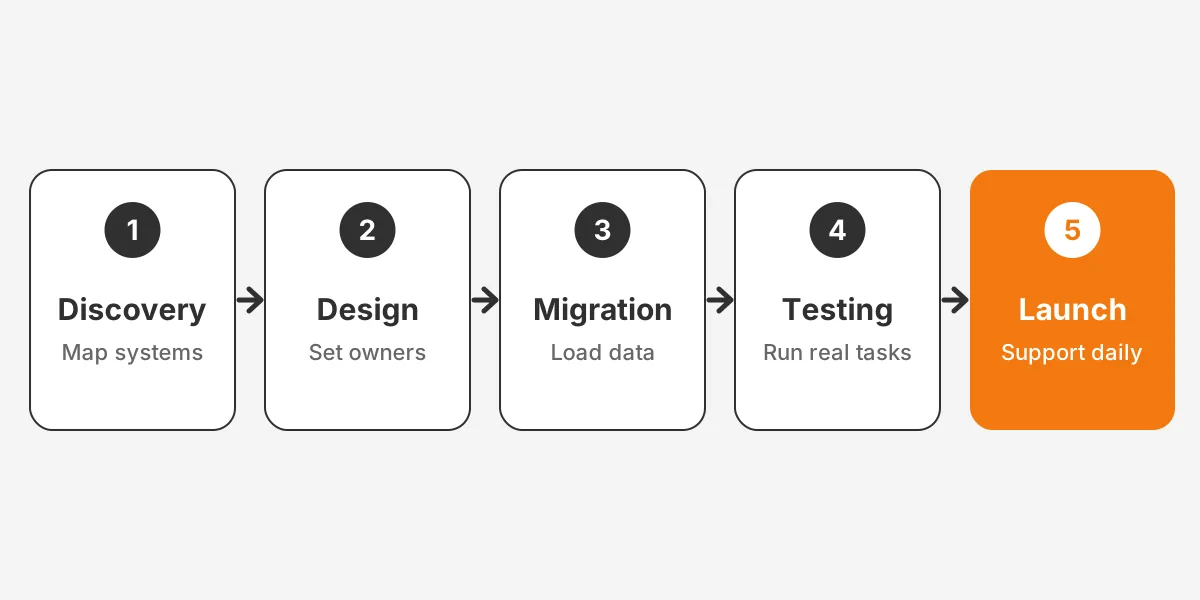
A wealth management crm implementation runs in five phases: discovery, design, data migration, testing and launch. Each phase ends with a sign-off, so problems surface before client data moves. Smaller firms finish faster, but they should skip no phase.
- Discovery: list every system, report and workflow that touches a client today.
- Design: map households, accounts and fields, and assign an owner to each data set.
- Data migration: clean duplicates, then load contacts, households, accounts and history in that order.
- Testing: run real service tasks with advisers and operations staff in a sandbox.
- Launch: switch over on a quiet week, then support users daily for the first month.
Data migration for advisors needs the most care. Old CRMs hold years of notes, tasks and attachments. Decide what moves in full, what moves as a summary and what stays in a read-only archive. Notes tied to advice are records, so they must stay retrievable.
Keep the old system read-only after cut-over rather than switching it off. Advisers will need to check an old note or attachment during the first weeks. A read-only copy answers that without reopening data entry in two places.
Training should follow roles, not features. Advisers need the review screen and the meeting note. Operations staff need tasks, account opening and exceptions. Compliance needs reports and exports. Ownership after launch is covered in the article on the internal IT support a fund CRM needs.
Adoption is the real test of a wealth management crm implementation. Track logins, notes logged per meeting and open tasks past due each week. If advisers keep notes elsewhere, fix the screen they use most before adding new features.
Firms that want help can start from the CRM for finance services page. It covers implementation, migration and integration for wealth management firms, banks, credit unions and RIAs.
Frequently Asked Questions
How much does a wealth management CRM cost?
A wealth management CRM costs a monthly licence per user plus one-time setup work. Adviser-built tools usually cost less to start. Salesforce Financial Services Cloud costs more but supports complex firms. Budget separately for data migration, custodian integrations, training and ongoing administration, which often exceed the first-year licence fees.
Does a CRM need to be SEC compliant?
No CRM is SEC compliant on its own, because compliance depends on how the firm uses it. The firm must keep required books and records, protect client data under Regulation S-P and oversee the vendor. The CRM should support retention, access logs, exports and archive links for examiners.
Can a small RIA use a general CRM?
A small RIA can use a general CRM, but it will rebuild features that adviser tools include. Households, account types, beneficiaries and review workflows need custom setup. Custodian and portfolio integrations may be missing. Most small firms save time with an adviser-built CRM unless marketing is their main need.
How long does a wealth management CRM migration take?
A wealth management CRM migration usually takes weeks for a small team and months for a multi-office firm. The timeline depends on data quality, the number of integrations and how much history moves. Cleaning duplicate contacts and households before the load shortens testing and reduces errors at launch.
Who should own the CRM inside an advisory firm?
An operations leader should own the CRM, with an administrator handling changes. Advisers define what the review screen must show. Compliance approves retention, access and export settings. Without a named owner, fields multiply and data quality falls. Advisers then drift back to spreadsheets within the first year.
Is Your Wealth Management CRM Ready to Scale?
A wealth management crm earns its cost when households, accounts, advice and compliance records share one trusted place. A sensible first step is a one-page map of every system that touches a client. Give each data set an owner. That map decides the platform, the integrations and the migration order.
Unboxx helps wealth management firms plan, implement and integrate Salesforce, HubSpot and Odoo platforms. Does your current system no longer match how you serve households? Then schedule a consultation with the Unboxx team to review your data and options.
Let's create something out of this world together.
Have a project in mind? Contact us for expert design and development solutions. Let's discuss how we can help grow your business.
Ready to Unboxx Your Potential?
Build smarter systems. Automate faster. Scale confidently.