
A sales leader signs the Agentforce order in March and expects agents working leads by April. By June, the agent still sits in a sandbox, waiting on data fixes. The question behind that delay is simple: how long does it take to deploy Agentforce for a sales team?
The short answer is one day to five months. A small business can deploy Agentforce Coworker on day one.
For a mid-size team, Unboxx plans 3 to 6 weeks to deploy Agentforce SDR or Sales Coach properly. An analyst study by Valoir (2025) puts the average full project at 4.8 months.
Key Takeaways
- Switching on the agent takes minutes, but data, email and testing work set the real Agentforce deployment time.
- Unboxx plans 3 to 6 weeks to deploy Agentforce for one sales agent on clean data.
- A pilot with 10 to 20 leads per rep catches problems before the agent reaches every buyer.
How Long Does It Take to Deploy Agentforce?
It takes between one day and five months to deploy Agentforce. Team size, data quality and the number of agents set the pace. The switch itself is fast. The preparation around it is what fills the calendar.
Salesforce's own engineers say the range has narrowed. Writing in a Salesforce Engineering post (2025), its Forward Deployed Engineering lead describes the change.
Customers working with that team cut deployment timelines from six months to a matter of weeks. One customer spent three to four months unsure the agent worked. Results improved within three to four weeks of engineering support.
The Valoir study measured each phase of an Agentforce implementation. Its averages for an Agentforce project were 1.0 month for model setup and 1.0 month for prompt work. Data integration took 0.3 months, and tuning took 1.6 months. The same work done as a do-it-yourself build averaged 75.5 months.
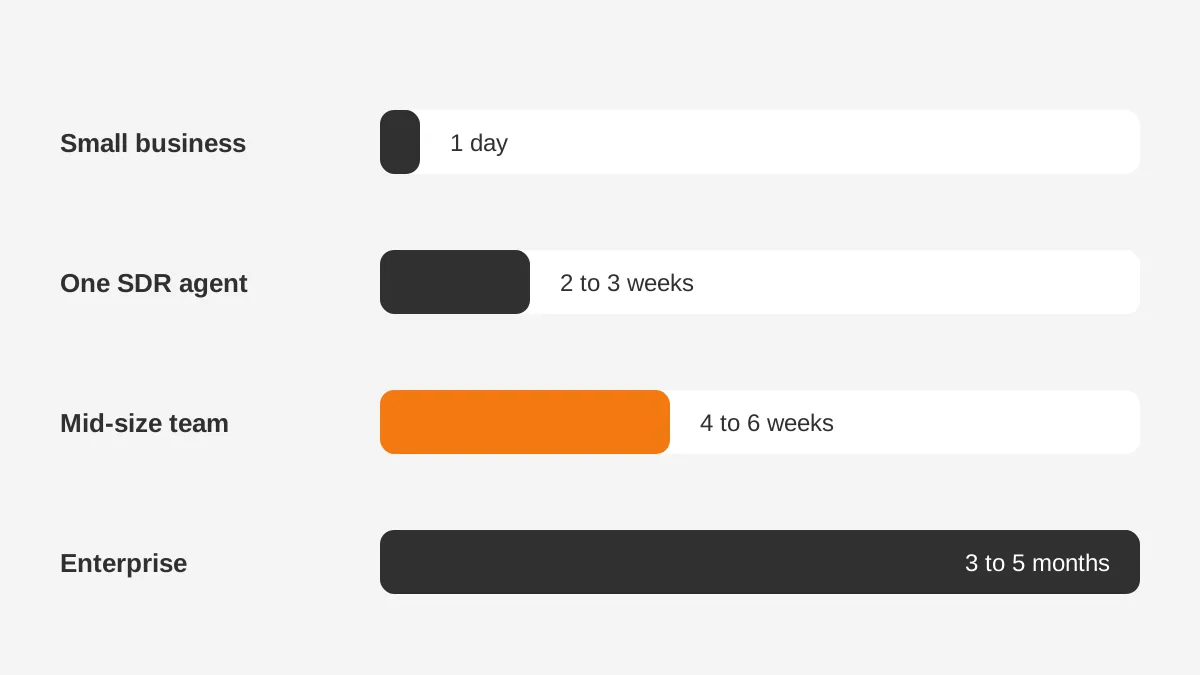
Those averages describe whole programs, often service agents with large knowledge bases. A sales agent from scratch is usually smaller in scope. The planning ranges below are Unboxx estimates drawn from the sources in this article, not Salesforce figures:
- Small business on Starter Suite or Pro Suite using Agentforce Coworker: 1 day.
- Sales team turning on one SDR agent in a clean org: 2 to 3 weeks.
- Mid-size team with SDR, Sales Coach and custom actions: 4 to 6 weeks.
- Agentforce timeline for enterprise programs with three or more agents and data projects: 3 to 5 months.
The rest of this guide explains what drives each range. It also shows how to plan a functioning Agentforce sales agent without surprises.
Vendor case studies need the same reading. Most describe service agents on Sales Cloud or Service Cloud data, answering thousands of support questions. Teams that deploy Agentforce for sales usually start with one agent and one lead source.
The Agentforce deployment timeline also depends on who does the work. An admin at half time moves slower than a dedicated project team. So the useful question is how long does Agentforce implementation take with your staffing, not an average customer's.
What Has to Be Ready Before You Deploy Agentforce?
Before you deploy Agentforce for sales, the org needs the right licenses, features, permissions and a dedicated email address. Missing any one of them stops activation. The Agentforce prerequisites are listed in the Agentforce for Sales Development Implementation Guide (Salesforce, 2025).
That guide says every condition must be met before the sales development agent can be activated. Its required features are:
- Einstein Generative AI, sold through the Einstein for Sales SKU.
- Einstein Activity Capture, so the agent can read and log email activity.
- Sales Engagement, with one license included in the Agentforce SKU.
- Automated Actions and Salesforce Inbox for sending and tracking messages.
- Data Cloud, enabled in the sandbox, to ground answers in company content.
The agentforce data cloud requirement surprises some buyers. Data Cloud is what lets the agent retrieve product sheets, pricing notes and FAQs at runtime. Without it, the agent writes from lead fields alone.
Permission sets come next. The agent user gets the Agentforce SDR Agent permission set. Admins and sales managers need Configure Agentforce SDR Agent and Data Cloud User. Reps who work alongside the agent need Use Agentforce SDR Agent and Inbox access.
The last item is an email address on the company domain, used only by the agent. Salesforce asks for it before setup starts. In larger companies, IT approval for a new mailbox can take longer than the agent setup itself.
A short agentforce readiness checklist covers all of this:
- Licenses confirmed for every feature above.
- Data Cloud enabled in a sandbox and in production.
- Agent mailbox created and approved.
- Lead and contact data checked for duplicates and missing owners.
- One named owner for the agent's behavior.
Confirming these five items first removes the most common reasons a build stops halfway. Teams that check them can deploy Agentforce on the date they planned.
How Long Does Agentforce SDR Setup Take?
The configuration screens for Agentforce SDR take under an hour in a prepared org. Salesforce's guide times its four setup stages in minutes. The ranges are 8 to 10, 5 to 7, 3 to 5 and 15 to 20 minutes.
The guide adds that setup time varies with the degree of customization. A team that wants to deploy Agentforce with custom topics should plan for more than the screen time.
That agentforce sdr setup time covers four stages:
- Enable: turn on Agentforce for Sales in Salesforce Go and confirm.
- Create and configure: build the agent user and connect its mailbox.
- Test and preview: send sample leads through the agent.
- Runtime and monitoring: watch the first live conversations.
Salesforce's Trailhead project confirms that Agentforce for Sales currently includes two agents: Sales Coach and the SDR Agent. The SDR handles inbound lead nurturing. Sales Coach runs role-play practice for reps before real calls.
Teams still report weeks, because three tasks sit outside the setup screens.
The first is content. The agent answers from the files and knowledge it is given. Writing approved answers on pricing, product fit and objections takes days, not minutes.
The second is email warm-up. A new mailbox that sends hundreds of messages on day one can land in spam. SaaStr (2026) reports that AI SDR warm-up takes 2 to 3 weeks and calls two weeks the floor.
The third is engagement rules. Someone must set the number of emails, their timing and the point of handoff to a rep. Those choices need sales leadership sign-off.
Plan two weeks for these tasks even when the setup screens take one afternoon.
What Are the Agentforce Deployment Steps for Sales?
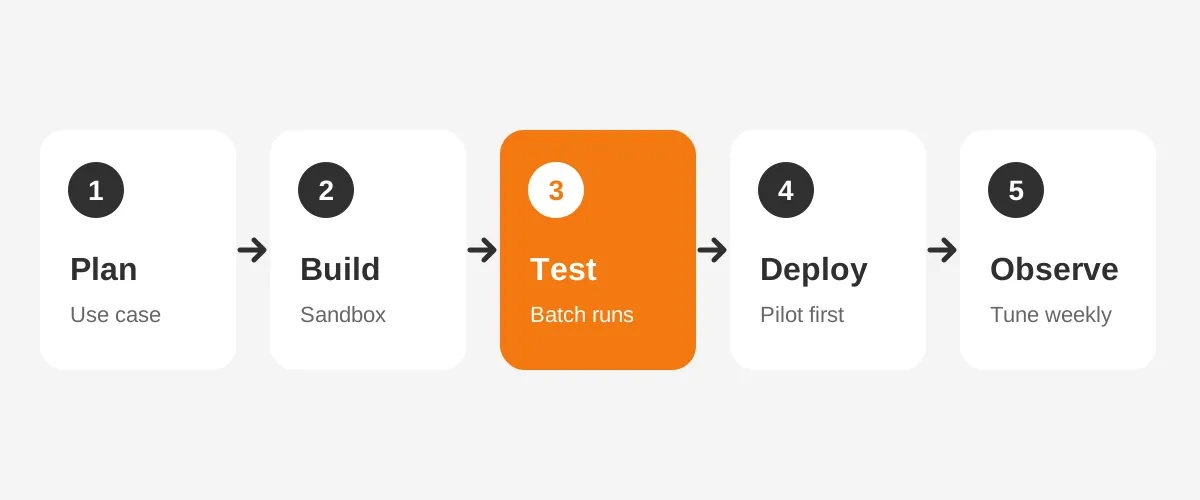
The Agentforce deployment steps follow one cycle: plan, build, test, deploy and observe. Salesforce's Trailhead guidance uses that same five-part lifecycle for agents. Each step has a clear output before the next one starts.
- Plan the use case. Pick one job, such as nurturing inbound leads under 50 employees. Write down what the agent may and may not say.
- Prepare the data. Clean lead records, fix ownership rules and load approved content into Data Cloud.
- Set up Agentforce in a sandbox. Turn on the features, create the agent user and assign permission sets.
- Configure the agent. Set engagement rules and entity assignments for leads, contacts and person accounts.
- Add topics and actions in Agentforce Builder. Topics define what the agent handles, and actions define what it can do.
- Test with Agentforce Testing Center. Run batches of sample conversations and score the answers.
- Launch an Agentforce agent to a pilot group. Start with one region or one lead source.
- Observe and tune. Review transcripts weekly and adjust instructions and guardrails.
Building an Agentforce sales agent from scratch adds work at step 5. Prebuilt SDR templates cover inbound nurturing, so custom topics are only needed for unusual sales motions. The Atlas Reasoning Engine then chooses which topic and action fit each message.
Step 6 deserves extra time. The Salesforce customer story on its own sales deployment says every new topic or skill needs regression testing. Without it, one topic can start answering questions meant for another.
Step 7 is where the agentforce pilot proves its value. A pilot of 10 to 20 leads per rep for two weeks shows whether tone, timing and handoffs work. That figure is an Unboxx planning rule, not a Salesforce requirement.
The Agentforce implementation guide covers each build step in more detail. This article stays on timing.
A team that follows these eight steps can name a realistic go-live date before it writes a single instruction.
How Fast Can a Small Business Deploy Agentforce?
A small business can deploy Agentforce in one day when it uses the assistant built into its suite. It is the fastest way to deploy Agentforce for a small business, because nothing custom gets built.
Salesforce says Agentforce Coworker is included in Starter and Pro Suites and ready on day one.
The Salesforce small business page (2026) lists Starter Suite from $25 per user per month. Pro Suite starts at $100 per user per month. The page says a digital teammate can be switched on quickly, without a long implementation project.
That speed applies to the assistant. It drafts emails, summarizes records and answers questions about the CRM. It does not run outbound sequences on its own. For small firms that deploy Agentforce this way, Unboxx suggests one hour of prompt training per rep.
A small business that wants an autonomous sales development agent faces the same tasks as a larger team. The mailbox still needs warm-up. The content still needs writing. The difference is scale: fewer records, fewer approvals and one decision maker.
For most firms on the salesforce starter suite, a sensible plan looks like this:
- Day 1: turn on Agentforce Coworker and train the team on prompts.
- Week 1: clean the top 500 lead records and write approved answers.
- Weeks 2 to 3: warm up the agent mailbox and test sample leads.
- Week 4: go live with one lead source.
This plan is an Unboxx example, not a Salesforce schedule. It shows that a small team can deploy Agentforce for sales in about a month. Teams with fewer than 10 reps rarely need a separate project manager.
What Slows an Agentforce Deployment Down?
Data quality slows an Agentforce deployment more than any other factor. An agent reads the same records reps read. If those records are wrong, the agent repeats the errors at scale.
The Salesforce story on its internal sales rollout makes the point directly. A senior IT architecture director there said an agent is only as smart as the data it can access. That is why crm data quality work often takes longer than configuration.
| Factor | Faster deployment | Slower deployment |
|---|---|---|
| Lead data | Deduplicated, owners assigned | Duplicates and blank owners |
| Content | Approved answers ready | Answers written during build |
| Agent mailbox warmed up | New domain on launch day | |
| Scope | One agent, one use case | Two or more agents at once |
| Licenses | All features confirmed | Gaps found during setup |
| Ownership | One named agent owner | Shared between teams |
| Testing | Batch tests in Testing Center | Manual spot checks |
Scope is the second factor. Teams that try SDR, Sales Coach and custom actions together multiply the testing load. Each topic must be tested against every other topic.
Approvals are the third factor. Legal, security and brand teams may each want to review agent messages. In a regulated industry such as financial services, book those reviews into the plan from week one.
The fourth factor is change management. Reps need to know when the agent hands over a lead and what it already said. Valoir notes that change management remains an issue even when the technology is fast.
Teams can estimate their own Agentforce implementation timeline by scoring each row of the table. As a planning rule, Unboxx adds about one week for every row in the slower column.
How Do Teams Deploy Agentforce Faster?
Teams deploy Agentforce faster by narrowing scope, fixing data first and testing in batches. Most of this work happens outside the setup screens, and each step removes a reason to wait.
Speed also comes from fewer handoffs between teams. When one owner can approve content, rules and pilot scope, teams deploy Agentforce without waiting on weekly steering meetings.
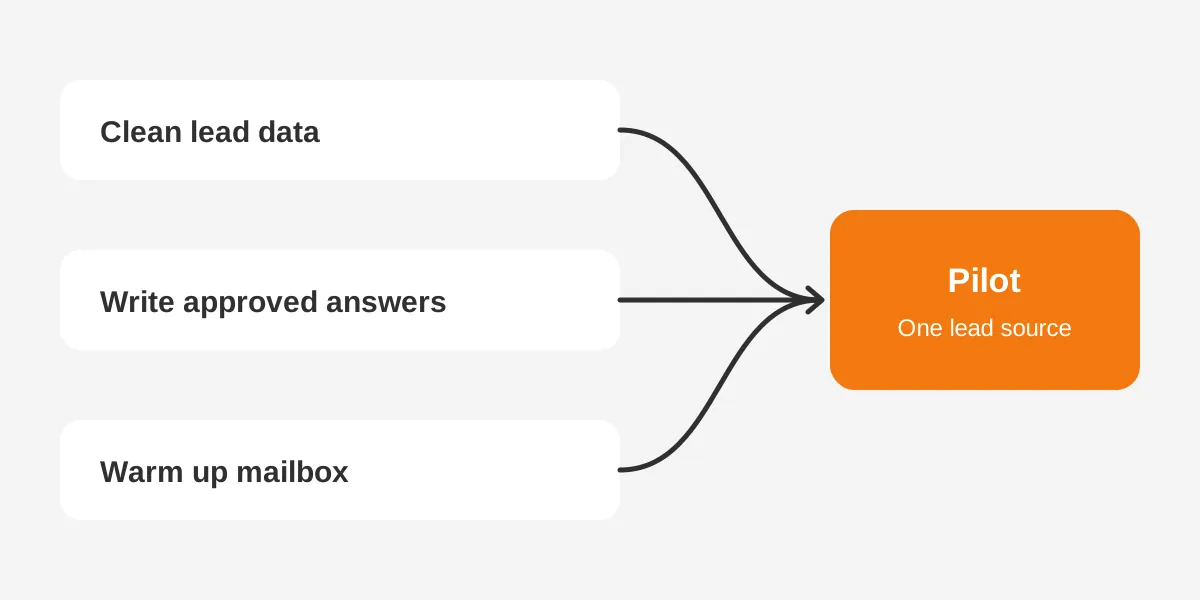
Start with one use case and one lead source. An agent that nurtures website demo requests is easier to test than one that handles every inbound channel. A narrow first release also gives the sales team a quick result to judge.
Fix data before build, not during it. Run a deduplication pass, assign owners to every open lead and remove test records. The CRM data cleansing runbook gives the steps by platform.
Write the approved answers early. A shared document with 20 to 30 common questions, each with an approved answer, covers most first conversations. Product marketing can draft it while admins set up the org.
Start the email warm-up in week one. Because warm-up takes two to three weeks, it should run in parallel with configuration. Waiting until the agent is ready adds that time to the end.
Use Testing Center for batch tests. Salesforce's implementation guide includes batch testing with Testing Center as a final setup step. Batch tests catch answer drift that a handful of manual chats will miss.
Finally, consider an experienced agentforce partner for the first agent. One Valoir customer bought Agentforce in fall 2024. A partner delivered it by January 2025. Another took about three months with two Salesforce staff.
Who Should Own the Agentforce Rollout?
One named person should own the Agentforce rollout, usually a sales operations lead with a Salesforce admin beside them. When two teams share the role, every approval waits for both.
The question of who should own agentforce deployment has a practical answer. The owner decides what the agent may say, approves engagement rules and reviews transcripts. The admin handles permission sets, the agent user and Agentforce Builder.
Three other roles join for short periods:
- A marketing writer drafts approved answers and email templates.
- An IT contact creates the agent mailbox and confirms domain settings.
- A sales manager runs the pilot and collects rep feedback.
A guide to Agentforce for Sales explains what each agent does for reps day to day. That context helps the owner set fair goals for the pilot.
Clear ownership also decides how quickly teams deploy Agentforce to a second use case. The owner already knows the rules, the content and the pilot results.
Teams with no admin capacity can bring in outside help for setup and keep ownership in sales operations. The owner role should stay inside the company, because it decides how the brand speaks to buyers.
What Does a Six-Week Agentforce Plan Look Like?
A six-week plan gives a mid-size sales team time to deploy Agentforce SDR with one use case and a pilot. The schedule below is a worked example from Unboxx planning, with assumed durations.
| Week | Main work | Output |
|---|---|---|
| 1 | Confirm licenses, request mailbox, start warm-up | Readiness checklist signed |
| 2 | Clean lead data, draft approved answers | Clean data and content library |
| 3 | Set up Agentforce in sandbox, configure rules | Agent built in sandbox |
| 4 | Batch testing and fixes | Test scores above target |
| 5 | Pilot with one lead source | Pilot results and rep feedback |
| 6 | Tune and widen to all inbound leads | Agentforce go-live |
Teams that deploy Agentforce on this schedule should hold a 30-minute review at the end of each week. The review checks the output column, not activity. A week that misses its output is the moment to reset the go-live date, before later weeks slip.
Weeks 1 and 2 carry the most risk. If the mailbox or data work slips, every later week moves with it.
The plan assumes Data Cloud is already licensed. If it is not, add one to two weeks for contracting and setup. It also assumes one admin at half time and one sales operations owner.
This agentforce rollout plan treats Sales Coach as a second phase. Teams add it after the SDR agent is stable, often in week 8 or 9. Reviewing Agentforce cost and pricing models before week 1 avoids budget surprises later.
Frequently Asked Questions
Does Agentforce SDR email leads right after activation?
No, there is a short delay. Salesforce's guide says the first outreach starts once a lead is assigned to the agent. Sending then waits one hour. That gap gives reps a window to step in when a lead already has an active conversation with them.
Can you test Agentforce in a sandbox before production?
Yes, and Salesforce expects it. The sales development guide asks whether Data Cloud is enabled in the sandbox before activation. Building and testing there keeps live buyers away from early mistakes. Most teams then move the finished configuration to production for the pilot stage.
How long should an Agentforce pilot run?
Two weeks is a practical minimum for an Agentforce pilot. That window covers enough leads to show reply rates, tone problems and handoff gaps. Unboxx suggests 10 to 20 leads per rep. Longer pilots help when the sales cycle has four or more touches before a meeting is booked.
Can a team deploy Agentforce without a Salesforce partner?
Yes, a team with a skilled admin can do the setup alone. The screens are guided and the configuration is short. Partners help most with data cleanup, content design and testing. Those three areas cause most of the delays described earlier, so they are where outside help saves time.
Which Salesforce editions support Agentforce for Sales?
Agentforce for Sales features depend on edition and add-on licenses, so confirm them with your account executive. Small business suites include Agentforce Coworker. The SDR agent needs Einstein Generative AI, Sales Engagement and Data Cloud. A license check in week one prevents the most common setup delay.
How Can Unboxx Help You Deploy Agentforce?
Unboxx helps sales teams deploy Agentforce with clean data, approved content and a tested pilot. The work follows a six-week plan like the one above. Our AI-native CRM services cover readiness checks, Agentforce Builder setup, Testing Center batches and rep training.
If you plan to deploy Agentforce this quarter, start with a readiness review. Our enterprise AI agents success story shows secure agents in practice. Schedule a consultation to get a dated plan for your team.
Let's create something out of this world together.
Have a project in mind? Contact us for expert design and development solutions. Let's discuss how we can help grow your business.
Ready to Unboxx Your Potential?
Build smarter systems. Automate faster. Scale confidently.