
A sales team signs for HubSpot Sales Hub Professional, then finds a second line on the quote. HubSpot charges a required, one-time onboarding fee of $1,500 on that tier. On Marketing Hub Enterprise the fee is $7,000 (HubSpot Marketing Hub pricing, 2026).
The HubSpot onboarding cost is the one-time spend to configure a paid hub, load data and get people using it. HubSpot's fee of $1,500 to $7,000 per hub is the visible part.
The rest is partner work, data migration and staff time that the fee leaves out. Below are HubSpot's current fees, then the costs around them.
Key Takeaways
- HubSpot lists a required onboarding fee of $1,500 to $7,000 per hub on Professional and Enterprise tiers.
- Data migration, integrations and internal staff hours often cost more than the fee itself.
- A written scope and a year-one budget keep the full HubSpot onboarding cost predictable.
What Is the HubSpot Onboarding Cost in 2026?
The HubSpot onboarding cost in 2026 starts with a fixed fee per hub and tier. HubSpot prints it as a footnote under each paid plan. The footnote says the plan price "does not include the required, one-time" onboarding fee.
These are the figures HubSpot lists on its own pricing pages in November 2026. The Sales Hub pricing page and the Service Hub pricing page show the same two amounts.
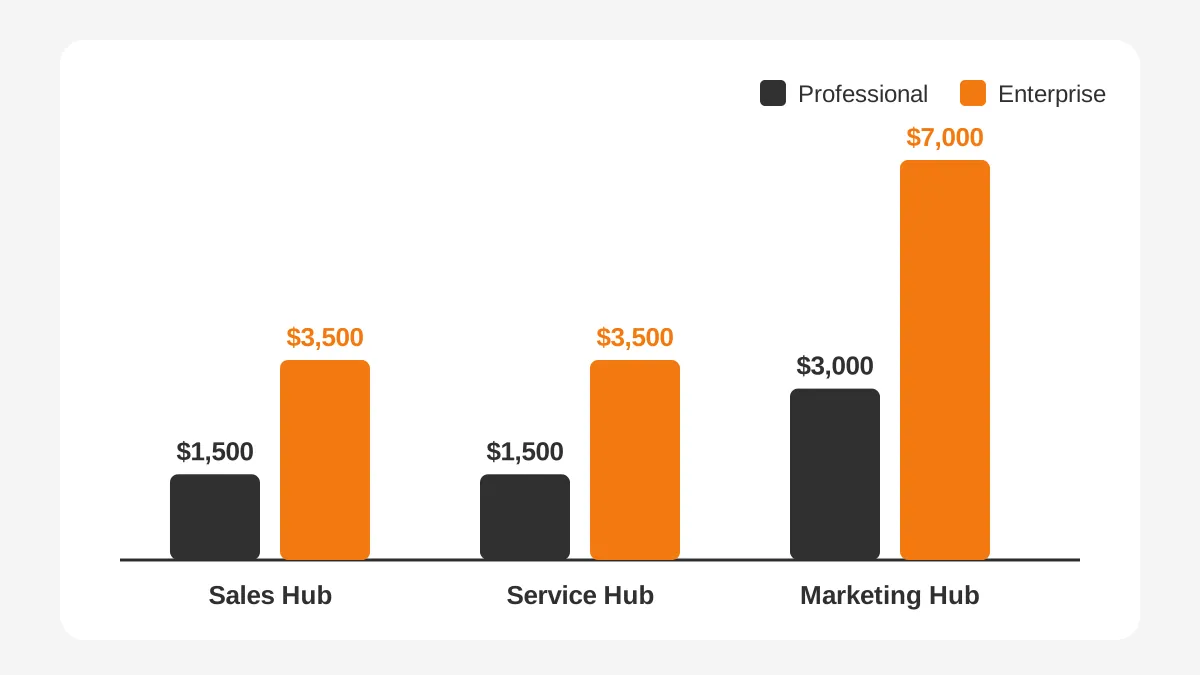
| Hub | Professional onboarding fee | Enterprise onboarding fee | Listed plan price |
|---|---|---|---|
| Sales Hub | $1,500 | $3,500 | Pro from $90 to $100 per seat a month; Enterprise from $150 per seat |
| Service Hub | $1,500 | $3,500 | Pro from $90 to $100 per seat a month; Enterprise from $150 per seat |
| Marketing Hub | $3,000 | $7,000 | Pro from $800 to $890 a month with 3 Core Seats; Enterprise from $3,600 a month with 5 Core Seats |
The HubSpot onboarding fee is charged once per hub, not per seat. A company that buys Sales Hub Professional and Marketing Hub Professional pays two fees, $1,500 plus $3,000. The seat count does not change those amounts.
Older blog posts quote lower numbers, such as $1,000 for Sales Hub. Those figures come from earlier price lists. Check the footnote on the live pricing page before you set a budget. The quote line item is the final word.
The HubSpot onboarding pricing is also separate from the license cost. Marketing Hub Professional, for example, lists 2,000 marketing contacts and 3,000 HubSpot Credits. Adding contacts, core seats or credits raises the subscription, not the one-time onboarding fee.
Which Hubs and Tiers Require Paid Onboarding?
Paid onboarding is required on the Professional and Enterprise tiers of Sales Hub, Service Hub and Marketing Hub. The footnote on each of those plan cards calls the fee "required". You cannot buy HubSpot Professional pricing without it unless the contract says otherwise.
The HubSpot Starter cards on the same pages carry no onboarding footnote. Starter plans list from $7 to $20 per seat a month. A small team can therefore start on HubSpot Starter with no listed one-time onboarding fee.
That gap shapes the first decision. Here is how the tiers line up:
- Starter: no listed onboarding fee, light setup, suited to small teams with simple pipelines.
- Professional: one-time onboarding fee of $1,500 to $3,000 per hub, plus workflow automation and custom reporting.
- Enterprise: one-time onboarding fee of $3,500 to $7,000 per hub, plus team routing and multi-brand permissions.
What changes between Professional and Enterprise?
Enterprise more than doubles the fee because the setup is larger. On Sales Hub, Enterprise onboarding adds routing and the management of separate teams. On Marketing Hub, Enterprise adds permissions, team setup and multi-brand management.
The plans also differ in what they include. Marketing Hub Professional includes 3 core seats and 2,000 marketing contacts. Enterprise includes 5 core seats and 10,000 marketing contacts. Extra core seats start at $45 a month on Professional and $75 on Enterprise.
More teams, brands and permissions mean more configuration to plan and test. That is why the HubSpot onboarding cost climbs with the tier. For hubs outside these three, such as Content Hub or Data Hub, check the quote line by line.
The rule matters during an upgrade too. A team that moves from Starter to Professional may meet the fee at that point. Ask the account executive whether the upgrade triggers the one-time onboarding fee before you sign.
What Does HubSpot's Onboarding Fee Include?
The HubSpot onboarding fee buys guided setup from HubSpot's own onboarding team. It covers configuration and coaching for the hub you bought. It does not include unlimited build work or data clean-up.
HubSpot lists the scope on its Sales Hub onboarding page. For HubSpot Sales Hub onboarding at Professional and Enterprise, the list includes:
- Productivity tools and an overview of your sales process in HubSpot.
- Customization of the CRM for your processes.
- Baseline reporting setup, then custom report setup and review.
- Onboarding your team, with invites, permissions and resources.
- Standard sales automation setup.
- Turning on standard integrations from the App Marketplace.
- Consulting on how to migrate or import data from your CRM.
HubSpot Marketing Hub onboarding is built the same way. Its scope covers lead capture, segmentation, email marketing, lead nurturing and campaign reporting.
The same page links a sample Sales Hub Professional onboarding plan. Read it before the kickoff call, so your team knows which decisions it must bring.
Read item seven closely. HubSpot provides consulting on data migration, not the migration itself. Your team, or a partner, still exports, cleans, maps and imports the records. The same applies to integrations beyond the standard App Marketplace connectors.
HubSpot Service Hub onboarding uses the same fee structure, $1,500 on Professional and $3,500 on Enterprise. Whichever hub you buy, HubSpot coaches and your side builds.
How Does Partner Onboarding Pricing Compare?
A HubSpot Solutions Partner can deliver onboarding instead of, or on top of, HubSpot's own service. Partner prices vary more than HubSpot's fixed fees. They depend on scope, hub count and how much build work the partner does.
One published example shows the spread. RevPartners lists a flat $999 per hub for a do-it-yourself package. Its Guided Sales Hub Professional onboarding starts at $1,500 (RevPartners, updated 2025). It also says combining hubs can save up to 30%.
Hub-by-hub figures like these cover a defined setup. Multi-hub projects with migration and integrations are usually quoted per project. The table below compares the three main routes.
| Route | Who does the work | Price model | Best fit |
|---|---|---|---|
| HubSpot direct onboarding | HubSpot coaches, your team builds | Fixed fee per hub and tier | One hub, clean data, an internal admin |
| HubSpot partner onboarding | Partner configures and trains | Package or project quote | Two or more hubs, migration, custom workflows |
| Self-guided setup | Your team alone | Internal hours only | Starter tier, simple pipeline |
Compare quotes on scope, not on the headline price. A low HubSpot onboarding package may exclude data migration, integration testing or user training. A higher quote may include all three and save money later.
Fixed price or hourly billing?
Partners quote in two ways. A fixed price covers a written scope, and changes go through a change request. Hourly billing, or a block of hours, flexes with the work but can drift.
A fixed price suits a defined setup with clean data. A capped block of hours suits a migration with unknown data quality. Either way, the HubSpot onboarding cost stays visible when the quote lists hours by task.
Ask every HubSpot implementation partner for the same four items. Ask for a named scope, a fixed price or capped hours, a timeline in weeks, and a list of exclusions. Those four answers make two quotes comparable.
What Hidden Costs Sit Outside the Onboarding Fee?
The largest hidden costs sit outside the fee: data migration, integrations, internal hours and training. Each one adds to the real HubSpot onboarding cost even though none appears on HubSpot's price page.
Data migration is usually first. Records from Salesforce, Zoho CRM or Pipedrive need export, de-duplication, field mapping and test imports. Our Zoho to HubSpot migration guide shows how much mapping a single move involves. The HubSpot data migration cost rises with record count, custom objects and attachments.
What drives the HubSpot data migration cost?
Six factors set the size of a migration quote:
- Record count across contacts, companies, deals and tickets.
- Custom objects and custom fields that need new properties in HubSpot.
- Email history, notes, calls and attachments tied to each record.
- Duplicate and stale records that need de-duplication first.
- Field mapping between the old picklists and HubSpot's properties.
- Test imports and the sign-off rounds before the final load.
A contacts-only move from a spreadsheet is small. A move from Salesforce with custom objects and five years of activity history is not. That difference alone can change the HubSpot onboarding cost more than the hub or tier you choose.
Integrations come second. HubSpot's onboarding scope covers turning on standard App Marketplace connectors. An ERP link, a billing sync or a custom API build sits outside it. The HubSpot integration cost depends on the number of systems that share data and in which direction.
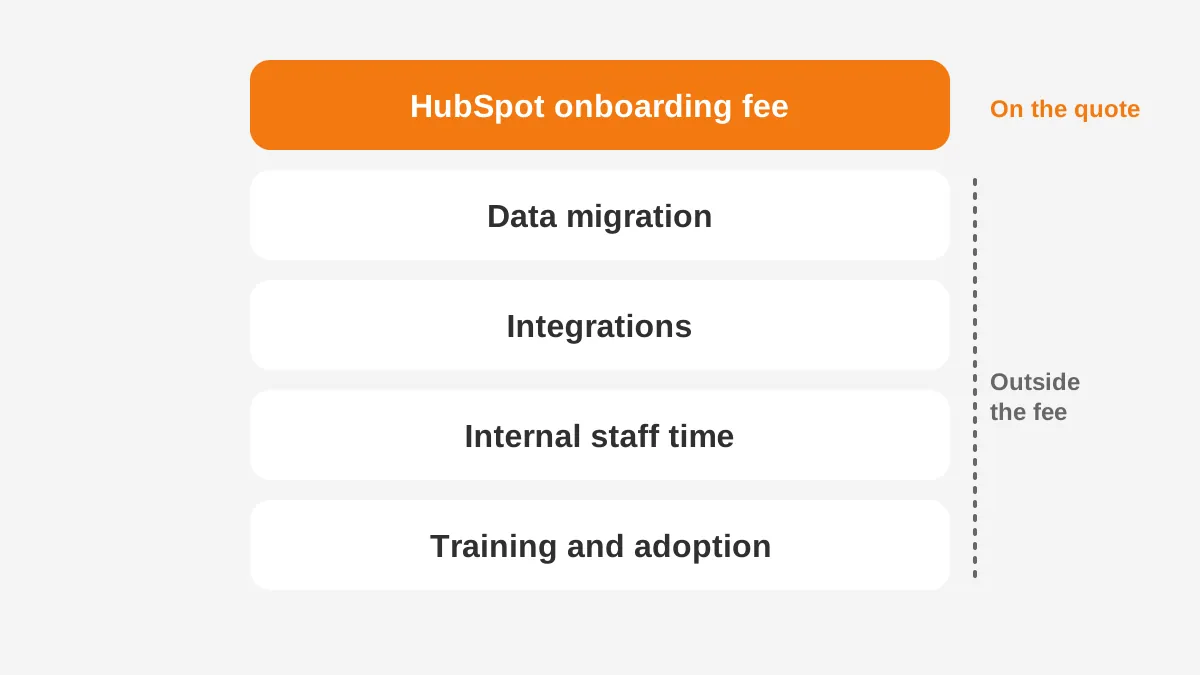
Internal time is the cost teams forget. An internal project lead must define stages, approve fields and test workflows. Sales managers must review the pipeline setup and the lead scoring rules. Every hour they spend has a salary cost, even if no invoice arrives.
Who spends internal hours during onboarding?
- The internal project lead runs calls, chases decisions and owns the timeline.
- Sales managers define deal stages, exit criteria and lead scoring rules.
- The marketing lead sets up forms, lists, email templates and lead nurturing.
- The CRM admin builds properties, permissions and workflow automation.
- Finance or IT approves integrations and checks data before go-live.
Track these hours from week one. Budgets leave this line out more than any other, yet it belongs in the HubSpot onboarding cost.
Training and user adoption close the list. A CRM that reps avoid delivers no return on the fee. Budget for role-based training, short refresher sessions and change management in the first 90 days.
Two smaller items also appear. The first is overlap, where the old CRM license runs alongside HubSpot during cut-over. The second is clean-up, where duplicate or stale records need fixing before import.
How Do You Budget the Full HubSpot Onboarding Cost?
Budget the full HubSpot onboarding cost as a sum of six lines for year one. Add the listed fee, partner work, migration, integrations, internal hours and training. A simple worksheet keeps each line visible.
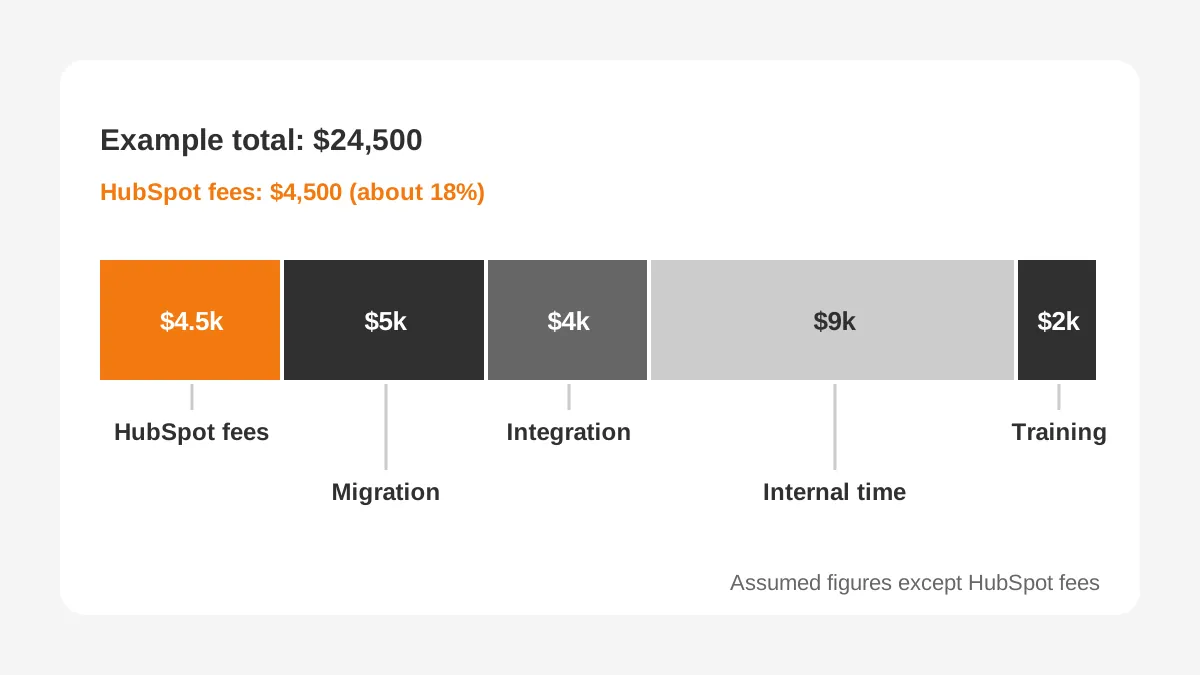
The example below is an illustration with assumed figures. Only the two onboarding fees come from HubSpot's pricing pages. Every other number is an assumption for a 10-person B2B sales team buying Sales Hub Professional and Marketing Hub Professional.
| Budget line | Example amount | Source |
|---|---|---|
| Sales Hub Professional onboarding fee | $1,500 | HubSpot pricing page |
| Marketing Hub Professional onboarding fee | $3,000 | HubSpot pricing page |
| Data migration from the old CRM | $5,000 | Assumed for this example |
| One ERP or billing integration | $4,000 | Assumed for this example |
| Internal time, 150 hours at $60 an hour | $9,000 | Assumed for this example |
| User training and adoption support | $2,000 | Assumed for this example |
| Total one-time onboarding spend | $24,500 | Sum of the lines above |
In this example, the two HubSpot fees make up $4,500 of $24,500. That is about 18% of the one-time spend. The other 82% comes from work the fees do not cover.
The subscription sits on top of these one-time lines. Marketing Hub Professional alone lists from $800 to $890 a month. That is $9,600 to $10,680 a year before any Sales Hub seats.
Your own numbers will differ. Replace each assumption with a quote or an internal estimate. Then add the subscription for year one, so the CRM budget shows one-time and recurring spend side by side.
Our guide to CRM implementation cost lists the budget drivers for any platform. The HubSpot implementation cost follows the same drivers, with HubSpot's fee added on top.
Can You Reduce the HubSpot Onboarding Cost?
You can reduce the HubSpot onboarding cost by cutting scope, preparing data early and buying hubs together. The fee itself is listed as required, so most savings come from the work around it.
Can you waive HubSpot onboarding? Some partners say they can deliver onboarding in place of HubSpot's own service. Treat that as a contract question. Ask HubSpot and the partner to confirm in writing which onboarding line appears on your order form.
These steps lower spend without lowering quality:
- Clean the data before onboarding starts, so paid hours go to setup.
- Write the sales process down: stages, exit criteria and owners.
- Start with standard properties and add custom fields only when a report needs them.
- Buy related hubs in one order, where package pricing applies.
- Name one internal project lead with time set aside each week.
Each of these shortens the HubSpot onboarding process. A coach or partner then spends fewer paid hours on questions your team could answer before the first call.
Phasing helps as well. Launch the core sales pipeline first and add marketing automation once reps use the CRM daily. That spreads the HubSpot onboarding cost across two budgets.
How Do You Choose Direct or Partner Onboarding?
Choose HubSpot direct onboarding when you buy one hub, have clean data and have an admin. Choose a partner when the project includes migration, integrations or two or more hubs. That rule covers most mid-sized B2B teams.
Do you need a HubSpot partner? Answer four questions first:
- Are you moving more than one object, such as contacts, companies and deals, from another CRM?
- Does HubSpot need to sync with an ERP, billing or support tool?
- Are you buying two or more hubs at Professional or Enterprise?
- Is there no internal admin with time for the project?
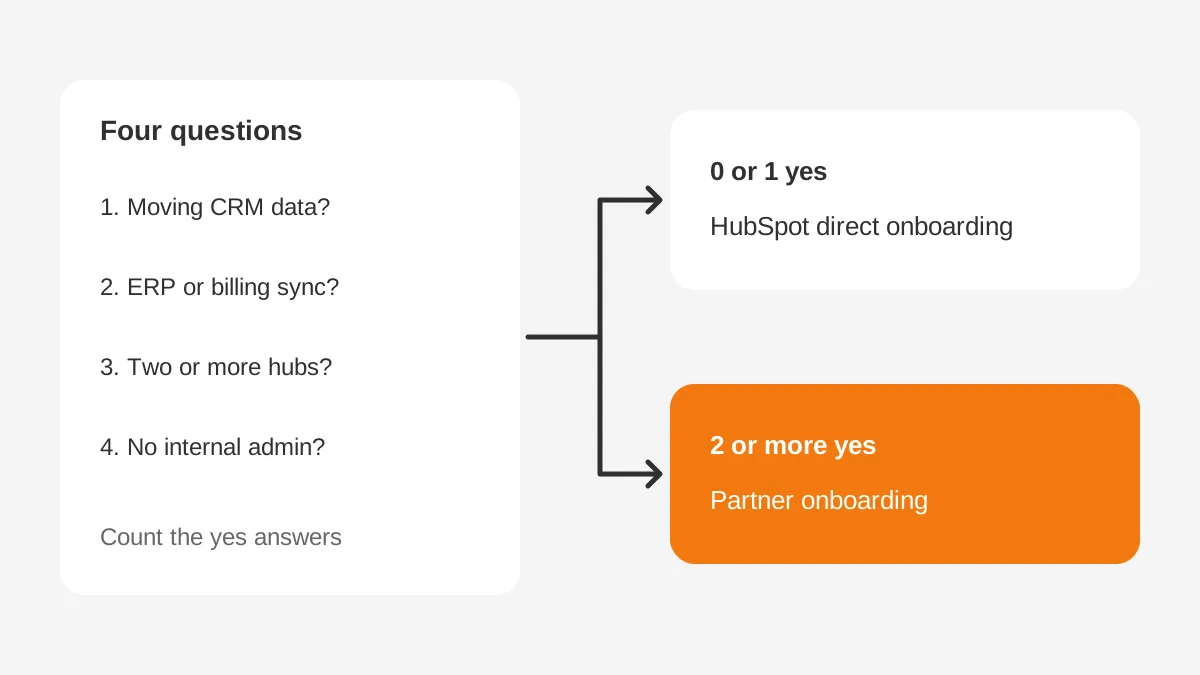
Count the yes answers, then compare that result with the HubSpot onboarding cost of each route. Direct onboarding has the lower fee but more internal hours. Partner onboarding costs more up front but moves the build work off your team.
HubSpot onboarding without a partner still works for a single hub with one or no yes answers. Plan the extra internal hours into the budget instead.
Unboxx delivers this work through its CRM consulting and implementation services. Our HubSpot implementation guide covers phases and roles in detail. The HubSpot onboarding checklist lists the tasks for each phase.
How Long Does HubSpot Onboarding Take?
HubSpot does not publish a fixed duration on its pricing or onboarding pages. The timeline depends on hub count, data volume and integrations, so ask for it in weeks on every quote.
Time also changes the HubSpot onboarding cost. A longer project runs the old CRM license for more months and holds internal staff longer. Agree the go-live date before work starts, and tie partner payments to clear milestones.
Most projects move through the same five stages, whatever their length:
- Discovery: confirm goals, users, hubs and data sources.
- Design: map the sales process, properties and permissions.
- Build: configure pipelines, workflows, reports and integrations.
- Migrate and test: run test imports, fix errors, then load the data.
- Train and launch: teach each role, go live, then review adoption.
A sound plan sets a go-live date for the core pipeline first. Marketing automation, custom reporting and advanced workflows can follow in a second phase. This keeps the first phase short and the team selling in HubSpot sooner.
What Should You Ask Before Signing a HubSpot Quote?
Ask six questions before signing, so the HubSpot onboarding cost on paper matches the project you will run. Send them to HubSpot and to any partner you are comparing.
- Which onboarding fee appears on the order form, and for which hubs?
- Does an upgrade from Starter to Professional trigger a new fee?
- Who exports, cleans and imports the data, and at what price?
- Which integrations are in scope, and who tests them?
- Which training sessions are included, and for which roles?
- What is the go-live date, and what happens if it slips?
Write the answers into one scope document. It becomes the reference for change requests, so extra work is priced before it starts.
A clear scope also protects the HubSpot onboarding cost after go-live. Requests such as a new pipeline or an extra report then move into a second phase with its own price.
Frequently Asked Questions
Is HubSpot onboarding mandatory?
Yes, on Professional and Enterprise tiers of Sales Hub, Service Hub and Marketing Hub. HubSpot's pricing pages call the one-time onboarding fee required on those plans. Starter plans carry no listed onboarding fee, so small teams can start without it and add guided setup later.
How much does HubSpot onboarding cost for Sales Hub?
The HubSpot onboarding cost for Sales Hub is $1,500 on Professional and $3,500 on Enterprise, per HubSpot's 2026 pricing page. The fee is charged once per hub, not per seat. Migration, integrations and internal time are extra and should sit in the same budget.
How much does HubSpot onboarding cost for Marketing Hub?
The HubSpot onboarding cost for Marketing Hub is $3,000 on Professional and $7,000 on Enterprise. These are the highest listed fees across the paid hubs. The scope covers lead capture, segmentation, email marketing, nurturing and campaign reporting, guided by HubSpot's onboarding team.
What is the difference between HubSpot onboarding vs implementation?
Onboarding is the guided setup HubSpot or a partner provides for a hub. Implementation is the whole project: process design, data migration, integrations, testing and training. The HubSpot onboarding fee covers part of onboarding, while implementation usually costs more and runs longer.
Does the HubSpot onboarding cost include data migration?
No. HubSpot's onboarding scope includes consulting on how to migrate or import data, not the migration work. Your team or a partner still exports, cleans, maps and imports records. Budget the HubSpot data migration cost as a separate line before onboarding starts.
How Can Unboxx Help Plan Your HubSpot Onboarding Cost?
Unboxx scopes HubSpot projects before you sign, so the HubSpot onboarding cost is known in advance. The team maps your data, integrations and hubs, then prices the work line by line. See a HubSpot CRM implementation success story for one example.
To check a quote against your data and timeline, schedule a consultation with Unboxx.
Let's create something out of this world together.
Have a project in mind? Contact us for expert design and development solutions. Let's discuss how we can help grow your business.
Ready to Unboxx Your Potential?
Build smarter systems. Automate faster. Scale confidently.