
Zoho to HubSpot Migration: Mapping, Import and Checks
A sales team switches off Zoho CRM on a Friday and opens HubSpot on Monday. The contacts are there, but half the deals sit alone, with no company and no history. Gartner (2018) found organizations blame poor data quality for an average of $15 million a year in losses.
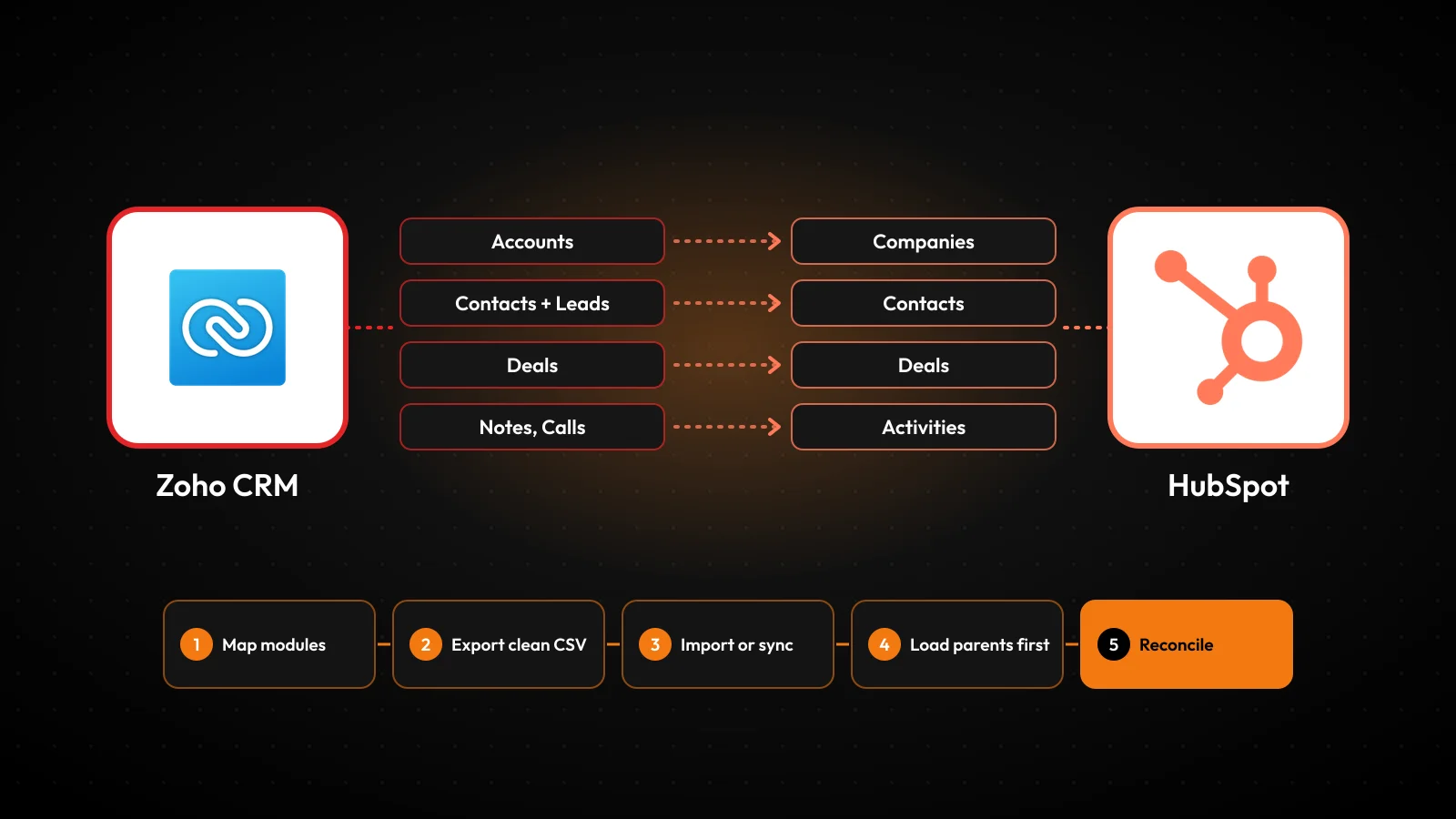
A zoho to hubspot migration moves leads, contacts, accounts, deals and activity history from Zoho CRM into HubSpot. Done well, it keeps every link between those records. Whether those links survive depends on the mapping, the load order and the checks run before cutover.
Key Takeaways
- A zoho to hubspot migration keeps associations only when each import row carries IDs for both linked records.
- HubSpot imports accept activities such as calls, notes and meetings, so history can move without a custom build.
- Load companies first, then contacts, deals and activities, and reconcile counts before Zoho becomes read-only.
What Does a Zoho to HubSpot Migration Move?
A zoho to hubspot migration moves three layers: records, configuration and automation. Records are the rows in each Zoho module. Configuration covers fields, pipelines, deal stages and users. Automation covers the rules that act on records every day.
Each layer travels differently. Records travel as CSV files or through a sync app. Configuration is rebuilt by hand in HubSpot as properties, pipelines and teams. Automation is redesigned, because Zoho workflow rules, Zoho Blueprint processes and Deluge scripts have no import path into HubSpot.
The reasons to move from Zoho to HubSpot vary. Often marketing already runs on HubSpot and wants one database. Sales wants HubSpot's sequences and reporting. Leadership wants fewer tools to license and maintain. The reason shapes the scope, so write it down before any data moves.
The scope decision matters more than the tool decision. A zoho to hubspot migration that copies every module, field and dormant record carries old problems into a new system. A migration that starts with a field audit lands a smaller, cleaner database that sales trusts on day one.
Write the scope as three lists: modules to move, modules to archive and modules to drop. Closed deals older than five years, bounced email contacts and test records often belong in the archive. A short list makes every later step of the zoho to hubspot migration faster to test.
Unboxx runs the move as a CRM consulting and implementation project. Each stage has a data owner, a mapping document and a pass condition. That structure is what keeps a CRM data migration from turning into a second clean-up project after go-live.
How Do Zoho Modules Map to HubSpot Objects?
Zoho modules map to HubSpot objects one by one, with two exceptions that need decisions. Zoho Accounts become HubSpot companies, Zoho Deals become HubSpot deals, and Zoho Contacts become HubSpot contacts.
HubSpot has no separate leads table in the way Zoho does. The HubSpot Zoho CRM Data Sync listing maps Zoho Leads to HubSpot contacts. So Zoho leads to HubSpot contacts is the default path. A lifecycle stage property tells sales which records are still leads.
Custom modules are the second decision. The Data Sync listing maps Zoho modules to HubSpot custom objects. Zoho custom modules to HubSpot custom objects only works when the subscription includes custom objects. Confirm the plan before mapping them.
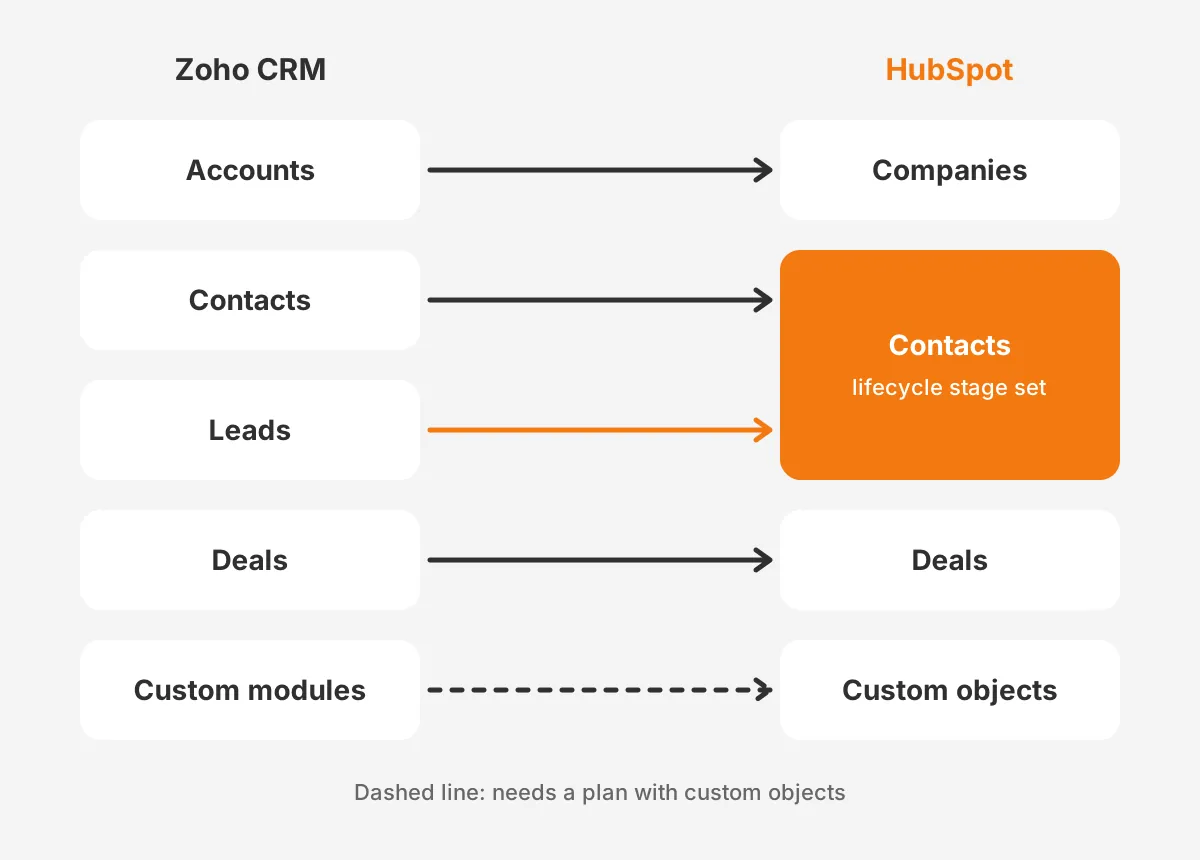
The table below shows the default mapping for a zoho crm to hubspot migration. It fits any zoho to hubspot migration on standard modules. Use it as the first page of your field mapping document.
| Zoho CRM module | HubSpot object | Decision to make |
|---|---|---|
| Accounts | Companies | Use company domain as the unique key |
| Contacts | Contacts | Use email as the unique key |
| Leads | Contacts | Set lifecycle stage to keep leads separate |
| Deals | Deals | Rebuild pipelines and deal stages first |
| Calls, Meetings, Tasks, Notes | Activities | Import after parent records exist |
| Products, Invoices | Products, Invoices | Check price and currency fields |
| Custom modules | Custom objects | Confirm the plan includes custom objects |
Below the object level sits the data mapping for each field. Zoho accounts to HubSpot companies needs the account name, website, industry and owner. Zoho deals to HubSpot deals needs the deal name, amount, close date, pipeline and stage. Every picklist value needs a matching dropdown option in HubSpot.
Owners need their own map. Each Zoho user who owns records must exist as a HubSpot user before the import, or ownership fields arrive empty. Add a sheet that pairs every Zoho user with a HubSpot user, including people who have left.
What Should You Clean Before Exporting Zoho Data?
Before a zoho to hubspot migration, clean duplicates, dead records and unused fields. HubSpot imports whatever the file contains. Data cleansing in Zoho is cheaper than clean-up in HubSpot after users start working.
Start with duplicate records. HubSpot deduplicates contacts by email address and companies by domain name, according to HubSpot's deduplication guide (2026). Two Zoho contacts sharing one email will collapse into one HubSpot record on import. Decide which version wins before the file is built.
The same guide adds a warning for sync tools. Companies created through the API are not deduplicated by domain, and that includes third-party sync apps. Duplicate Zoho accounts can therefore arrive twice through a sync even when a CSV import would have merged them.
Next, cut the fields nobody uses. Run a fill-rate report on every Zoho field and drop any field below an agreed threshold, such as 5% filled. Fewer custom properties make the HubSpot portal easier to report on and easier to train.
Finally, normalize picklist values. HubSpot's property guide notes that turning a text field into a dropdown creates one option for every unique value. "LinkedIn", "linkedin" and "linked in" become three options. Fix spelling in Zoho with one mass update. Unboxx covers this step in its CRM data cleansing runbook.
Give the clean-up a deadline and an owner. A zoho to hubspot migration stalls when sales reps are asked to fix records in their spare time. A sales operations lead with two set clean-up days per week keeps the work moving and the decisions consistent.
How Do You Export Data From Zoho CRM?
You export data from Zoho CRM one module at a time, as CSV files, from the Data Administration menu. The Zoho CRM export guide gives three steps.
- Go to Settings, then Setup, then Data Administration, then Export.
- Choose the module from the Select Export Module list.
- Click Export and save the CSV file to a secure folder.
The Zoho export permission is set per module. Only users with the Export permission for a module can run its export, so check the profile first. Confirm it a week before export day, not on the day.
Export every module the mapping document lists, plus a full set of the remaining modules as an archive. The archive is your fallback if a field turns out to matter after cutover. Store it outside both systems, with access limited to the project team.
Keep the Zoho record ID column in every file. That ID ties a contact to its account, a deal to its contact and a note to its deal. Without it, a zoho crm export is a pile of unconnected rows, and HubSpot cannot rebuild the links.
Check file encoding before import. HubSpot requires UTF-8 encoding when a file includes foreign language characters. Accented names saved in another encoding arrive garbled, and correcting them after import means a second update pass.
Should You Use Import, Data Sync or the API?
Use CSV import for a one-time move and data sync for a phased move. Use the API for complex history or custom modules. Most zoho to hubspot migration projects combine two of the three methods.
The HubSpot import tool handles core records. The HubSpot import file guide (2026) sets the limits for paid plans. Files can reach 512 MB and 1,048,576 rows. An account can run 500 imports and 10,000,000 rows a day.
Free tools stop at 20 MB files, 50 imports and 500,000 rows a day. A module under that row limit fits in one paid-plan file. File size rarely decides the method for a zoho to hubspot migration.
The Zoho CRM Data Sync app connects the two systems directly. Its HubSpot listing describes two-way sync in real time, with the option of one-way sync. The listing says existing data syncs right away. Custom field mappings need Data Hub Starter or a higher plan.
The same listing also says activities and custom modules will not sync, which conflicts with its own object table. Treat that as a reason to test, not to assume. Run the sync against a small set of records and check what arrives.
A simple decision rule helps. Pick CSV import when the cutover date is fixed and history is modest. Pick the sync when teams will move in phases over weeks. Add API work only for the gaps that import and sync cannot close in your zoho to hubspot migration.
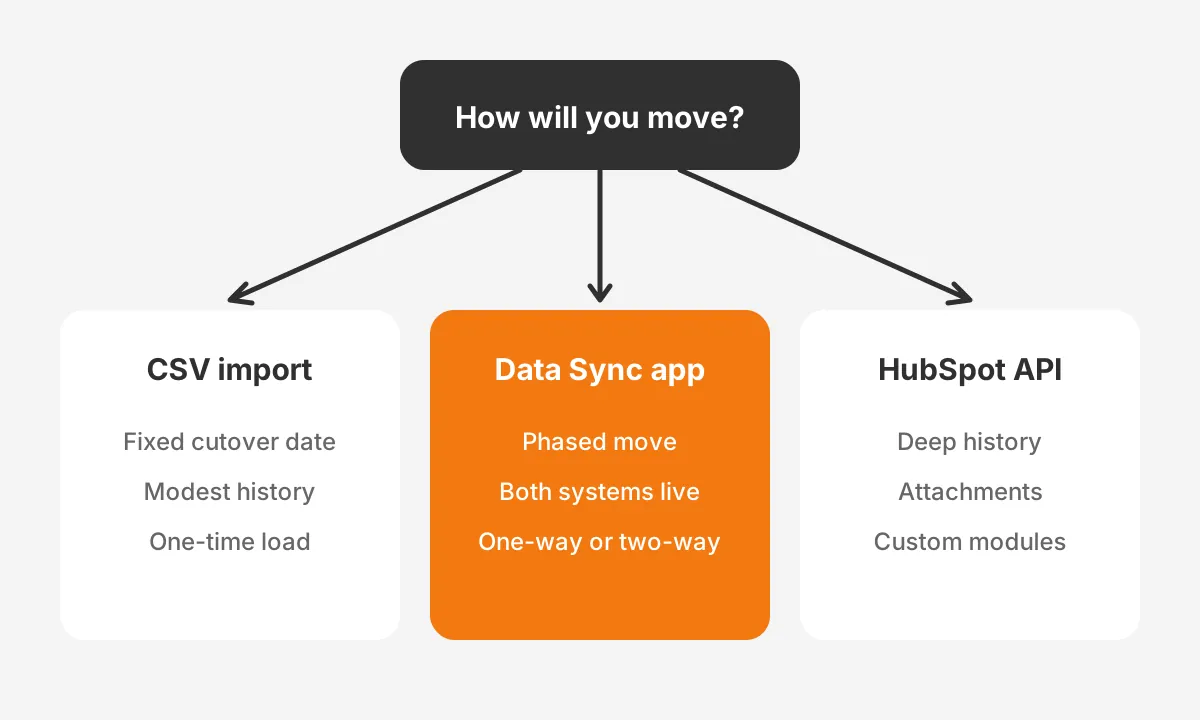
HubSpot's Zoho integration guide adds two setup rules. The person connecting the app needs Super Admin or App Marketplace permissions in HubSpot. Each Zoho object that will sync needs the Modified By field added in Zoho CRM first.
| Method | Best for | Main limit |
|---|---|---|
| CSV import | One-time move with a set cutover date | Needs unique IDs in every row to keep links |
| Data Sync app | Phased move with both systems live | Custom field mappings need Data Hub Starter or higher |
| HubSpot API | Deep history, attachments and custom modules | Needs a developer and rate-limit planning |
The API route suits accounts with years of email history or large attachment libraries. It also suits Zoho custom modules with their own relationships. It costs more to build, but it moves records with full control over order and error handling.
What Are the Zoho to HubSpot Migration Steps?
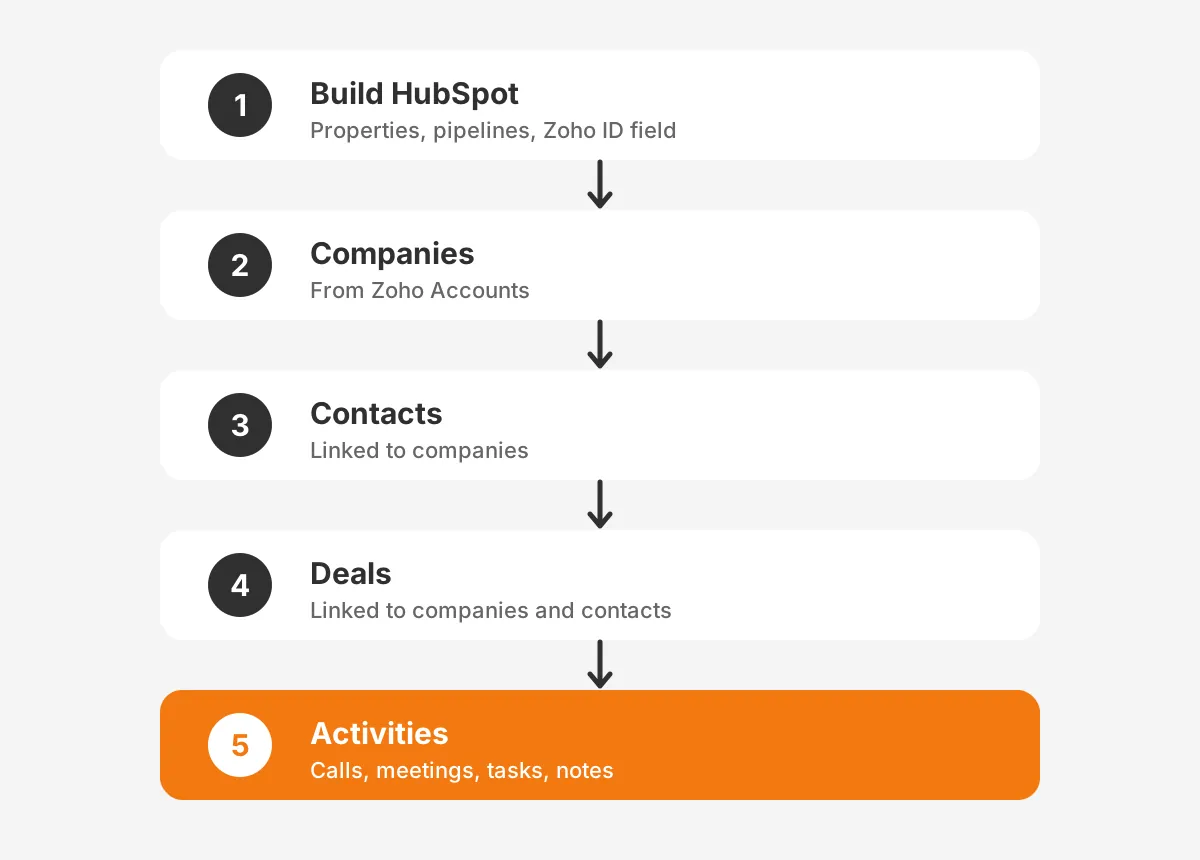
The zoho to hubspot migration steps run in a fixed order. Build, test, load parents, load children, load activities, then validate. Change the order and deals or notes arrive with no parent record to attach to.
- Build HubSpot first: custom properties, pipelines, deal stages, users and teams.
- Create a custom property on each object to hold the Zoho record ID.
- Run a test import of 100 to 200 records per object.
- Import companies from the Zoho Accounts file.
- Import contacts from the Zoho Contacts and Leads files, linked to companies.
- Import deals, linked to their companies and contacts.
- Import calls, meetings, tasks and notes, linked to their parent records.
- Run reconciliation checks and fix errors before the next load.
Step 2 is what makes the rest repeatable. HubSpot's import guide lists a custom property that requires unique values as a valid identifier. HubSpot allows up to ten such properties per object. A "Zoho ID" property set to unique lets every later file find the right record.
Each import needs its required fields. HubSpot needs an email for contacts and a name or domain for companies. New deals need a deal name, pipeline and deal stage. Notes need a note body, and tasks need a title and due date.
Choose the import mode for each file with care. HubSpot offers create and update, create only, and update only. Use create only on the first load, then update only for correction passes. That stops a correction file from creating fresh duplicates.
This order matches the approach in Unboxx's Pipedrive to HubSpot migration guide and its Zoho to Salesforce migration guide. The source system changes, but parent-first loading and a stored source ID hold for every crm migration.
How Do You Keep Associations and Activity History?
You keep associations by putting a unique identifier for both linked records in every import row. HubSpot's import file guide states that rows without unique identifiers create duplicate records instead of associations.
In practice, a deal file carries the Zoho deal ID plus the Zoho ID of its account and contact. HubSpot matches the account ID against the Zoho ID property on companies and links the deal. To link one deal to two contacts, add one row for each link.
HubSpot association labels, such as "Decision maker" or "Billing contact", need a Professional or Enterprise subscription. Create the labels in HubSpot before the import file references them. The value "Primary" sets a company association as the primary one.
Activity history moves the same way. HubSpot imports calls, meetings, notes, tasks and emails as records with associations. Calls need call notes, and meetings need a description with start and end times. Emails need a body and a direction. Map each Zoho activity field to these properties.
One rule changes the plan for corrections. HubSpot's import guide says existing emails, meetings, notes and tasks cannot be updated through import. A bad activity load must be deleted and loaded again, so test activity files on a sample first.
Email history needs its own decision. Logged Zoho emails can load as HubSpot email records with a body and direction. Thread history from personal inboxes does not sit in Zoho, so it stays with the inbox. Agree with sales which email records a zoho to hubspot migration must carry.
Attachments are the usual gap. Neither CSV import nor the data sync lists Zoho attachments as a mapped object. Teams either move recent files through the API or keep the Zoho archive for older documents. Decide which before cutover, and tell users where old files live.
How Do You Validate the Data and Cut Over?
Validate a zoho to hubspot migration with three checks: record counts, field samples and association samples. Run them after every load, not only at the end.
- Record counts: each HubSpot object total matches its Zoho export, minus planned exclusions.
- Field samples: 25 random records per object show the same values in both systems.
- Association samples: 25 random deals show the right company, contacts and activities.
- Import errors: every error row in the HubSpot import log has a fix or a written reason.
Blank cells need special attention. HubSpot ignores blank cells on import and does not clear existing values. An update file cannot erase wrong data by leaving a column empty. Plan explicit corrections for any field that must be cleared.
Cut the zoho to hubspot migration over on a set date. Freeze Zoho edits the evening before. Run a final delta import of records changed since the main load. Switch users to HubSpot the next morning. Keep Zoho read-only for 30 to 90 days so users can check old records.
Data validation does not end at cutover. Ask sales managers to review their own pipelines in the first week and report gaps. A HubSpot implementation plan covers the training, reporting and adoption work that follows the data move.
Track three numbers for the first 30 days: daily active users, deals updated per rep and new duplicate records. A rising duplicate count points to a form, sync or import rule that needs fixing. A falling deal update rate points to a training gap rather than a data problem.
How Long Does a Zoho to HubSpot Migration Take?
How long a zoho to hubspot migration takes depends less on record count than on scope. Field count, custom modules, activity history and automation rebuilds set the timeline.
The worked example below uses assumed figures for a mid-sized B2B company. The account holds 40,000 contacts, 6,000 accounts, 3,500 deals and four custom modules. These are example numbers, not benchmarks.
| Phase | Example duration | Main output |
|---|---|---|
| Audit and mapping | 2 weeks | Signed field mapping document |
| HubSpot build | 2 weeks | Properties, pipelines, users, Zoho ID fields |
| Test loads | 1 week | Clean sample imports and fixed files |
| Full loads and validation | 1 week | Reconciled records and associations |
| Cutover and support | 1 week | Live HubSpot portal, read-only Zoho |
In this example the project runs about seven weeks. An account with no custom modules and little history could finish in half that time. An account with heavy Deluge automation or four Zoho apps could take longer. Each workflow needs a new design in HubSpot.
Zoho to hubspot migration cost follows the same drivers. More fields, more custom modules and deeper history mean more mapping, more testing and more API work. A fixed quote given before the audit is a guess.
A partner shortens the zoho to hubspot migration when the account has custom modules, Deluge scripts or strict reporting needs. An in-house admin can run a standard move with clean data and a fixed cutover. Unboxx's HubSpot CRM migration guide lists the questions to ask either way.
Frequently Asked Questions
Can Zoho and HubSpot run side by side?
Yes, Zoho and HubSpot can run side by side through the Zoho CRM Data Sync app. Its HubSpot listing describes two-way sync in real time. A parallel run suits phased rollouts by team. Set a firm end date so users do not update two systems for months.
Will Zoho notes and attachments move to HubSpot?
Notes can move to HubSpot as note records through import, with a note body and associations to parent records. Can you migrate zoho notes to hubspot with attachments? Not through CSV import. Attachments need API work or a retained Zoho archive, so decide which files users still need before cutover.
Who should own a Zoho to HubSpot migration?
A named data owner from sales operations should own a Zoho to HubSpot migration. A HubSpot admin and an executive sponsor support them. A CRM consultant or HubSpot partner can run mapping and loads. The business owner still signs off the field mapping and the final reconciliation.
Do Zoho workflows transfer to HubSpot automatically?
No, Zoho workflow rules, Blueprint processes and Deluge scripts do not transfer to HubSpot. Each one is rebuilt as HubSpot workflows after the data loads. Treat the rebuild as a redesign. List what each rule does, drop unused rules, and test the rest on sample records.
What does a Zoho to HubSpot migration cost?
A Zoho to HubSpot migration cost depends on field count, custom modules, activity history and automation rebuilds. Record count matters less. A small account with standard modules costs far less than one with Deluge scripts and custom objects. Price the audit first, then quote the build.
Is Your Zoho to HubSpot Migration Ready to Plan?
A zoho to hubspot migration succeeds when the mapping is signed and every row carries a Zoho ID. Parent records must load first. Skipping the audit moves the gaps to after go-live, when every fix touches live records.
Unboxx has run CRM moves such as a Salesforce to HubSpot migration with data intact. Planning a zoho to hubspot migration? Schedule a consultation with Unboxx to review your Zoho modules and get a migration plan with owners and checks.
Let's create something out of this world together.
Have a project in mind? Contact us for expert design and development solutions. Let's discuss how we can help grow your business.
Ready to Unboxx Your Potential?
Build smarter systems. Automate faster. Scale confidently.