
The gala closes at midnight with a strong total on the screen. Two weeks later, the development team still cannot say who gave. Nobody knows who bought tickets and who only bid on a painting.
The money sits in the ticketing tool, the auction app and the payment processor. None of it reaches the donor record. To integrate event revenue into CRM records, each payment needs a home, a type and a donor attached to it.
The stakes are financial as well as practical. The IRS (2026) can charge $10 per contribution when a required quid pro quo disclosure is missing. The cap is $5,000 per fundraising event.
Key Takeaways
- To integrate event revenue into CRM records correctly, split every ticket into its gift and benefit portions.
- Link each event payment to one campaign, one donor and one revenue type, so reports always agree.
- Reconcile CRM totals against processor payouts within one week of the event, while staff still remember the edge cases.
Why Integrate Event Revenue Into CRM Donation Records?
Teams integrate event revenue into CRM donation records so one system shows what each supporter gave and received. Event money is a common blind spot in a nonprofit's donor history.
A ticket buyer at a spring gala may become a monthly donor by autumn. If the ticket sits in a separate spreadsheet, the gift officer never sees that first touch. Donor retention work starts with a full giving history, and event income is part of it.
There are four practical reasons to integrate event revenue into CRM records:
- Accurate giving totals: lifetime and yearly totals include event gifts, so upgrade asks start from the right number.
- Correct tax receipts: the donor acknowledgment shows the deductible amount, not the full ticket price.
- Campaign ROI: costs and income sit under one campaign, so the board sees net revenue per event.
- Faster follow-up: thank-you emails and calls go out from the CRM within days, not weeks.
Event revenue reporting also changes how a team plans next year. With event donations in the donor database, staff can see which guests came back. They can also see which sponsors renewed and which bidders later gave outright.
The cost of skipping this work shows up months later. Gala guests receive generic appeals instead of a personal thank-you. Sponsors arrive at renewal talks with no history on file.
The annual report also undercounts event-driven giving. A nonprofit that chooses to integrate event revenue into CRM records closes all three gaps with one process.
A nonprofit CRM is built for this kind of linked history. The guide on what a nonprofit CRM is explains how people, households, gifts and campaigns connect inside one system.
Which Event Revenue Streams Belong in a Donor Record?
Every stream that carries a donor's money belongs in a donor record, but each one needs its own revenue type. Fundraising events usually produce seven streams, and each behaves differently for tax and reporting.
- Ticket sales: the price covers a meal or show plus a gift, so the payment has two parts.
- Sponsorship revenue: a company pays for visibility, tables or naming, often under a written agreement.
- Auction revenue: a winning bidder pays for an item, and only any amount above its value counts as a gift.
- Raffle tickets: buyers pay for a chance to win, so the purchase is not a charitable gift.
- Paddle raise or fund-a-need: guests pledge cash for a cause with nothing in return.
- Peer-to-peer fundraising: supporters raise money from friends before or during the event.
- In-kind donations: donors give goods or services, such as auction items or catering.
Reports get cleaner when you integrate event revenue into CRM records stream by stream. Treating all seven as one "event income" line hides the difference between a gift and a purchase. It also breaks fund designation, because a paddle raise for scholarships should not land in general operations.
A clean rule helps here. Record in-kind donations as gifts at fair value. Record raffle tickets as revenue without a deductible amount. Give every other stream a clear donor and campaign.
How Do Ticket Payments Split Into Gift and Benefit?
A ticket payment splits into the fair market value of the benefits and the remaining gift. Only the gift part is deductible, and the CRM should store both parts.
The IRS calls this a quid pro quo contribution. When a donor pays more than $75 and receives goods or services, the charity owes a written disclosure statement.
That statement explains the deductible limit. Per the IRS, it also gives "a good faith estimate of the fair market value" of what the donor received.
A worked case from Archer & Greiner (2024) shows the math. A gala ticket sells for $225, and dinner and entertainment are worth $100. Only $125 is a tax-deductible donation.
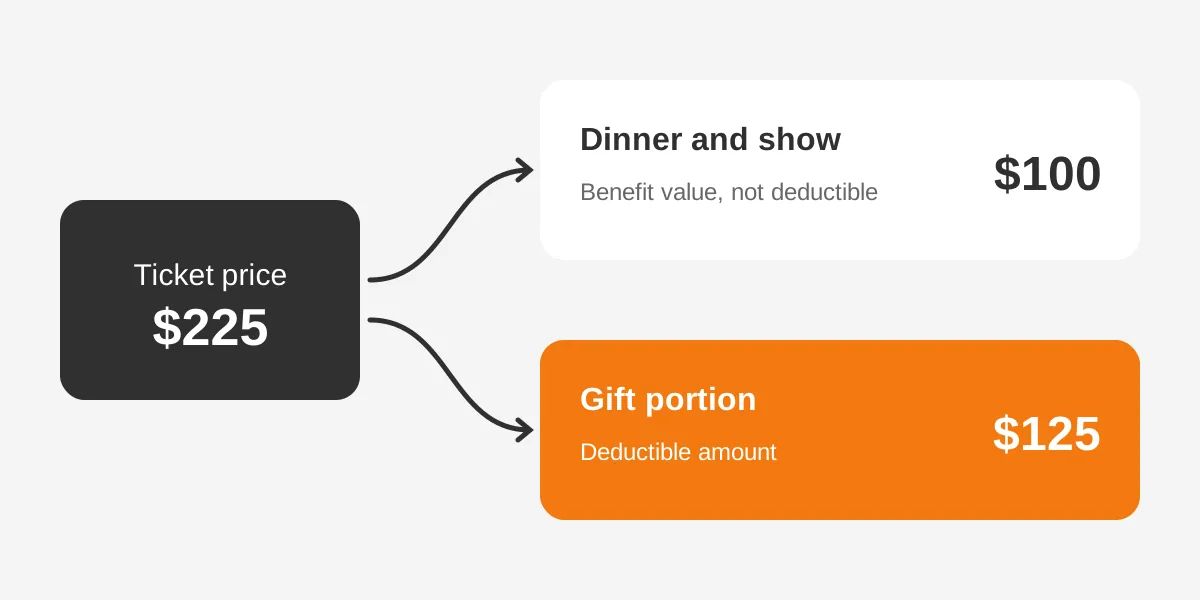
So, are gala tickets tax deductible? Partly. The CRM should hold the full $225 as the payment and $100 as the benefit value. The $125 is the deductible amount. The tax receipt then reads from those fields.
The fair market value of event benefits should be set once per event, before tickets go on sale. Finance usually prices the meal, drinks and entertainment per guest. Print the figure on invitations, tickets and receipts, as the Archer & Greiner advisory suggests.
The table below shows how each stream maps to a CRM record and a deductible amount.
| Revenue stream | CRM record type | Deductible portion | Credit |
|---|---|---|---|
| Gala ticket | Gift with benefit value | Price minus fair market value | Hard credit to buyer |
| Sponsorship | Gift or sponsorship record | Depends on benefits received | Hard credit to company |
| Auction item | Purchase with item value | Amount above item value | Hard credit to bidder |
| Raffle ticket | Revenue, not a gift | None | None |
| Paddle raise | Gift | Full amount | Hard credit to donor |
| Peer-to-peer gift | Gift | Full amount | Hard credit to donor, soft credit to fundraiser |
| In-kind item | In-kind gift | Rules differ, ask a tax adviser | Hard credit to giver |
This article explains common practice, not tax advice. Confirm benefit values and receipt wording with a qualified accountant.
Which CRM Objects Hold Event Revenue?
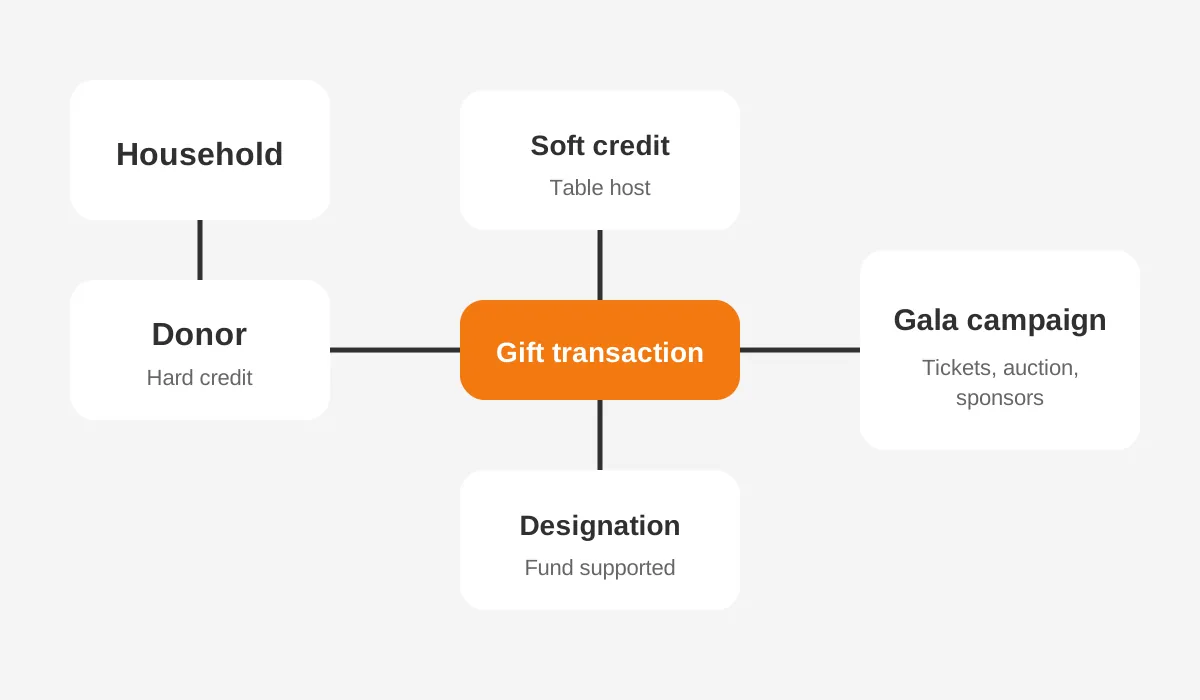
Event revenue lives in gift records linked to a contact, a household and a campaign. The object names change by platform, but the pattern stays the same. Before you integrate event revenue into CRM records, learn which object holds each part.
In Salesforce Nonprofit Cloud, the Salesforce fundraising data model (2026) gives each part its own object:
- Gift Transaction: a completed payment from a gift.
- Gift Entry and Gift Batch: gifts entered alone or in groups before processing.
- Gift Soft Credit: credit for a person other than the donor.
- Gift Designation: the fund a gift supports.
- Gift Commitment: a pledge paid over time.
- Gift Refund: money returned to a donor.
- Donor Gift Summary: rollup totals for each account and contact.
When you integrate event revenue into CRM records in Salesforce, the event itself is a Campaign. A campaign hierarchy can hold a parent campaign for the gala and child campaigns for tickets, sponsorships and the auction.
Older Salesforce orgs on the Nonprofit Success Pack use the Opportunity object instead. Each ticket or gift is an Opportunity, with a record type for donations, sponsorships or event purchases.
HubSpot has no native gift object. Teams usually record gifts as deals in a donations pipeline, or build HubSpot custom objects for gifts and events. The guide to moving donor data into a nonprofit CRM covers how those records are mapped.
Dedicated donor management tools such as Blackbaud Raiser's Edge NXT and Bloomerang have their own gift and event modules. Whatever the tool, the way to integrate event revenue into CRM records holds: one gift record, one donor, one campaign.
How Do You Integrate Event Revenue Into CRM?
You integrate event revenue into CRM records in five steps: design, price, connect, process and reconcile. Each step has an owner and a finish line.
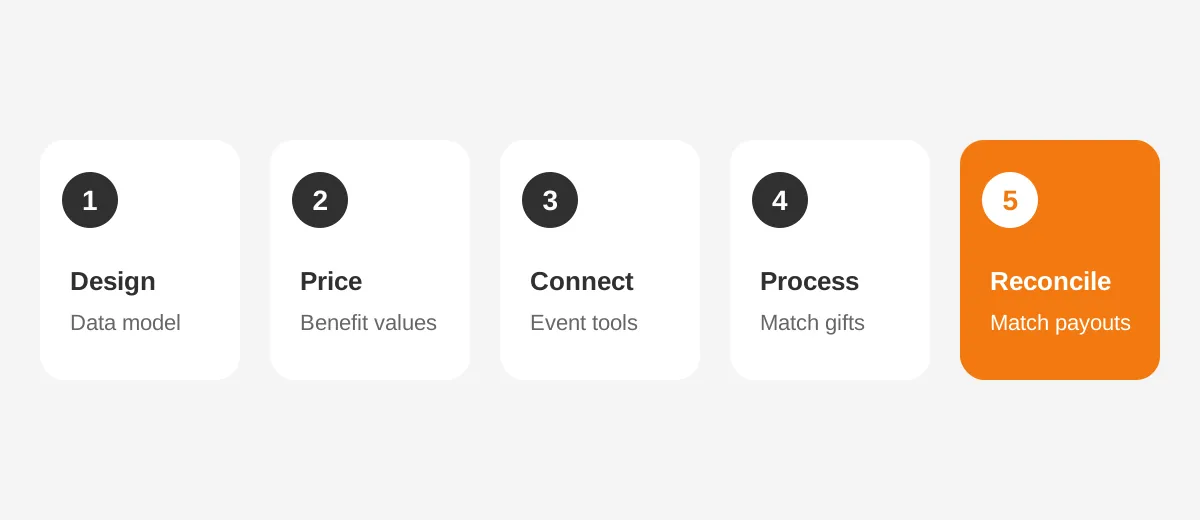
- Design the data model. Create the event campaign, its child campaigns and the revenue types. Add fields for benefit value and deductible amount.
- Price the benefits. Finance sets the fair market value per ticket, table and auction item before sales open.
- Connect the sources. Link the ticketing, auction and peer-to-peer tools to the CRM, or plan a batch import.
- Process the gifts. Match each payment to an existing contact, create new donor records only when no match exists, and apply soft credits.
- Reconcile and acknowledge. Compare CRM totals with processor payouts, then send tax receipts and thank-you messages.
The order matters. If tools are connected before the model is designed, gifts land in the wrong campaign. Nothing records the benefit value either.
Data mapping sits inside step three. Each field in the event tool, such as buyer email, ticket type and amount, needs a matching CRM field. The development lead and the finance lead both sign off the mapping sheet.
Scale changes the effort. For a single gala, a small team can integrate event revenue into CRM records with a one-time setup. A program with yearly events and a peer-to-peer campaign needs a repeatable process instead.
What Should the Pre-Event Checklist Cover?
A short checklist keeps each event on the same footing. Seven checks cover what has to be true before tickets go on sale:
- The parent and child campaigns exist and carry the event date.
- Every ticket type and table level has a benefit value approved by finance.
- Auction items have a recorded value before bidding opens.
- The ticketing tool asks for email, name and postcode for each buyer.
- The connector or import template is tested with five sample gifts.
- Crediting rules for table hosts and sponsors are written down.
- One named person owns the reconciliation after the event.
Once the data model exists, the checklist is quick to complete. It is the cheapest way to integrate event revenue into CRM records without a cleanup project afterwards.
How Should Event Platforms Sync With the CRM?
Event platforms should sync with the CRM through the most direct route the tools support, in this order of preference. A native integration comes first, a connector second and a file import last.
- Native integration: the event tool writes to the CRM directly, as Salesforce-native event apps do.
- Middleware connector: tools such as Zapier pass each new registration or donation to the CRM.
- Batch import: staff export a CSV after the event and load it through Gift Entry or an import wizard.
Each route to integrate event revenue into CRM records has a trade-off. A native app keeps data in one place but limits the choice of ticketing tool. A connector is quick to build, yet someone must watch it for failed runs.
To sync Eventbrite with CRM records, most teams use a connector or a scheduled export. Send the buyer, the ticket type and the amount together. The CRM can then split gift from benefit.
Gift Entry suits batch work. Salesforce Trailhead (2026) describes a Batch Dry Run that tests every gift before processing. That check catches bad matches before they reach the donor record.
HubSpot teams follow the same logic with different objects. A connector creates or updates the contact, then adds a deal in the donations pipeline. To integrate event revenue into CRM records in HubSpot, add deal properties for benefit value, deductible amount and revenue type.
Whatever the route, import event donations into Salesforce or any other CRM in a fixed order. Load contacts and households first, then gifts, then soft credits. The guide to nonprofit integrations lists the tools worth connecting first.
Some connection work is larger than one admin can carry. In that case, CRM integration services can design the sync and its error handling.
Who Gets Credit for Table Hosts and Peer Fundraisers?
The person who paid gets the hard credit, and the person who brought the gift in gets a soft credit. This rule keeps giving totals honest while still showing who raised the money.
A soft credit (Trailhead, 2026) goes to an influencer. Trailhead names a household member or a board member fundraising as a volunteer. Soft credits roll up on the Donor Gift Summary.
Events create soft credit cases every time. A soft credit for table hosts records the guests a host invited. A peer-to-peer fundraiser earns soft credit for every gift on their page.
Board give-and-get policies depend on this. A board member who sold three tables and gave $5,000 personally needs both numbers visible. Hard credit shows the $5,000, and soft credit shows the tables sold.
Sponsorships need one more decision. When a company sponsors a table, the company receives the hard credit. The executive who arranged it may receive a soft credit, depending on the nonprofit's own crediting policy.
Write the crediting rules down before you integrate event revenue into CRM records. Staff then apply the same logic to every gift, and reports stay comparable year to year.
How Do You Reconcile Event Revenue With Finance?
You reconcile event revenue by matching CRM gift totals to payment processor payouts and the general ledger. The three numbers should agree, or every difference should have a written reason.
Start with the payout reports from each processor, such as Stripe or the ticketing platform's own payments. Then pull CRM totals for the event campaign by revenue type.
Differences usually come from four sources:
- Processing fees: payouts arrive net of fees, while gifts are recorded at the gross amount.
- Refunds: a cancelled ticket needs a refund record, not a deleted gift.
- Timing: a gift made after midnight may fall into the next day's payout.
- Offline payments: checks and cash pledged at the event arrive days later.
Assumed example, for illustration only: a gala sells 200 tickets at $225, for $45,000 in ticket sales. With a $100 benefit value per ticket, the deductible amount totals $25,000. Finance then confirms the payouts, minus fees, match that $45,000 gross figure.
Run the reconciliation twice. The first pass happens within a week, once online payouts have settled. The second pass follows a month later, after checks and pledge payments have arrived.
Each pass is a chance to integrate event revenue into CRM records that arrived late. A pledge from the paddle raise should become a Gift Commitment, with its payments logged as they land.
Finance and development should agree on one owner for the reconciliation. When both teams assume the other one is checking, gaps stay open until the year-end audit.
Campaign ROI comes last. Add event costs to the parent campaign. The CRM then shows net revenue per event next to donor retention from the same guest list.
What Mistakes Break Event Revenue Reporting?
Most broken event revenue reporting traces back to six mistakes made before or during the event. Each one is preventable.
- Recording the full ticket price as a gift. This inflates giving totals and produces wrong tax receipts.
- Creating duplicate records at check-in. Guests type their email differently, so match on name, email and postcode together.
- Logging the gift under the wrong person. A spouse often buys tickets for a household, so link the household as well.
- Skipping refunds. A deleted gift erases the audit trail, while a refund record keeps it.
- Leaving auction items unpriced. Without an item value, the CRM cannot calculate any gift portion above it.
- Treating each event as a one-off. When every gala uses a new campaign structure, year-over-year reports stop matching.
Duplicate records are the hardest problem to fix after you integrate event revenue into CRM records. A check-in app that creates a new contact for every walk-in guest duplicates each returning supporter who skips the lookup.
Track sponsorships in CRM records with their own type, not as large donations. Otherwise the major gifts report shows a $20,000 "donor" who was paying for brand visibility.
Silent auction revenue tracking needs the same care. Store the item, its value, the winning bid and the winner, so the receipt shows the amount above value.
The last mistake is easy to prevent. Integrate event revenue into CRM records the same way each year, and events can be compared directly.
Planning the data model first means you can integrate event revenue into CRM records without these repairs. The guide to implementing a fundraising CRM shows how long that setup takes.
Frequently Asked Questions
Can you integrate event revenue into CRM without coding?
Yes, most teams can integrate event revenue into CRM records without code. Native event apps and connectors such as Zapier handle the sync, and batch imports cover the rest. Custom code is usually needed only for unusual auction tools or large peer-to-peer programs with their own data model.
How do you track event donations in a CRM?
Track event donations as gift records linked to the event campaign. Give each gift a revenue type, a benefit value and a deductible amount. Connect the gift to the donor and household. Apply soft credits to table hosts or peer fundraisers who brought the gift in.
Should sponsorships be recorded as donations?
Sponsorships should be recorded as their own revenue type, linked to the company account. Some sponsorships include benefits such as tables or logo placement, which affects the deductible amount. Keeping them separate stops them inflating individual giving totals and major gift reports in the CRM.
When should event revenue be entered in the CRM?
Plan to integrate event revenue into CRM records within one week of the event. Online tickets can sync in real time, while checks and pledges arrive later. Entering gifts quickly lets the team send thank-you messages and tax receipts while guests still remember the evening.
Who should own event data in a nonprofit?
The development operations lead should own event data, with finance owning the reconciliation. One person signs off the field mapping, the benefit values and the crediting rules. Clear ownership stops gifts from sitting unprocessed between the event team, finance and the database administrator.
Ready to Integrate Event Revenue Into CRM Records?
You are ready to integrate event revenue into CRM records once each stream has a type, value and owner. The sync and the reconciliation then follow a fixed plan.
Unboxx helps nonprofits design the data model, connect event tools and set up CRM for nonprofits that finance can trust. If your next gala is coming up, book a free consultation and plan the setup before tickets go on sale.
Let's create something out of this world together.
Have a project in mind? Contact us for expert design and development solutions. Let's discuss how we can help grow your business.
Ready to Unboxx Your Potential?
Build smarter systems. Automate faster. Scale confidently.