
A B2B marketing team runs 140 active workflows and four lead scoring models. Nobody has opened its CRM sync settings in two years. Sales calls the leads cold, marketing calls them fine, and neither side can prove its case. Nobody knows which automations still fire as designed.
A marketing automation audit settles that argument. It reviews the workflows, data, scoring, sync, email setup and reporting in one platform. The stakes rose in February 2024. Google's email sender guidelines began requiring SPF, DKIM and DMARC from bulk senders.
Key Takeaways
- A marketing automation audit checks seven areas in a fixed order, starting with data and ending with reporting.
- Email authentication with SPF, DKIM and DMARC is now a delivery requirement at Gmail and Outlook.com.
- A pass, partial or fail scorecard turns audit findings into a ranked 90-day fix list.
What Is a Marketing Automation Audit?
A marketing automation audit is a check of whether every automated process still does what the business needs. It covers the platform, the data feeding it and the CRM it talks to. The output is a list of defects, each with an owner and a fix date.
The work goes by other names too. A marketing automation platform audit, a MAP audit and a marketing automation health check all describe this review. Some teams call it a marketing ops audit or a martech audit when it also covers tools around the platform.
An email automation audit is narrower, since it looks only at templates and sends. A full marketing automation audit also tests lead scoring, lead routing, CRM sync errors, consent records and attribution. A marketing automation assessment before a rebuild uses the same checks.
Where the review starts also sets it apart from a CRM audit. A CRM audit with a scored checklist starts from the sales database. This audit starts from the programs that create and nurture leads, then follows each record into the CRM.
The common platforms are HubSpot Marketing Hub, Salesforce Marketing Cloud Account Engagement (formerly Pardot) and Dynamics 365 Customer Insights - Journeys. The settings differ by tool, while the questions stay the same. Does each record arrive clean, get scored correctly, reach the right owner and receive mail it agreed to?
When Should You Run a Marketing Automation Audit?
Run a marketing automation audit once a year as routine maintenance and again after any major change. Major changes include a CRM migration, a new lead scoring model, a merger or a new sales territory plan. A quarterly light review of deliverability and sync errors fills the gap.
Signs your marketing automation needs an audit show up in daily work. Watch for these five signals:
- Sales ignores marketing qualified leads or reports that scores feel random.
- Open rates fall sharply in one month without a change in content.
- The CRM sync error queue holds hundreds of unresolved records.
- Nobody can name the owner of half the active workflows.
- Campaign reports in the platform disagree with pipeline reports in the CRM.
Platform switches raise the stakes, because broken logic tends to move with the data. The phase-by-phase marketing automation implementation plan assumes clean inputs, and an audit is how a team gets them.
Why audit before a migration?
A marketing automation audit before migration costs less than fixing defects after the move. Every workflow copied to a new platform carries its old errors with it. The audit decides which assets to rebuild, which to retire and which to leave behind.
Retire assets with no owner and no enrolments in 90 days. Rebuild assets that still matter but break the naming rules. Move only the lists, fields and scoring rules the new design needs.
How long does a marketing automation audit take? The answer depends on workflow count, the number of connected tools and how much documentation already exists. Plan it as a project with a start date, an end date and named reviewers, so it does not drift.
How Do You Run a Marketing Automation Audit?
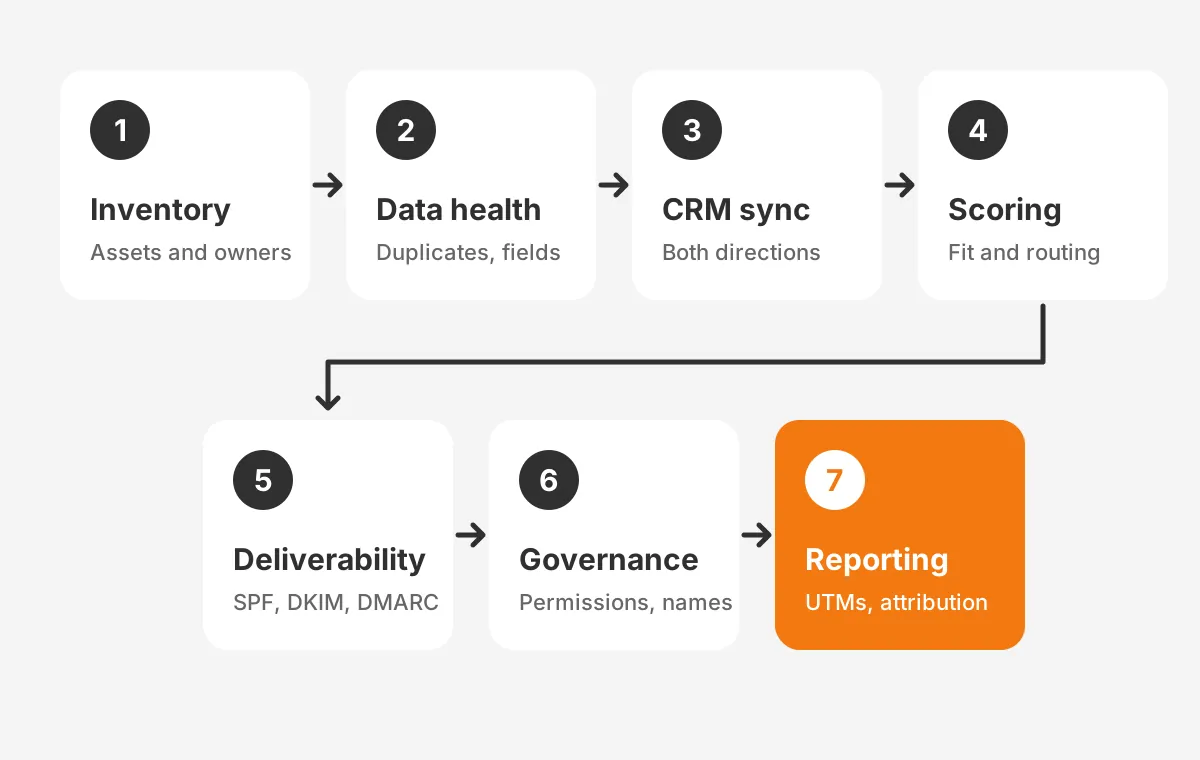
Run a marketing automation audit in seven steps, in this order, because each step depends on the one before it. Scoring cannot be trusted if the data underneath is wrong. Reports cannot be trusted if routing is broken.
- Inventory every workflow, list, form, score and integration, with an owner for each.
- Check data health: duplicates, missing fields, invalid emails and lifecycle stage values.
- Test CRM sync and field mapping in both directions.
- Calibrate lead scoring and test lead routing against recent deals.
- Review email deliverability, authentication and consent handling.
- Check governance: user permissions, naming conventions and documentation.
- Validate reporting, UTM parameters and attribution against the CRM.
The inventory in step one usually takes longest. Export every active workflow with its trigger, goal, last edit date and enrolment count. Mark any workflow that has not enrolled a record in 90 days. Those are candidates to switch off.
A marketing automation audit template keeps the work consistent between audits. Use one row per asset, with columns for owner, purpose, status, defect and fix date. The same template becomes the marketing automation audit checklist for the next cycle.
Testing beats reading settings. Enrol a test contact in each critical workflow and follow it through every branch. A workflow audit that only reads settings misses the conditions that fail in practice.
How Do You Check Data Health and CRM Sync?
Start data health by measuring duplicates, blank required fields and invalid addresses across the whole database. Pull counts, not samples. Duplicates inflate list counts and split engagement across records, which distorts every score and report that follows.
Data hygiene checks to run in this step:
- Duplicate records matched on email address and on company domain.
- Contacts with no lifecycle stage, or with a stage that moved backwards.
- Hard bounces and unsubscribed contacts still enrolled in nurture programs.
- Free-text fields, such as country or industry, that should be picklists.
- Records with no original source, which breaks attribution later.
Marketing data and sales data meet at the CRM integration. Open the sync error log in the platform and group errors by type. Common causes are required CRM fields with no marketing value, validation rules and picklist values that differ between systems.
Test field mapping in both directions with five test records. Change a field in the platform and confirm the CRM updates. Then change it in the CRM and confirm the platform updates. Note which system wins each field when both change.
In HubSpot, review the inclusion list that controls which contacts sync to Salesforce. In Account Engagement, review the Salesforce connector settings and the sync error queue. In Dynamics 365 Customer Insights - Journeys, data already lives in Dataverse, so review the segment definitions and duplicate detection rules.
Fix data at the source rather than cleaning it every quarter. A form that lets visitors type a country should offer a picklist instead. A separate CRM data cleansing project handles the records already in the database.
How Do You Test Lead Scoring and Routing?
Test lead scoring by comparing scores with outcomes from the last two or three quarters. Pull every lead that became an opportunity and every lead that went nowhere. A working model gives the first group clearly higher scores than the second.
Review fit and engagement separately. Fit asks whether the company and role match the buyer profile. Engagement asks whether the person is acting like a buyer. HubSpot's lead scoring tool separates fit, engagement and combined scores, with combined labels from A1 to C3.
Account Engagement uses a similar split with two fields. The prospect score measures engagement, and the prospect grade measures fit on an A to F scale. Dynamics 365 Customer Insights - Journeys builds lead scoring models with conditions and a sales-ready threshold.
How to audit lead scoring in practice:
- List every scoring rule and the points it adds or removes.
- Remove points for actions that do not predict buying, such as careers page visits.
- Add negative points for competitors, students and personal email domains.
- Check that scores decay when engagement stops.
- Confirm the MQL threshold with sales, using closed-won data.
Repeat the comparison by source. A webinar lead and a pricing page lead may earn the same score for different reasons. If one source converts at twice the rate of another, the weights need to change.
For lead routing, submit test leads for each territory, product and company size. Each one should reach the right owner within the agreed time, with a fallback owner when no rule matches.
The HubSpot lead scoring guide covers model design in more depth. For the audit, the only question is whether the current model separates good leads from poor ones.
Which Deliverability Checks Belong in the Audit?
Authentication, unsubscribe handling and spam complaint rates belong in every audit, because mailbox providers now enforce them. Email deliverability has become a configuration problem as much as a content one. A failed DNS record can stop a whole campaign from reaching the inbox.
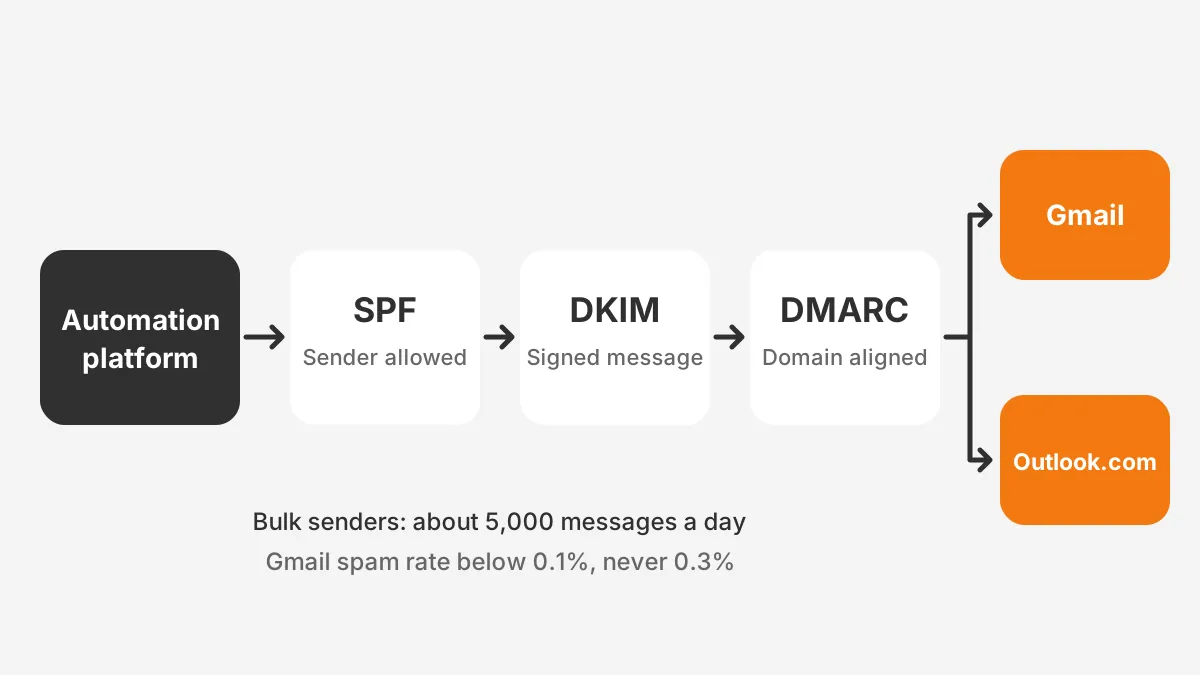
Gmail sets the clearest rules. Senders of close to 5,000 messages a day to personal Gmail accounts must pass SPF and DKIM. They also need a DMARC record with at least a policy of none. Marketing messages need one-click unsubscribe, and Google expects unsubscribes honored within 48 hours.
Gmail also asks bulk senders to keep the user-reported spam rate below 0.1%. Senders must never let it reach 0.3%. Google started ramping up enforcement on non-compliant traffic in November 2025.
Microsoft followed with similar rules for Outlook.com. Its requirements for high-volume senders apply to domains sending over 5,000 emails a day. Since May 5, 2025, Outlook.com rejects mail that fails them.
| Check | Gmail (personal accounts) | Outlook.com |
|---|---|---|
| Volume threshold | Close to 5,000 messages a day | Over 5,000 emails a day |
| SPF and DKIM | Both must pass | Both must pass |
| DMARC | Record required, policy of none or stricter | Policy of none or stricter, aligned with SPF or DKIM |
| Unsubscribe | One-click for marketing mail, honored within 48 hours | Working unsubscribe link recommended |
| Result of failing | Delivery problems and no mitigation above 0.3% spam rate | Rejected with error 550 5.7.515 |
How to check email authentication during the audit:
- List every sending domain and subdomain the platform uses.
- Confirm each has a published SPF record that includes the platform.
- Confirm DKIM signing is set up for each domain inside the platform.
- Confirm a DMARC record exists and aligns with the From domain.
- Send test emails and read the authentication results in the message headers.
Consent management belongs here as well. Confirm that every form records consent, that unsubscribes sync to the CRM and that suppression lists apply to every send. Rules such as GDPR and CAN-SPAM apply on top of the mailbox provider rules.
Track the email bounce rate by campaign, not only in total. A hard bounce spike on one list usually points to an old import or a purchased list that slipped through.
Remove those addresses before the next send, then trace how they entered the database. Close that entry point, or the same problem returns with the next import.
What Platform Checks Apply to HubSpot, Pardot and Dynamics?
Each platform hides its risks in different places. The marketing automation audit therefore adds four platform checks to the shared steps. The table shows where to look first in each tool.
| Area | HubSpot Marketing Hub | Account Engagement (Pardot) | Dynamics 365 Customer Insights - Journeys |
|---|---|---|---|
| Automation | Workflows and their enrolment triggers | Engagement Studio programs, automation rules and completion actions | Real-time journeys and their trigger conditions |
| Audiences | Active and static lists or segments | Dynamic lists and static lists | Segments built on Dataverse data |
| Scoring | Fit, engagement and combined scores | Prospect score and grade | Lead scoring models |
| CRM sync | Salesforce inclusion list and sync errors | Salesforce connector and sync error queue | Native Dataverse tables, duplicate rules |
How to audit HubSpot workflows starts with the workflows tool filtered by last edit date. Look for workflows that set the same property in opposite directions. A HubSpot portal audit should also review marketing contacts, because unused contacts still cost money each month.
A Pardot audit (Account Engagement under its current name) starts with automation rules. Rules that repeat can add points or assign owners again and again. Engagement Studio programs with paused steps often hold prospects that never move forward.
In Dynamics 365, a marketing audit centres on journeys and segments. Check that each journey has an exit condition and that consent is checked through contact point consent records. The Account Engagement automation success story shows these platform fixes applied on a live account.
A martech audit that covers more than one platform should also list every tool that writes to the CRM. Webinar tools, chat tools and enrichment tools all create records. Each one needs an owner and a mapping document.
How Do You Score a Marketing Automation Audit?
Score a marketing automation audit by rating each of the seven areas pass, partial or fail against written criteria. Three levels keep the review fast and make next year's results easy to compare. Write the criteria before the audit starts, so scores reflect evidence.
A marketing automation audit scorecard needs three columns per area. The first holds the criterion, such as "duplicates below 2%". The second holds the evidence, such as a report link. The third holds the rating and a one-line fix.
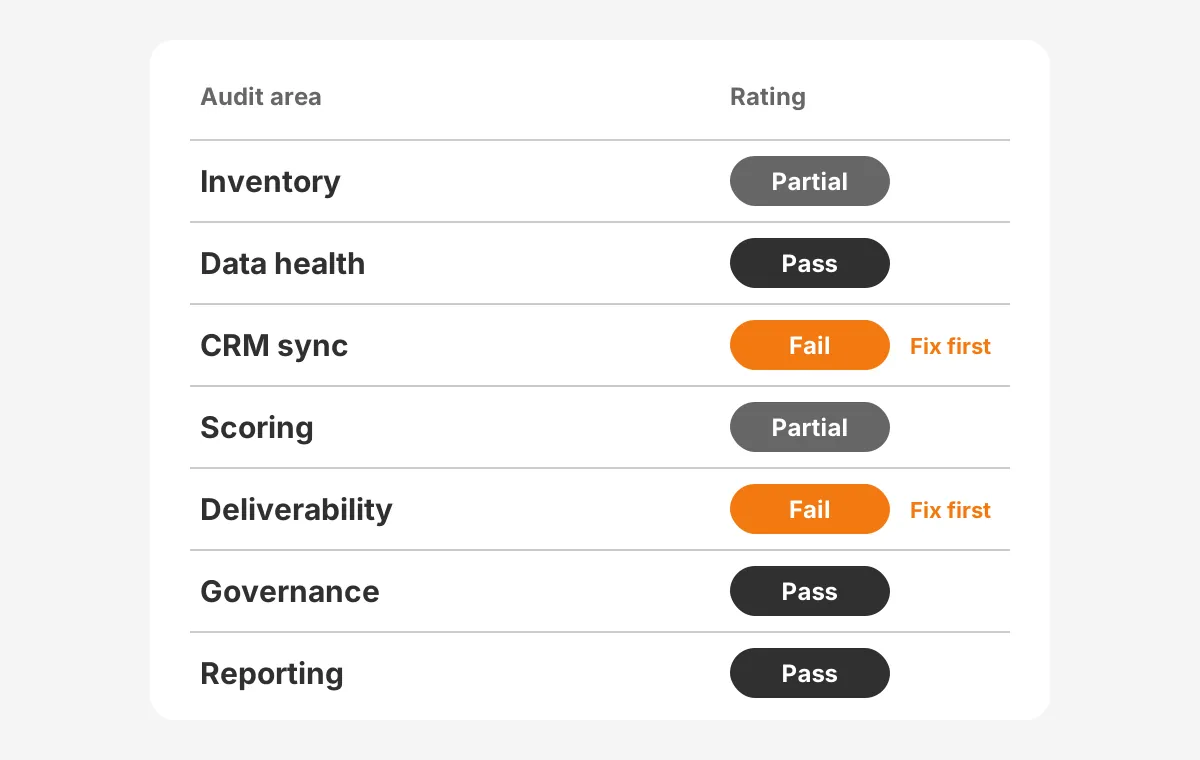
The scorecard above is an example with assumed ratings, not data from a real account. It shows how two fails and two partials turn into a short, ranked fix list.
Rank the fixes by risk first and effort second. Authentication failures and sync errors come first, because they stop mail or lose leads today. Naming conventions and documentation come later, because they slow work but rarely break it.
Turn the ranking into a 90-day plan:
- Days 1 to 30: authentication, broken routing and sync errors.
- Days 31 to 60: scoring calibration, data cleanup and workflow retirement.
- Days 61 to 90: permissions, naming conventions, documentation and reporting fixes.
Attribution checks belong in the same pass. Compare lead counts by original source in the platform with the same counts in the CRM. As a working rule, a gap above 5% calls for a closer look at sync rules and UTM values.
Reporting closes the loop. Check UTM parameters on every live campaign and confirm that original source survives the CRM sync. The marketing performance tracking setup explains how campaign data should reach pipeline reports.
Who Should Run a Marketing Automation Audit?
A marketing operations lead should own the marketing automation audit, with sales operations and IT as named reviewers. Marketing ops knows the workflows and sales ops knows routing and CRM rules. IT or the domain owner controls the DNS records for SPF, DKIM and DMARC.
Permissions get reviewed in the same pass. List every user with admin or publishing rights and remove anyone who left the company or changed role. Shared logins should not exist in any marketing automation system.
Naming conventions are the next governance check. A workflow named "Copy of nurture v3 FINAL" tells the next admin nothing. A pattern of region, program, audience and date makes every asset easy to find and retire.
Documentation closes the governance step. Each critical workflow needs one short page covering its purpose, trigger, owner and the fields it changes. A marketing automation audit that ends without this record forces the next team to start from zero.
An outside reviewer helps when the in-house team built most of the automations. Builders tend to read their own logic as correct. A reviewer with no history in the account tests what the workflows do, not what they were meant to do.
The same applies when the audit feeds a rebuild or a migration. Unboxx runs this review within its AI growth marketing services. The work covers marketing automation workflows, campaign reporting and CRM sync for B2B teams.
The cost of a marketing automation audit depends on scope. A single-platform audit with fewer than 100 workflows is a small job. A review across two platforms and a custom CRM integration takes far longer. Measure the return with the marketing automation ROI formula once fixes are live.
Frequently Asked Questions
How often should you audit marketing automation?
Audit marketing automation in full once a year, and run a quarterly check of deliverability, sync errors and scoring. Add a full review after a CRM migration, a merger or a new scoring model. Regular reviews keep small defects from building into lost leads and blocked email.
How does it differ from a CRM audit?
A marketing automation audit starts with the programs that create, score and nurture leads, then follows records into the CRM. A CRM audit starts with the sales database, pipeline stages and user adoption. The two overlap at sync and data quality, so teams often run them together.
What should a marketing automation audit checklist include?
The checklist should cover seven areas. They are inventory, data health, CRM sync, scoring and routing, deliverability, governance and reporting. Each item needs a written pass criterion, a place to record evidence and an owner. That structure makes the next audit faster to repeat.
Why do marketing automation workflows break over time?
Workflows break because the business changes around them. Fields get renamed, products change, territories move and staff leave without handing over their automations. Each change can leave a trigger pointing at old values. Without a regular review, these broken workflows keep running quietly and send records down the wrong path.
Can a small team run it in-house?
A small team can run the audit in-house when one person owns it. It works best with fewer than 50 workflows. The team needs admin access, a test contact and DNS help. Outside help is most useful when the original builders are gone or a migration is planned.
How Can Unboxx Help With Your Marketing Automation Audit?
Unboxx runs the marketing automation audit across HubSpot, Account Engagement and Dynamics 365, then fixes what the scorecard finds. The work covers data, sync, scoring, deliverability and reporting, with a ranked 90-day plan your team can follow.
A marketing automation audit shows which automations still earn their place and which ones cost leads. Schedule a consultation to scope a review of your platform and CRM.
Let's create something out of this world together.
Have a project in mind? Contact us for expert design and development solutions. Let's discuss how we can help grow your business.
Ready to Unboxx Your Potential?
Build smarter systems. Automate faster. Scale confidently.