
A deal partner walks into a quarterly portfolio check-in and cannot recall what the CEO promised last time. The notes sit in one associate's inbox. The action items live in a slide deck nobody reopened.
Bain & Company's 2026 Global Private Equity Report puts buyout holding periods at about seven years. That is a long time to rely on memory.
The fix starts with a short list of private equity CRM questions. Answer them before buying software or designing a process. They decide what a check-in record holds and who logs it. They also decide how email arrives and what the next brief shows.
None of the answers needs a new system on day one. Most can be tested at the next check-in on the calendar.
Key Takeaways
- Most cold check-ins come from notes and commitments stored in personal inboxes, not from missing software.
- A check-in record needs five parts: company, people, meeting notes, commitments with owners, and the KPIs discussed.
- Answering eight private equity CRM questions first keeps the process light enough that partners keep using it.
What Are the Private Equity CRM Questions That Matter?
The private equity CRM questions that matter are the ones that decide whether the next check-in starts with context. Eight questions cover it. The same answers hold on Salesforce, Microsoft Dynamics 365, HubSpot and DealCloud. PE-specific tools such as Affinity or 4Degrees are no exception.
Each question below maps to a common failure at PE firms. The usual ones are lost notes, forgotten promises and missing owners. The table shows what each answer decides and what it prevents.
| Question | What the answer decides | Failure it prevents |
|---|---|---|
| What does a check-in record hold? | The data model for portfolio companies | Notes with no home |
| Where do meeting notes live? | One place per company | Notes stuck in inboxes |
| How are commitments tracked? | Owner, due date and status | Promises nobody follows up |
| How does email reach the CRM? | Activity capture or sync | Manual logging that stops |
| Who logs what, and when? | Roles and a 24-hour rule | Gaps after busy weeks |
| What does the pre-meeting brief show? | A one-page view per company | Walking in cold |
| Who can see which records? | Permissions by fund and team | Sensitive data overshared |
| How is adoption measured? | Two or three usage checks | A CRM that fades out |
Answer these private equity CRM questions in writing before a demo. A vendor can then show each answer live, with the firm's own example, instead of a scripted tour. The same list later becomes the acceptance test for the rollout.
Firms that want a scoring method for the answers can use the Unboxx guide to gathering and ranking CRM requirements. It turns each answer into a weighted requirement that vendors can be scored against.
Why Do PE Teams Walk Into Check-Ins Cold?
PE teams walk into check-ins cold because the record of the last meeting is scattered. Notes sit in personal notebooks, email threads and board decks. No single place shows what was agreed, by whom and by when.
Relationship knowledge is also concentrated in a small group. Affinity's 2026 private equity CRM buyer's guide cites benchmark data from more than 300 firms. It reports that one person holds a median 31% of a firm's strong relationships. The top three people hold 72%.
Affinity sells a CRM, so treat that figure as directional rather than neutral. The pattern still matches what partners describe. When one of those people is travelling or leaves, the context leaves with them.
Longer holds make the problem worse. Bain reports that buyout holding periods now hover around seven years. From 2010 to 2021, the average was five to six years. Over seven years, associates rotate, operating partners change and management teams turn over. Memory does not survive that much change.
The same Bain report says typical deals now need 10% to 12% average annual EBITDA growth. That is the growth rate behind a 2.5x return over five years. It puts more weight on the value creation plan and raises the cost of each missed follow-up.
These conditions explain why private equity CRM questions now come from operations teams as often as from deal teams. The deal pipeline is no longer the only thing a PE firm CRM must hold.
What Should a Portfolio Check-In Record Capture?
Five things belong in a portfolio check-in record: the company, the people, the notes, the commitments and the KPIs. Everything else is optional. Most private equity CRM questions about data come back to these five objects.
- Portfolio company: fund, entry date, deal partner, operating partner and the themes of the value creation plan.
- Management team contacts: CEO, CFO and other leaders, with role history so departures stay visible.
- Meeting notes: date, attendees, meeting type and a short summary of decisions.
- Commitments and action items: what was promised, who promised it, the owner, the due date and the status.
- KPIs discussed: revenue, EBITDA, cash and any covenant figures named in the meeting.
The commitment object is the piece most firms skip. A note that says "CFO to send revised forecast" is easy to lose. A task with an owner, a due date and an open status shows up on the next brief automatically.
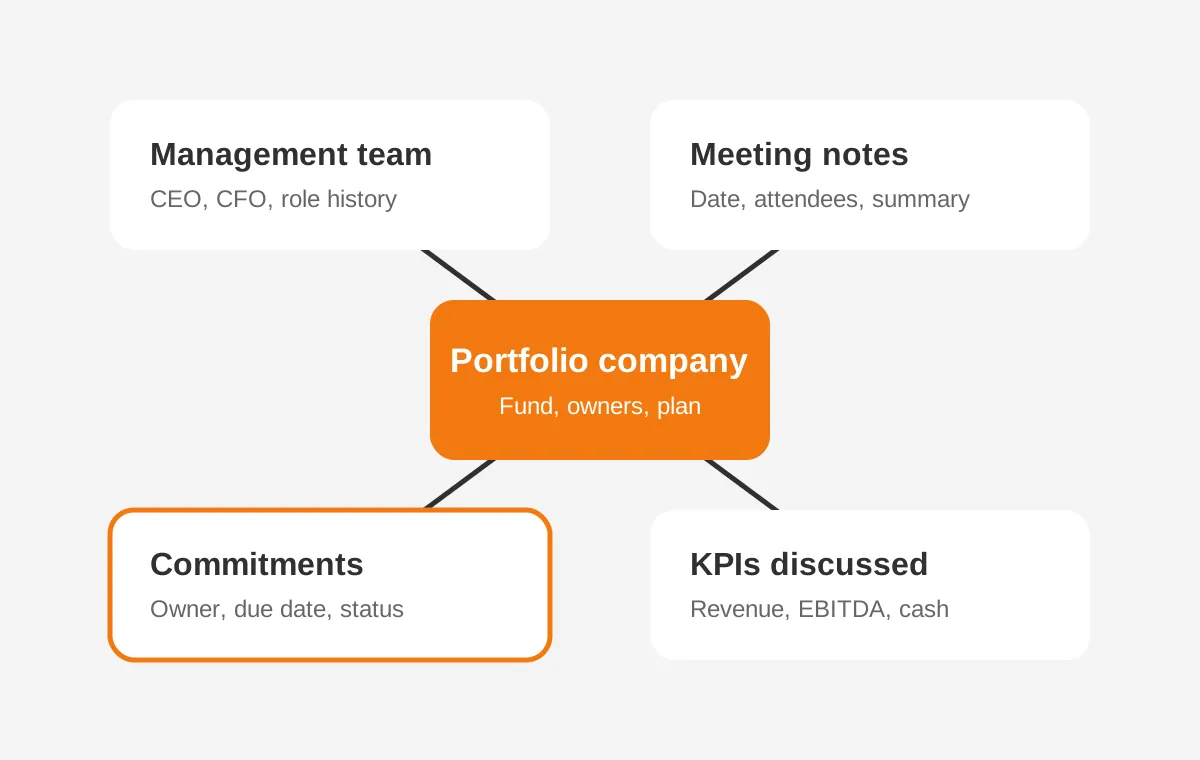
In Salesforce, this data model usually uses the standard Account, Contact, Event and Task objects. HubSpot covers most of it with companies, contacts, meetings, notes and tasks. Microsoft Dynamics 365 uses accounts, contacts, appointments and tasks in the same way.
Custom fields or a custom object add commitment status and KPI history where the standard objects fall short. Unboxx builds this model as part of its CRM for private equity service. The deal pipeline and investor relations records sit beside it.
Keep the field count small. A check-in record with eight to ten required fields tends to get filled in. One with forty gets skipped after the second month. That is a working rule Unboxx uses on CRM implementation projects, not a measured benchmark.
Run the private equity CRM questions about fields past the associates who will log the meetings. They know which fields slow them down.
How Can PE Firms Fix This Without Heavy Process?
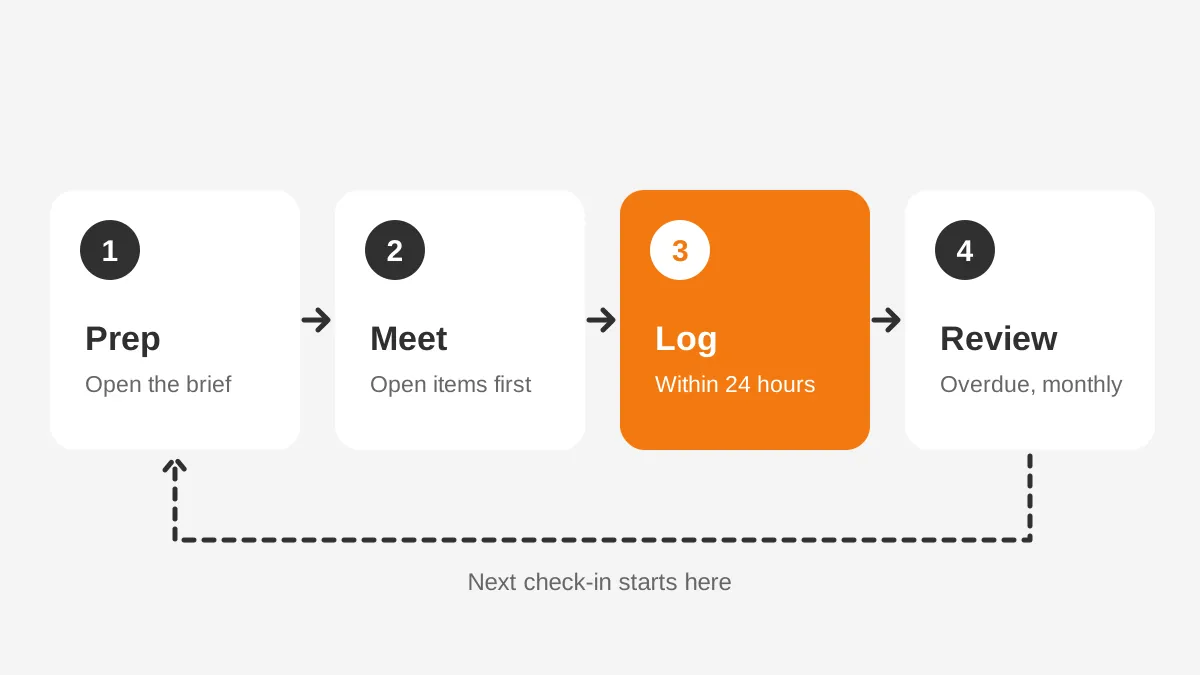
PE firms can fix cold check-ins with a four-step loop. It adds one short task before each meeting and one after it. It needs no new committee and no long template. The loop is prep, meet, log and review.
- Prep: the day before, open the pre-meeting brief. It lists open commitments, the last meeting summary and recent emails with the management team.
- Meet: run the check-in from the open commitments first. Close or re-date each one before new topics start.
- Log: within 24 hours, the meeting owner adds a five-line summary and creates a task for every new commitment.
- Review: once a month, the operating partner scans overdue commitments across the portfolio and chases the owners.
This answers the real question behind the search: how to remember what was agreed without building a whole CRM process. The loop uses the CRM as a memory first. Dashboards and reporting can come later, once the data is there.
A worked example shows the scale. Assume a 60-person PE firm with 12 portfolio companies and monthly check-ins. That is 144 meetings a year. If each check-in creates four commitments, the firm tracks 576 commitments a year. These are example figures, not benchmarks.
No partner can hold 576 open promises in memory. A CRM with tasks, owners and due dates can. That gap is why the lightweight loop matters more than the software brand.
The private equity CRM questions at this stage are short ones. Who preps the brief? Who logs the meeting? Who reviews overdue items? Write the answers on one page and share it with the deal team.
What Should the Pre-Meeting Brief Show?
The pre-meeting brief should show, on one page, everything a partner needs in the five minutes before a check-in. It is a saved report or record page, not a new document. Partners open it from the calendar invite or the company record.
A useful brief for a portfolio company holds six blocks:
- The last meeting summary, with the date and who attended.
- Open commitments, sorted by due date, with overdue items at the top.
- Commitments closed since the last meeting, so progress is visible.
- The latest KPIs against the value creation plan targets.
- Recent emails and calls with the management team.
- Changes to the management team, such as a new CFO.
Every block reads from records the loop already creates. Nobody writes the brief by hand. That is the test for the private equity CRM questions about briefs. A block that needs manual work will be empty within a quarter.
Board meeting prep uses the same brief with a longer date range. Instead of the last check-in, it shows every commitment and KPI change since the previous board meeting. Operating partners can then raise overdue items before the board does.
Keep the brief short. One screen is the target. Private equity CRM questions about extra fields need a simple test. Would a partner read the field in the five minutes before walking in? If not, leave it on the company record instead.
Which Private Equity CRM Questions Decide Email Capture?
The private equity CRM questions that decide email capture are about sync method, scope and storage. Manual logging fails first in busy weeks, so automatic capture is worth the setup time. Salesforce, Dynamics 365 and HubSpot each handle it in a different way.
Salesforce uses Einstein Activity Capture. The Salesforce Admins blog (2021) explains that emails and events are added to the activity timeline of related records. It also notes that captured email data is stored in AWS and is not available in standard reporting.
Events synced through Einstein Activity Capture do become Salesforce records, so meetings can still appear in reports. Check how your org is set up, because the feature has changed since 2021.
Microsoft Dynamics 365 uses server-side synchronization. Microsoft Learn states that with Exchange it syncs email, contacts, tasks and appointments in both directions. Users control what syncs through synchronization filters, and Outlook does not need to stay open.
HubSpot connects to Gmail and Outlook inboxes and also lets users log activities by hand. HubSpot's knowledge base lists calls, emails, meetings, notes and tasks as activity types. A logged meeting can create a follow-up task directly, which suits commitment tracking.
| Platform | Capture method | What to check first |
|---|---|---|
| Salesforce | Einstein Activity Capture | Email reporting limits and which records emails attach to |
| Microsoft Dynamics 365 | Server-side synchronization with Exchange | Sync filters and mailbox setup for each user |
| HubSpot | Inbox connection and activity logging | Who connects inboxes and how follow-up tasks are used |
| DealCloud | Outlook and Microsoft 365 integration | Admin effort needed for changes |
| Affinity or 4Degrees | Firmwide email and calendar sync | What data is shared and who controls sync |
Ask one more question before switching capture on: which emails stay private? Threads with a portfolio CFO can include compensation or legal matters. Set sync filters and permissions first, then turn on capture. Answer the private equity CRM questions about privacy with the compliance lead in the room.
Who Should Own Notes and Follow-Ups?
The person who led the meeting should own the notes, and each commitment should have one named owner. Shared ownership usually means no ownership. Clear roles answer the practical private equity CRM questions about who logs what.
- Deal partner: owns the relationship with the CEO and approves the meeting summary.
- Operating partner: owns value creation commitments and runs the monthly overdue review.
- Associate: drafts the summary within 24 hours and creates the follow-up tasks.
- CRM administrator: keeps fields, permissions and the pre-meeting brief report working.
Firms without a full-time admin can outsource the CRM administrator role. Unboxx offers outsourced Salesforce administration for this reason. A part-time admin can keep the brief accurate and fix broken sync before partners notice.
Write the 24-hour logging rule into the team's operating rhythm. A rule that lives only in CRM settings will not change behavior. Partners should see overdue commitments in the Monday meeting. Those private equity CRM questions about ownership need a partner's sign-off, not only an admin's.
Who Should See Which Portfolio Records?
Each portfolio record should be visible to the deal team, the operating partner and the company's support staff. Nobody else sees it by default. Permissions are one of the private equity CRM questions firms answer too late, after sensitive notes are already shared.
Three rules cover most firms. First, restrict records by fund, so teams on one fund do not see another fund's portfolio notes without reason.
Second, mark meeting notes about people, such as a CEO replacement, as private to the deal team. Third, log who changed what, so the audit trail survives staff turnover.
Salesforce, Microsoft Dynamics 365 and HubSpot all support role-based access, with different depth by edition. Test the firm's three rules in a sandbox before go-live. Ask the vendor to show a restricted note from the view of a user who should not see it.
Plan for departures as well. When an associate leaves, the commitments they owned need a new owner the same week. A monthly report of open tasks owned by inactive users answers this check. These private equity CRM questions protect the memory the loop builds.
Which PE CRM Platforms Answer These Questions Best?
No single platform answers every question best, because the right fit depends on firm size and existing tools. General CRMs offer flexibility and one system for every team. PE-specific tools offer faster relationship capture with less configuration. The private equity CRM questions above give a fair way to compare them.
| Platform | Type | Fits best when |
|---|---|---|
| Salesforce | General CRM, highly configurable | The firm wants one system for deals, portfolio and investor relations |
| Microsoft Dynamics 365 | General CRM on Microsoft 365 | The firm runs on Outlook and Exchange |
| HubSpot | General CRM with simpler setup | A smaller team wants tasks and notes working fast |
| DealCloud | PE-focused CRM from Intapp | A larger firm has CRM operations staff |
| Affinity | Relationship intelligence CRM | Sourcing through networks matters most |
| 4Degrees | Lighter relationship CRM | A smaller PE or VC team wants fast setup |
Vendor claims about deployment speed vary. Affinity's own guide says most firms go live within 60 days. Treat every vendor timeline as a claim to test in a reference call. For a wider method, see the Unboxx guide to CRM selection in seven steps.
Ask each vendor to run the check-in loop live. Prep a brief, log a meeting, create a commitment and show the overdue view. Private equity CRM questions answered on screen are worth more than answers on a slide.
Firms that also run venture deals can read why VC firms need CRM. It covers the relationship data model for funds, LPs and portfolio companies in more depth.
How Do You Roll It Out in 30 Days?
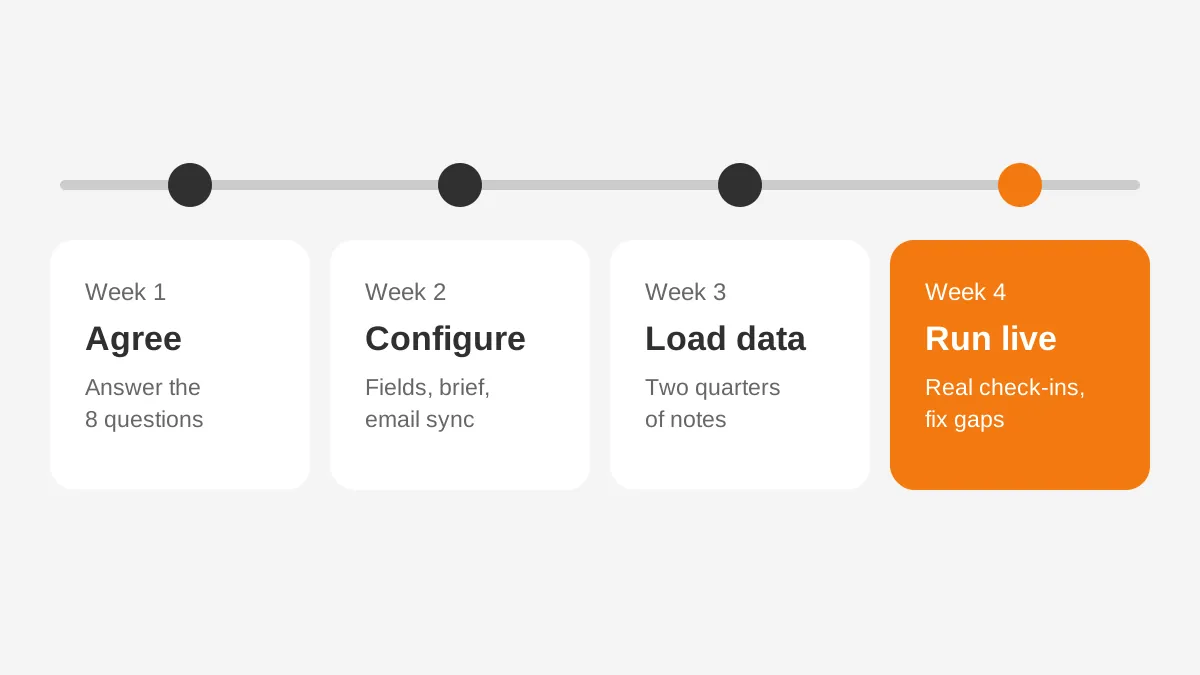
A check-in workflow can roll out in about 30 days when the scope stays small. Start with portfolio companies only. Add the deal pipeline and investor relations once the loop runs.
- Week 1: agree the answers to the eight private equity CRM questions and the five-object data model.
- Week 2: configure fields, the commitment object and the pre-meeting brief report, then connect email and calendar.
- Week 3: load the last two quarters of notes and open commitments for each portfolio company.
- Week 4: run the loop on real check-ins, review gaps and remove fields that nobody fills in.
Revisit the private equity CRM questions at the end of week 4 and record what changed. The written answers become the operating guide for new hires.
Clean the data before loading it. Duplicate contacts and old management names break the brief. The CRM data cleansing runbook covers deduplication steps by platform.
Connect the CRM to the tools partners already use. Calendar, email and board portal links matter most. Unboxx's CRM integration services handle these connections on Salesforce, Dynamics 365 and HubSpot.
Measure CRM adoption from the start. Three checks are enough. Track check-ins logged within 24 hours, overdue commitments per company and briefs opened before meetings. Review them at the monthly portfolio meeting. A weak score points back to one of the private equity CRM questions that was answered too loosely.
Frequently Asked Questions
How do you stop walking into check-ins cold?
Use a pre-meeting brief that pulls the last meeting summary, open commitments and recent emails for that portfolio company. Log every check-in within 24 hours and turn each promise into a task with an owner and a due date. This works without building a whole CRM process.
What private equity CRM questions should we ask vendors?
Ask how the system stores portfolio meetings, how commitments get owners and due dates, and how email reaches records. Also ask about permissions by fund, data export when staff leave, and realistic go-live time. Then ask the vendor to show each answer live on screen.
Can a spreadsheet replace a CRM for portfolio tracking?
A spreadsheet can track commitments for a small portfolio, but it gets harder to keep current as people change. It has no email capture, weak permissions and no reminders. A CRM becomes worth the setup once two or more teams need the same portfolio records.
Do operating partners need their own CRM views?
Yes. Operating partners need a view of overdue commitments and KPI trends across every portfolio company. Deal partners need a brief for each company. Both views read the same records, so no data is entered twice. Set them up as saved reports or dashboards in the CRM.
How long does a PE CRM take to implement?
A focused check-in workflow can go live in about 30 days. A full rollout covering deals, portfolio and investor relations usually takes longer. Vendor estimates differ widely. Affinity cites about 60 days for its platform, while some vendors describe DealCloud projects lasting six months or more.
Where Should Your Private Equity CRM Questions Start?
Your private equity CRM questions should start with the next portfolio check-in on the calendar. Define the five-object record, assign owners and run the prep, meet, log and review loop once. The answers then show which platform and setup the firm needs.
Unboxx helps PE firms answer these private equity CRM questions and set up Salesforce, Dynamics 365 or HubSpot around them. Schedule a consultation to map the check-in workflow for your portfolio.
Let's create something out of this world together.
Have a project in mind? Contact us for expert design and development solutions. Let's discuss how we can help grow your business.
Ready to Unboxx Your Potential?
Build smarter systems. Automate faster. Scale confidently.