

A small marketing team buys Salesforce, imports its contacts, and then stalls before the first campaign goes out. Salesforce's State of Marketing research, cited by Salesforce in 2026, found that 84% of marketers sometimes run generic campaigns. A half-finished setup is one common reason.
A small business can set up Salesforce marketing automation without a developer. Segments, emails, forms and journeys are all built with clicks. Two jobs still need someone with the right access: domain authentication in DNS, and the first data and consent setup.
Key Takeaways
- A marketer can set up Salesforce marketing automation without a developer when the edition matches the team's size.
- DNS records for SPF, DKIM and DMARC need IT or domain access, so request them in week one.
- Consent status, clean data and one welcome journey come before any advanced automation.
Can you set up Salesforce marketing automation without coding?
In most small businesses, a marketer can set up Salesforce marketing automation without writing a line of code. Salesforce designed its small business editions around click-based tools. Email templates, forms, landing pages and simple journeys come together in visual builders.
The real question is access, not code. Developers write Apex, custom integrations and complex data model changes. A small business that sends email newsletters and nurture sequences needs none of that. It needs an admin login, a domain owner and a marketer with weekly time set aside.
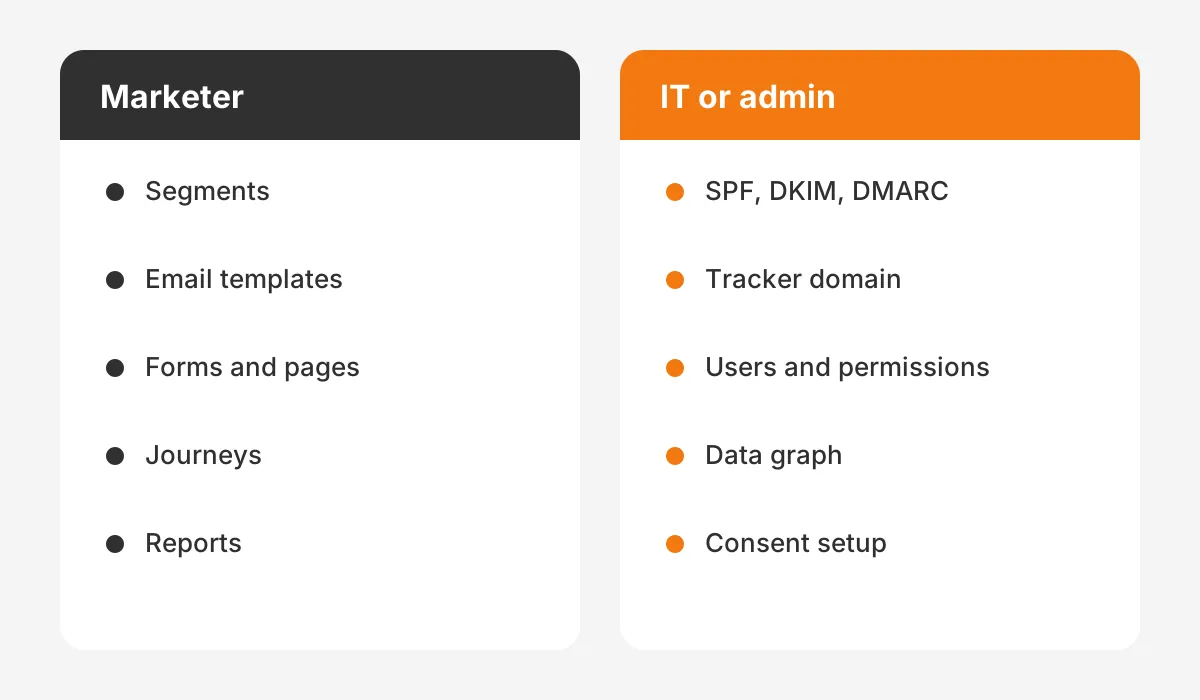
The same 2026 Salesforce guide, Marketing Cloud Without Technical Help, draws this line. It lists segmentation, campaign briefs, journey building, email content and reporting as marketer-led work. It lists data integration, schema setup, API connections and sandbox management as admin work.
What counts as developer work?
Developer work starts when the business needs something the product does not offer out of the box. Examples include a custom sync with an ERP, an API feed from a booking system, or code in templates. A newsletter-only team rarely needs any of it in year one.
What counts as admin work?
Admin work is configuration with clicks inside Setup. It covers user licenses, permission sets, field mapping, page layouts and the data graph. A marketer with admin rights can do it. A part-time Salesforce administrator can also handle it alongside other work.
Which Salesforce marketing editions fit a small business?
Four Salesforce products can run marketing automation for a small business. The right one depends on team size and send volume. Picking the wrong edition is the first reason teams fail to set up Salesforce marketing automation alone.
- Starter Suite is the entry point. Salesforce lists email nurture campaigns, AI-assisted content creation and built-in sales flows.
- Pro Suite adds greater customization, more automation, AppExchange access and quoting and forecasting.
- Marketing Cloud Next Growth Edition adds multi-channel journeys, forms and landing pages, consent management and campaign attribution reporting.
- Marketing Cloud Account Engagement, formerly Pardot, focuses on B2B lead nurturing and lead scoring.
Salesforce positions Starter Suite and Pro Suite for businesses new to marketing automation. Marketing Cloud Next Growth and Advanced target teams that already run campaigns and want more automation. That split is useful when you set up Salesforce marketing automation for the first time.
Account Engagement suits B2B companies with a sales team that works leads by score. Its value is lead nurturing, engagement history dashboards and scoring. B2B teams that set up Salesforce marketing automation on Account Engagement should agree on scoring rules with sales first.
The Pardot vs HubSpot comparison for B2B marketing teams covers that choice in detail.
What does each edition cost per month?
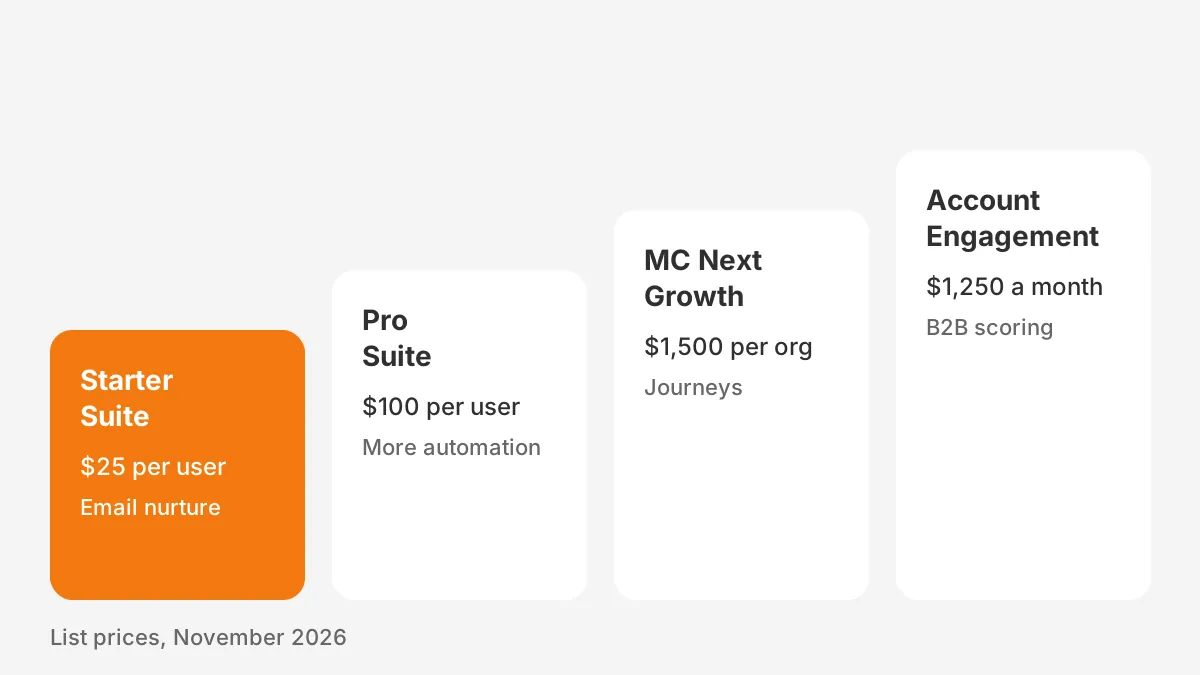
List prices run from $25 per user per month for Starter Suite to $1,500 per org per month for Growth. The figures below come from Salesforce's small business marketing pricing page, read in November 2026. Prices change, so confirm them with a Salesforce representative.
| Edition | List price (USD) | Billing | Marketing features named by Salesforce |
|---|---|---|---|
| Starter Suite | $25 per user per month | Monthly or annual | Email nurture campaigns, AI-assisted content, lead routing |
| Pro Suite | $100 per user per month | Annual contract | Everything in Starter plus more automation and AppExchange |
| Marketing Cloud Next Growth | $1,500 per org per month | Annual | Multi-channel journeys, forms, landing pages, consent, attribution |
| Marketing Cloud Next Advanced | $3,250 per org per month | Annual | SMS, WhatsApp, custom automation events, engagement scoring |
| Account Engagement Growth | $1,250 per month, up to 10,000 contacts | Annual | Lead nurturing, scoring, engagement dashboards, campaign reporting |
The Account Engagement figures come from Salesforce's Account Engagement pricing page. Growth includes 50 automation rules and 50 forms. The Plus edition lists $2,750 per month, and Advanced lists $4,400 per month.
A worked cost example
This example uses assumed numbers, not a quote. A three-person team on Starter Suite pays $75 per month at list price. The same team on Pro Suite pays $300 per month on an annual contract. Moving to Marketing Cloud Next Growth adds $1,500 per month for the org.
The jump from per-user pricing to per-org pricing is the main budget decision. A team that sends one newsletter and one welcome series rarely needs the per-org product. A team that runs SMS, attribution and four or more audiences at once often does.
Even with no developer involved, budget for admin time when you set up Salesforce marketing automation. Users, fields and consent rules still need an owner.
What setup work needs IT or DNS access?
Domain authentication is the one task almost every team must hand to IT or the domain owner. Email providers check SPF, DKIM and DMARC records before they trust mail from a new sender. Without them, campaign email lands in spam or bounces.
The DNS records live with whoever manages the company domain. That might be an IT provider, a web agency or a registrar account the founder set up years ago. Find that person before you set up Salesforce marketing automation, because the request can take time.
Salesforce Ben covers email authentication for Pardot and Marketing Cloud. It warns that IT approval can take 2 to 4 weeks. It also says DNS changes can take up to 72 hours to spread.
Which DNS records are involved?
- SPF: a TXT record that lists Salesforce as an approved sender for the domain.
- DKIM: keys generated in Salesforce Setup and published as CNAME or TXT records.
- DMARC: a TXT policy record that tells inboxes how to treat mail that fails the checks.
- Tracker domain: an Account Engagement CNAME that brands tracked links with the company domain.
In Salesforce, an admin creates DKIM keys under Setup, then sends the CNAME values to IT. In Account Engagement, the marketer adds the domain under Domain Management and copies the expected DNS entries. Once IT publishes them, the marketer clicks Check DNS Entries.
Starter Suite works differently from Account Engagement setup at this point. Teams that set up Salesforce marketing automation on Starter Suite follow the DKIM path in Setup instead.
Marketing Cloud can use a Sender Authentication Package bought from Salesforce. That package configures SPF and DKIM, but DMARC still needs its own DNS record. Ask the account executive whether the package applies before you set up Salesforce marketing automation on that product.
How do you set up Salesforce marketing automation?
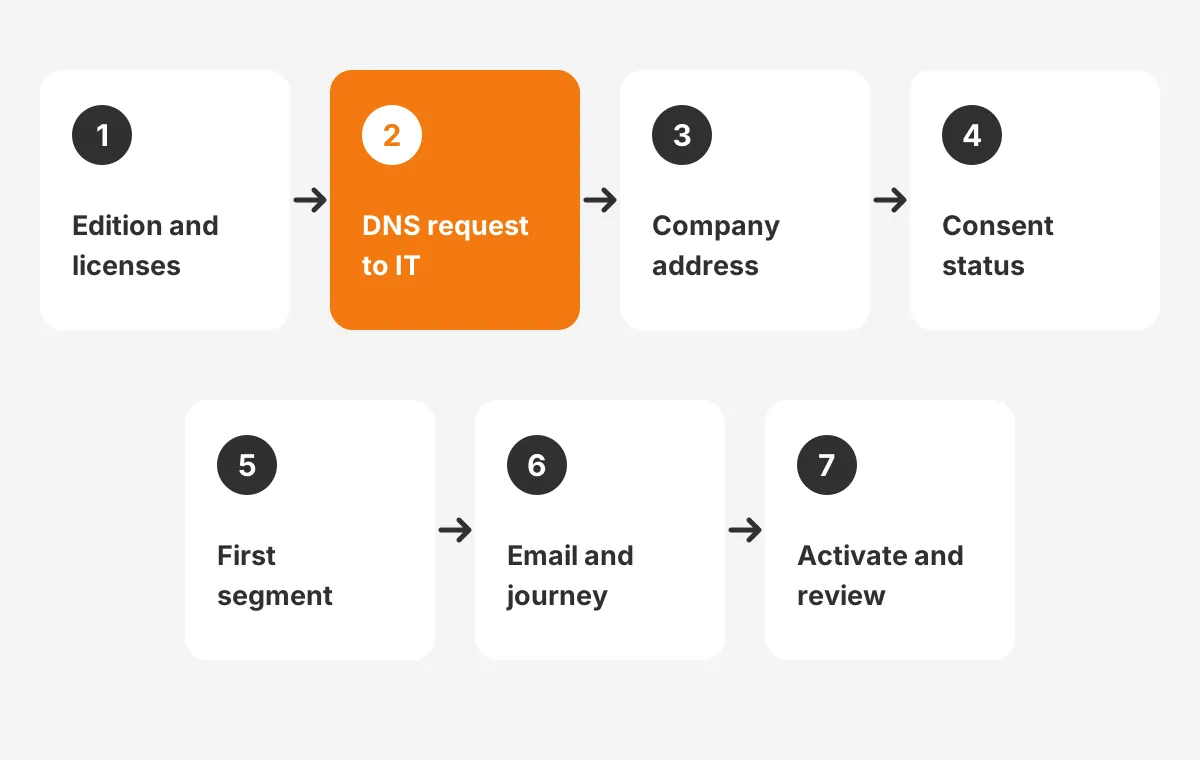
You set up Salesforce marketing automation in seven steps, and a marketer can own six of them. The order matters, because each step depends on the one before it. The sequence below fits Starter Suite, Pro Suite and Marketing Cloud Next.
- Confirm the edition and assign marketing user licenses and permissions.
- Send the SPF, DKIM and DMARC request to IT on day one.
- Save the company address under Company Information in Setup for email footers.
- Import or clean contacts and set a consent status for every record.
- Build one segment with the visual Segment Builder.
- Create the first email and journey from a template, then test it.
- Publish, schedule and activate, then review results after the first week.
Salesforce Trailhead shows this flow in its single promotional email module. The module walks a marketer from a new campaign to an activated send. It estimates about 15 minutes to complete.
Why does consent come before the first email?
Salesforce will not send promotional email to a contact without a consent status. The Trailhead module says every lead and contact needs a Consent Status of Opt In or Opt Out. A blank value means that record cannot receive the email.
The footer also matters. CAN-SPAM requires a physical address and an unsubscribe link in commercial email. Salesforce adds both through merge fields, but the address only appears once it is saved in Setup.
Where does the data graph fit?
On Marketing Cloud Next, an admin must configure and select a data graph before emails can use customer fields. The data graph is part of Data Cloud, which Salesforce now also calls Data 360. It is a one-time setup step, done with clicks in Setup.
Which first journeys should a small business build?
A small business should build three journeys first: a welcome series, a post-purchase or post-demo follow-up, and a re-engagement campaign. These three cover new contacts, active buyers and contacts going quiet. They also test every part of the setup.
- Welcome series: three to five emails over two weeks after a form fill.
- Follow-up journey: a thank-you note, onboarding tips and a review request after a purchase or demo.
- Re-engagement campaign: a short sequence for contacts who have not opened an email in six months.
Each journey starts from a trigger. Common triggers are a form submission, a link click, a new lead, or a date. Salesforce Starter Suite can send email based on time zones or lead behavior. It can also trigger follow-ups after a form fill.
Build the Salesforce welcome series first. It is the simplest test of how well you set up Salesforce marketing automation. It touches the form, the segment, the template, the consent field and the tracking.
If it works, the rest of the setup works. A team that wants to set up Salesforce marketing automation in stages can stop here for the first month.
How should forms and landing pages connect?
Salesforce forms should write to a lead or contact record and set the consent status at the same time. Salesforce landing pages should send people to one nurture journey, not three. Lead routing in Starter Suite can then assign the new lead to the right salesperson.
When should a small business hire a Salesforce partner?
A small business should bring in a Salesforce partner when the setup touches other systems, legacy data or scoring rules. Those are the areas where rework tends to happen. Everything else can stay with the marketer.
Signs that outside help will save time:
- Contacts live in two or more systems, such as a spreadsheet, a webinar tool and an old email platform.
- The business needs a custom sync with an ERP, a booking system or an ecommerce store.
- Sales wants lead scoring and handoff rules agreed before launch.
- The team is moving from Account Engagement to Marketing Cloud Next, or from another platform.
- Nobody inside the company has admin rights or time to learn Setup.
A partner engagement for a small business is usually short and focused. The partner handles the data, sync and scoring rules, then trains the marketer. The goal is to set up Salesforce marketing automation that the marketer can run alone from week three.
Unboxx works with small and mid-sized teams through its Salesforce Marketing Cloud consulting services. Its Account Engagement email automation success story shows a typical scope. The work ends with a handover, so the marketer runs daily campaigns without outside help.
What mistakes slow down a do-it-yourself setup?
The most common mistake is starting the email build before the domain is authenticated. Delays when teams set up Salesforce marketing automation come from waiting, not from building. The team writes templates, then waits weeks for IT. Send the DNS request on day one and build in parallel.
Other mistakes that slow a team down:
- Importing every old contact without checking consent, which risks spam complaints.
- Buying Marketing Cloud Next before the team has used the email tools in Starter Suite.
- Building five journeys at once instead of testing one welcome series end to end.
- Leaving lead source and campaign fields blank, which breaks reporting later.
- Skipping a test send to an inbox outside the company domain, such as a personal Gmail or Outlook address.
Data quality is the quiet blocker. Duplicate records send the same person two emails, and blank first names break merge fields. Clean the data before you set up Salesforce marketing automation journeys that rely on it. The Salesforce implementation steps for small business article covers the data import side.
Should lead scoring start on day one?
No, a small business should add lead scoring after it has 60 to 90 days of engagement data. Scores built before real data exist are guesses. The Salesforce lead scoring options in Einstein, Pardot and Flow article explains the choices once data exists.
How do you measure whether the setup works?
You measure the setup by delivery, engagement and pipeline, in that order. If email does not reach the inbox, nothing else matters. If people do not open or click, the content needs work. If clicks do not turn into leads, the journey needs work.
Starter Suite includes real-time dashboards for opens, clicks, conversions and bounce rates. Marketing Cloud Next Growth adds campaign attribution reporting. Account Engagement adds engagement history dashboards. Check these weekly in the first month after you set up Salesforce marketing automation.
Read the bounce rate first, because a rising rate points to list or DNS problems.
| Metric | What it tells you | What to fix if it is weak |
|---|---|---|
| Bounce rate | Whether the list and domain are healthy | DNS records, list hygiene |
| Open rate | Whether subject lines and timing work | Subject line, send time |
| Click rate | Whether the content earns attention | Offer, call to action |
| Form conversions | Whether landing pages turn visits into leads | Form length, page copy |
| Pipeline from campaigns | Whether marketing creates sales opportunities | Lead routing, follow-up speed |
The Salesforce Ben guide sets a delivery target above 99.5% and treats anything under 98% as a deliverability problem. That is the author's rule of thumb, not an industry standard. It is still a useful first alarm.
A weekly dashboard review is the final step to set up Salesforce marketing automation properly. It shows which part to fix next.
For the return on the license, compare campaign pipeline with the monthly cost. The marketing automation implementation plan by phase shows how to set those targets before launch.
What does a 30-day setup plan include?
A 30-day plan to set up Salesforce marketing automation splits the work into four weekly blocks. Each block ends with something a manager can check. This is a sample plan for a team of one to three marketers, not a fixed rule.
- Week 1: confirm the edition, assign licenses, send the DNS request and save the company address.
- Week 2: clean and import contacts, set consent status, and build the first segment.
- Week 3: build the welcome series, connect the form and landing page, and run test sends.
- Week 4: activate the welcome series, check bounces and opens, and plan the follow-up journey.
The plan assumes DNS approval arrives by week three. If IT is slower, keep building and hold the activation. Never send live campaign email from an unauthenticated domain to save a week.
Teams that set up Salesforce marketing automation this way get one working journey in a month. That is a better result than five half-built journeys. Each later journey reuses the same segment, template and consent rules, so it takes days, not weeks.
Who should be in the 30-day plan?
Three people cover the work. The marketer owns segments, templates and journeys. The admin owns users, fields and the data graph. IT owns the DNS records. A sales lead should join the week-four review to agree on which leads sales will follow up.
Frequently Asked Questions
How long does it take to set up Salesforce marketing automation?
A small business can set up Salesforce marketing automation for a first welcome journey in two to four weeks. The marketer's work takes days. The longest wait is usually IT approval for DNS records. Salesforce Ben says that can take 2 to 4 weeks.
Does Salesforce Starter Suite include marketing automation?
Yes. Starter Suite costs $25 per user per month at list price. Salesforce lists email nurture campaigns, AI-assisted content and built-in lead routing. It suits a team that sends newsletters and simple nurture sequences. Teams that need SMS, attribution or engagement scoring look at Marketing Cloud Next instead.
Is Account Engagement the same as Pardot?
Yes. Marketing Cloud Account Engagement is the current name for Pardot. It focuses on B2B lead nurturing, lead scoring and engagement history. The Growth edition lists $1,250 per month for up to 10,000 contacts. B2B teams often pair it with Sales Cloud for the handoff to sales.
Who should own Salesforce marketing automation after launch?
One named marketer should own campaigns, segments and templates after launch. A Salesforce admin, internal or outsourced, should own users, permissions, fields and the data graph. IT keeps the DNS records. Writing these three owners down prevents gaps when someone leaves the business.
Can HubSpot users move to Salesforce without a developer?
Often yes, if the move is contacts, lists and templates only. Export contacts with their consent status, rebuild templates in Salesforce and recreate journeys one at a time. Custom HubSpot properties and workflow logic need mapping first, and that is where a partner helps most.
Is it time to set up Salesforce marketing automation?
A Salesforce team still sending email from another tool is ready to set up Salesforce marketing automation in the CRM. Start with the edition that fits today. Request DNS records on day one, and launch one welcome journey before adding more.
Unboxx helps small teams choose the edition, finish the admin and DNS work, and hand over a working setup. Read more about AI growth marketing services from Unboxx, or schedule a consultation to plan the first 30 days.
Let's create something out of this world together.
Have a project in mind? Contact us for expert design and development solutions. Let's discuss how we can help grow your business.
Ready to Unboxx Your Potential?
Build smarter systems. Automate faster. Scale confidently.